
- Installs
- —
- Apple does not publish download counts
- Rating
- —
- Ratings
- —
- Version
- 1.0.1
- Updated 3 Nov 2026
- Released
- 8 Sep 2026
- Tracked since 15 Nov 2026
- Size
- 17 MB
- Needs 15.0
Screenshots
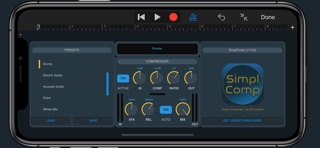
About SimplComp
The description on the store listing
Introduction
SimpleComp is very simple general purpose compressor that’s easy to use and very light on CPU. Sometimes you just need some basic dynamics processing that doesn’t add “character”, or that relies on sophisticated techniques or performance expensive DSP.
SimplComp was designed for those times!
SimpleComp is an AUv3 effects plugin that can run standalone, or in any AUv3 compatible host such as Logic Pro, GarageBand or AUM. SimpleComp currently runs on iPadOS / iOS (iPad & iPhone) and macOS (Intel & Silicon) and is available as a Universal Purchase from the Apple App Store.
If you’re planning on using SimpleComp on Mac / desktop, please ensure that your favourite DAW / host …
Read the full description
Introduction SimpleComp is very simple general purpose compressor that’s easy to use and very light on CPU. Sometimes you just need some basic dynamics processing that doesn’t add “character”, or that relies on sophisticated techniques or performance expensive DSP. SimplComp was designed for those times! SimpleComp is an AUv3 effects plugin that can run standalone, or in any AUv3 compatible host such as Logic Pro, GarageBand or AUM. SimpleComp currently runs on iPadOS / iOS (iPad & iPhone) and macOS (Intel & Silicon) and is available as a Universal Purchase from the Apple App Store. If you’re planning on using SimpleComp on Mac / desktop, please ensure that your favourite DAW / host supports AUv3 (not just AU). Parameters ACTIVE - toggles the effect on or off. IN - sets the level of the incoming signal. Typically you would leave this as 0dB, i.e unity gain. The meters to the left of the panel show the level of the incoming signal. COMP - sets the compression threshold. Note that unlike many compressor plugins, the threshold is reduced as you turn up the control, so as you turn it up, you get more compression effect. The bar meter below this control will give an indication of how much over the threshold the input signal is. RATIO - sets the compression ratio. A higher ratio results in a more noticeable “squashing” effect on the signal. OUT - sets the level of the output signal. You may need to adjust this is you wish to manually make up the gain lost by the compression effect, e.g. when AUTO is off (see below). ATK - sets the attack time of the compressor. REL - sets the release time of the compressor. AUTO - toggles automatic makeup gain. When switched on, SimplComp will automatically adjust the gain to compensate for the gain reduction that occurs when compression is applied. This is calculated using the compression threshold and ratio. MIX - sets the balance between the compressed and original / dry signal. This allows SimplComp to be used for parallel compression. Factory Presets There are a few factory presets included to get you going. The overall compression will be dependent on the level of the input signal so you will need to select an appropriate factory preset as a starting point, then adjust the COMP parameter up or down for more or less compression indicated by the bar meter below the control.
Installs
Apple does not publish download counts. Estimates are in testing.
We publish iOS estimates only after they pass a back-test against real numbers. Chart history below is measured.
Estimated store revenue Estimated Beta
App Store, worldwide, monthly rate from the last 15 chart days to 22 Nov 2026
Below the top 100 grossing apps in the markets we calibrate. In the United States that usually means under about $6.4M a month. App Store purchases and subscriptions only, before Apple's 15 to 30% fee. Ads and web payments are not included.
Ratings
No rating breakdown published for this app.
Recent reviews
Latest public reviews from the store
No reviews in our sample for this app yet.
Top chart positions
Latest App Store chart ranks by country, last 10 days
- Countries ranked
- 1 of 50
- Best rank
- #60
- Top 10 placements
- 0
- of 1 chart placements
- Average rank
- #60
Best countries on App Store
- 🇰🇷 South Korea · Top paid, Music#60
| Country | Chart | Category | Rank | Best (10 days) | Date |
|---|---|---|---|---|---|
| 🇰🇷 South Korea | Top paid | Music | #60 | #60 | 16 Nov 2026 |
SimplComp history
Release, install milestones, listing and store changes
- First released on the store 8 Sep 2026
Update frequency
How often SimplComp ships a new version, month by month
0 updates in the last 12 months. Less often than most similar apps: they shipped a median of 1 updates in the same year.
Listing keywords
Words and phrases SimplComp repeats most in its store listing
Top phrases: bar meter below (2), sets the compression (2), sets the level (2), bar meter (2), compression effect (2).
Highlighted words also appear in the title. Counts cover the title, short description and description.
Compliance
What the listing and the app package show
- Store status
- Live
- Upkeep
- Updated 3 Nov 2026
- Age rating
- 4+
Apps like SimplComp
 Pyware 3D ViewerPygraphics, Inc.★ 2.86
 WNGC Your Georgia CountryCox Media Group★ 4.54
 Rhythm Necklace - Geometric SequencerSam Tarakajian★ 4.64
 DigiStix 2 AUv3 Plugin4Pockets.com★ 4.54
 JPLAYMarcin Ostapowicz★ 4.3
 MS Vinyl - Music WidgetDinh Dong Nguyen★ 4.26
 Radio TEDDYIR MediaAd GmbH★ 4.56
 Arpeggionome Pro | matrix arpeggiatorAlexandernaut★ 4.56
 Guitar & Ukulele Tuner 2025Aleksandr Kulaga★ 4.44
SimplComp: questions and answers
Who makes SimplComp?
SimplComp is published by Rob Jackson.
When was SimplComp last updated?
The latest version (1.0.1) was released on 3 Nov 2026.
Is SimplComp free?
No. SimplComp is a paid app priced at $1.99.
Is SimplComp still available?
Yes. SimplComp is live on App Store as of 15 Nov 2026.
Track SimplComp and its competitors
Watch any app for new versions, rating drops, chart moves and removals. Free plan, no card.