- Installs
- —
- Apple does not publish download counts
- Rating
- 4.67
- Ratings
- 1.7K
- 1.7K reviews
- Version
- 1.8.425
- Updated 25 Aug 2022
- Released
- 18 May 2017
- Tracked since 10 May 2026
- Size
- 309 MB
- Needs 10.0
Screenshots


About SlingStudio Console
The description on the store listing
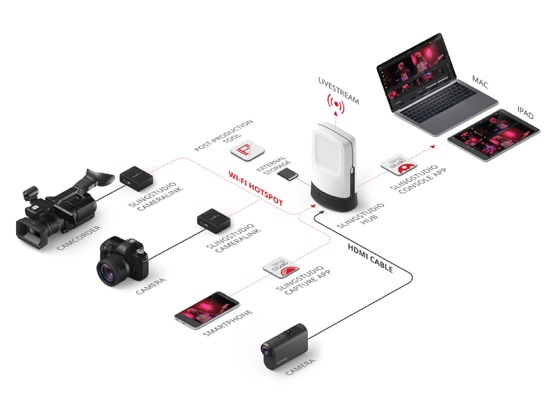
WHEN ONE CAMERA ANGLE ISN’T ENOUGH, SLINGSTUDIO DELIVERS MULTI-CAMERA MAGIC IN MINUTES for a variety of video applications – sports, schools, houses of worship, distance learning, corporate events, weddings, video blogging, broadcast TV, etc. There are all kinds of possibilities. What will you discover?
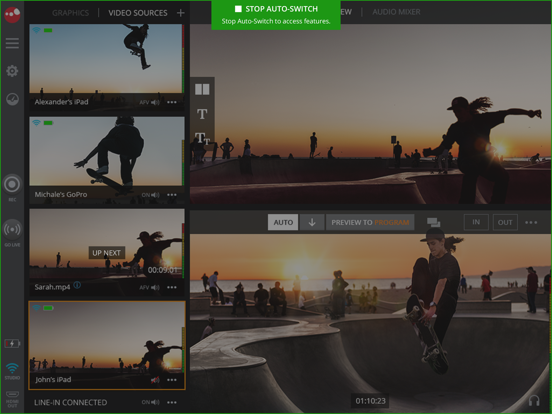
When used with SlingStudio hardware, the SlingStudio Console app puts the power of multi-camera right in your hands, allowing you to easily manage your entire wireless SlingStudio production with a supported iPad.
*SlingStudio hardware required.*
*NOTE: SlingStudio is designed for use only in the United States and Canada; performance is not guaranteed in other countries.*
The wireless, …
Read the full description
WHEN ONE CAMERA ANGLE ISN’T ENOUGH, SLINGSTUDIO DELIVERS MULTI-CAMERA MAGIC IN MINUTES for a variety of video applications – sports, schools, houses of worship, distance learning, corporate events, weddings, video blogging, broadcast TV, etc. There are all kinds of possibilities. What will you discover? When used with SlingStudio hardware, the SlingStudio Console app puts the power of multi-camera right in your hands, allowing you to easily manage your entire wireless SlingStudio production with a supported iPad. *SlingStudio hardware required.* *NOTE: SlingStudio is designed for use only in the United States and Canada; performance is not guaranteed in other countries.* The wireless, battery-powered SlingStudio makes it easy to connect cameras and smartphones to live-broadcast your professional multi-camera productions to Facebook, YouTube, Vimeo, Twitch, Twitter/Periscope, Livestream, Ustream, Restream.io and other RTMP destinations: • Connect up to 10 video sources and, with no cables or external power source, you can be on location anywhere – at the beach, on the slopes, in the football stadium – anywhere you can carry a backpack. • Your video sources can be your iPhone, iPod, smartphones or super-expensive professional-grade camera. You can even use your laptop. • All video is in gorgeous 1080p HD resolution. • With zero wires to wrangle and camera distances of up to 300 feet, your setup and teardown is a breeze. • Switch camera angles as you please, add text and graphic overlays, compose picture-in-picture, and mix in external audio from a microphone. • Hands-free operation when auto-switching using custom time intervals or voice-activated switching. • Choose from a variety of transitions like cut, dissolve, wipe, fade to/from black with programmable durations • Import, insert, adjust and overlay your own JPG and PNG graphics and motion graphics – including logos, watermarks, lower-third titles, profile pics, ads and background images – on your live program feed. • Use prerecorded video as a source for pre-roll, post-roll, ads, bumpers, etc. by importing MP4 and MOV files from supported SD cards and USB drives. • Instant replay of program video up to one minute in length at normal or slower speeds. • Review multi-camera video footage from last ten minutes for coaching and referee scenarios. • Create custom scoreboard overlays using your own graphics and team logos. • Create highlight clips by tagging special moments on the fly. • Get up to 7 recordings with each production, including individual feeds, the program recording, a quad view and line-in audio. • Take the live-switched program output from the HDMI out port of SlingStudio to connect to displays or other devices, such as encoders, expanding your workflow. • Save your project settings as default for next production • Use for videoconferencing in a special low-delay mode. • Enhance the live viewing experience with a no-latency HDMI passthrough mode that syncs your video with the house audio. • Easily import and automatically time-sync your footage in Adobe Premiere Pro CC and Apple Final Cut Pro X, saving hours of post-production time. By importing native camera recordings, you can substitute for any of the SlingStudio recordings and create a new program recording in 4K, in higher bit rates, or with higher quality video codecs using the SlingStudio Extension for Adobe Premiere Pro CC. All edits, effects and transitions are automatically preserved in the higher-quality program recording. COMPATIBLE DEVICES: - iPad Mini 4 and newer - iPad Air 2 and newer - iPad Pro models - iPad (released 2017) and newer REQUIRED SLINGSTUDIO DEVICES: - SlingStudio
Installs, last 30 days
Apple does not publish download counts. Estimates are in testing.
Estimated store revenue Estimated Beta
App Store, worldwide, monthly rate from the last 12 chart days to 19 Nov 2026
Below the top 100 grossing apps in the markets we calibrate. In the United States that usually means under about $6.4M a month. App Store purchases and subscriptions only, before Apple's 15 to 30% fee. Ads and web payments are not included.
Ratings
1,664 ratings, 1,664 reviews
- 5 ★83%
- 4 ★9.7%
- 3 ★2.3%
- 2 ★1.3%
- 1 ★3.7%
Recent reviews
Latest public reviews from the store
- 31 Aug 2024
Amazing system!!!
Sling Studio is an absolute amazing system, makes our job of filming funerals such a breeze. Would love some more features where you could take a photo and import that straight into the sling or upload a video from email. Hoping the keep developing the system, as it’s one we can’t live without…
- 14 Sep 2020
Some upgrade ideas
We love the sling studio app and gear for our churches live steaming purposes. We even got to use our gear at the local High School to help them save their graduation ceremony during covid restrictions. We would like to offer 2 suggestions to help improve functionality of the iPad app. Could you give the input section the ability to scroll up and down through all of the available inputs? Rather than having to click to the extra inputs if there are more than 4. Also, could you ,are the chrome key turn on and off with a simple toggle switch? Having to perform 3 clicks to activists or deactivate makes quite cumbersome to do quickly. Our old video mixer had a 1 button system for turning the chromo key on and off.
- 1 Apr 2020
Absolutely the best investment
Sling studio is the best investment I’ve made for my business. I use it for all types of gigs... houses of worship, schools, music or dance recitals, tutorial videos, interviews. The quality is perfect for the medium I’m using and the flexibility of having mobile devices as cameras is amazing. Pair all of this with a decent mixer for excellent audio and you are set. Looking forward to the future of this app and the sling studio in general.
- 22 Mar 2020
Robust but needs some updates
Been using sling studio for over a year now and would like to say it’s a nice piece of kit. Some flaws though only 4 inputs at a time, overlays are tedious to use. Also cannot use motion lower thirds in app (without loosing a video Chanel )and a very weak title generator. The Mac app is better laid out than the iPad version even though with the iPad Pro there is more real estate. Would love to see up to 6 sources a full featured title generator, the ability to use motion graphics with alpha channels in said generator without loosing a video channel also easier to use lower third commands I have a longer list but would love to see 4K version if that ever happens..
What reviewers bring up
Topics mentioned in the latest 8 reviews, by how many reviews mention them
Liked in good reviews (7 reviews)
- video 5
- sling studio 4
- system 4
- ability 3
- live 3
- motion graphics 2
- features 2
- without 2
Raised in bad reviews (1 reviews)
No topic comes up twice.
Top chart positions
Latest App Store chart ranks by country, last 10 days
Not in any tracked top chart in the last 10 days.
SlingStudio Console history
Release, install milestones, listing and store changes
- First released on the store 18 May 2017
Update frequency
How often SlingStudio Console ships a new version, month by month
0 updates in the last 12 months. Less often than most similar apps: they shipped a median of 1 updates in the same year.
Recent versions
Current version 1.8.425
- Version 1.8.42525 Aug 2022
Bug Fixes
Listing keywords
Words and phrases SlingStudio Console repeats most in its store listing
Top phrases: multi camera (4), program recording (3), adobe premiere pro (2), premiere pro cc (2), adobe premiere (2).
Highlighted words also appear in the title. Counts cover the title, short description and description.
Compliance
What the listing and the app package show
- Store status
- Live
- Upkeep
- No update since 25 Aug 2022
- Age rating
- 4+
Apps like SlingStudio Console
 All Seasons Photo FrameHareshbhai Issamaliya★ 4.59
 Anonymous Face Camera MaskMeAppkruti Solutions LLP★ 4.52
 InstSaverKetan Kathiriya★ 4.6
 Merge Videos - CompilationMaroun Abi Ramia★ 4.13
 تطبيق زخرفة الصور الاحترافيSameh Aly★ 4.25
 LogoMaker: Logo Creator editorlionel alves★ 4.35
 Santa Video Call – Fake ChatMeza Apps SL★ 4.72
 SANNCE HOMEShenzhen Kean Digital co., LTD.★ 4.74
 SP CameraRatha Sou★ 4.46
SlingStudio Console: questions and answers
Who makes SlingStudio Console?
SlingStudio Console is published by Sling Media.
When was SlingStudio Console last updated?
The latest version (1.8.425) was released on 25 Aug 2022.
Is SlingStudio Console free?
Yes. SlingStudio Console is free to download.
Is SlingStudio Console still available?
Yes. SlingStudio Console is live on App Store as of 19 Nov 2026.
Track SlingStudio Console and its competitors
Watch any app for new versions, rating drops, chart moves and removals. Free plan, no card.