- Installs
- —
- Apple does not publish download counts
- Rating
- 1.0
- Ratings
- 2
- 2 reviews
- Version
- 5.4.0
- Updated 9 Jul 2024
- Released
- 6 Feb 2015
- Tracked since 10 May 2026
- Size
- 12 MB
- Needs 12.0
Screenshots





About Talking Reminder Lite
The description on the store listing
Main Features:
1. Run the reminder at the indicted time
2 When the App is launched, the reminder could talk the text in more than 20 international languages at the indicted time.
3 When the device is locked or the user is using other App, the App could reminder the user by playing 26 talking sounds in English and also display the message in the notification bar.
4 The App includes the following six standard time reminders:One Time reminder, every hour reminder, every day reminder, every week reminder, every month reminder, Interval reminder.
Detail features:
1 import the text from the paste board, soft keyboard or text file.
2 In the main list, each table cell contains one cycle …
Read the full description
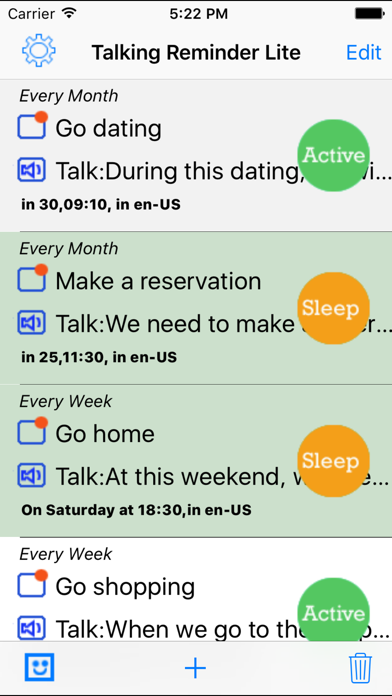
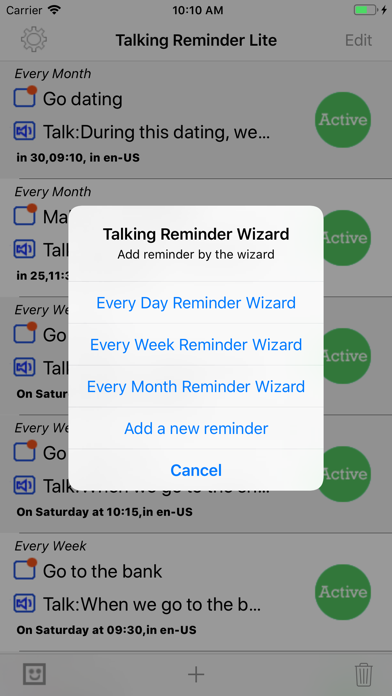
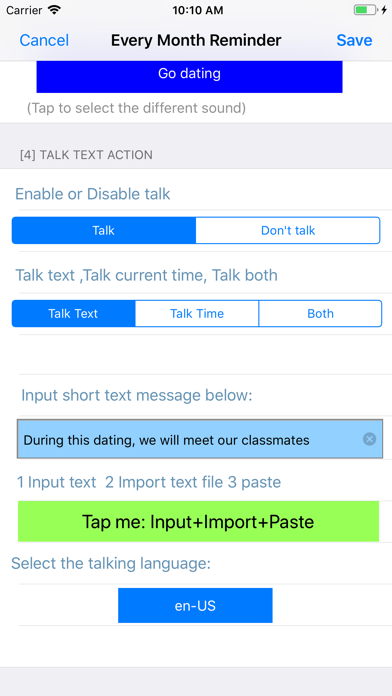
Main Features: 1. Run the reminder at the indicted time 2 When the App is launched, the reminder could talk the text in more than 20 international languages at the indicted time. 3 When the device is locked or the user is using other App, the App could reminder the user by playing 26 talking sounds in English and also display the message in the notification bar. 4 The App includes the following six standard time reminders:One Time reminder, every hour reminder, every day reminder, every week reminder, every month reminder, Interval reminder. Detail features: 1 import the text from the paste board, soft keyboard or text file. 2 In the main list, each table cell contains one cycle button at the right side, after tapping the right button,the user could change the reminder status between active and sleep. In the sleep status, the reminder will be ignored. 3 When the reminder record is running, the right button will be stop button. So tap the stop button could stop the current reminder job. 4 The user could select the talking speed from the setting view. 5 The user could control the talking volume from the setting view. 6 In the main list view, at the tool bar, the right one is the wizard button. Tap the wizard button, the user could select the every day template, every week template or the every month template. 7 In the main list view, at the tool bar, the left one is the clear button. Tap the clear button, the user could delete all the reminder records from the database and the notification list. Screen shots description: in the screen shot, if there are only one main title line in each cell , the notification sound is the default iOS sound and only the talking text is displayed. If there are two main title lines in each cell of the main list view, one line is for the talking notification sound. the other line is for the talking text. In the main list view, if we tap the + button at the bottom tool bar, the menu list is displayed. From this menu, the user could select the reminder type. In the main list view, if one reminder event cell is displayed, and we tap the active button, the status of the event will be changed to sleep status. The lite edition includes the iOS default notification sound and 26 talking sounds in English. Below is the notification sounds list: 0 iOS default Notification Sound 1 Go home 2 Go to school 3 Go to work 4 Go to the cafeteria 5 Do some exercise 6 Get up 7 Go to bed 8 Set out 9 Go back 10 Take a break 11 Make a reservation 12 Go dating 13 Call up 14 Send an Email 15 Go to the bank 16 Go to the hospital 17 Attend a meeting 18 Go to the grocery 19 Check out the internet 20 Check the email box 21 Play the sound 22 Play music 23 listen the talking 24 Have an afternoon Tea 25 Go to a party 26 Go shopping
Installs
Apple does not publish download counts. Estimates are in testing.
We publish iOS estimates only after they pass a back-test against real numbers. Chart history below is measured.
Estimated store revenue Estimated Beta
App Store, worldwide, monthly rate from the last 14 chart days to 21 Nov 2026
Below the top 100 grossing apps in the markets we calibrate. In the United States that usually means under about $6.4M a month. App Store purchases and subscriptions only, before Apple's 15 to 30% fee. Ads and web payments are not included.
Ratings
2 ratings, 2 reviews
No rating breakdown published for this app.
Recent reviews
Latest public reviews from the store
No reviews in our sample for this app yet.
Top chart positions
Latest App Store chart ranks by country, last 10 days
Not in any tracked top chart in the last 10 days.
Talking Reminder Lite history
Release, install milestones, listing and store changes
- First released on the store 6 Feb 2015
Recent versions
Current version 5.4.0
- Version 5.4.09 Jul 2024
1. Update the default preference of the talking volume as the high level instead of loudest level. Our user could update the preference from the setting view. 2. Bug fixes.
Listing keywords
Words and phrases Talking Reminder Lite repeats most in its store listing
Top phrases: main list (6), main list view (5), list view (5), notification sound (4), button the user (3).
Highlighted words also appear in the title. Counts cover the title, short description and description.
Compliance
What the listing and the app package show
- Store status
- Live
- Upkeep
- No update since 9 Jul 2024
- Age rating
- 4+
Apps like Talking Reminder Lite
 GoTime RepairAudatex North America Inc.★ 3.94
 Super VPN: Fast Private ProxyGeek Incorporated★ 4.4
 Hubtel RetailerHubtel Limited★ 4.32
 Monthly Calendar 2022 - CalistOmoboto LLC★ 4.38
 CBUS 311City of Columbus, Ohio★ 1.8
 Themes for Powerpoint - DesiGNGraphic Node★ 4.22
 iSiloDC & Co.★ 3.82
 Flashlight Pro [Multipurpose LED light]KAVAPOINT★ 3.88
 WiPryOscium LLC★ 2.68
Talking Reminder Lite: questions and answers
Who makes Talking Reminder Lite?
Talking Reminder Lite is published by 方 沈.
When was Talking Reminder Lite last updated?
The latest version (5.4.0) was released on 9 Jul 2024.
Is Talking Reminder Lite free?
Yes. Talking Reminder Lite is free to download.
Is Talking Reminder Lite still available?
Yes. Talking Reminder Lite is live on App Store as of 1 Jul 2026.
Track Talking Reminder Lite and its competitors
Watch any app for new versions, rating drops, chart moves and removals. Free plan, no card.