- Installs
- —
- Apple does not publish download counts
- Rating
- 3.5
- Ratings
- 2
- 2 reviews
- Version
- 1.5.2
- Updated 24 May 2024
- Released
- 28 Oct 2014
- Tracked since 10 May 2026
- Size
- 3 MB
- Needs 12.0
Screenshots


About Flashlight Reminder
The description on the store listing
Turn on the flashlight at the indicted time. At night, use this app to help ourself see the remote view. At night, tell remote friends what we want to do and what they need to do. Only for iPhone.
The app has the same usage as the following app:
talking reminder: talk the text at the indicted time
sound reminder:play music file or talk text at the indicted time
camera capture event: record video or take photo at the indicted time
sound record event:record the sound at the indicted time
Introduction
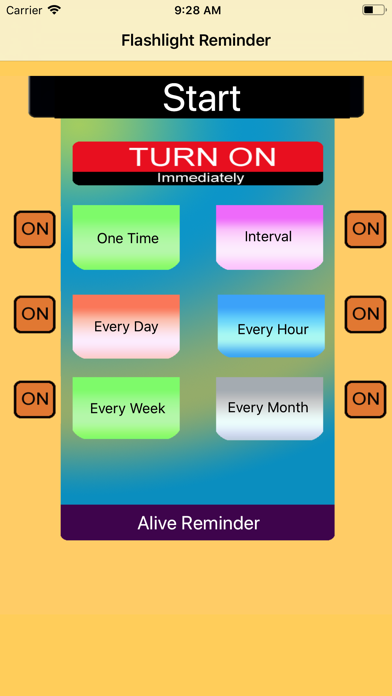
Flashlight Reminder could turn on the Flashlight at the indicted time and turn off the flashlight after the indicted duration.The time is indicted by six kinds of different event …
Read the full description
Turn on the flashlight at the indicted time. At night, use this app to help ourself see the remote view. At night, tell remote friends what we want to do and what they need to do. Only for iPhone. The app has the same usage as the following app: talking reminder: talk the text at the indicted time sound reminder:play music file or talk text at the indicted time camera capture event: record video or take photo at the indicted time sound record event:record the sound at the indicted time Introduction Flashlight Reminder could turn on the Flashlight at the indicted time and turn off the flashlight after the indicted duration.The time is indicted by six kinds of different event schedulers.They are called One Time Reminder, Interval Reminder, One Hour Reminder,One Day Reminder,One Week Reminder and One Month Reminder. Features 1.Turn on the flashlight by One time reminder. 2 turn on the flashlight by interval reminder. 3 Turn on the flashlight by every hour reminder. 4 Turn on the flashlight by every day reminder 5. Turn on the flashlight by every week reminder. 6 Turn on the flashlight by every month reminder. 7 Turn off the flashlight after the indicted duration. Usage When we use the app for the first time, the database is empty. So we need add the reminder recorder. Tap any event button, we could begin to add new reminder record. Then , return back to the main view, tap the Alive Reminder button, we could check whether our input is correct. After that, back to the main view. tap the start button. Example Add Every Hour Event From the main view, tap the every hour reminder button, then the every hour event list view will be displayed. Then tap the add button at the bottom tool bar. So new record view will be displayed. Select the start time and the duration. Finally, tap the save button. The new every hour event record will be displayed in the list. Example: Add Every Week Reminder From the main view, tap the every week reminder button, then the every week reminder list view will be displayed. Then tap the add button at the bottom tool bar. So new record view will be displayed. Select the start time and the duration.Finally, tap the save button. The new every week record will be displayed in the list. Notice: For the current edition, this app is only foreground app. When the job list is displayed, the app must be in the foreground status and cannot press the home key at this time.
Installs
Apple does not publish download counts. Estimates are in testing.
We publish iOS estimates only after they pass a back-test against real numbers. Chart history below is measured.
Estimated store revenue Estimated Beta
App Store, worldwide, monthly rate from the last 13 chart days to 20 Nov 2026
Below the top 100 grossing apps in the markets we calibrate. In the United States that usually means under about $6.4M a month. App Store purchases and subscriptions only, before Apple's 15 to 30% fee. Ads and web payments are not included.
Ratings
2 ratings, 2 reviews
No rating breakdown published for this app.
Recent reviews
Latest public reviews from the store
No reviews in our sample for this app yet.
Top chart positions
Latest App Store chart ranks by country, last 10 days
Not in any tracked top chart in the last 10 days.
Flashlight Reminder history
Release, install milestones, listing and store changes
- First released on the store 28 Oct 2014
Recent versions
Current version 1.5.2
- Version 1.5.224 May 2024
Improve the performance of the interval reminder. For the interval reminder job, in the job list, all of the jobs in the 48 hours will be displayed in the list. in the earlier edition, only jobs in the 24 hours will be displayed.
Listing keywords
Words and phrases Flashlight Reminder repeats most in its store listing
Top phrases: reminder turn (6), week reminder (5), main view tap (4), main view (4), view tap (4).
Highlighted words also appear in the title. Counts cover the title, short description and description.
Compliance
What the listing and the app package show
- Store status
- Live
- Upkeep
- No update since 24 May 2024
- Age rating
- 4+
Apps like Flashlight Reminder
 LaundrappLaundrapp Limited★ 4.28
 RoomstylerFloorplanner.com★ 1.98
 The Oldie magazineThe Oldie★ 4.84
 XRunningShenzhen Qixiang Technology Co., Ltd.★ 2.98
 Tamilan Tamil Calendar 2026banuchander janarthn★ 4.64
 MR StarShenZhen Lenze Technology Co,.Ltd.★ 2.74
 rllyrlly★ 4.84
 Book of Psalms For WorshipDeo Volente, LLC★ 4.66
 Daily Bible Devotion & PrayerSalem Communications★ 3.38
Flashlight Reminder: questions and answers
Who makes Flashlight Reminder?
Flashlight Reminder is published by 方 沈.
When was Flashlight Reminder last updated?
The latest version (1.5.2) was released on 24 May 2024.
Is Flashlight Reminder free?
Yes. Flashlight Reminder is free to download.
Is Flashlight Reminder still available?
Yes. Flashlight Reminder is live on App Store as of 1 Jul 2026.
Track Flashlight Reminder and its competitors
Watch any app for new versions, rating drops, chart moves and removals. Free plan, no card.