
- Installs
- —
- Apple does not publish download counts
- Rating
- 4.7
- Ratings
- 311
- 311 reviews
- Version
- 1.6.1
- Updated 21 Sep 2026
- Released
- 28 Feb 2023
- Tracked since 10 May 2026
- Size
- 32 MB
- Needs 15.1
Also on Google Play: UserLock Push (173 ratings)
Screenshots


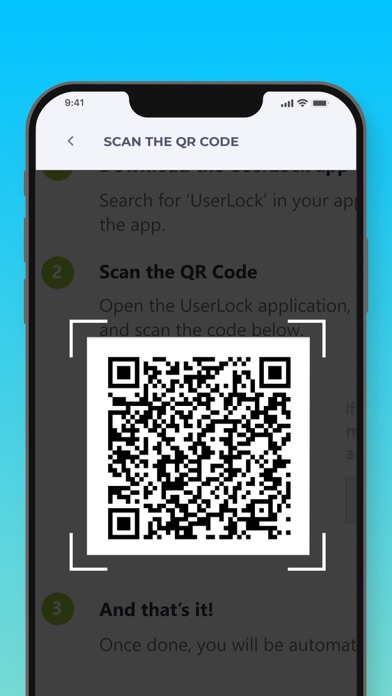
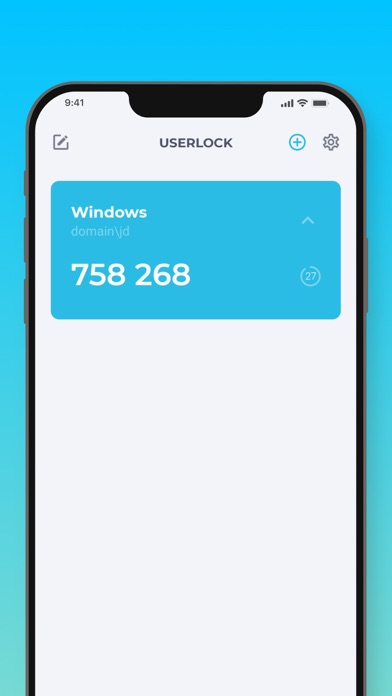


About UserLock Push
The description on the store listing
UserLock Push works with UserLock’s two-factor authentication solution to verify Active Directory user identities and secure their access to both on-premise and cloud resources.
UserLock Push can also work with other services that require two-factor authentication passcodes, such as Gmail and Facebook.
• How the app works
After entering your Active Directory login credentials, UserLock Push gives you two easy options for two-factor authentication:
1. One-Tap: Simply respond to the application’s push notification for easy, one-tap two-factor authentication, or
2. Enter the TOTP code generated by the app.
The app shows the location, device, and time of the login attempt to help ensure …
Read the full description
UserLock Push works with UserLock’s two-factor authentication solution to verify Active Directory user identities and secure their access to both on-premise and cloud resources. UserLock Push can also work with other services that require two-factor authentication passcodes, such as Gmail and Facebook. • How the app works After entering your Active Directory login credentials, UserLock Push gives you two easy options for two-factor authentication: 1. One-Tap: Simply respond to the application’s push notification for easy, one-tap two-factor authentication, or 2. Enter the TOTP code generated by the app. The app shows the location, device, and time of the login attempt to help ensure you approve the correct request. To get a passcode for other applications and web services, enter your login credentials and then go to UserLock Push to recover the TOTP code generated by the app. • Self-enrollment with UserLock Push Before enrolling with UserLock Push, your organization needs to enable UserLock and activate your account. Once this is done: 1. Install UserLock Push on your smartphone 2. Scan the QR code displayed at login 3. Enter the code generated by the app to confirm activation 4. UserLock Push is now configured as a second authentication method on your Active Directory account You can add third party accounts at any time for OTP passcodes.
Installs since 29 Aug 2026
Apple does not publish download counts. Estimates are in testing.
Estimated store revenue Estimated Beta
App Store, worldwide, monthly rate from the last 12 chart days to 19 Nov 2026
Below the top 100 grossing apps in the markets we calibrate. In the United States that usually means under about $6.4M a month. App Store purchases and subscriptions only, before Apple's 15 to 30% fee. Ads and web payments are not included.
Ratings
311 ratings, 311 reviews
No rating breakdown published for this app.
Recent reviews
Latest public reviews from the store
No reviews in our sample for this app yet.
Top chart positions
Latest App Store chart ranks by country, last 10 days
Not in any tracked top chart in the last 10 days.
UserLock Push history
Release, install milestones, listing and store changes
- First released on the store 28 Feb 2023
Update frequency
How often UserLock Push ships a new version, month by month
1 updates in the last 12 months. Less often than most similar apps: they shipped a median of 2 updates in the same year.
Recent versions
Current version 1.6.1
- Version 1.6.021 Sep 2026
Changes: - Added a visual indicator when a TOTP code is about to expire. - Improved the reliability of responses from iOS notifications.
- Version 1.4.46 Nov 2025
Improvements: - The app has been updated to provide a smoother and more stable experience. - Fixed an issue affecting users with a large number of accounts. - Fixed an issue with TOTP codes not displaying correctly on certain devices.
Listing keywords
Words and phrases UserLock Push repeats most in its store listing
Top phrases: userlock push (9), factor authentication (4), active directory (3), code generated (3), totp code generated (2).
Highlighted words also appear in the title. Counts cover the title, short description and description.
Compliance
What the listing and the app package show
- Store status
- Live
- Upkeep
- Updated 21 Sep 2026
- Age rating
- 4+
Apps like UserLock Push
 SikaCashhttps://appstoreconnect.apple.com/★ 3.72
 Immediate Contact TransferCyberValue LLC★ 3.88
 Islamiyat BahraineGovernment Authority Bahrain★ 4.75
 WoW Classic Talent CalculatorHalasz Gergo★ 4.58
 Thunder VPN - Proxy UnlimitedINITIO TECH MEDIA PRIVATE LIMITED★ 4.45
 Nagarik AppNITC, Government of Nepal★ 2.97
 Whale - Naver Whale BrowserNAVER Corp.★ 4.53
 新浪邮箱Beijing New Media Information Technology Co.ltd.★ 3.72
 Morse TransmitterShuyang Sun★ 4.28
UserLock Push: questions and answers
Who makes UserLock Push?
UserLock Push is published by IS Decisions.
When was UserLock Push last updated?
The latest version (1.6.1) was released on 21 Sep 2026.
Is UserLock Push free?
Yes. UserLock Push is free to download.
Is UserLock Push still available?
Yes. UserLock Push is live on App Store as of 14 Nov 2026.
Track UserLock Push and its competitors
Watch any app for new versions, rating drops, chart moves and removals. Free plan, no card.