
- Installs
- —
- Apple does not publish download counts
- Rating
- 4.07
- Ratings
- 302
- 302 reviews
- Version
- 1.1.7
- Updated 8 Jun 2021
- Released
- 16 Mar 2020
- Tracked since 10 May 2026
- Size
- 4 MB
- Needs 13.2
Screenshots


About VizRef
The description on the store listing
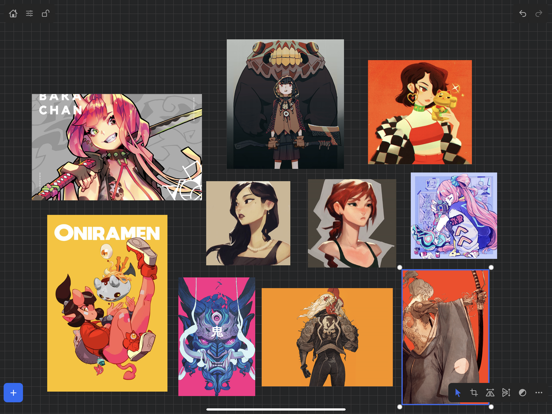
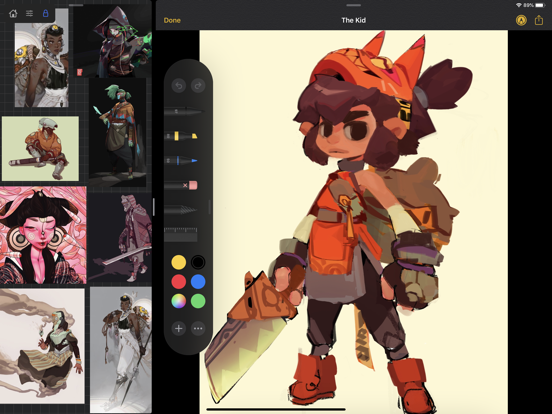
VizRef for iPad enables creatives to finally take their inspiration anywhere. It becomes the perfect companion app for Procreate® or paired with your favorite drawing/animation application by utilizing iPad IOS multitasking features. Clear up your hard to find hidden layers in your drawing app and easily organize your inspiration on the go. Make visual reference boards with any images or gifs from web browsers, cloud storage, photos, screen captures and more. The first mood board creation app made by artists for artists, that brings comprehensive referencing tools to animators and visual artists/en. We are dedicated to bringing creatives what they need most in being inspired everywhere they …
Read the full description
VizRef for iPad enables creatives to finally take their inspiration anywhere. It becomes the perfect companion app for Procreate® or paired with your favorite drawing/animation application by utilizing iPad IOS multitasking features. Clear up your hard to find hidden layers in your drawing app and easily organize your inspiration on the go. Make visual reference boards with any images or gifs from web browsers, cloud storage, photos, screen captures and more. The first mood board creation app made by artists for artists, that brings comprehensive referencing tools to animators and visual artists/en. We are dedicated to bringing creatives what they need most in being inspired everywhere they go. HIGHLIGHTS -Perfect companion app paired with Procreate® Adobe Fresco ® Clip Studio Paint® Infinite Painter® etc. by utilizing iPad IOS multitasking features -Supports many image types including GIF -Drag and drop from web -Batch Import from Photos app -Batch Export images from boards to cloud storage using Files app - *Multi-Select and auto pack images for a quicker workflow * -Import High-Resolution images with HD toggle _*Focus on whats importing with Focus mode. ( rotate imageboard ) -Batch Import from iCloud, Dropbox, Google Drive with split-screen -Quick and responsive visual reference board experience -Easy to use/ minimal UI -Light mode and Dark mode -Set thumbnails for reference boards to visually organize your inspiration ANIMATED GIF SUPPORT -Reference your favorite animated gifs -Pause animation and play frame by frame to better understand referenced animations -Advanced animation timeline gives you an interactive visual breakdown of all frames EASY TO USE REFERENCE TOOLS -Crop images to optimize screen space and view more references -Greyscale toggle for images for value reference -Flip horizontally and vertically -Rotate Images -Copy-paste images into other apps Artwork and animation credits @_Artazi @_baomii @_Deadslug_ @amnesiapancake @barachan @belgeist @criisalys @ergo.josh @evan_monteiro @gloomwastaken @mrbeezul @onemegawatt @rocketboiART @samuelyounart @cobalt_requin VizRef was created by Max Gonzalez and RoboWorld Entertainment with supporting development from Valere Labs
Installs since 29 Aug 2026
Apple does not publish download counts. Estimates are in testing.
Estimated store revenue Estimated Beta
App Store, worldwide, monthly rate from the last 12 chart days to 19 Nov 2026
Below the top 100 grossing apps in the markets we calibrate. In the United States that usually means under about $6.4M a month. App Store purchases and subscriptions only, before Apple's 15 to 30% fee. Ads and web payments are not included.
Ratings
302 ratings, 302 reviews
No rating breakdown published for this app.
Recent reviews
Latest public reviews from the store
- 4 Jul 2024
Great app, getting slower
Update July 2024: No updates for 3 years. I wish the developer would keep refining the app. I’ve just upgraded to an M4 iPad Pro, and the app still works, but gifs play back at double speed or more, making them harder to work with. Still hoping for the ability to flip and rotate gifs like we can with still images. ——- I’ve been using VizRef since it came out, and it’s become integral to my art workflow. So well-designed and useful! Unfortunately I find that some of my reference galleries become slower and slower to work with over time, and can take up to 8 seconds to fully open and display. I thought the problem might be simply the volume of images (240) but then I exported all those images and added them to a new gallery, and the new gallery opened twice as fast. This procedure is not a good workaround, though, because it loses all the placement, scale, rotation, and cropping that I’ve done. It would be great if VizRef allowed the user to duplicate a gallery, which would make it easy to split up a big gallery into smaller galleries. I would also like to see support for copy-pasting multiple images at a time. Currently it will only paste one image at a time, which is
- 18 Mar 2023
Love it but one big setback
Its a huge help and streamlines my process by a ton, its a simple tool but saves the clutter from my actual canvas. I love how it lets you scroll through gifs for animation studies, and being able to move the images around freely feels easier than scrolling up and down a pinterest board. The only frustrating thing is sometimes my boards will crash and theres no way to recover lost images (as far as I can tell) It doesnt matter if theres a 100 images or 10 on a board it just Happens randomly and deletes pictures. I had to knock my rating down because I had just had a board crash and lose half the pictures, re-add in as many as I could find in my camera roll, only for it to crash again 10 minutes later and lose even more refs. I've also noticed the crashes happen when I try to export selected images. But yea this app gets the job done, I just hope the crash + erasing refs problem gets fixed
- 24 May 2021
Can’t fully articulate how great this app is.
Have a project you need reference for? This is the place to save it. Open up your browser side by side with VIZREF. Choose a pic from your browser. Hold the pic with one finger and drag it to VIZREF. Once you have one pic, or many pics, open VIZREF fully. Now you can resize and move your saved reference pics. Want a giant board with thousands of tiny pics. No problem. Not only can you change the size of the pic you want at any time (within reason- make it much larger than the original file and it gets blurry, you’ll have to play around with the app to get the ins and outs) you can also move it anywhere on the board AND THEN you can zoom the board in and out with the pinch gesture. Yes this app cost you some money, but it’s well worth it. Create the board anywhere you have internet, save it and when you are away from home (or just don’t have internet access) you can access all your photo refs you saved in this app. It’s not Pinterest, yes you can save photos, but this is JUST the pics you save. No suggestions, no ads. Just you, your reference pics and your imagination. BUY IT RIGHT MEOW...seriously though, it’s great.
- 14 Apr 2021
Nice but not even close to a cigar
Don’t get me wrong. This app is really useful when it comes to pulling up references for drawing, piecing together pictures, and helped me out in class one time. It’s simple and easy to use, however that’s the app’s downside. You are very limited when it comes to how you mess with your boards. I couldn’t even draw on the boards when I was presetting pictures in a group forcing me to open up Procreate. There is a lack of transform tools to mess with your image forcing you to edit in a photo editing app even if it’s minor. The rotation tool only rotates the image 90 degrees one way and that’s all you can do and why is it in a briefcase icon with the flip-vertically tool while the rest of the tools are out on the small bar? The flip-horizontally tool is on there so why can’t the rest as well? You can’t even drag them out. Another thing that annoys me is there is no way to auto-sort your boards or put them in folders. You can drag them in between each other one by one while the board doesn’t tell you if it’s going to do so cause it flickers like crazy. I think app has potential but it’s not there yet. It’s hard to recommend this $3 app when your paint app ca
What reviewers bring up
Topics mentioned in the latest 8 reviews, by how many reviews mention them
Liked in good reviews (5 reviews)
- reference 4
- vizref 3
- board 3
- ipad 3
- once 3
- see 3
- problem 2
- browser 2
Raised in bad reviews (1 reviews)
No topic comes up twice.
Top chart positions
Latest App Store chart ranks by country, last 10 days
Not in any tracked top chart in the last 10 days.
VizRef history
Release, install milestones, listing and store changes
- First released on the store 16 Mar 2020
Update frequency
How often VizRef ships a new version, month by month
0 updates in the last 12 months. Less often than most similar apps: they shipped a median of 1 updates in the same year.
Recent versions
Current version 1.1.7
- Version 1.1.78 Jun 2021
NEW FEATURES in 1.1.7 Exporting- Fixed some bugs related to exporting. Some of the UI was unresponsive when hitting export within the app. This was most likely due to some newer IOS versions that were later released. *** Please keep in mind that exporting/ importing directly into other apps such as Dropbox or even using Airdrop and Discord all work completely differently because of how those apps are created. We, unfortunately, can not improve much on batch exporting/ importing into these apps unless those developers improve how their apps deal with multiple images being imported or passing through them. For batch exporting images, I still recommend hooking up Dropbox/ Google Drive to the files app on your iPad and just batch exporting through the files app from Vizref. Please also keep in mind that batch exporting hundreds of images at once will most likely crash Vizref. This is also out of our control. I recommend batch exporting about 50 images at once for the most stable and consistent experience. Vizref and other apps can't export hundreds of images at once because every app on the iPad is limited to how much Memory it can use during all operations. The app is crashing because of the hard limit set by Apple for each app. Feature - Revert Button- Revert will undo any cropping or rotating you've done to the image. The main reason for adding the revert button was that some users were finding their images were oddly scaled/ stretched to the wrong ratio. Revert is a backup for returning your image to the correct ratio/ scaling - the revert button is located in the toolbox icon at the bottom right after selecting an image. - Exporting gif files. Should work now give it a try! *Bug Fixes* -Fixed a bug that caused images from your board to not display if your board crashed on exporting. This bug should be completely gone. If it persists after updating your app please contact us at [email protected] **If your images have disappeared from your board, please note that those images are still on you iPad and stored locally. You can retrieve them by going to the Files app then searching for your Vizref folder in " On My iPhone " or " On My iPad" file Open "Private Documents" then you will see each .VRB file. These are your reference boards and store your images locally. You can then retrieve your images here. Fixed some crash bugs. Fixed several UI inconsistencies and bugs.
Listing keywords
Words and phrases VizRef repeats most in its store listing
Top phrases: ios multitasking features (2), ipad ios multitasking (2), organize your inspiration (2), utilizing ipad ios (2), batch import (2).
Highlighted words also appear in the title. Counts cover the title, short description and description.
Compliance
What the listing and the app package show
- Store status
- Live
- Upkeep
- No update since 8 Jun 2021
- Age rating
- 4+
Apps like VizRef
 Fonts for ProcreateDouble Time Software LLC★ 4.01
 Poster Maker, Flyer designNazly Maryori Rea Legarda★ 4.28
 Omni Banana - AI Photo EditorCoreMoose, LLC★ 4.66
 AI Tattoo:Tattoo Design&Try OnUmut Koray Melek★ 4.59
 Stencil AI - Tattoo StencilsSimon Turkovic★ 4.68
 AI Toolkit for ProcreateDouble Time Software LLC★ 4.34
 Designkit: Ecommerce CreativesXiamen Meitu Technology Co., Ltd.★ 4.6
 Gun Maker : pimp my weaponMIDLANDSTORY inc.★ 4.54
 VividPic - AI Video Generator小勇 蒙★ 4.12
VizRef: questions and answers
Who makes VizRef?
VizRef is published by Studio Pixanoh.
When was VizRef last updated?
The latest version (1.1.7) was released on 8 Jun 2021.
Is VizRef free?
No. VizRef is a paid app priced at $3.99.
Is VizRef still available?
Yes. VizRef is live on App Store as of 14 Nov 2026.
Track VizRef and its competitors
Watch any app for new versions, rating drops, chart moves and removals. Free plan, no card.