
- Installs
- —
- Apple does not publish download counts
- Rating
- 3.76
- Ratings
- 37
- 37 reviews
- Version
- 1.1.7
- Updated 8 Jun 2021
- Released
- 11 Mar 2020
- Tracked since 10 May 2026
- Size
- 4 MB
- Needs 13.2
Screenshots
About VizRef Lite
The description on the store listing
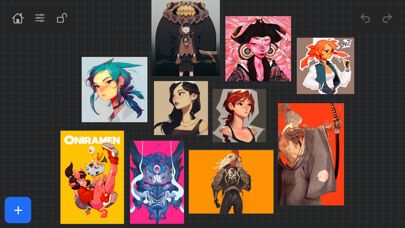
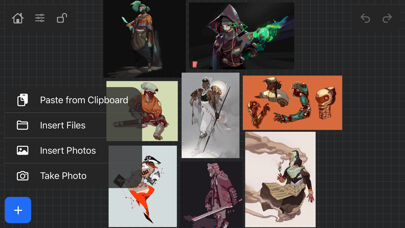
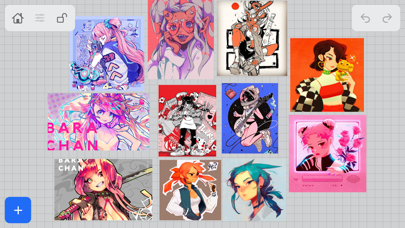
VizRef Lite® for iPhone enables creatives to finally take their inspiration anywhere on their phones. *You can not use iPad multitasking features with the iPhone version of VizRef. Please Download VIZREF for use on iPad. * It becomes the perfect companion app for Procreate or paired with your favorite drawing/animation application by using your iPhone as a second monitor dedicated to references. Take your reference boards with you while you travel and draw in your sketchbook. Make visual reference boards with any images or gifs from web browsers, cloud storage, photos, screen captures and more. The first mood board creation app made by artists for artists, that brings comprehensive …
Read the full description
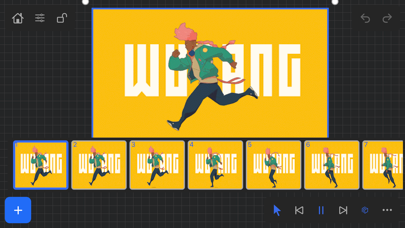
VizRef Lite® for iPhone enables creatives to finally take their inspiration anywhere on their phones. *You can not use iPad multitasking features with the iPhone version of VizRef. Please Download VIZREF for use on iPad. * It becomes the perfect companion app for Procreate or paired with your favorite drawing/animation application by using your iPhone as a second monitor dedicated to references. Take your reference boards with you while you travel and draw in your sketchbook. Make visual reference boards with any images or gifs from web browsers, cloud storage, photos, screen captures and more. The first mood board creation app made by artists for artists, that brings comprehensive referencing tools to animators and visual artists. We are dedicated to bringing creatives what they need most in being inspired everywhere they go. HIGHLIGHTS -VIZREF LITE® version for iPhone has all the same in-app features as VIZREF on iPad ( Vizref Lite if used on IPad does not have multitasking features and is not fullscreen. For iPad please purchase VIZREF® -Take your visual reference boards with you while you sketch at your favorite locations -Perfect companion app paired with Procreate® Adobe Fresco ® Clip Studio Paint® Infinite Painter® etc. by utilizing iPhone as a second monitor along with an iPad -Supports many image types including GIF -Quickly copy and paste images from web -Batch Import from Photos app -Batch Export images from boards to cloud storage using Files app -Import High-Resolution images with HD toggle -*Focus on whats importing with Focus mode. ( rotate imageboard ) *Multi-Select and auto pack images for a quicker workflow * - -Import from iCloud, Dropbox, Google Drive -Quick and responsive visual reference board experience -Easy to use/ minimal UI -Light mode and Dark mode -Set thumbnails for reference boards to visually organize your inspiration ANIMATED GIF SUPPORT -Reference your favorite animated gifs -Pause animation and play frame by frame to better understand referenced animations -Advanced animation timeline gives you an interactive visual breakdown of all frames EASY TO USE REFERENCE TOOLS -Crop images to optimize screen space and view more references -Greyscale toggle for images for value reference -Flip horizontally and vertically -Rotate Images -Copy-paste images into other apps Artwork and animation credits @_Artazi @_baomii @_Deadslug_ @amnesiapancake @barachan @belgeist @criisalys @ergo.josh @evan_monteiro @gloomwastaken @mrbeezul @onemegawatt @rocketboiART @samuelyounart @cobalt_requin VizRef was created by Max Gonzalez (@mrbeezul) and RoboWorld Entertainment with supporting development from Valere Labs
Installs
Apple does not publish download counts. Estimates are in testing.
We publish iOS estimates only after they pass a back-test against real numbers. Chart history below is measured.
Estimated store revenue Estimated Beta
App Store, worldwide, monthly rate from the last 12 chart days to 19 Nov 2026
Below the top 100 grossing apps in the markets we calibrate. In the United States that usually means under about $6.4M a month. App Store purchases and subscriptions only, before Apple's 15 to 30% fee. Ads and web payments are not included.
Ratings
37 ratings, 37 reviews
No rating breakdown published for this app.
Recent reviews
Latest public reviews from the store
No reviews in our sample for this app yet.
Top chart positions
Latest App Store chart ranks by country, last 10 days
- Countries ranked
- 50 of 50
- Best rank
- #7
- Top 10 placements
- 3
- of 50 chart placements
- Average rank
- #18.2
Best countries on App Store
- 🇬🇧 United Kingdom · Top paid, Graphics & Design#7
- 🇫🇷 France · Top paid, Graphics & Design#9
- 🇨🇦 Canada · Top paid, Graphics & Design#10
- 🇷🇴 Romania · Top paid, Graphics & Design#11
- 🇵🇪 Peru · Top paid, Graphics & Design#11
- 🇻🇳 Vietnam · Top paid, Graphics & Design#12
| Country | Chart | Category | Rank | Best (10 days) | Date |
|---|---|---|---|---|---|
| 🇬🇧 United Kingdom | Top paid | Graphics & Design | #7 | #2 | 19 Nov 2026 |
| 🇫🇷 France | Top paid | Graphics & Design | #9 | #3 | 19 Nov 2026 |
| 🇨🇦 Canada | Top paid | Graphics & Design | #10 | #6 | 19 Nov 2026 |
| 🇷🇴 Romania | Top paid | Graphics & Design | #11 | #11 | 19 Nov 2026 |
| 🇵🇪 Peru | Top paid | Graphics & Design | #11 | #10 | 19 Nov 2026 |
| 🇻🇳 Vietnam | Top paid | Graphics & Design | #12 | #11 | 19 Nov 2026 |
| 🇵🇹 Portugal | Top paid | Graphics & Design | #12 | #11 | 19 Nov 2026 |
| 🇮🇩 Indonesia | Top paid | Graphics & Design | #13 | #12 | 19 Nov 2026 |
| 🇨🇱 Chile | Top paid | Graphics & Design | #13 | #13 | 19 Nov 2026 |
| 🇵🇭 Philippines | Top paid | Graphics & Design | #14 | #13 | 19 Nov 2026 |
VizRef Lite history
Release, install milestones, listing and store changes
- First released on the store 11 Mar 2020
Recent versions
Current version 1.1.7
- Version 1.1.78 Jun 2021
NEW FEATURES in 1.1.7 Exporting- Fixed some bugs related to exporting. Some of the UI was unresponsive when hitting export within the app. This was most likely due to some newer IOS versions that were later released. *** Please keep in mind that exporting/ importing directly into other apps such as Dropbox or even using Airdrop and Discord all work completely differently because of how those apps are created. We, unfortunately, can not improve much on batch exporting/ importing into these apps unless those developers improve how their apps deal with multiple images being imported or passing through them. For batch exporting images, I still recommend hooking up Dropbox/ Google Drive to the files app on your iPad and just batch exporting through the files app from Vizref. Please also keep in mind that batch exporting hundreds of images at once will most likely crash Vizref. This is also out of our control. I recommend batch exporting about 50 images at once for the most stable and consistent experience. Vizref and other apps can't export hundreds of images at once because every app on the iPad is limited to how much Memory it can use during all operations. The app is crashing because of the hard limit set by Apple for each app. Features - Revert Button- Revert will undo any cropping or rotating you've done to the image. The main reason for adding the revert button was that some users were finding their images were oddly scaled/ stretched to the wrong ratio. Revert is a backup for returning your image to the correct ratio/ scaling - the revert button is located in the toolbox icon at the bottom right after selecting an image. - Exporting gif files. Should work now give it a try! *Bug Fixes* -Fixed a bug that caused images from your board to not display if your board crashed on exporting. This bug should be completely gone. If it persists after updating your app please contact us at [email protected] **If your images have disappeared from your board, please note that those images are still on you iPad and stored locally. You can retrieve them by going to the Files app then searching for your Vizref folder in " On My iPhone " or " On My iPad" file Open "Private Documents" then you will see each .VRB file. These are your reference boards and store your images locally. You can then retrieve your images here. Fixed some crash bugs. Fixed several UI inconsistencies and bugs.
Listing keywords
Words and phrases VizRef Lite repeats most in its store listing
Top phrases: reference boards (4), vizref lite (4), visual reference (3), iphone as second (2), visual reference boards (2).
Highlighted words also appear in the title. Counts cover the title, short description and description.
Compliance
What the listing and the app package show
- Store status
- Live
- Upkeep
- No update since 8 Jun 2021
- Age rating
- 4+
Apps like VizRef Lite
 AI Cut - Photo Generate & EditBeijing Changhai Internet Technology Co., Ltd.★ 4.1
 Birthday Invitations Makerwilliam leandro aristizabal giraldo★ 4.7
 Artimind - AI Video GeneratorAPERO TECHNOLOGIES GROUP PTE.LTD★ 1.42
 AI VistaSCIENJOY META TECHNOLOGY LLC★ 2.9
 Logotipo - AI Logo GeneratorMobile Ocean★ 4.02
 Anime AI Maker: DreamtuneLYKOV STUDIO LTD★ 4.34
 DIY Wallpaper Maker DIYScreenEvgenii Fomin★ 4.68
 Vintage Camera - Film FiltersPlane Cubes★ 4.42
 Color Widgets - WallpapersFlying Pigeons LLC★ 4.34
VizRef Lite: questions and answers
Who makes VizRef Lite?
VizRef Lite is published by Studio Pixanoh.
When was VizRef Lite last updated?
The latest version (1.1.7) was released on 8 Jun 2021.
Is VizRef Lite free?
No. VizRef Lite is a paid app priced at $1.99.
Is VizRef Lite still available?
Yes. VizRef Lite is live on App Store as of 1 Jul 2026.
Track VizRef Lite and its competitors
Watch any app for new versions, rating drops, chart moves and removals. Free plan, no card.