
All Document Reader Premium
Document Reader : View and manage PPT, DOC, PPT, Excel, Text, and HTML files .
- Installs
- 1.78K
- Measured
- Rating
- 4.73
- Ratings
- 218
- 6 reviews
- Version
- Varies with device
- Updated 7 May 2026
- Released
- 12 Sep 2024
- Tracked since 12 May 2026
- Size
- —
Screenshots





About All Document Reader Premium
The description on the store listing
Introducing Document Reader, your go-to app for handling all your document needs! Designed by the expert team at Simple Design, this free, lightweight, and powerful app is perfect for viewing, managing, and editing PDF, Excel, DOCX, and more.
📚 Full-Featured Document Manager for All Your Needs
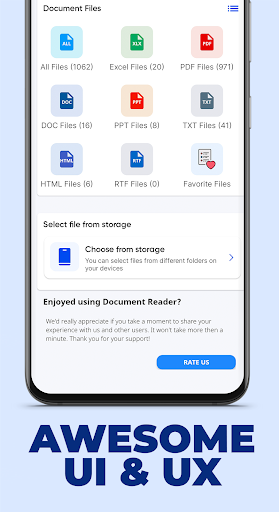
Document Reader provides a comprehensive document management experience. With an intuitive folder structure view, you can easily locate PDF, Word, Excel, and PowerPoint files. The app ensures that all your documents are listed in one place, enabling quick searching and hassle-free viewing. You can even add important documents to your Favorites list for instant access.
Folder Structure View: …
Read the full description
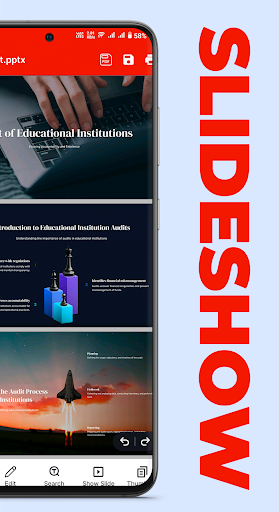
Introducing Document Reader, your go-to app for handling all your document needs! Designed by the expert team at Simple Design, this free, lightweight, and powerful app is perfect for viewing, managing, and editing PDF, Excel, DOCX, and more. 📚 Full-Featured Document Manager for All Your Needs Document Reader provides a comprehensive document management experience. With an intuitive folder structure view, you can easily locate PDF, Word, Excel, and PowerPoint files. The app ensures that all your documents are listed in one place, enabling quick searching and hassle-free viewing. You can even add important documents to your Favorites list for instant access. Folder Structure View: Organize documents by file types like PDFs, Excel, and Word. Easy Document Access: All files are available in one location for streamlined search and viewing. Favorites List: Quickly access frequently used files by marking them as favorites. 📝 Support for Multiple Document Formats Document Reader supports a wide range of document types, including PDF, DOC, DOCX, XLS, XLSX, PPT, PPTX, and even TXT files. This makes it the ultimate tool for handling various document types without the need for multiple apps. View and manage PDF files, Word documents (DOC/DOCX), Excel spreadsheets (XLS/XLSX), PowerPoint presentations (PPT/PPTX), and TXT files all in one app. Simple interface to view, read, and navigate through documents efficiently. 🔍 Powerful Search and Marking Features Document Reader allows you to quickly search within documents for specific keywords or phrases. You can also highlight and mark important sections, making it easy to reference key points later. Quick Document Search: Find specific text within a document instantly. Mark & Highlight: Highlight important sections for easy future reference. 📝 Note-Taking and Sharing Annotate your documents, add personal notes, and share them with friends or colleagues effortlessly. 📔 Advanced PDF Reader Features Fast Access to PDF Files: Open PDFs quickly from within the app or other apps. Zoom In/Out: Adjust document size for optimal viewing. Navigate Pages: Jump to specific pages with the “Go to Page” feature. Share PDFs: Share your PDF files with others in seconds. 🧐 Word Viewer (DOC/DOCX) Quickly Open DOC/DOCX Files: Fast, reliable document access. Simple, Elegant Reading Interface: A clean layout for a distraction-free reading experience. 📊 Excel Viewer (XLS/XLSX) Handle Excel Spreadsheets: Supports both XLS and XLSX formats. Manage Spreadsheets on the Go: View and edit reports or financial data on your mobile device with ease. 🧑💻 PPT Viewer (PPT/PPTX) PowerPoint Viewer: Display PPT and PPTX presentations in high resolution with stable performance. 📝 TXT File Reader Conveniently read txt files anywhere. 🖊️ Add Text to PDFs Need to fill out forms or add notes to a PDF? Document Reader makes it easy to add text to PDF files. Customize font size, color, and placement to suit your needs. Why Choose Document Reader? Simple and User-Friendly: A minimal interface ensures easy navigation and usage for users of all skill levels. File Sorting Options: Sort by name, size, date modified, or recently visited. Fast Performance: Opens and loads documents quickly for a smooth experience. No Internet Required: Work with your documents offline without any disruptions. File Management: Easily rename, delete, and share files directly from the app.
Installs since 2 Sep 2026 Measured
Exact Google Play install counts, collected daily
Ratings
218 ratings, 6 reviews
- 5 ★89%
- 4 ★0.0%
- 3 ★0.0%
- 2 ★11%
- 1 ★0.0%
Recent reviews
Latest public reviews from the store
No reviews in our sample for this app yet.
Top chart positions
Latest Google Play chart ranks by country, last 10 days
Not in any tracked top chart in the last 10 days.
All Document Reader Premium history
Release, install milestones, listing and store changes
- Reached 1,000+ installs 17 Oct 2025
- Reached 500+ installs 4 Nov 2024
- First released on the store 12 Sep 2024
Update frequency
How often All Document Reader Premium ships a new version, month by month
2 updates in the last 12 months. More often than most similar apps: they shipped a median of 1 updates in the same year.
Recent versions
Current version Varies with device
- Version 4.07 May 2026
🛠️ Improved performance and fixed minor bugs.
- Version 3.02 Feb 2026
Listing keywords
Words and phrases All Document Reader Premium repeats most in its store listing
Top phrases: document reader (8), doc docx (4), pdf files (4), ppt pptx (3), txt files (3).
Highlighted words also appear in the title. Counts cover the title, short description and description.
Business model and tech
From the store listing and declared permissions
- Business model
- Paid, $0.49
- Sensitive access
- Photos, videos and files
4 permissions
1 special access, 2 sensitive, 1 standard
- Manage all filesMANAGE_EXTERNAL_STORAGESpecial access
- Change or delete shared storageSensitive
- Read shared storageSensitive
- Internal app permissionDYNAMIC_RECEIVER_NOT_EXPORTED_PERMISSIONStandard
Compliance
What the listing and the app package show
- Store status
- Live
- Upkeep
- Updated 7 May 2026
- Privacy policy
- Linked on the listing
- Advertising
- No ads declared
- In-app purchases
- None declared
- Age rating
- Everyone
- Sensitive permissions
- 2 sensitive, 1 special access of 4
- Location access
- No
- Camera and microphone
- Neither
Apps like All Document Reader Premium
Cast for Chromecast & TV CastKonnect Apps13.4K installs★ 3.13
PI mPowerPI Industries16.9K installs★ 4.5
Speco GraySpeco Technologies10.9K installs★ 3.67
Meeting Summary - AI NotesGODHITECH JSC20.7K installs★ 2.4
Magnifying Glass with FlashligOne Music Player42.1K installs★ 3.34
Drift: Notification TickerLight Source Labs5.5K installs★ 4.52
BI LifeBI Digital16.3K installs★ 4.8
Bluedot Al Note TakerTwiso Inc.11.8K installs★ 4.71
VPN Prime - Unlimited ProxyAVATARA LTD12.9K installs★ 4.06
All Document Reader Premium: questions and answers
How many downloads does All Document Reader Premium have?
All Document Reader Premium has 1,783 installs on Google Play, measured from the store's own count on 14 Nov 2026.
Who makes All Document Reader Premium?
All Document Reader Premium is published by Premium Quality Apps.
When was All Document Reader Premium last updated?
The latest version (Varies with device) was released on 7 May 2026.
Is All Document Reader Premium free?
No. All Document Reader Premium is a paid app priced at $0.49.
Is All Document Reader Premium still available?
Yes. All Document Reader Premium is live on Google Play as of 14 Nov 2026.
Track All Document Reader Premium and its competitors
Watch any app for new versions, rating drops, chart moves and removals. Free plan, no card.