
Android System Widgets +
Simplistic, minimalistic, a bit nerdy: a retro style system monitor
- Installs
- 4.52K
- Measured
- Rating
- 4.84
- Ratings
- 304
- 35 reviews
- Version
- 25.12.2
- Updated 9 Mar 2026
- Released
- 4 Sep 2018
- Tracked since 13 May 2026
- Size
- 2 MB
- Needs 4.1
Screenshots




About Android System Widgets +
The description on the store listing
<b>System Widgets Collection – Monitor & Customize Your Phone</b>
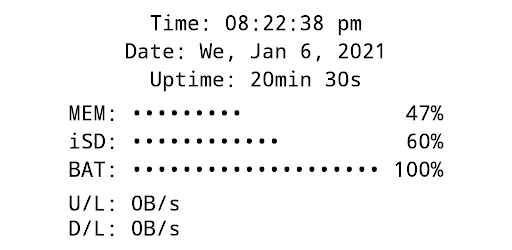
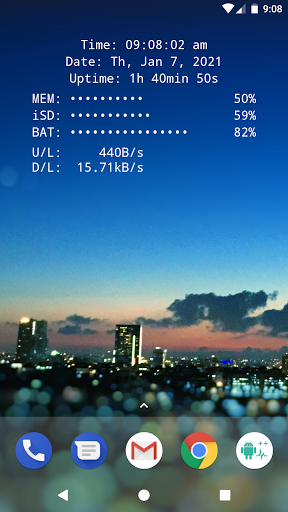
All essential info right on your home screen: Clock, Date, Uptime, RAM, Storage, Battery, Net Speed & Flashlight.
<u><b>Included Widgets:</b></u>
🕒 <b>Clock / Date / Uptime</b>
📈 <b>Memory (RAM) Usage</b> – monitor free & used RAM
💾 <b>Storage / SD-Card Usage</b> – available & used space
🔋 <b>Battery</b> – level + <b>NEW: 🌡️ temperature (°C / °F)</b>
🌐 <b>Net Speed</b> – current upload/download speed (<b>NEW:</b> switch Bytes/s ↔ Bits/s)
✨ <b>Multi Widget</b> – combine the above in one customizable widget
<u><b>Flashlight Widget:</b></u>
• Auto-off timer (2m, 5m, 10m, 30m, never)
• Choose from 4 …
Read the full description
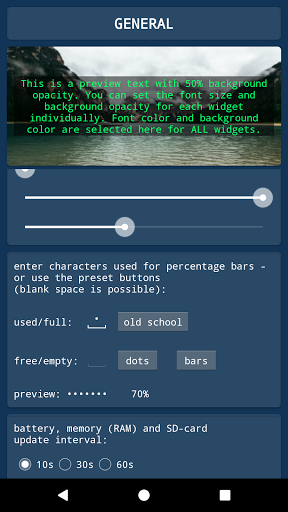
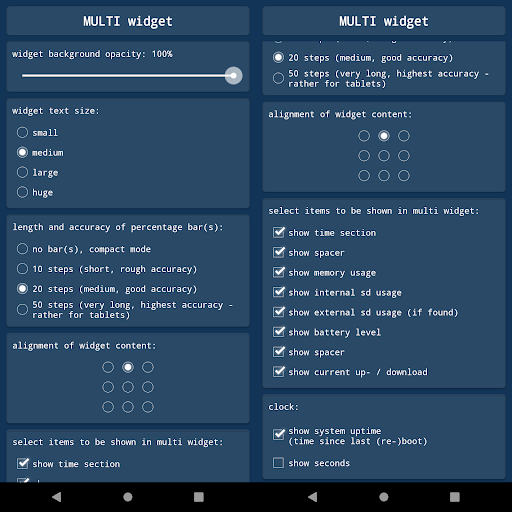
<b>System Widgets Collection – Monitor & Customize Your Phone</b> All essential info right on your home screen: Clock, Date, Uptime, RAM, Storage, Battery, Net Speed & Flashlight. <u><b>Included Widgets:</b></u> 🕒 <b>Clock / Date / Uptime</b> 📈 <b>Memory (RAM) Usage</b> – monitor free & used RAM 💾 <b>Storage / SD-Card Usage</b> – available & used space 🔋 <b>Battery</b> – level + <b>NEW: 🌡️ temperature (°C / °F)</b> 🌐 <b>Net Speed</b> – current upload/download speed (<b>NEW:</b> switch Bytes/s ↔ Bits/s) ✨ <b>Multi Widget</b> – combine the above in one customizable widget <u><b>Flashlight Widget:</b></u> • Auto-off timer (2m, 5m, 10m, 30m, never) • Choose from 4 flashlight icon sets <i>(Permission for camera & flashlight is required only to control the LED. The app cannot take pictures!)</i> <u><b>Global Settings:</b></u> 🎨 <b>Font Color</b> – free choice + <b>NEW: color picker with HEX input</b> 🖼️ <b>Background Color</b> – black or white ▓ <b>Custom Characters</b> – for percentage bar display <u><b>Widget Configuration Options:</b></u> • Background opacity • Font size • Percentage bar length & accuracy (or compact mode) • Alignment of widget content (precise screen positioning) <u><b>Tapping Actions:</b></u> Tap on most widgets to see more details via toast/notification. Example: Internal SD: 753.22MB / 7.89GB <u><b>How To (Setup & Troubleshooting):</b></u> 1. Open the app and adjust widget settings to your needs 2. Add the desired widgets to your home screen 👉 If widgets don’t load right after installation: restart your device or re-install the app. 👉 If widgets show "null" or don’t update: open the app once to initialize <b>and make sure the Keep-Alive Service is enabled in General Settings.</b> <u><b>Why Choose System Widgets?</b></u> ✔️ All-in-one collection (RAM, Storage, Battery, Clock, Network/Internet Speed, Flashlight) ✔️ Highly customizable (colors, opacity, font size, alignment) ✔️ Lightweight, fast & <b>no ads</b> 📲 <b>Get the System Widgets Collection now – make your Android home screen smarter and more useful!</b>
Installs since 27 Aug 2026 Measured
Exact Google Play install counts, collected daily
Ratings
304 ratings, 35 reviews
- 5 ★93%
- 4 ★2.7%
- 3 ★0.0%
- 2 ★1.3%
- 1 ★2.7%
Recent reviews
Latest public reviews from the store
- 8 May 2026
imo
- 22 Feb 2026
I'm In
- 20 Jan 2026
Excellent, understandable picture of what is going on in the phone.
- 17 Dec 2025
awesome! is there a way to add "free space" to the SD card widget? having the percentage is nice, but seeing "90 GB free" for example would be great!
What reviewers bring up
Topics mentioned in the latest 50 reviews, by how many reviews mention them
Liked in good reviews (42 reviews)
- widget 9
- battery 4
- ads 4
- percentage 3
- option 3
- space 3
- money 3
- wish 3
Raised in bad reviews (6 reviews)
No topic comes up twice.
Top chart positions
Latest Google Play chart ranks by country, last 10 days
Not in any tracked top chart in the last 10 days.
Android System Widgets + history
Release, install milestones, listing and store changes
- Moved from Tools to Productivity 26 Jun 2022
- Moved from Productivity to Tools 3 Sep 2020
- Reached 1,000+ installs 23 Sep 2018
- Reached 500+ installs 13 Sep 2018
- Reached 100+ installs 10 Sep 2018
- First released on the store 4 Sep 2018
Update frequency
How often Android System Widgets + ships a new version, month by month
1 updates in the last 12 months. About as often as similar apps, which shipped a median of 1 updates in the same year.
Recent versions
Current version 25.12.2
- Version 25.12.213 Dec 2025
Battery temperature has been added to the battery widget Net-speed widget can now be switched between Bytes/s and Bits/s Added a dialog for improved widget text-color selection (supports direct HEX input) Added support for Android 16 Added translations for more than 30 languages Added missing translation for Simplified Chinese
- Version 24.2.123 Feb 2024
- Version 2.2.012 Apr 2023
- Version 2.1.46 Jan 2022
Listing keywords
Words and phrases Android System Widgets + repeats most in its store listing
Top phrases: system widgets (4), home screen (3), ram storage (3), clock date uptime (2), opacity font size (2).
Highlighted words also appear in the title. Counts cover the title, short description and description.
Business model and tech
From the store listing, the SDKs in the app package and its declared permissions
- Business model
- Paid, $5.99
- Built with
- No cross-platform framework or game engine detected
- Ad networks (0)
- None detected
- Sensitive access
- Camera
0 ad, attribution and analytics SDKs detected. SDKs are read from the app package and permissions from the store listing, so code that loads later is not seen.
Technology
11 SDKs found in the app package
10 permissions
0 special access, 2 sensitive, 8 standard
- Take photos and videosSensitive
- Show notificationsPOST_NOTIFICATIONSSensitive
- Control the flashlightStandard
- Foreground service (special use)FOREGROUND_SERVICE_SPECIAL_USEStandard
- Keep the phone awakeStandard
- Run a foreground serviceFOREGROUND_SERVICEStandard
- Start when the phone turns onStandard
- Internal app permissionDYNAMIC_RECEIVER_NOT_EXPORTED_PERMISSIONStandard
- Set alarmSET_ALARMStandard
- Set an alarmStandard
Compliance
What the listing and the app package show
- Store status
- Live
- Upkeep
- Updated 9 Mar 2026
- Registered in
- Germany
- Privacy policy
- Linked on the listing
- Advertising
- No ads declared
- In-app purchases
- None declared
- Age rating
- Everyone
- Sensitive permissions
- 2 sensitive of 10
- Location access
- No
- Camera and microphone
- Camera
Apps like Android System Widgets +
Alarm Clock: Wake Up ChallengeHong Kong Lux Limo Service Limited64.6K installs★ 4.69
KeepdStayPrivate Ltd43.6K installs★ 3.67
Photos (for Nextcloud)nkming229.6K installs★ 3.82
Wifi Shortcuts+OpenGait.NET28.6K installs★ 3.83
Handwriting to Text ScannerAppzys - AI Apps, Scanner & OCR37.9K installs★ 4.33
Beams AnalysisEng.Alyteem104K installs★ 2.75
Presli – Attendance Managercouchbits GmbH88K installs★ 4.36
SyncGene Contact Calendar SyncCira Apps Limited144K installs★ 3.0
My Morning RoutineCovise67.3K installs★ 3.19
Android System Widgets +: questions and answers
How many downloads does Android System Widgets + have?
Android System Widgets + has 4,522 installs on Google Play, measured from the store's own count on 14 Nov 2026.
Who makes Android System Widgets +?
Android System Widgets + is published by Benjamin Laws, a developer based in DE.
When was Android System Widgets + last updated?
The latest version (25.12.2) was released on 9 Mar 2026.
Is Android System Widgets + free?
No. Android System Widgets + is a paid app priced at $5.99.
Is Android System Widgets + still available?
Yes. Android System Widgets + is live on Google Play as of 14 Nov 2026.
Track Android System Widgets + and its competitors
Watch any app for new versions, rating drops, chart moves and removals. Free plan, no card.