
おサイフケータイ アプリ
The Osaifu-Keitai app is an app that displays and introduces a list of Osaifu-Keitai compatible services. You can use other functions required to use Osaifu-Keitai.
- Installs
- 142M
- Measured
- Rating
- 2.46
- Ratings
- 30.4K
- 19 reviews
- Version
- Varies with device
- Updated 2 Sep 2026
- Released
- —
- Tracked since 12 May 2026
- Size
- —
Screenshots


About おサイフケータイ アプリ
The description on the store listing
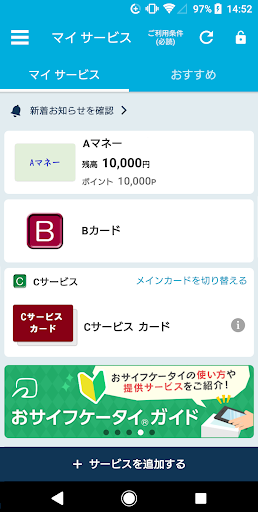
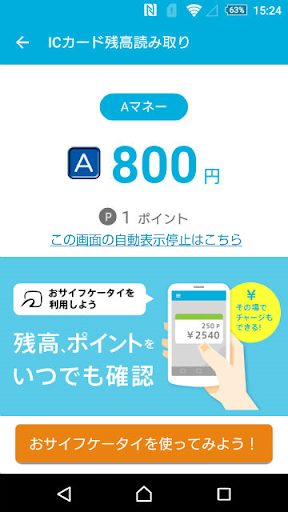
In addition to performing the initial setup required to start using Osaifu-Keitai, you can view a list of your current Osaifu-Keitai-compatible services, such as electronic money, transportation tickets, and membership cards. You can also receive notifications and receive special offers, and read your IC card balance.
This app is also required for using apps for iD and QUICPay (when setting up through apps like Google Wallet), the Mobile PASMO app, the Mobile Suica app, and apps that handle Mobile Suica, as well as the Mobile ICOCA app.
■Features
- My Services
- Displays a list of services you've installed or configured.
- Displays the balance of your current electronic money …
Read the full description
In addition to performing the initial setup required to start using Osaifu-Keitai, you can view a list of your current Osaifu-Keitai-compatible services, such as electronic money, transportation tickets, and membership cards. You can also receive notifications and receive special offers, and read your IC card balance. This app is also required for using apps for iD and QUICPay (when setting up through apps like Google Wallet), the Mobile PASMO app, the Mobile Suica app, and apps that handle Mobile Suica, as well as the Mobile ICOCA app. ■Features - My Services - Displays a list of services you've installed or configured. - Displays the balance of your current electronic money account. - Press and hold a displayed service to rearrange its display order. - Card Display - Tap "Check/Switch Primary Card" or ">" to view information about the card for the service you're using (including links to each service provider). - Switch your primary card. (iD, Mobile Suica, Mobile PASMO, Mobile ICOCA) - Deposit and receive cards for your current service when changing your phone model (Mobile PASMO, Mobile Suica, Mobile ICOCA) - Recommended - Select the service you want to use and view an overview of the required apps from Google Play and setup instructions. - Notifications - Display a list of notifications you've received. - Read your IC card balance - Read your IC card balance. - Frequently Asked Questions - Information on changing your phone model. - Lock settings - Display the smartphone settings screen for locking the Osaifu-Keitai function. - Display service introduction sites. - Display campaign sites. - Notifications when holding your phone over your mobile phone (※1). - Initial Settings - Update service display information - Support & Terms of Use - Memory Usage - About Osaifu-Keitai - Terms of Use - Version Information - Settings - Notification Settings - Disable Information Acquisition When Holding Your Phone Over Your Phone - Notification Settings When Holding Your Phone Over Your Phone - Google Account Switch Notification Settings - IC Card Scan Screen Restriction Settings - Log in with Google, Display Google Account While Logged In, Display Account Switch History , etc. ■ Usage Notes - This app can be used with Osaifu-Keitai-compatible smartphones. (■ Check Compatible Models) - This app uses communication. - We recommend updating to the latest app version when using this app. There may be limitations on available features and Osaifu-Keitai-compatible services. Please update to the latest app version and check before contacting us regarding the use of this app. - Osaifu-Keitai-compatible services, such as electronic money, are provided by each service provider. For details on setting up and using each service, please refer to the information provided by each service provider. - Compatible models for this app and each Osaifu-Keitai-compatible service differ. Please refer to the information provided by each service provider. - IC cards that support IC card balance scanning include Rakuten Edy, nanaco, WAON, and transportation IC cards. *Some cards are not compatible. If the card is difficult to read, try moving the IC card away from the reader and holding it up again. Try changing the orientation of the IC card, slightly shifting it, or increasing the distance between the IC card and your phone. It may not respond well on some devices. - "Sign in with Google" is required to use iD, QUICPay, Mobile PASMO, Mobile Suica, and apps that handle Mobile Suica. - Also, to receive your Mobile PASMO, Mobile Suica, or Mobile ICOCA after changing your phone, you'll need to "Sign in with Google" using the Google account you used to "Sign in with Google" (*) to this app when registering for the service you use. - In older versions of this app, "Sign in with Google" is on the "Account Linking" screen. - For information on checking the status of "Sign in with Google" on this app and how to use it, please refer to the FAQ. - For information on checking and restoring your Google account name (ID), email address, and password, and for instructions on two-factor authentication, please visit the Google website. https://support.google.com/accounts/troubleshooter/2402620?hl=ja&ref_topic=3382255 *For inquiries regarding the Osaifu-Keitai app, please contact [email protected]. This does not support inquiries regarding checking or restoring your Google Account ID, email address, or password, or regarding two-factor authentication. Please check the Google website above. - On some devices, changing the screen font size in the Android OS settings may prevent the app from launching. If this occurs, please update to the latest version (app update). - To use Osaifu-Keitai by holding it close to your device, you must turn on NFC. This is different from the "Reader/Writer, P2P" setting. *1 "Hold-up Notifications" is a feature that notifies you of changes in your balance and other information on the notification display of your phone when you hold your phone over an electronic money reader. (*2) Whether or not you receive a notification and the content of the notification may vary depending on the type of electronic money you use, the details of the transaction, how you hold your phone over your mobile phone, the state of your mobile phone, and other factors. Accuracy is not guaranteed, so please use this information for reference only. *2 If you want to stop "wave notifications," turn "wave notification settings" OFF in this app's settings. Also, if you want to receive notifications again after stopping them, turn it ON. On some models, when turning "wave notification settings" ON, you will need to exclude this app from battery optimization. To do this, go to your phone's Settings → Apps and notifications → Advanced settings → Special app access → Battery optimization, select "All apps" from the drop-down menu, and s
Installs, last 30 days Measured
Exact Google Play install counts, collected daily
Ratings
30,357 ratings, 19 reviews
- 5 ★23%
- 4 ★0.0%
- 3 ★7.7%
- 2 ★2.2%
- 1 ★67%
Recent reviews
Latest public reviews from the store
- 3 Apr 2026
good
- 19 Jan 2026
excellent
- 26 Aug 2025
ruhan
What reviewers bring up
Topics mentioned in the latest 17 reviews, by how many reviews mention them
Liked in good reviews (2 reviews)
No topic comes up twice.
Raised in bad reviews (14 reviews)
- pixel 4
- overseas 3
- google 3
- watch 3
- english 2
- brought 2
- won't 2
- able 2
Top chart positions
Latest Google Play chart ranks by country, last 10 days
Not in any tracked top chart in the last 10 days.
おサイフケータイ アプリ history
Release, install milestones, listing and store changes
- Reached 100,000,000+ installs 25 Dec 2024
- Reached 50,000,000+ installs 12 Dec 2021
- Reached 10,000,000+ installs 24 Jan 2019
- Reached 5,000,000+ installs 11 Aug 2016
Update frequency
How often おサイフケータイ アプリ ships a new version, month by month
2 updates in the last 12 months. Less often than most similar apps: they shipped a median of 3 updates in the same year.
Recent versions
Current version Varies with device
- Version 36.26.161 Feb 2026
- Version 36.26.1018 Jan 2026
- Version 35.25.2022 Jul 2025
- Version 35.25.1211 Feb 2025
Listing keywords
Words and phrases おサイフケータイ アプリ repeats most in its store listing
Top phrases: osaifu keitai (13), ic card (8), mobile suica (7), osaifu keitai compatible (6), keitai compatible (6).
Highlighted words also appear in the title. Counts cover the title, short description and description.
Business model and tech
From the store listing, the SDKs in the app package and its declared permissions
- Business model
- Free to download
- Built with
- No cross-platform framework or game engine detected
- Ad networks (0)
- None detected
- Analytics and crash reports
- Firebase
- Sensitive access
- Advertising ID
1 ad, attribution and analytics SDKs detected. SDKs are read from the app package and permissions from the store listing, so code that loads later is not seen.
Technology
29 SDKs found in the app package
19 permissions
0 special access, 1 sensitive, 18 standard
- Show notificationsPOST_NOTIFICATIONSSensitive
- Ad attribution (Privacy Sandbox)ACCESS_ADSERVICES_ATTRIBUTIONStandard
- Read how it was installed (install referrer)BIND_GET_INSTALL_REFERRER_SERVICEStandard
- Read the advertising IDAD_IDStandard
- Read the advertising ID (Privacy Sandbox)ACCESS_ADSERVICES_AD_IDStandard
- Foreground service (special use)FOREGROUND_SERVICE_SPECIAL_USEStandard
- Keep the phone awakeStandard
- Run a foreground serviceFOREGROUND_SERVICEStandard
- Start when the phone turns onStandard
- Use fingerprint or face unlockUSE_BIOMETRICStandard
- Use the fingerprint readerUSE_FINGERPRINTStandard
- Control NFCStandard
Compliance
What the listing and the app package show
- Store status
- Live
- Upkeep
- Updated 2 Sep 2026
- Registered in
- Japan
- Privacy policy
- Linked on the listing
- Advertising
- No ads declared
- In-app purchases
- None declared
- Age rating
- Everyone
- Sensitive permissions
- 1 sensitive of 19
- Location access
- No
- Camera and microphone
- Neither
Apps like おサイフケータイ アプリ
UltData: Photo & Data RecoveryTENORSHARE8.7M installs★ 3.48
Call Voice ChangerTechs Solution1.1M installs★ 4.16
Synology Secure SignInSynology Inc.1.1M installs★ 4.64
WiFi FTP ServerMedha Apps10.6M installs★ 4.27
Router ChefMohRaouf4.4M installs★ 3.83
MicroscopeCiberdroix Soft8.4M installs★ 4.06
Unfollowers & FollowersSave Share Unfollow1.3M installs★ 4.23
My SingtelSingtel Idea Factory Pte Ltd8.9M installs★ 2.7
GlassWire Data Usage MonitorDomotz Inc3.7M installs★ 4.13
おサイフケータイ アプリ: questions and answers
How many downloads does おサイフケータイ アプリ have?
おサイフケータイ アプリ has 141,999,689 installs on Google Play, measured from the store's own count on 20 Nov 2026.
Who makes おサイフケータイ アプリ?
おサイフケータイ アプリ is published by FeliCa Networks, Inc., a developer based in JP.
When was おサイフケータイ アプリ last updated?
The latest version (Varies with device) was released on 2 Sep 2026.
Is おサイフケータイ アプリ free?
Yes. おサイフケータイ アプリ is free to download.
Is おサイフケータイ アプリ still available?
Yes. おサイフケータイ アプリ is live on Google Play as of 20 Nov 2026.
Track おサイフケータイ アプリ and its competitors
Watch any app for new versions, rating drops, chart moves and removals. Free plan, no card.