
음력 기념일 입력기
This is the app that adds the Google Lunar Day Calendar.
- Installs
- 10.20K
- Measured
- Rating
- 4.2
- Ratings
- 52
- 4 reviews
- Version
- 1.2.21
- Updated 30 Apr 2026
- Released
- 16 Apr 2018
- Tracked since 13 May 2026
- Size
- 6 MB
- Needs 4.1
Screenshots
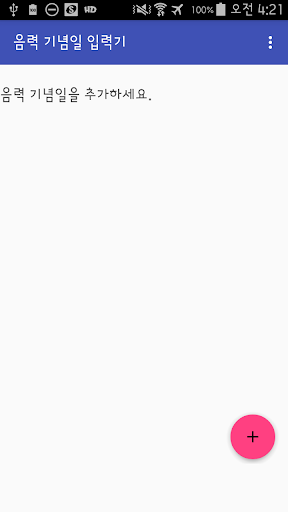

About 음력 기념일 입력기
The description on the store listing
The app individually added to Google Calendar, the lunar day.
Register your schedule each year.
[How to use]
1. Create a separate calendar (recommended)
1) Visit the Google Calendar on your PC.
2) to select a calendar, and the "My Calendars" Topics option on the left side, click "Create new calendar."
3) Create a new calendar.
4) Set a smartphone -> entry in the account and synchronize your Google account.
2. Register the lunar anniversary of the app
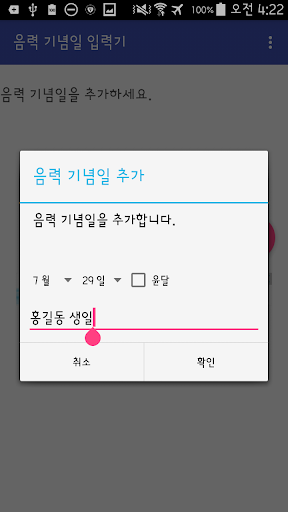
Add and confirm the lunar date, title, intercalation.
3. Confirm registration to the lunar calendar anniversary and Google Calendar
1) Select the lunar anniversary enrolled in two.
2) Select the range you want to …
Read the full description
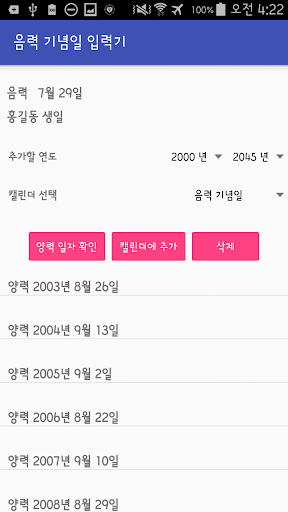
The app individually added to Google Calendar, the lunar day. Register your schedule each year. [How to use] 1. Create a separate calendar (recommended) 1) Visit the Google Calendar on your PC. 2) to select a calendar, and the "My Calendars" Topics option on the left side, click "Create new calendar." 3) Create a new calendar. 4) Set a smartphone -> entry in the account and synchronize your Google account. 2. Register the lunar anniversary of the app Add and confirm the lunar date, title, intercalation. 3. Confirm registration to the lunar calendar anniversary and Google Calendar 1) Select the lunar anniversary enrolled in two. 2) Select the range you want to add a calendar year. (Year 2000 - 2045 support) 3) Select a Google calendar to add the schedule. 4) Press the OK button to confirm the date of lifting the converted Gregorian date. 5) Press the Add button to add the selected calendar with Google calendar. [Precautions] Synchronize your Google account on the> Account items - 1. Set a smartphone if you add a certain invisible on other devices. 2. Delete button in the app to erase only the anniversary is registered. If you want to delete, add and delete schedules, please search by title in the Calendar app on the web and devices.
Installs since 29 Aug 2026 Measured
Exact Google Play install counts, collected daily
Ratings
52 ratings, 4 reviews
- 5 ★60%
- 4 ★20%
- 3 ★0.0%
- 2 ★20%
- 1 ★0.0%
Recent reviews
Latest public reviews from the store
- 7 Sep 2019
기존 구글 캘린더와 연동도 되고 기념일 입력도 되고 찾던기능이 다 들어있네요. 추천합니다.
- 25 Feb 2019
Excellent
Top chart positions
Latest Google Play chart ranks by country, last 10 days
Not in any tracked top chart in the last 10 days.
음력 기념일 입력기 history
Release, install milestones, listing and store changes
- Reached 10,000+ installs 30 Apr 2026
- Reached 5,000+ installs 9 May 2020
- Reached 1,000+ installs 16 Mar 2019
- Reached 500+ installs 8 Aug 2018
- First released on the store 16 Apr 2018
- Reached 100+ installs 14 Mar 2018
- Reached 50+ installs 11 Jan 2018
- Reached 10+ installs 2 Dec 2017
Update frequency
How often 음력 기념일 입력기 ships a new version, month by month
0 updates in the last 12 months. Less often than most similar apps: they shipped a median of 1 updates in the same year.
Recent versions
Current version 1.2.21
- Version 1.2.2022 Jul 2024
타이틀 복구
- Version 1.2.1820 Sep 2023
- Version 1.2.1523 Aug 2023
- Version 1.2.133 Feb 2021
Listing keywords
Words and phrases 음력 기념일 입력기 repeats most in its store listing
Top phrases: google calendar (5), create new calendar (2), synchronize your google (2), google account (2), lunar anniversary (2).
Highlighted words also appear in the title. Counts cover the title, short description and description.
Business model and tech
From the store listing, the SDKs in the app package and its declared permissions
- Business model
- Free to downloadShows ads
- Built with
- No cross-platform framework or game engine detected
- Ad networks (1)
- AdMob
- Analytics and crash reports
- Firebase
- Sensitive access
- CalendarAdvertising ID
2 ad, attribution and analytics SDKs detected. SDKs are read from the app package and permissions from the store listing, so code that loads later is not seen.
Technology
32 SDKs found in the app package
Ad networks
Advertising and install-attribution SDKs found in the app package
- AdMob
13 permissions
0 special access, 1 sensitive, 12 standard
- Read calendar eventsSensitive
- Ad attribution (Privacy Sandbox)ACCESS_ADSERVICES_ATTRIBUTIONStandard
- Ad topics (Privacy Sandbox)ACCESS_ADSERVICES_TOPICSStandard
- Read how it was installed (install referrer)BIND_GET_INSTALL_REFERRER_SERVICEStandard
- Read the advertising IDAD_IDStandard
- Read the advertising ID (Privacy Sandbox)ACCESS_ADSERVICES_AD_IDStandard
- Control vibrationStandard
- Keep the phone awakeStandard
- Run a foreground serviceFOREGROUND_SERVICEStandard
- Full internet accessStandard
- See network connectionsStandard
- Internal app permissionDYNAMIC_RECEIVER_NOT_EXPORTED_PERMISSIONStandard
Compliance
What the listing and the app package show
- Store status
- Live
- Upkeep
- Updated 30 Apr 2026
- Registered in
- South Korea
- Privacy policy
- Linked on the listing
- Advertising
- Shows ads
- In-app purchases
- None declared
- Age rating
- Everyone
- Sensitive permissions
- 1 sensitive of 13
- Location access
- No
- Camera and microphone
- Neither
Apps like 음력 기념일 입력기
Solidifi Notary NetworkSolidifi U.S. Inc.6.6K installs★ 4.1
FaB CounterStefanKarlsson10.7K installs★ 4.67
My Christmas BuddyMyBuzz Technologies Ltd13.5K installs★ 3.92
Control Dash: Watch faceamoledwatchfaces™5.5K installs★ 5.0
Aria AI – Private Offline AIAlphaY15.6K installs★ 2.29
عميل خط الناقلsaad.dawood9012.8K installs★ 3.75
AES Encryption (256-Bit)Coding Fries8.3K installs★ 3.33
TypeDroid Pro with KeyboardShantanu Deshmukh2.4K installs★ 4.5
CargaYaEquipo Cargaya21.9K installs★ 4.1
음력 기념일 입력기: questions and answers
How many downloads does 음력 기념일 입력기 have?
음력 기념일 입력기 has 10,200 installs on Google Play, measured from the store's own count on 21 Nov 2026.
Who makes 음력 기념일 입력기?
음력 기념일 입력기 is published by yypbd.dev, a developer based in KR.
When was 음력 기념일 입력기 last updated?
The latest version (1.2.21) was released on 30 Apr 2026.
Is 음력 기념일 입력기 free?
Yes. 음력 기념일 입력기 is free to download, and it shows ads.
Is 음력 기념일 입력기 still available?
Yes. 음력 기념일 입력기 is live on Google Play as of 21 Nov 2026.
Track 음력 기념일 입력기 and its competitors
Watch any app for new versions, rating drops, chart moves and removals. Free plan, no card.