
AutoApp For Pebble
Totally and dynamically control Tasker from your Pebble.
- Installs
- 32.53K
- Measured
- Rating
- 3.93
- Ratings
- 316
- 30 reviews
- Version
- 1.0.31
- Updated 16 Aug 2016
- Released
- 30 Jan 2014
- Tracked since 13 May 2026
- Size
- 3 MB
- Needs 4.0
Screenshots

About AutoApp For Pebble
The description on the store listing
Automate your Life from your wrist!
AutoApp For Pebble is a Tasker plugin that allows you to completely customize your watch!
It is to the Pebble what Tasker is to your Android device. With all its versatility it allows anyone to build mini-apps on their Pebble that can replace many other apps. It's just like bringing Tasker into your Pebble.
As featured on Android Police (http://goo.gl/UbFgS9), Android Authority (http://goo.gl/HzNFeO) and Android Headlnes (http://goo.gl/3fAA4L)!
Watch this video to see what AutoApp For Pebble can do: http://goo.gl/6HCPxB
Please take a look at the FAQ to see if any of your questions are already answered: http://goo.gl/uOMlJO
Get the unlocker …
Read the full description
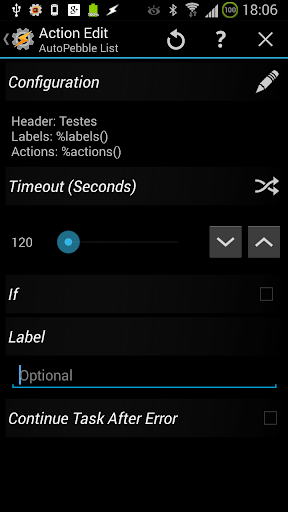
Automate your Life from your wrist! AutoApp For Pebble is a Tasker plugin that allows you to completely customize your watch! It is to the Pebble what Tasker is to your Android device. With all its versatility it allows anyone to build mini-apps on their Pebble that can replace many other apps. It's just like bringing Tasker into your Pebble. As featured on Android Police (http://goo.gl/UbFgS9), Android Authority (http://goo.gl/HzNFeO) and Android Headlnes (http://goo.gl/3fAA4L)! Watch this video to see what AutoApp For Pebble can do: http://goo.gl/6HCPxB Please take a look at the FAQ to see if any of your questions are already answered: http://goo.gl/uOMlJO Get the unlocker here: http://goo.gl/DU0BJA . Free version is limited to 5 char commands. Get the watch app from the Pebble Appstore by searching for AutoApp For Pebble. Learn how to get started with AutoApp For Pebble here: http://goo.gl/w9FXil Learn about the command system used in AutoApp For Pebble here: http://goo.gl/3FVCyQ DYNAMIC HOME SCREENS: When you open the app on your Pebble, the screen that shows up can depend on the situation you're in. For example, you can have a different home screen for when you're at home, when you're at work or you can even have a Late Night home screen. LISTS With list screens you can create customized lists, where you set the header and lines. Each line can have a different Label and Action, so you can for example list your favourite music apps when you insert your headphones or connect to the bluetooth radio in your car, or list your favourite TV shows and play them on your TV. NOTIFICATIONS You can redirect your notifications to your Pebble with the help of AutoNotification, or create your own notifications, where each button can do a different action. QUICK SCREENS You can also set quick static screens. This type of screen always shows a Title and 3 options and you can set different actions for each button. With this you can easily use your pebble as a remote control. TEXT SCREENS You can set a screen with a title and a very long text, so that you can for example read a news article on your Pebble or have some notes show up on it when you need them. TWIST/SHAKE/TAP ACTION you can do any action with a twist of your wrist. This lets you dismiss a notification without ever having to touch your Pebble! Or you can switch between commands and channel list mode on a remote control. SHORT/LONG/DOUBLE CLICK Every button on your Pebble can have different modes. For example, you can make it so that a long click on a notification will show its full text. Or you can make a short click toggle a light, but a long click check the light status. Or you can make a double click on a button restart the show you're watching instead of its normal function. VIBRATION You can set custom vibration patterns for when a screen shows up or when ever you please as long as the AutoApp For Pebble app is open on your watch. Generate the vibration pattern on your PC and it will be reproduced faithfully on your Pebble. PEBBLE LIGHT You can turn on and off your pebble light whenever you please. You could make it always be on at night, and always be off during the day for example. WINDOW MANAGEMENT You can control window creation and dismissal on your Pebble. For example, by using window IDs I can make my Remote Control and Channel screens always overlap eachother, and when I press back I go directly to my Home screen instead of just going back to the previous screen. DO NOT DISTURB You can make it so that a screen is never dismissed. This lets you have some notes for your class on your pebble for example, and be sure that you won't receive notifications as long as that screen is up. MUSIC APP INTEGRATION You can make the built-in Pebble Music app control AutoApp For Pebble as well. For example, you can launch the AutoApp For Pebble watch app with the Play button.
Installs since 29 Aug 2026 Measured
Exact Google Play install counts, collected daily
Ratings
316 ratings, 30 reviews
- 5 ★53%
- 4 ★0.0%
- 3 ★12%
- 2 ★5.4%
- 1 ★29%
Recent reviews
Latest public reviews from the store
- 1 Nov 2015
Great work
- 7 Feb 2014
I bought the key minutes after getting the trial app. Great work again joaomgcd!
What reviewers bring up
Topics mentioned in the latest 5 reviews, by how many reviews mention them
Liked in good reviews (2 reviews)
No topic comes up twice.
Raised in bad reviews (3 reviews)
- pebble 2
- round 2
Top chart positions
Latest Google Play chart ranks by country, last 10 days
Not in any tracked top chart in the last 10 days.
AutoApp For Pebble history
Release, install milestones, listing and store changes
- Reached 10,000+ installs 19 Jan 2015
- Reached 5,000+ installs 27 Jun 2014
- Reached 1,000+ installs 11 Feb 2014
- Reached 500+ installs 3 Feb 2014
- First released on the store 30 Jan 2014
Update frequency
How often AutoApp For Pebble ships a new version, month by month
0 updates in the last 12 months. Less often than most similar apps: they shipped a median of 3 updates in the same year.
Recent versions
Current version 1.0.31
- Version 1.0.3110 Nov 2015
- compatibility fixes related to pebble time https://play.google.com/store/apps/details?id=com.joaomgcd.autoappshub - AutoApps compatibility.AutoApps is a new app where you can manage all the joaomgcd Tasker plugins and also get access to pre-made Tasker projects and Alpha AutoApps. Get it in the link above. -Added achievements: play as you learn to use the app! Try to get them all and check the leaderboards to compare your score with your friends! http://joaoapps.com/
- Version 1.0.3027 Sep 2014
- Version 1.0.203 Mar 2014
- Version 1.0.1819 Feb 2014
Listing keywords
Words and phrases AutoApp For Pebble repeats most in its store listing
Top phrases: autoapp for pebble (9), home screen (3), remote control (3), list your favourite (2), pebble for example (2).
Highlighted words also appear in the title. Counts cover the title, short description and description.
Business model and tech
From the store listing, the SDKs in the app package and its declared permissions
- Business model
- Free to downloadIn-app purchasesShows ads
- Built with
- No cross-platform framework or game engine detected
- Ad networks (1)
- AdMob
- Subscriptions and payments
- Google Play billing
- Analytics and crash reports
- Google Analytics
- Sign-in and social
- Google Play Games Services
- Sensitive access
- Photos, videos and files
2 ad, attribution and analytics SDKs detected. SDKs are read from the app package and permissions from the store listing, so code that loads later is not seen.
Technology
9 SDKs found in the app package
Ad network libraries
Development tools
Social libraries
Ad networks
Advertising and install-attribution SDKs found in the app package
- AdMob
7 permissions
0 special access, 2 sensitive, 5 standard
- Change or delete shared storageSensitive
- Read shared storageSensitive
- Full internet accessStandard
- See network connectionsStandard
- See Wi-Fi connectionsStandard
- Check joaomgcd licenseCHECK_JOAOMGCD_LICENSEStandard
- In-app purchases with Google PlayStandard
Compliance
What the listing and the app package show
- Store status
- Live
- Upkeep
- No update since 16 Aug 2016
- Registered in
- Portugal
- Privacy policy
- Linked on the listing
- Advertising
- Shows ads
- In-app purchases
- Offered
- Age rating
- Everyone
- Sensitive permissions
- 2 sensitive of 7
- Location access
- No
- Camera and microphone
- Neither
Apps like AutoApp For Pebble
TimestripeTimestripe51.3K installs★ 3.44
AI Translator: Camera & VoiceIsaaclight AI88.5K installs★ 4.5
comlogMike Beyer11.8K installs★ 4.94
GESC StudentGESC74.3K installs★ 4.0
PanoptoPanopto242K installs★ 2.02
Linas MatkasseCheffelo75.1K installs★ 1.7
Simple Progress TrackerQookie Games44.8K installs★ 3.68
VIP NotesOgroman3K installs★ 4.43
DevDuo IDE: AI Code EditorDevDuo Apps11K installs★ 4.21
AutoApp For Pebble: questions and answers
How many downloads does AutoApp For Pebble have?
AutoApp For Pebble has 32,530 installs on Google Play, measured from the store's own count on 14 Nov 2026.
Who makes AutoApp For Pebble?
AutoApp For Pebble is published by joaomgcd, a developer based in PT.
When was AutoApp For Pebble last updated?
The latest version (1.0.31) was released on 16 Aug 2016.
Is AutoApp For Pebble free?
Yes. AutoApp For Pebble is free to download and offers in-app purchases, and it shows ads.
Is AutoApp For Pebble still available?
Yes. AutoApp For Pebble is live on Google Play as of 14 Nov 2026.
Track AutoApp For Pebble and its competitors
Watch any app for new versions, rating drops, chart moves and removals. Free plan, no card.