
Autosync - File Sync & Backup
Universal file sync and backup tool for cloud storages and NAS devices
- Installs
- 409K
- Measured
- Rating
- 4.63
- Ratings
- 7.3K
- 337 reviews
- Version
- 7.8.4
- Updated 9 Nov 2026
- Released
- 1 Apr 2021
- Tracked since 13 May 2026
- Size
- 17 MB
- Needs 5.0
Screenshots

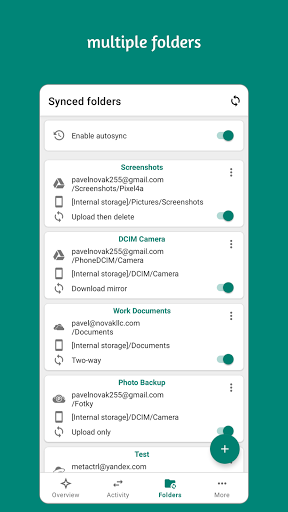

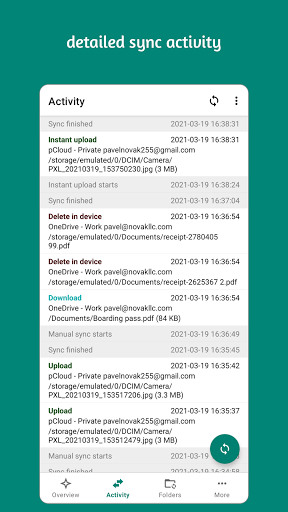
About Autosync - File Sync & Backup
The description on the store listing
<b>Please note: This is a trial version. When the trial period expires, you will be requested to purchase to continue using the app.</b>
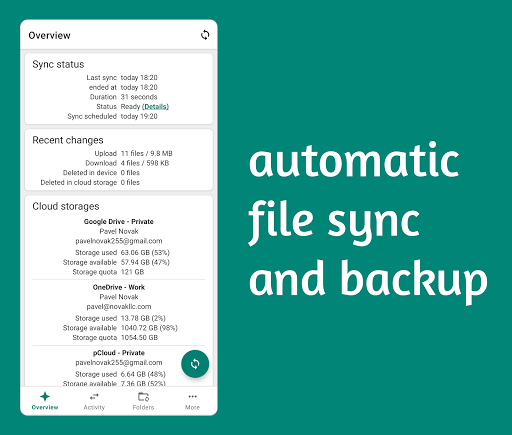
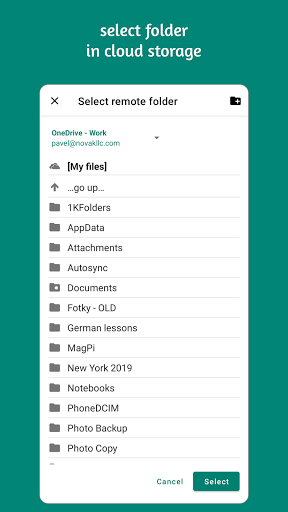
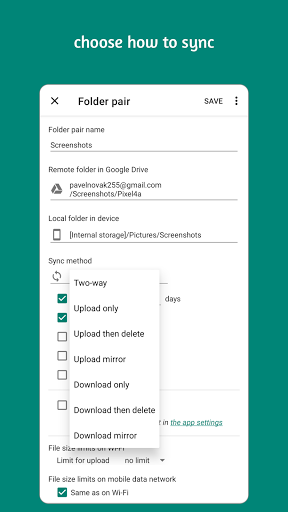
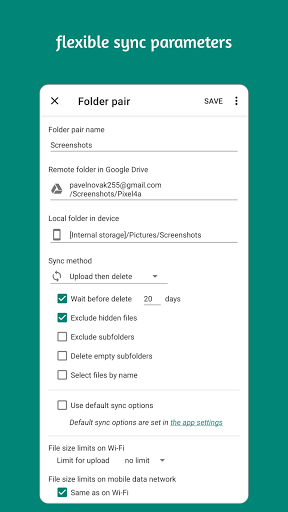
<b>Autosync</b> is an automatic file sync and backup tool. You choose which folder in your device should be synced with which folder in your cloud storage account, and how. <b>Autosync</b> will then keep files in these two folders in sync with each other, automatically and without any additional efforts from the user.
The official cloud storage apps don't have automatic sync capabilities, or only to a very limited extent. The commonly offered automatic photo upload might suffice for simple photo backup but not for keeping photos on multiple devices …
Read the full description
<b>Please note: This is a trial version. When the trial period expires, you will be requested to purchase to continue using the app.</b> <b>Autosync</b> is an automatic file sync and backup tool. You choose which folder in your device should be synced with which folder in your cloud storage account, and how. <b>Autosync</b> will then keep files in these two folders in sync with each other, automatically and without any additional efforts from the user. The official cloud storage apps don't have automatic sync capabilities, or only to a very limited extent. The commonly offered automatic photo upload might suffice for simple photo backup but not for keeping photos on multiple devices synchronized. <b>If you want automatic file sync between your device and your cloud storage, you need this app.</b> <b>Autosync</b> can be configured to do automatic file sharing between your devices, to back up selected folders in your phone to your cloud storage, or to make backup copies of important document folders in your cloud storage and save them in your device for offline use. These are a few examples of what you can accomplish with automatic file sync. All file transfers and communication between user devices and cloud storage servers are securely encrypted and do not go through our servers. Outsiders, including us, will not be able to decrypt and hence see or modify any file contents. <b>Supported storage services and protocols:</b> • Google Drive • OneDrive • SharePoint Online • Dropbox • Box • MEGA • Nextcloud • ownCloud • pCloud • Yandex Disk • WebDAV • FTP • SFTP (ssh/scp) • LAN/SMB network drives If your cloud storage is not on the list, please check if it supports WebDAV protocol. WebDAV is widely supported by many storage service vendors. LAN/SMB network drives are supported by Windows/Mac/Linux computers and NAS devices. This app can sync with them via local network. <b>Support</b> • Website: https://metactrl.com/autosync/ • Email: [email protected] (please use English) ----- <i>This "Autosync Universal" app supports multiple cloud storage services in a single app. Users who use only one cloud storage may prefer one of our single-cloud "Autosync for ..." apps. They are smaller, have fewer features but are simpler and easier to use than this all-in-one app.</i>
Installs, last 30 days Measured
Exact Google Play install counts, collected daily
Ratings
7,275 ratings, 337 reviews
- 5 ★82%
- 4 ★6.9%
- 3 ★1.7%
- 2 ★1.7%
- 1 ★7.7%
Recent reviews
Latest public reviews from the store
- 18 May 2026
I saw reviews saying it syncs folders to network, not that this is only in the paid version. Please make things clear from the start
- 13 May 2026
The best Sync app, easy to use, and reliable works well with Synology storage device
- 12 May 2026
I'm using smb sync, I've granted all permissions, but as soon the app hours in background , i cancel the sync saying network error... i am afraid if same happen in paid version...
- 10 May 2026
good
What reviewers bring up
Topics mentioned in the latest 50 reviews, by how many reviews mention them
Liked in good reviews (34 reviews)
- sync 10
- storage 5
- nas 5
- highly 4
- drive 4
- files 4
- recommended 3
- backup 3
Raised in bad reviews (10 reviews)
- paid 3
- data 3
- recently 2
- download 2
- folders 2
- there's 2
- upload 2
- delete 2
Top chart positions
Latest Google Play chart ranks by country, last 10 days
Not in any tracked top chart in the last 10 days.
Autosync - File Sync & Backup history
Release, install milestones, listing and store changes
- First released on the store 1 Apr 2021
Update frequency
How often Autosync - File Sync & Backup ships a new version, month by month
14 updates in the last 12 months. More often than most similar apps: they shipped a median of 2 updates in the same year.
Recent versions
Current version 7.8.4
- Version 7.8.39 Nov 2026
In this update we fixed a few bugs and made some performance improvements. If you like our app, please give it a nice 5-star rating. If you run into issues or have questions, don't hesitate to email us at [email protected]. We'll follow up.
- Version 7.8.214 Oct 2026
In this update we fixed a few bugs and made some performance improvements. If you like our app, please give it a nice 5-star rating. If you run into issues or have questions, don't hesitate to email us at [email protected]. We'll follow up.
- Version 7.7.726 Aug 2026
In this update we fixed a few bugs and made some performance improvements. If you like our app, please give it a nice 5-star rating. If you run into issues or have questions, don't hesitate to email us at [email protected]. We'll follow up.
- Version 7.7.425 Jul 2026
In this update we fixed a few bugs and made some performance improvements. If you like our app, please give it a nice 5-star rating. If you run into issues or have questions, don't hesitate to email us at [email protected]. We'll follow up.
Listing keywords
Words and phrases Autosync - File Sync & Backup repeats most in its store listing
Top phrases: cloud storage (9), file sync (5), automatic file (4), automatic file sync (3), lan smb network (2).
Highlighted words also appear in the title. Counts cover the title, short description and description.
Business model and tech
From the store listing, the SDKs in the app package and its declared permissions
- Business model
- Free to downloadIn-app purchases
- Built with
- No cross-platform framework or game engine detected
- Ad networks (0)
- None detected
- Subscriptions and payments
- Google Play billing
- Analytics and crash reports
- Firebase
- Sensitive access
- LocationPhotos, videos and filesAdvertising ID
1 ad, attribution and analytics SDKs detected. SDKs are read from the app package and permissions from the store listing, so code that loads later is not seen.
Technology
31 SDKs found in the app package
27 permissions
1 special access, 6 sensitive, 20 standard
- Manage all filesMANAGE_EXTERNAL_STORAGESpecial access
- Change or delete shared storageSensitive
- Read shared storageSensitive
- Approximate locationSensitive
- Location in the backgroundACCESS_BACKGROUND_LOCATIONSensitive
- Precise locationSensitive
- Show notificationsPOST_NOTIFICATIONSSensitive
- Ad attribution (Privacy Sandbox)ACCESS_ADSERVICES_ATTRIBUTIONStandard
- Read how it was installed (install referrer)BIND_GET_INSTALL_REFERRER_SERVICEStandard
- Read the advertising IDAD_IDStandard
- Read the advertising ID (Privacy Sandbox)ACCESS_ADSERVICES_AD_IDStandard
- Ask to skip battery optimisationREQUEST_IGNORE_BATTERY_OPTIMIZATIONSStandard
Compliance
What the listing and the app package show
- Store status
- Live
- Upkeep
- Updated 9 Nov 2026
- Registered in
- Czechia
- Privacy policy
- Linked on the listing
- Advertising
- No ads declared
- In-app purchases
- Offered
- Age rating
- Everyone
- Sensitive permissions
- 6 sensitive, 1 special access of 27
- Location access
- Yes, also in the background
- Camera and microphone
- Neither
Apps like Autosync - File Sync & Backup
Smart TranslatorSMARTWHO1.4M installs★ 4.51
AI Notes & Transcribe MemoNewway Apps1.2M installs★ 4.17
ScanAll - QR code & BarcodesGlilab524K installs★ 5.0
Sleep Time - Alarm CalculatorOleg Filimonov1.5M installs★ 4.6
RICOH Smart Device ConnectorRicoh Co., Ltd.3.3M installs★ 3.16
AdsCoin - Easy Mobile EarningsCDM Apps263K installs★ 3.37
TIM Segurança DigitalFS SECURITY SERVIÇOS DE TECNOLOGIA S A328K installs★ 4.69
All Document Reader - ViewerDragster Production2.1M installs★ 3.37
Habit Tracker - Habit RadarGoal Tracker203K installs★ 4.48
Autosync - File Sync & Backup: questions and answers
How many downloads does Autosync - File Sync & Backup have?
Autosync - File Sync & Backup has 409,100 installs on Google Play, measured from the store's own count on 19 Nov 2026.
Who makes Autosync - File Sync & Backup?
Autosync - File Sync & Backup is published by MetaCtrl, a developer based in CZ.
When was Autosync - File Sync & Backup last updated?
The latest version (7.8.4) was released on 9 Nov 2026.
Is Autosync - File Sync & Backup free?
Yes. Autosync - File Sync & Backup is free to download and offers in-app purchases.
Is Autosync - File Sync & Backup still available?
Yes. Autosync - File Sync & Backup is live on Google Play as of 19 Nov 2026.
Track Autosync - File Sync & Backup and its competitors
Watch any app for new versions, rating drops, chart moves and removals. Free plan, no card.