OneSync: Autosync for OneDrive
File sync and backup for Android and OneDrive
- Installs
- 1.33M
- Measured
- Rating
- 4.69
- Ratings
- 19.9K
- 964 reviews
- Version
- 7.8.4
- Updated 9 Nov 2026
- Released
- 23 Jul 2015
- Tracked since 13 May 2026
- Size
- —
Screenshots


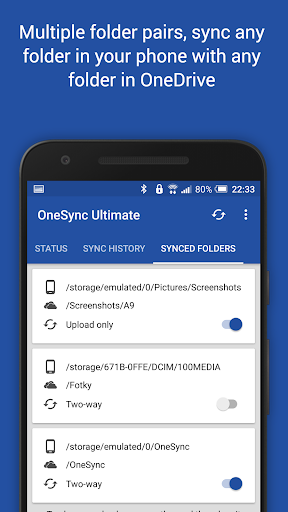


About OneSync: Autosync for OneDrive
The description on the store listing
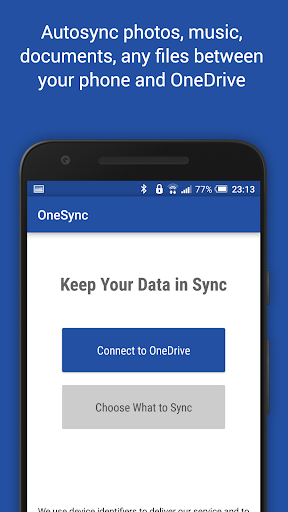
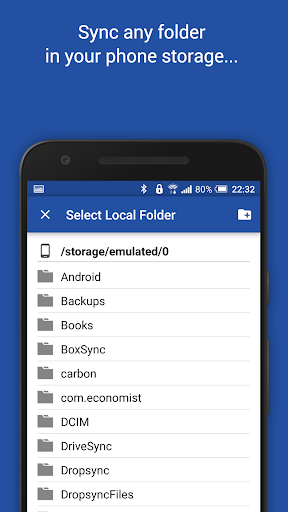
This app is an automatic file sync and backup tool. It lets you automatically synchronize files and folders with Microsoft OneDrive cloud storage and with your other devices. It is an ideal tool for photo sync, document and file backup, automatic file transfer, automatic file sharing between devices,...
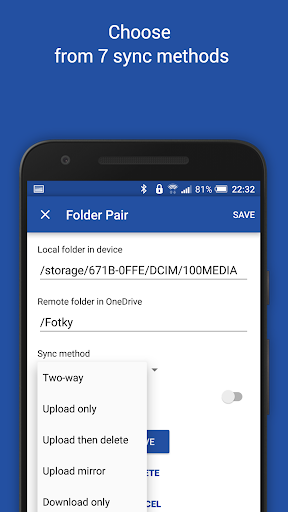
New files in your cloud account are automatically downloaded onto your device. New files in your device are uploaded. If you delete a file on one side, it will be deleted on the other side. It works across multiple devices (your phone and your tablet). If their folders are synced with the same cloud account, they will be kept in sync with each other.
This is how OneDrive works on …
Read the full description
This app is an automatic file sync and backup tool. It lets you automatically synchronize files and folders with Microsoft OneDrive cloud storage and with your other devices. It is an ideal tool for photo sync, document and file backup, automatic file transfer, automatic file sharing between devices,... New files in your cloud account are automatically downloaded onto your device. New files in your device are uploaded. If you delete a file on one side, it will be deleted on the other side. It works across multiple devices (your phone and your tablet). If their folders are synced with the same cloud account, they will be kept in sync with each other. This is how OneDrive works on computers but not on Android. Two-way automatic synchronization should be an essential function of the official app. For whatever reason, it is not the case. OneSync is here to fill the gap. All file transfers and communications between user devices and cloud storage servers are securely encrypted and do not go through our servers. No outsiders will be able to decrypt, see or modify any file contents. <b>MAIN FEATURES</b> • Full two-way automatic synchronization of files and folders • Many sync modes. Not only two-way, you can also choose Upload only, Upload then delete, Download only, Download mirror,... • Very efficient, consumes almost no battery • Easy to set up. Once set up files will be kept in sync without any effort from users • Works reliably under ever changing network conditions on your phone • Monitors battery level, WiFi/3G/4G/LTE connectivity and adapts its behavior according to user preferences • Configurable autosync interval: 15 minutes, 30 minutes, every hour,... If you like this app, please consider upgrading to premium version. By doing so you support the development efforts and get access to premium features. You can upgrade via in-app purchase. <b>PREMIUM FEATURES</b> • Sync multiple pairs of folders • Upload files larger than 10 MB • Sync your entire cloud account with a folder in your device • Sync with multiple accounts • Sync with SharePoint sites • Protect app settings with passcode • No ads displayed in the app • Email support by developer <b>SUPPORT</b> Please check out our website (http://metactrl.com/) for more information about the app, including User's Guide (http://metactrl.com/userguide/) and FAQ (http://metactrl.com/faq/). If you run into any issues or have suggestions for improvements, don't hesitate to email us at [email protected]. We will do our best to assist you.
Installs, last 30 days Measured
Exact Google Play install counts, collected daily
Ratings
19,855 ratings, 964 reviews
- 5 ★84%
- 4 ★8.0%
- 3 ★2.3%
- 2 ★1.0%
- 1 ★4.3%
Recent reviews
Latest public reviews from the store
No reviews in our sample for this app yet.
Top chart positions
Latest Google Play chart ranks by country, last 10 days
Not in any tracked top chart in the last 10 days.
OneSync: Autosync for OneDrive history
Release, install milestones, listing and store changes
- First released on the store 23 Jul 2015
Update frequency
How often OneSync: Autosync for OneDrive ships a new version, month by month
15 updates in the last 12 months. More often than most similar apps: they shipped a median of 4 updates in the same year.
Recent versions
Current version 7.8.4
- Version 7.8.39 Nov 2026
In this update we fixed a few bugs and made some performance improvements. If you like our app, please give it a nice 5-star rating. If you run into issues or have questions, don't hesitate to email us at [email protected]. We'll follow up.
- Version 7.8.214 Oct 2026
In this update we fixed a few bugs and made some performance improvements. If you like our app, please give it a nice 5-star rating. If you run into issues or have questions, don't hesitate to email us at [email protected]. We'll follow up.
- Version 7.7.726 Aug 2026
In this update we fixed a few bugs and made some performance improvements. If you like our app, please give it a nice 5-star rating. If you run into issues or have questions, don't hesitate to email us at [email protected]. We'll follow up.
- Version 7.7.425 Jul 2026
In this update we fixed a few bugs and made some performance improvements. If you like our app, please give it a nice 5-star rating. If you run into issues or have questions, don't hesitate to email us at [email protected]. We'll follow up.
Listing keywords
Words and phrases OneSync: Autosync for OneDrive repeats most in its store listing
Top phrases: automatic file (3), cloud account (3), files and folders (2), kept in sync (2), sync and backup (2).
Highlighted words also appear in the title. Counts cover the title, short description and description.
Business model and tech
From the store listing, the SDKs in the app package and its declared permissions
- Business model
- Free to downloadIn-app purchasesShows ads
- Built with
- No cross-platform framework or game engine detected
- Ad networks (1)
- AdMob
- Subscriptions and payments
- Google Play billing
- Analytics and crash reports
- Firebase
- Sensitive access
- LocationPhotos, videos and filesAdvertising ID
2 ad, attribution and analytics SDKs detected. SDKs are read from the app package and permissions from the store listing, so code that loads later is not seen.
Technology
25 SDKs found in the app package
Ad networks
Advertising and install-attribution SDKs found in the app package
- AdMob
28 permissions
1 special access, 6 sensitive, 21 standard
- Manage all filesMANAGE_EXTERNAL_STORAGESpecial access
- Change or delete shared storageSensitive
- Read shared storageSensitive
- Approximate locationSensitive
- Location in the backgroundACCESS_BACKGROUND_LOCATIONSensitive
- Precise locationSensitive
- Show notificationsPOST_NOTIFICATIONSSensitive
- Ad attribution (Privacy Sandbox)ACCESS_ADSERVICES_ATTRIBUTIONStandard
- Ad topics (Privacy Sandbox)ACCESS_ADSERVICES_TOPICSStandard
- Read how it was installed (install referrer)BIND_GET_INSTALL_REFERRER_SERVICEStandard
- Read the advertising IDAD_IDStandard
- Read the advertising ID (Privacy Sandbox)ACCESS_ADSERVICES_AD_IDStandard
Compliance
What the listing and the app package show
- Store status
- Live
- Upkeep
- Updated 9 Nov 2026
- Registered in
- Czechia
- Privacy policy
- Linked on the listing
- Advertising
- Shows ads
- In-app purchases
- Offered
- Age rating
- Everyone
- Sensitive permissions
- 6 sensitive, 1 special access of 28
- Location access
- Yes, also in the background
- Camera and microphone
- Neither
Apps like OneSync: Autosync for OneDrive
SimplenoteAutomattic, Inc1.9M installs★ 3.64
Thakur Prasad Calendar 2026Inditech bird2.1M installs★ 4.43
SGWorkPassMinistry of Manpower3.7M installs★ 3.93
BlockerHero - Porn BlockerTechsolvex1.6M installs★ 3.67
instdownfawazapp4.1M installs★ 4.3
NW PublisherNew World Publisher2.1M installs★ 4.74
CV & Resume CreatorDesygner Pty Ltd1.7M installs★ 4.65
identity onlineIDnow GmbH (iTM)1.4M installs★ 3.89
Collabora OfficeCollabora Productivity Limited1.6M installs★ 3.62
OneSync: Autosync for OneDrive: questions and answers
How many downloads does OneSync: Autosync for OneDrive have?
OneSync: Autosync for OneDrive has 1,329,671 installs on Google Play, measured from the store's own count on 19 Nov 2026.
Who makes OneSync: Autosync for OneDrive?
OneSync: Autosync for OneDrive is published by MetaCtrl, a developer based in CZ.
When was OneSync: Autosync for OneDrive last updated?
The latest version (7.8.4) was released on 9 Nov 2026.
Is OneSync: Autosync for OneDrive free?
Yes. OneSync: Autosync for OneDrive is free to download and offers in-app purchases, and it shows ads.
Is OneSync: Autosync for OneDrive still available?
Yes. OneSync: Autosync for OneDrive is live on Google Play as of 19 Nov 2026.
Track OneSync: Autosync for OneDrive and its competitors
Watch any app for new versions, rating drops, chart moves and removals. Free plan, no card.