
Child Diary
Child Diary is the app you can keep records of your children's growth.
- Installs
- 15.98K
- Measured
- Rating
- 5.0
- Ratings
- 34
- 4 reviews
- Version
- Varies with device
- Updated 21 Dec 2019
- Released
- 23 Jun 2012
- Tracked since 13 May 2026
- Size
- 7 MB
- Needs 4.2
Screenshots

About Child Diary
The description on the store listing
Child Diary is the app you can keep records of your children's growth.
Make children's list and switch the calendar for each child so you can keep each child's records separately.
Save photos, daily events, daily and repeated plans for your children! You can set the alarm for important events as well!
Child Diary Manual
*Initial Window*
Initial Window is "Add Child". The second time and after you open Child Diary, The initial window is a calendar.
Let's start with making a list of your children!
*How to make a list*
1. Tap the top-right button with plus mark on the calendar.
2. Move to "Child List". Tap a plus button top-right of the window to add a new list.
3. Move to …
Read the full description
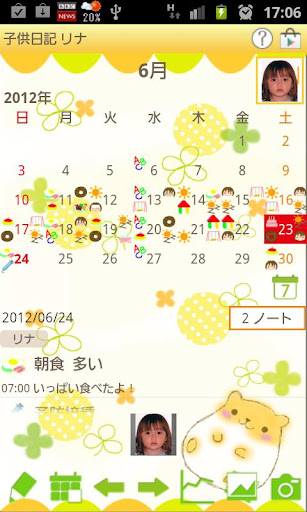
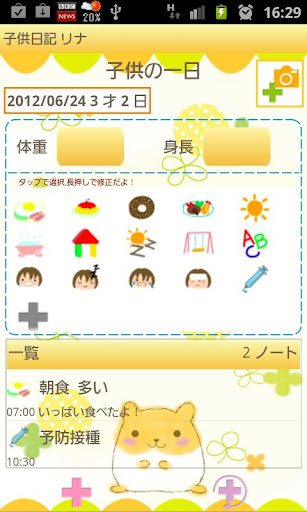
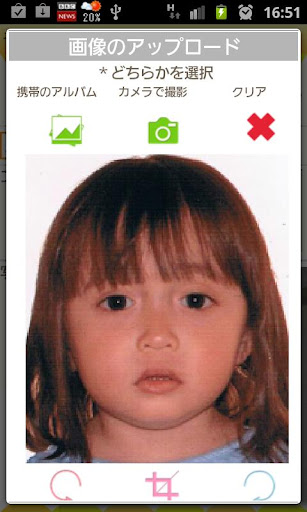
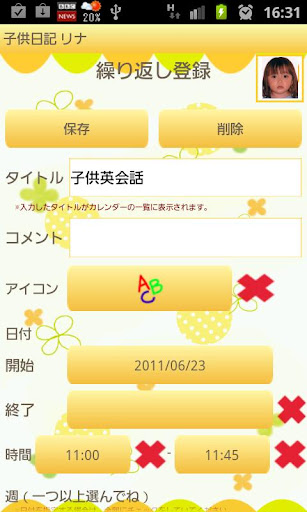
Child Diary is the app you can keep records of your children's growth. Make children's list and switch the calendar for each child so you can keep each child's records separately. Save photos, daily events, daily and repeated plans for your children! You can set the alarm for important events as well! Child Diary Manual *Initial Window* Initial Window is "Add Child". The second time and after you open Child Diary, The initial window is a calendar. Let's start with making a list of your children! *How to make a list* 1. Tap the top-right button with plus mark on the calendar. 2. Move to "Child List". Tap a plus button top-right of the window to add a new list. 3. Move to "Add Child" . Enter the infomation you need and press "Save". 4. Then you go back to "Child List". You can add more children in the same way. 5. From "Child List", select one name you want to show on the calendar. Press "Back" button of your mobile to go back to the calendar. *How to switch the calendar for each child* When you go back to the calendar after saving the Child list to reselect the child. *How to create Daily To-Do* 1.Tap where it says "Tap here to create Event Lists." or tap Pensil button on the left-bottom of the calendar. 2. Move to "Daily To-Do". 3. You can save child's weight, height and daily events. 4. Add new categories by pressing gray plus button. Long press each event to edit categories. a) Save button: save a new category with this button. b) Back button: go back to "Daily To-Do". c) Delete button: delete a category. 5. How to edit each event. 6. Tap one of the event icons to edit. *How to create Daily Event* 1. Press "Plus" left-bottom button of "Daily To-Do". 2. Move to "Daily Event". a) Moveup button: Move up the event previouous day or before. b) Putoff button: Move the event to the next day or after. c) CheckMark: When you have done the event, press the mark. Check mark will be appeared on the calendar's list. d) Delete button: Delete the event. Press Menu button of Daily Event window. You can set the alarm for the event with "Reminder" button. You can send the event by email with "Email" button. 3. Enter every infomation you need and press "Back" button of your mobile to save the event. *How to create Repeated List* 1. Press right-bottom button (Plus with arrow) of "Daily To-Do". 2. Move to "Repeated List" window. 3. Press "New". 4. Move to "Repeated Event". Enter the infomation you need and press "Save" button to save the event. *Buttons of the calendar* 1. Edit button: Move to "Daily To-Do". 2. Today button: Go back to today's date. 3. Left&Right button: Move the date right and left. 4. Graph button: You can see graphs. 5. Photo List button: Move to "Photo" window. 6. Camera button: Take photos or import photos from the album. *Photo window* 1. Press "Photo List" button of the calendar. 2. Move to "Photo". 3. Tap one of the photos then move to "Photo Edit". 4. You can save a comment for each photo. 5. Press "Back" button of your mobile to save the comment. 6. Press "Album" button of "Photo". 7. Move to "Album". Turn over the album cover to see the photos. *How to edit saved photos on the calendar* 1. Tap one of photos that saved on the calendar (You can see small sized photos above of calendar's buttons.). 2. Move to Edit window. Left-top: Email button→send the photo by email. Right-top: Twitter button→upload the photo to Twitter. Left-bottom: Move to Photo Edit window. Second left-bottom: Rotate left→rotate photo. Middle: Clipping button: Clip the photo. Second right-bottom: Rotate right→rotate photo. Right-bottom: List button→Move to Photo window.
Installs since 29 Aug 2026 Measured
Exact Google Play install counts, collected daily
Ratings
34 ratings, 4 reviews
- 5 ★100%
- 4 ★0.0%
- 3 ★0.0%
- 2 ★0.0%
- 1 ★0.0%
Recent reviews
Latest public reviews from the store
- 21 Dec 2013
Great App...
- 7 Oct 2012
GR8 :-)
Top chart positions
Latest Google Play chart ranks by country, last 10 days
Not in any tracked top chart in the last 10 days.
Child Diary history
Release, install milestones, listing and store changes
- Reached 10,000+ installs 8 May 2018
- Moved from Lifestyle to Parenting 2 Oct 2016
- Reached 5,000+ installs 4 Jul 2013
- Reached 1,000+ installs 31 Oct 2012
- Reached 500+ installs 5 Sep 2012
- Reached 100+ installs 10 Jul 2012
- First released on the store 23 Jun 2012
Recent versions
Current version Varies with device
- Version 1.4.2821 Dec 2019
- Version 1.4.208 Oct 2019
- Version 1.4.1910 Oct 2018
- Version 1.4.1619 Feb 2017
Listing keywords
Words and phrases Child Diary repeats most in its store listing
Top phrases: button move (6), move to photo (5), child diary (5), child list (4), left bottom (4).
Highlighted words also appear in the title. Counts cover the title, short description and description.
Business model and tech
From the store listing, the SDKs in the app package and its declared permissions
- Business model
- Free to downloadShows ads
- Built with
- No cross-platform framework or game engine detected
- Ad networks (7)
- AdMobAdlantisAdstirInMobiMediba AdmakerNendmediba ad
- Sensitive access
- No sensitive permission declared
7 ad, attribution and analytics SDKs detected. SDKs are read from the app package and permissions from the store listing, so code that loads later is not seen.
Technology
13 SDKs found in the app package
Development tools
Ad networks
Advertising and install-attribution SDKs found in the app package
- AdMob
- Adlantis
- Adstir
- InMobi
- Mediba Admaker
- Nend
- mediba ad
Compliance
What the listing and the app package show
- Store status
- Live
- Upkeep
- No update since 21 Dec 2019
- Registered in
- Japan
- Privacy policy
- Linked on the listing
- Advertising
- Shows ads
- In-app purchases
- None declared
- Age rating
- Everyone
Apps like Child Diary
CurbSmart ParentNutriLink Technologies12.6K installs★ 3.13
Playful Eats: Fix Picky EatingSpeakEasy Community10.7K installs★ 4.35
Mamibabi Thai giáo & Nuôi conMamibabi68.9K installs★ 3.9
Breastfeeding trackerPolyKids17.6K installs★ 4.1
Scoot Family CalendarDoug Greene8.5K installs★ 4.54
Roman Numerals for Kid NumbersEducational Flashcards Universe18.2K installs★ 5.0
Ooly: Configuration App.Novo123 Inc.2.5K installs★ 4.45
Parental Control - Safe LagoonSafe Lagoon5.5K installs★ 2.93
Learn colors while playingTikamori6.8K installs★ 4.5
Child Diary: questions and answers
How many downloads does Child Diary have?
Child Diary has 15,978 installs on Google Play, measured from the store's own count on 7 Nov 2026.
Who makes Child Diary?
Child Diary is published by 株式会社GalleryApp, a developer based in JP.
When was Child Diary last updated?
The latest version (Varies with device) was released on 21 Dec 2019.
Is Child Diary free?
Yes. Child Diary is free to download, and it shows ads.
Is Child Diary still available?
Yes. Child Diary is live on Google Play as of 7 Nov 2026.
Track Child Diary and its competitors
Watch any app for new versions, rating drops, chart moves and removals. Free plan, no card.