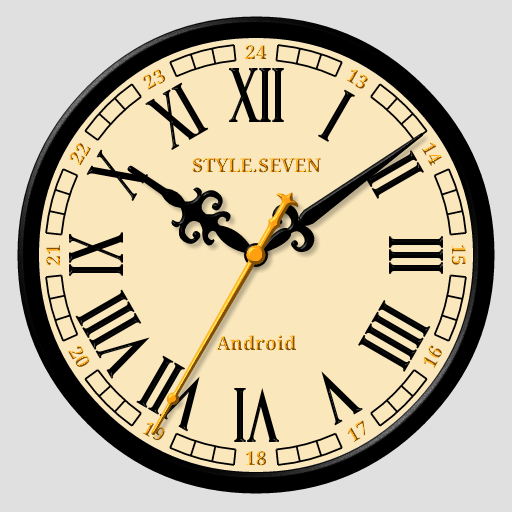
Classic Analog Clock-7
Analog clock with classic deals
- Installs
- 186K
- Measured
- Rating
- 3.62
- Ratings
- 1.2K
- 42 reviews
- Version
- 5.21
- Updated 17 May 2026
- Released
- 21 Aug 2019
- Tracked since 14 May 2026
- Size
- 2 MB
- Needs 4.0
Screenshots


About Classic Analog Clock-7
The description on the store listing
This analog clock has many options for appearance. There are three kinds of dials and hands, seven color themes. You can also use Arabic or Roman numbers and set custom title for the dial.
Use the analog clock as topmost or overlay clock. The clock will be set under all windows. You can change position of the clock by drag and drop method and size of the clock.
Use the analog clock as Live Wallpaper: set the clock size and position on the Home screen.
Use the analog clock as an app widget: clock shows the second hand for Android 12 or high.
Use the analog clock as app in full screen mode with "keep screen on" option.
Use the analog clock as screensaver while a device is …
Read the full description
This analog clock has many options for appearance. There are three kinds of dials and hands, seven color themes. You can also use Arabic or Roman numbers and set custom title for the dial. Use the analog clock as topmost or overlay clock. The clock will be set under all windows. You can change position of the clock by drag and drop method and size of the clock. Use the analog clock as Live Wallpaper: set the clock size and position on the Home screen. Use the analog clock as an app widget: clock shows the second hand for Android 12 or high. Use the analog clock as app in full screen mode with "keep screen on" option. Use the analog clock as screensaver while a device is charging. 🕒 Use analog clocks as “Night Clock” — a calm mode with economy style (black background and dark‑gray hands) that saves battery. Random position change every minute protects the screen from burn‑in. All options work in Fullscreen mode, Live Wallpaper, and Screensaver. 🌙 Use analog clocks as “Always on Screen” — the clock remains visible even when the screen is turned off. ⚠ Important: the function does not start automatically, you need to launch it manually in Fullscreen mode. “Always on Display” emulation works through additional options: 🔆 brightness control and Auto‑lock on exit. Analog clock can tell you the current time by voice by double tap on the app window or Live Wallpaper and periodically, for example by 60 minutes. Select an image from the Gallery and color for the background. So this app is: classic analog clock, analog clock Live Wallpaper, analog clock widget, clock widget with second hand, talking clock, classic clock.
Installs, last 30 days Measured
Exact Google Play install counts, collected daily
Ratings
1,247 ratings, 42 reviews
- 5 ★48%
- 4 ★9.3%
- 3 ★17%
- 2 ★1.3%
- 1 ★24%
Recent reviews
Latest public reviews from the store
- 24 Apr 2026
Excellent app. I love the 24. hr. time option and the option to make the clock face bigger or smaller. I just wish that there was a wake up alarm available!
- 13 Mar 2026
I'm running the app, and I am using live wallpaper. would be much better as a widget. when you set the clock as live wall paper, it gives you two choices. you have no choice. it does login screen and home screen every time. would be much better as a widget !
- 24 Dec 2025
Can't get out of full-screen ad. Also, 1/5th sec needlessly shown with no apparent way to disable. Otherwise, OK.
- 16 Sep 2024
I love this true 24-hour clock! You can set the clock face color and use one of your pictures on your phone to merge the clock and make it your background for "Home Screen" or "Lock & Home Screen" I have mine set with the black clock face on a solid black background, and it looks sweet! The clock hands have transparency so that as they pass over the Date/Day and battery usage ( being the 9 and 3 positions ), you can still see that information. Excellent App. I would gladly pay for No Ads
What reviewers bring up
Topics mentioned in the latest 10 reviews, by how many reviews mention them
Liked in good reviews (3 reviews)
- clock face 2
Raised in bad reviews (6 reviews)
- ads 3
- wallpaper 2
- widget 2
- plus 2
Top chart positions
Latest Google Play chart ranks by country, last 10 days
Not in any tracked top chart in the last 10 days.
Classic Analog Clock-7 history
Release, install milestones, listing and store changes
- Reached 100,000+ installs 22 Nov 2022
- Reached 50,000+ installs 1 Mar 2021
- Reached 10,000+ installs 23 Feb 2020
- Reached 5,000+ installs 1 Dec 2019
- Reached 1,000+ installs 13 Sep 2019
- Reached 500+ installs 28 Aug 2019
- First released on the store 21 Aug 2019
Update frequency
How often Classic Analog Clock-7 ships a new version, month by month
4 updates in the last 12 months. More often than most similar apps: they shipped a median of 2 updates in the same year.
Recent versions
Current version 5.21
- Version 5.2117 May 2026
Minor changes.
- Version 5.220 Mar 2026
* Added "Mini Clock" mode for Android 8+. When enabled, the clock collapses into a standard floating window that can be moved around the screen and snapped to the edge. You can return to the normal mode at any time. Enable it from the main menu. * Other improvements and fixes.
- Version 5.124 Jan 2026
- Version 5.022 Nov 2025
Listing keywords
Words and phrases Classic Analog Clock-7 repeats most in its store listing
Top phrases: analog clock (12), live wallpaper (4), classic analog clock (2), analog clocks (2), classic analog (2).
Highlighted words also appear in the title. Counts cover the title, short description and description.
Business model and tech
From the store listing and declared permissions
- Business model
- Free to downloadShows ads
- Sensitive access
- No sensitive permission declared
Compliance
What the listing and the app package show
- Store status
- Live
- Upkeep
- Updated 17 May 2026
- Registered in
- Russia
- Privacy policy
- Linked on the listing
- Advertising
- Shows ads
- In-app purchases
- None declared
- Age rating
- Everyone
Apps like Classic Analog Clock-7
Pixenia: Ai Photo Editor & ArtNowTech - Halo Group777K installs★ 3.43
Space Clean ToolkitStarlume Tech597K installs★ 3.85
Views Fans: CommunityaAa Designer36.5K installs★ 3.67
BrowseNowGamonic Studio274K installs★ 4.43
Aranet HomeSAF Tehnika A/S69.2K installs★ 4.79
WiFi+Transfer | Cross-sys SyncNero AG399K installs★ 2.8
GPS Location Sharing & LocatorNeo Utilities796K installs★ 4.2
Gauss MeterDZApps Guru24.1K installs★ 4.15
Tally Counter & Score ClickerTrekound107K installs★ 4.47
Classic Analog Clock-7: questions and answers
How many downloads does Classic Analog Clock-7 have?
Classic Analog Clock-7 has 185,593 installs on Google Play, measured from the store's own count on 21 Nov 2026.
Who makes Classic Analog Clock-7?
Classic Analog Clock-7 is published by StyleSeven.com, a developer based in RU.
When was Classic Analog Clock-7 last updated?
The latest version (5.21) was released on 17 May 2026.
Is Classic Analog Clock-7 free?
Yes. Classic Analog Clock-7 is free to download, and it shows ads.
Is Classic Analog Clock-7 still available?
Yes. Classic Analog Clock-7 is live on Google Play as of 21 Nov 2026.
Track Classic Analog Clock-7 and its competitors
Watch any app for new versions, rating drops, chart moves and removals. Free plan, no card.