ColorMeter camera color picker
ColorMeter: take live color around you with camera and use it for wallpaper.
- Installs
- 49.09K
- Measured
- Rating
- 4.41
- Ratings
- 260
- 9 reviews
- Version
- Varies with device
- Updated 2 Nov 2023
- Released
- 27 Mar 2012
- Tracked since 13 May 2026
- Size
- 1 MB
- Needs 2.2
Screenshots



About ColorMeter camera color picker
The description on the store listing
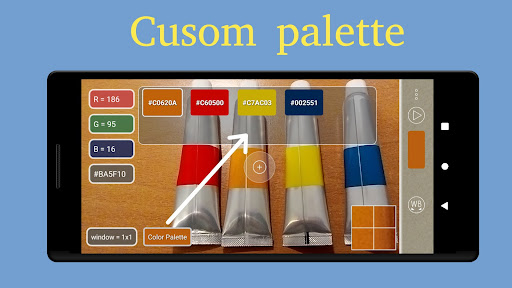
ColorMeter is a user-friendly camera tool designed to help you easily capture and identify colors in your surroundings. With this app, you can conveniently pick live colors and view their RGB components on your screen. It even provides you with the hexadecimal (HTML) color code commonly used in graphic, picture, and photo editors.
The app offers various ways to analyze and select colors:
1. Live Camera View 📷: Simply point the crosshair at different objects in real-time and see the color results on your screen.
2. Snapshot Analysis: Take a picture of an object and analyze its colors in a still image.
3. Gallery Pictures : Load images from your gallery and pick colors from them. …
Read the full description
ColorMeter is a user-friendly camera tool designed to help you easily capture and identify colors in your surroundings. With this app, you can conveniently pick live colors and view their RGB components on your screen. It even provides you with the hexadecimal (HTML) color code commonly used in graphic, picture, and photo editors. The app offers various ways to analyze and select colors: 1. Live Camera View 📷: Simply point the crosshair at different objects in real-time and see the color results on your screen. 2. Snapshot Analysis: Take a picture of an object and analyze its colors in a still image. 3. Gallery Pictures : Load images from your gallery and pick colors from them. Key Features: - Live Color Analyzer 🌈: Analyze colors in real-time using your device's camera. - Snapshot and Image Analysis 📷: Capture still images and analyze colors from them. - Gallery Picture Support: Load pictures from your gallery and extract colors. - White Balance with Undo Function: Adjust white balance with the option to undo changes (long touch). - Average Window Size Option 📏: Customize the size of the color analysis window. - Color Palette 🎨: Create your own custom color palette, save, delete, and preview colors. - Share 📤: Share your color palette using an HTML file. - Find Closest Color 🔍: Find the closest color match in your palette to the currently selected color. - Channel Values and Color Models 📊: Access the values for the R-, G-, B- channels and CMY color model. - Hexadecimal Color Code #️⃣: View the hexadecimal color code for precise color matching. - Flashlight 🔦 - Preview Colors: Select and freeze colors, preview them in full-screen mode. - Use Color as Wallpaper: Set the currently selected color as your device's wallpaper. - Autofocus Button and Zoom View 🔍: Enhance your color analysis experience with autofocus and zoom options. - Help ❓: Access helpful information about the app. Thank you for your interest and hope it can be a valuable tool for you. If you have any questions, encounter any issues, or need assistance, please don't hesitate to reach out. We're here to help! Your feedback and suggestions are important to us. If you have any ideas or features you'd like to see implemented, please feel free to share them with us. Contact us at [email protected] for any support-related inquiries. We'll be more than happy to assist you. Thank you again for your support!
Installs since 29 Aug 2026 Measured
Exact Google Play install counts, collected daily
Ratings
260 ratings, 9 reviews
- 5 ★70%
- 4 ★22%
- 3 ★0.0%
- 2 ★4.3%
- 1 ★4.3%
Recent reviews
Latest public reviews from the store
- 26 Feb 2016
This app uses my preference method of GPS measuring. By the mile. I do not like pedometers that make you convert stride length. GPS is much easier, and you can easily share your progress to social media. 5 Star's.
- 11 Feb 2016
Easy real time plotting
- 10 Jan 2016
Very good track
- 20 Sep 2015
Awesome package. Use it all the time
Top chart positions
Latest Google Play chart ranks by country, last 10 days
Not in any tracked top chart in the last 10 days.
ColorMeter camera color picker history
Release, install milestones, listing and store changes
- Reached 10,000+ installs 23 Jul 2023
- Reached 1,000+ installs 23 Mar 2015
- First released on the store 27 Mar 2012
Recent versions
Current version Varies with device
- Version 3.1.32 Nov 2023
- Version 3.1.213 May 2023
- Version 3.1.12 Sep 2016
- Version 3.1.011 Jun 2016
Listing keywords
Words and phrases ColorMeter camera color picker repeats most in its store listing
Top phrases: color code (3), color palette (3), currently selected color (2), hexadecimal color code (2), analyze colors (2).
Highlighted words also appear in the title. Counts cover the title, short description and description.
Business model and tech
From the store listing, the SDKs in the app package and its declared permissions
- Business model
- Paid, $0.99
- Built with
- No cross-platform framework or game engine detected
- Ad networks (0)
- None detected
- Sensitive access
- CameraPhotos, videos and files
0 ad, attribution and analytics SDKs detected. SDKs are read from the app package and permissions from the store listing, so code that loads later is not seen.
Technology
15 SDKs found in the app package
5 permissions
0 special access, 2 sensitive, 3 standard
- Take photos and videosSensitive
- Read shared storageSensitive
- Set the wallpaperStandard
- Full internet accessStandard
- Google Play license checkStandard
Compliance
What the listing and the app package show
- Store status
- Live
- Upkeep
- No update since 2 Nov 2023
- Registered in
- United States
- Privacy policy
- Linked on the listing
- Advertising
- No ads declared
- In-app purchases
- None declared
- Age rating
- Everyone
- Sensitive permissions
- 2 sensitive of 5
- Location access
- No
- Camera and microphone
- Camera
Apps like ColorMeter camera color picker
Wolfie for KWGT21MaRcO12 - Nativa design31.2K installs★ 4.47
Photo Lab - Photo BlendingDuoApptech104K installs★ 4.25
Running Watch Facethema8.3K installs★ 4.11
Wisteria Tunnel Theme +HOME+HOME by Ateam Entertainment35.3K installs★ 5.0
Girly Wallpaper Fancy Cat+HOME by Ateam Entertainment33.8K installs★ 5.0
Win10 Flat - Icon PackOlivera Onias Design56.4K installs★ 3.92
Fruit Launcher ThemeLive Locker21.6K installs★ 4.67
Samsung A70 Launcher & ThemesSmart Soft Company103K installs★ 3.43
Rainbow WallpaperEasy apps172K installs★ 4.65
ColorMeter camera color picker: questions and answers
How many downloads does ColorMeter camera color picker have?
ColorMeter camera color picker has 49,089 installs on Google Play, measured from the store's own count on 7 Nov 2026.
Who makes ColorMeter camera color picker?
ColorMeter camera color picker is published by vistech.projects, a developer based in US.
When was ColorMeter camera color picker last updated?
The latest version (Varies with device) was released on 2 Nov 2023.
Is ColorMeter camera color picker free?
No. ColorMeter camera color picker is a paid app priced at $0.99.
Is ColorMeter camera color picker still available?
Yes. ColorMeter camera color picker is live on Google Play as of 7 Nov 2026.
Track ColorMeter camera color picker and its competitors
Watch any app for new versions, rating drops, chart moves and removals. Free plan, no card.