Coordinate Master
The most comprehensive coordinate converter tool available for Android!
- Installs
- 2.19K
- Measured
- Rating
- 4.67
- Ratings
- 44
- 8 reviews
- Version
- 8.9
- Updated 16 Aug 2025
- Released
- 17 Dec 2012
- Tracked since 10 May 2026
- Size
- 7 MB
- Needs 4.0
Also on App Store: Coordinate Master (5 ratings)
Screenshots


About Coordinate Master
The description on the store listing
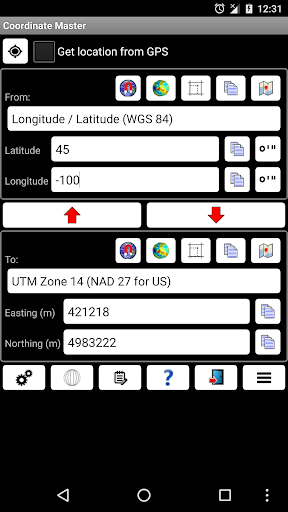
This powerful geodesy app allows you to convert coordinates between many of the world's coordinate systems, compute geoid offsets, and estimate the current or historic magnetic field for any location. It also includes a calculator tool as well as surveying tools to compute the point scale factor, grid convergence, traverse, inverse, and sun angle. You can also store multiple points and compute boundary length and area on them, or import/export them to CSV files.
The app uses the PROJ4 library and a lookup file containing projection and datum parameters to support over 1700 coordinate systems. Lat/lon, UTM, US coordinate systems (including US State Plane), Australian coordinate systems …
Read the full description
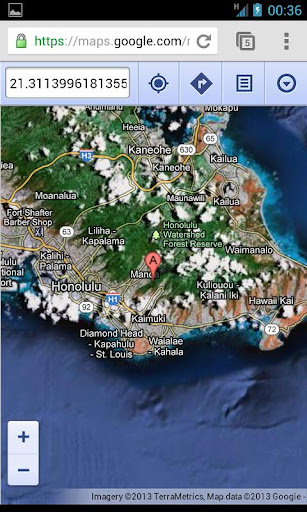
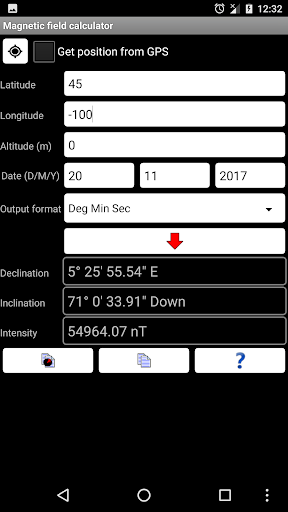
This powerful geodesy app allows you to convert coordinates between many of the world's coordinate systems, compute geoid offsets, and estimate the current or historic magnetic field for any location. It also includes a calculator tool as well as surveying tools to compute the point scale factor, grid convergence, traverse, inverse, and sun angle. You can also store multiple points and compute boundary length and area on them, or import/export them to CSV files. The app uses the PROJ4 library and a lookup file containing projection and datum parameters to support over 1700 coordinate systems. Lat/lon, UTM, US coordinate systems (including US State Plane), Australian coordinate systems (including GDA2020), UK coordinate systems (including Ordinance Survey) and many, many others are supported. You can also create your own coordinate systems if you know the parameters.The app also supports affine transformations to allow you to set up local grid systems. See http://www.binaryearth.net/Miscellaneous/affine.html for details. The app either takes manual coordinate input or uses your current GPS location. The computed location can be displayed in Google Maps via your web browser with a single button press. It also supports MGRS grid references. You can export any lat/lon, UTM or transverse Mercator coordinate systems to a HandyGPS datum (.hgd) file for use as a custom datum in HandyGPS. The magnetic field calculator page computes the Earth's current or historical magnetic field at a given location. The magnetic declination computed is useful for compass navigation since it represents the difference between true north and magnetic north. Field inclination and total intensity are also computed. This tool uses the International Geomagnetic Reference Field model (IGRF-13). See http://www.ngdc.noaa.gov/IAGA/vmod/igrf.html for full details. Years from 1900 through to 2025 are supported. The app can also compute the geoid height offset for a given location, using the EGM96 model. Geoid offset can be subtracted from the height reported by GPS to give your actual height above sea level. The app also includes a sun angle calculator which can be used to compute the location of the sun in the sky at any location for any date and time. Online help for the app is available at http://www.binaryearth.net/CoordinateMasterHelp A version of this app which allows batch coordinate conversions is now available for Windows. See http://www.binaryearth.net/CoordinateMaster/Windows Permissions required: (1) GPS - to determine your location, (2) SD card access - to read and write user projections file.
Installs since 17 Nov 2026 Measured
Exact Google Play install counts, collected daily
Daily history starts once this app is in our daily install sample.
Ratings
44 ratings, 8 reviews
- 5 ★85%
- 4 ★7.7%
- 3 ★7.7%
- 2 ★0.0%
- 1 ★0.0%
Recent reviews
Latest public reviews from the store
- 21 Oct 2020
Man, these komps are so cool!
- 20 Oct 2020
❤️💯
- 25 Jul 2020
This is how u use a kustom plugin totally worth buyin
- 23 Jul 2020
Thanks for the great stuff.. Really nice
Top chart positions
Latest Google Play chart ranks by country, last 10 days
Not in any tracked top chart in the last 10 days.
Coordinate Master history
Release, install milestones, listing and store changes
- Reached 1,000+ installs 24 Jul 2018
- First released on the store 17 Dec 2012
Update frequency
How often Coordinate Master ships a new version, month by month
0 updates in the last 12 months. Less often than most similar apps: they shipped a median of 1 updates in the same year.
Recent versions
Current version 8.9
- Version 8.815 Aug 2025
8.8: Updated geoid model to EGM2008. 8.7: Updated geomagnetic field calculations to use the IGRF-14 model. 8.6: Updated to target Android SDK 35. 8.5: Made map zoom less sensitive. 8.4: Labelled the "Select all" checkbox at top of point list for clarity. 8.3: When exporting points list to CSV, include both the "from" and "to" coordinates, as well as lat/lon. Added a button to email the points list as a CSV file. 8.2: Updated calculator tool.
- Version 8.68 Jul 2025
- Version 8.512 May 2025
- Version 8.429 Apr 2025
Listing keywords
Words and phrases Coordinate Master repeats most in its store listing
Top phrases: coordinate systems (7), coordinate systems including (3), magnetic field (3), systems including (3), lat lon utm (2).
Highlighted words also appear in the title. Counts cover the title, short description and description.
Business model and tech
From the store listing and declared permissions
- Business model
- Paid, $3.99
- Sensitive access
- No sensitive permission declared
Compliance
What the listing and the app package show
- Store status
- Live
- Upkeep
- Updated 16 Aug 2025
- Registered in
- Australia
- Privacy policy
- Linked on the listing
- Advertising
- No ads declared
- In-app purchases
- None declared
- Age rating
- Everyone
Apps like Coordinate Master
Psychrometric chart plotterEZ杉浦12.5K installs★ 2.2
FilioFilio Corp5.3K installs★ 4.74
Smart talkieHangzhou Zhidou Technology Co., Ltd.4.1K installs★ 4.45
Apk InstallerAppsLib14.2K installs★ 3.13
Anker SOLIX ProfessionalAnker47K installs★ 3.83
PicFind - Local photo searchMagic Pixel Studio3.5K installs★ 3.9
File Vault - Hide your filesALIF Technology7.3K installs★ 4.25
iSmKitAllen-Tong20.7K installs★ 3.5
AGC PlayerMobile Filters & Watermark & Video Player24.5K installs★ 3.7
Coordinate Master: questions and answers
How many downloads does Coordinate Master have?
Coordinate Master has 2,188 installs on Google Play, measured from the store's own count on 17 Nov 2026.
Who makes Coordinate Master?
Coordinate Master is published by BinaryEarth, a developer based in AU.
When was Coordinate Master last updated?
The latest version (8.9) was released on 16 Aug 2025.
Is Coordinate Master free?
No. Coordinate Master is a paid app priced at $3.99.
Is Coordinate Master still available?
Yes. Coordinate Master is live on Google Play as of 17 Nov 2026.
Track Coordinate Master and its competitors
Watch any app for new versions, rating drops, chart moves and removals. Free plan, no card.