
CountdownCalendar
Can see how many days left until your saved to-do list!
- Installs
- 10.98K
- Measured
- Rating
- 3.7
- Ratings
- 16
- Version
- Varies with device
- Updated 28 Sep 2019
- Released
- 25 Aug 2011
- Tracked since 13 May 2026
- Size
- 6 MB
- Needs 4.2
Screenshots




About CountdownCalendar
The description on the store listing
Countdown Calendar is a very convenient application that you can see how many days left until your saved to-do list!
When you save the time of delivery of the project 1 for example, you can see the remaining days till the due date on the calendar at one view.
Not only you can save project's due date but also travel, presentation, business trip or commemoration day and so on. You can select the color of post-it for each to-do list and switch the calendar by color.
Check the checkbox when you have done the to-do list so that you can confirm by the calendar whether it is done or not.
The initial window is calendar.
~Calendar and Calendar's buttons (from the left) ~
1. 「to-do …
Read the full description
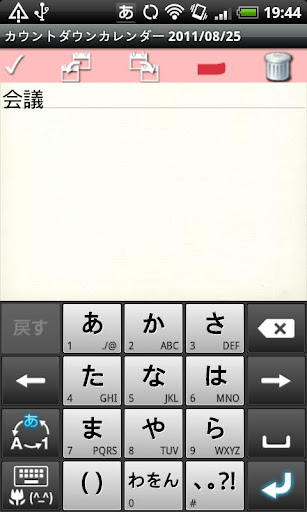
Countdown Calendar is a very convenient application that you can see how many days left until your saved to-do list! When you save the time of delivery of the project 1 for example, you can see the remaining days till the due date on the calendar at one view. Not only you can save project's due date but also travel, presentation, business trip or commemoration day and so on. You can select the color of post-it for each to-do list and switch the calendar by color. Check the checkbox when you have done the to-do list so that you can confirm by the calendar whether it is done or not. The initial window is calendar. ~Calendar and Calendar's buttons (from the left) ~ 1. 「to-do list Add」button: Select the date → Tap this button to move to the to-do list Add Window. 2. 「Today」button: Go back to the today's date. 3. 「Left」& 「Right」button: Move the date right and left. 4. 「List」button: You can see the list of saved to-do list. 5. 「Post-it」buttons of the upper part of the calendar: When you tap each color, you can switch the calendar by color. ~to-do list Add Window's buttons (from the left)~ 1. 「Checkmark」: Tap this checkmark when you have done the to-do list. 2. 「Move the to-do list to previous day」: Use this button when you want to move the to-do list to previous day. 3. 「Move the to-do list to next day」: Use this button when you want to move the to-do list to next day. 4. 「Post-it」: You can select a color for your to-do list. Select white when you don't need to add post-it. 5. 「Delete」: You can delete the to-do list. ~How to save to-do list!~ 1. Select a date that you want to save the to-do list. 2. Tap 「to-do list Add」button of the calendar. 3. Then move to the to-do list Add Window. 4. Enter your to-do list and select a color of post-it for the to-do list. 5. Press 「Back」button to go back to the calendar. 6. You can confirm the saved to-do list in the list of the calendar where there was a message 「There is no to-do list」. 7. When you save the to-do list, a 「Stopwatch」mark will be displayed on the date. 8. You can save 5 to-do list per day. When you select the color of post-it, post-it mark will be displayed on the date. 9. When you want to check the done to-do list, tap a to-do list in the list. 10. Then move to the to-do list Add Window. Tap the checkmark. 11. Press 「Back」button of the mobile to go back to the calendar. 12. You can confirm the checkmark next to the done to-do list. 13. When you tap each color of「Post-it」button of the upper part of the calendar, you can switch the calendar by color. ※Pay version:No ads display
Installs since 13 Nov 2026 Measured
Exact Google Play install counts, collected daily
Daily history starts once this app is in our daily install sample.
Ratings
16 ratings
- 5 ★0.0%
- 4 ★0.0%
- 3 ★0.0%
- 2 ★0.0%
- 1 ★0.0%
Recent reviews
Latest public reviews from the store
- 21 Apr 2018
Please add a feature to insert/draw/import a new icon
- 2 Jun 2016
Very cool and effective. All that you'll ever need. And very functional
- 29 Oct 2014
Wow... It really speaks from my heart... Simple.. cool... multi app.. not heavy... aaahh... what an app... Thankssss. May God bless you...
- 13 Mar 2014
Been looking for these for yrs,. Just love it still find out secrets to it*trouble sync tab to phone, phone to tab no prob* figured out but real pain to do
What reviewers bring up
Topics mentioned in the latest 11 reviews, by how many reviews mention them
Liked in good reviews (10 reviews)
- haven't 2
- icon 2
- yet 2
Raised in bad reviews (0 reviews)
No topic comes up twice.
Top chart positions
Latest Google Play chart ranks by country, last 10 days
Not in any tracked top chart in the last 10 days.
CountdownCalendar history
Release, install milestones, listing and store changes
- Reached 10,000+ installs 10 Feb 2014
- Reached 5,000+ installs 4 Feb 2012
- Reached 1,000+ installs 30 Sep 2011
- Reached 500+ installs 1 Sep 2011
- Reached 100+ installs 28 Aug 2011
- First released on the store 25 Aug 2011
Recent versions
Current version Varies with device
- Version 1.0.728 Sep 2019
- Version 1.0.612 Oct 2018
- Version 1.0.418 Feb 2017
- Version 1.0.37 May 2015
Listing keywords
Words and phrases CountdownCalendar repeats most in its store listing
Top phrases: list add (6), color of post (4), calendar by color (3), list add window (3), switch the calendar (3).
Highlighted words also appear in the title. Counts cover the title, short description and description.
Business model and tech
From the store listing, the SDKs in the app package and its declared permissions
- Business model
- Free to downloadShows ads
- Built with
- No cross-platform framework or game engine detected
- Ad networks (4)
- AdMobAdlantisAdstirNend
- Analytics and crash reports
- Google Analytics
- Sensitive access
- Photos, videos and files
5 ad, attribution and analytics SDKs detected. SDKs are read from the app package and permissions from the store listing, so code that loads later is not seen.
Technology
12 SDKs found in the app package
Development tools
Ad networks
Advertising and install-attribution SDKs found in the app package
- AdMob
- Adlantis
- Adstir
- Nend
8 permissions
0 special access, 2 sensitive, 6 standard
- Change or delete shared storageSensitive
- Read shared storageSensitive
- Control vibrationStandard
- Keep the phone awakeStandard
- Start when the phone turns onStandard
- Full internet accessStandard
- See network connectionsStandard
- Receive push messagesStandard
Compliance
What the listing and the app package show
- Store status
- Live
- Upkeep
- No update since 28 Sep 2019
- Registered in
- Japan
- Privacy policy
- Linked on the listing
- Advertising
- Shows ads
- In-app purchases
- None declared
- Age rating
- Everyone
- Sensitive permissions
- 2 sensitive of 8
- Location access
- No
- Camera and microphone
- Neither
Apps like CountdownCalendar
영산강 안심 알림eICT융합소프트 & 스마트오더18.3K installs★ 4.0
JBLETRADOC Mobile10.3K installs★ 4.5
Two Point HeightOmega Centauri Software15.3K installs★ 2.22
Sheridan RecyclesCity of Sheridan634 installs★ 4.67
NAFNorges Automobil-Forbund200K installs★ 3.9
Ipsos Adria CAPIIpsos Serbia7.4K installs★ 3.9
Clock: Alarm Clock & TimerIntratech so36.1K installs★ 3.79
Süzme Sayaç HesaplamaNotsup30.3K installs★ 3.6
Cattle & Goat Record KeepingVetzKin10.3K installs★ 2.5
CountdownCalendar: questions and answers
How many downloads does CountdownCalendar have?
CountdownCalendar has 10,983 installs on Google Play, measured from the store's own count on 13 Nov 2026.
Who makes CountdownCalendar?
CountdownCalendar is published by 株式会社GalleryApp, a developer based in JP.
When was CountdownCalendar last updated?
The latest version (Varies with device) was released on 28 Sep 2019.
Is CountdownCalendar free?
Yes. CountdownCalendar is free to download, and it shows ads.
Is CountdownCalendar still available?
Yes. CountdownCalendar is live on Google Play as of 13 Nov 2026.
Track CountdownCalendar and its competitors
Watch any app for new versions, rating drops, chart moves and removals. Free plan, no card.