
CursiveAI: Text to Handwriting
Text to handwriting converter for handwritten notes, assignments, and PDFs
- Installs
- 50.62K
- Measured
- Rating
- 4.8
- Ratings
- 267
- 1 reviews
- Version
- 3.0.0
- Updated 7 Aug 2026
- Released
- 28 Jun 2025
- Tracked since 12 May 2026
- Size
- —
Also on App Store: CursiveAI: Text to Handwriting (10 ratings)
Screenshots




About CursiveAI: Text to Handwriting
The description on the store listing
CursiveAI: Text to Handwriting is a text to handwriting converter and handwriting AI app for Android. Convert typed text, PDF, and DOCX content into realistic handwritten notes, assignments, letters, worksheets, and PDF pages. Turn plain text into human handwriting with natural spacing, paper layouts, and fast export.
If you are looking for a text to handwriting converter, handwriting converter, handwriting AI, handwriting generator, or PDF to handwriting converter, CursiveAI is built for that exact job. Create handwritten notes for study, make handwritten assignments for class, convert text to handwriting for letters and worksheets, and export polished handwritten pages that are ready …
Read the full description
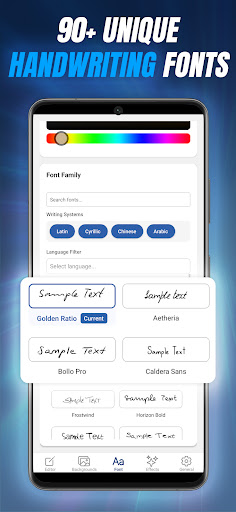
CursiveAI: Text to Handwriting is a text to handwriting converter and handwriting AI app for Android. Convert typed text, PDF, and DOCX content into realistic handwritten notes, assignments, letters, worksheets, and PDF pages. Turn plain text into human handwriting with natural spacing, paper layouts, and fast export. If you are looking for a text to handwriting converter, handwriting converter, handwriting AI, handwriting generator, or PDF to handwriting converter, CursiveAI is built for that exact job. Create handwritten notes for study, make handwritten assignments for class, convert text to handwriting for letters and worksheets, and export polished handwritten pages that are ready to save, print, or share. Convert text to handwriting with realistic results CursiveAI helps you create realistic handwriting from typed text in seconds. Instead of a simple handwriting font, it gives you natural variation, cleaner spacing, better page structure, and realistic paper and ink effects so each page looks more like real human handwriting. What you can do • Convert text to handwriting for notes, assignments, letters, worksheets, and practice pages • Create handwritten notes with natural spacing, realistic variation, and clean page layout • Make handwritten assignments and handwritten homework pages faster • Use handwriting AI tools to turn typed content into realistic handwritten pages • Import PDF and DOCX files on Android and convert them into editable handwritten documents • Export handwriting as PDF, PNG, or ZIP files • Share multi-page handwritten PDF files for school, work, or printing 95 handwriting styles with broad language support Choose from 95 handwriting styles, including new styles with improved Arabic and Hindi support. CursiveAI supports 40+ languages, making it useful for handwritten notes, handwritten assignments, and handwriting conversion across a wide range of scripts and use cases. Page setup and paper customization Create pages in A3, A4, A5, A6, US Letter, US Legal, US Tabloid, and JIS B5. Choose portrait or landscape layout, adjust page spacing, and customize margins, padding, and paper backgrounds. Whether you need a handwritten assignment, handwritten class notes, or a handwritten letter, you can match the page setup to the result you want. Hand-drawn tables and realistic formatting CursiveAI includes hand-drawn tables with editable rows, columns, widths, and border color controls. It also supports rich text formatting, alignment, underline, strikethrough, and bold text styling, with a redesigned toolbar that makes editing faster on mobile. Advanced controls for realistic handwriting Fine-tune font size, ink color, line height, letter spacing, word spacing, margins, and layout. Add paper texture, shading, shadow, blur, and other handwriting effects to create realistic handwritten notes and realistic handwritten assignments that look polished and natural. Built for real use cases • Students making handwritten notes, handwritten assignments, homework pages, and study sheets • Teachers preparing worksheets, examples, and classroom handouts • Professionals creating letters, forms, and handwritten PDF documents • Creators making aesthetic handwritten pages to share online Why users choose CursiveAI Many apps only apply a cursive or handwritten font. CursiveAI is a full text to handwriting converter designed for realistic handwriting output, flexible layout control, and clean export. Whether you need a handwritten assignment maker, class-note converter, or PDF to handwriting converter, CursiveAI covers the full workflow. It works as a handwriting converter for everyday notes, as a handwriting AI tool for fast generation, and as a realistic handwriting generator for polished assignments, letters, and worksheets. Download CursiveAI: Text to Handwriting to create handwritten notes, convert text to handwriting, make handwritten assignments, and export realistic handwritten PDF pages.
Installs since 29 Aug 2026 Measured
Exact Google Play install counts, collected daily
Ratings
267 ratings, 1 reviews
- 5 ★80%
- 4 ★20%
- 3 ★0.0%
- 2 ★0.0%
- 1 ★0.0%
Recent reviews
Latest public reviews from the store
- 3 Jan 2026
nice app 👍👍👍👍
- 31 Dec 2025
it's very good
- 24 Dec 2025
what a wonderful App text to handwriting... l love it... keep it up
- 22 Dec 2025
nice 👍 one
What reviewers bring up
Topics mentioned in the latest 13 reviews, by how many reviews mention them
Liked in good reviews (11 reviews)
- handwriting 2
- text 2
Raised in bad reviews (2 reviews)
No topic comes up twice.
Top chart positions
Latest Google Play chart ranks by country, last 10 days
Not in any tracked top chart in the last 10 days.
CursiveAI: Text to Handwriting history
Release, install milestones, listing and store changes
- First released on the store 28 Jun 2025
Update frequency
How often CursiveAI: Text to Handwriting ships a new version, month by month
2 updates in the last 12 months. About as often as similar apps, which shipped a median of 2 updates in the same year.
Recent versions
Current version 3.0.0
- Version 3.0.07 Aug 2026
Version 3 brings a refreshed design, new handwriting controls, and compatibility with the latest Android version.
- Version 2.0.025 Mar 2026
• New page setup options: A3, A4, A5, A6, US Letter, US Legal, US Tabloid, and JIS B5, plus portrait and landscape layouts. • Added 5 new handwriting styles with improved Arabic and Hindi support. • Improved handwriting realism with better-looking tables and cleaner underline, strikethrough, and bold-text rendering. • Redesigned the editor toolbar and polished the editing experience throughout the app.
Listing keywords
Words and phrases CursiveAI: Text to Handwriting repeats most in its store listing
Top phrases: text to handwriting (11), handwriting converter (8), handwritten notes (8), handwritten assignments (6), realistic handwritten (5).
Highlighted words also appear in the title. Counts cover the title, short description and description.
Business model and tech
From the store listing and declared permissions
- Business model
- Free to downloadIn-app purchases
- Subscriptions and payments
- Google Play billing
- Sensitive access
- No sensitive permission declared
13 permissions
0 special access, 1 sensitive, 12 standard
- Show notificationsPOST_NOTIFICATIONSSensitive
- Read how it was installed (install referrer)BIND_GET_INSTALL_REFERRER_SERVICEStandard
- Control vibrationStandard
- Keep the phone awakeStandard
- Run a foreground serviceFOREGROUND_SERVICEStandard
- Start when the phone turns onStandard
- Use fingerprint or face unlockUSE_BIOMETRICStandard
- Use the fingerprint readerUSE_FINGERPRINTStandard
- Full internet accessStandard
- See network connectionsStandard
- Internal app permissionDYNAMIC_RECEIVER_NOT_EXPORTED_PERMISSIONStandard
- Google Play license checkStandard
Compliance
What the listing and the app package show
- Store status
- Live
- Upkeep
- Updated 7 Aug 2026
- Registered in
- United States
- Privacy policy
- Linked on the listing
- Advertising
- No ads declared
- In-app purchases
- Offered
- Age rating
- Everyone
- Sensitive permissions
- 1 sensitive of 13
- Location access
- No
- Camera and microphone
- Neither
Apps like CursiveAI: Text to Handwriting
ADV ResidencialADV SEGURIDAD111K installs★ 3.63
Region 6 NS RecyclesRegion 6 Solid Waste Management6.7K installs★ 4.8
Kalendarz Polski ze ŚwiętamiAkstar Mobile70.2K installs★ 3.9
Ai AnalyzerJLP Creation Studio165K installs★ 4.0
Servientrega ColombiaServientrega S.A.144K installs★ 1.83
JigglyPaint: Draw/Shake/Share!KunLun.Co7.4K installs★ 4.06
Taxi CalculatorLeonardo Javier Russo65.1K installs★ 4.11
Supernotes – Notes & JournalSupernotes28.4K installs★ 4.19
FileCloudFileCloud76.5K installs★ 3.66
CursiveAI: Text to Handwriting: questions and answers
How many downloads does CursiveAI: Text to Handwriting have?
CursiveAI: Text to Handwriting has 50,624 installs on Google Play, measured from the store's own count on 14 Nov 2026.
Who makes CursiveAI: Text to Handwriting?
CursiveAI: Text to Handwriting is published by Morax Apps, a developer based in US.
When was CursiveAI: Text to Handwriting last updated?
The latest version (3.0.0) was released on 7 Aug 2026.
Is CursiveAI: Text to Handwriting free?
Yes. CursiveAI: Text to Handwriting is free to download and offers in-app purchases.
Is CursiveAI: Text to Handwriting still available?
Yes. CursiveAI: Text to Handwriting is live on Google Play as of 14 Nov 2026.
Track CursiveAI: Text to Handwriting and its competitors
Watch any app for new versions, rating drops, chart moves and removals. Free plan, no card.