
DIY CAD Designer
DIY CAD Designer is an innovative CAD software to create 3D drawings.
- Installs
- 1.55M
- Measured
- Rating
- 3.9
- Ratings
- 9.1K
- 358 reviews
- Version
- 3.2
- Updated 31 Aug 2026
- Released
- 30 Jan 2023
- Tracked since 12 May 2026
- Size
- —
Also on App Store: DIY - CAD Designer (24 ratings)
Screenshots
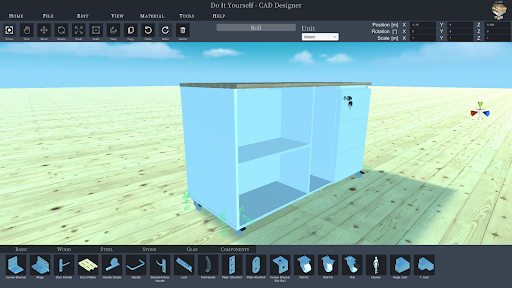
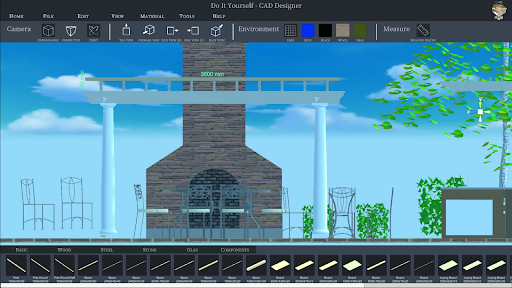
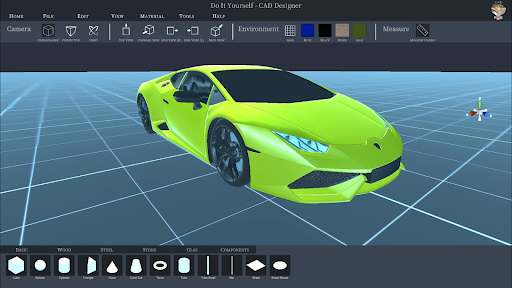


About DIY CAD Designer
The description on the store listing
Do you have an idea, would you like to do some handicrafts yourself? You are planning a project in your own home, maybe you want to build your own table, a porch or a cupboard? But are you still looking for suitable software to plan your project and draw it beforehand, preferably in 3D?
Then DIY CAD Designer is just right for you! Download DIY CAD Designer today and implement your project in a playful way.
DIY CAD Designer has numerous libraries so you can easily drag and drop wooden beams, boards, sheets, rods and much more into your 3D scene to construct your project.
You can also use the importer to import models from other programs to use in your project. With DIY CAD Designer you …
Read the full description
Do you have an idea, would you like to do some handicrafts yourself? You are planning a project in your own home, maybe you want to build your own table, a porch or a cupboard? But are you still looking for suitable software to plan your project and draw it beforehand, preferably in 3D? Then DIY CAD Designer is just right for you! Download DIY CAD Designer today and implement your project in a playful way. DIY CAD Designer has numerous libraries so you can easily drag and drop wooden beams, boards, sheets, rods and much more into your 3D scene to construct your project. You can also use the importer to import models from other programs to use in your project. With DIY CAD Designer you can import the following formats: - FBX - OBJ - GLTF2 - STL - PLY - 3MF Numerous libraries make your work easier. DIY CAD Designer contains the following component libraries: - Base - Wood - Metal - Glass - Stone - Components There are also numerous materials and colours that will help you to implement your planning realistically. You can change components quickly and easily with the editing functions. Rotate, scale, position or copy your components. Choose between imperial [ft] or metric [m] system of measurement. You can change your view at the push of a button, whether orthogonal or perspective, depending on the application. Fast viewing angles such as top view, front view or side view are also possible. With the 3D dimensioning system, you can very quickly read all the information you want from your construction. With the photo function, you can create and share high-resolution images of your project. So what are you waiting for? Download DIY CAD Designer now and take full advantage! I wish you lots of fun with DIY CAD Designer!!!
Installs, last 30 days Measured
Exact Google Play install counts, collected daily
Ratings
9,086 ratings, 358 reviews
- 5 ★58%
- 4 ★16%
- 3 ★5.9%
- 2 ★3.0%
- 1 ★17%
Recent reviews
Latest public reviews from the store
- 1 May 2026
i like this app
- 29 Mar 2026
Great app. easy to work with.
- 16 Mar 2026
best app for me when drawing
- 8 Feb 2026
its good
What reviewers bring up
Topics mentioned in the latest 50 reviews, by how many reviews mention them
Liked in good reviews (39 reviews)
- drawing 2
- wow 2
Raised in bad reviews (11 reviews)
- resize 3
- object 2
- off 2
- pay 2
Top chart positions
Latest Google Play chart ranks by country, last 10 days
Not in any tracked top chart in the last 10 days.
DIY CAD Designer history
Release, install milestones, listing and store changes
- Reached 1,000,000+ installs 2 Sep 2024
- Reached 500,000+ installs 19 Dec 2023
- Reached 100,000+ installs 4 May 2023
- Reached 10,000+ installs 19 Mar 2023
- Reached 1,000+ installs 5 Mar 2023
- Reached 500+ installs 19 Feb 2023
- Reached 100+ installs 7 Feb 2023
- Reached 50+ installs 6 Feb 2023
Update frequency
How often DIY CAD Designer ships a new version, month by month
2 updates in the last 12 months. About as often as similar apps, which shipped a median of 2 updates in the same year.
Recent versions
Current version 3.2
- Version 3.231 Aug 2026
• Added yearly subscription and lifetime purchase options • Improved compatibility with newer Android devices, including 16 KB memory page size support • General improvements and bug fixes
- Version 3.024 Jul 2026
- Version 2.89 Oct 2025
- Version 2.711 Sep 2025
Listing keywords
Words and phrases DIY CAD Designer repeats most in its store listing
Top phrases: diy cad designer (9), cad designer (9), diy cad (9), download diy cad (2), download diy (2).
Highlighted words also appear in the title. Counts cover the title, short description and description.
Business model and tech
From the store listing and declared permissions
- Business model
- Free to downloadIn-app purchasesShows ads
- Sensitive access
- No sensitive permission declared
Compliance
What the listing and the app package show
- Store status
- Live
- Upkeep
- Updated 31 Aug 2026
- Registered in
- Germany
- Privacy policy
- Linked on the listing
- Advertising
- Shows ads
- In-app purchases
- Offered
- Age rating
- Everyone
Apps like DIY CAD Designer
Smart Transfer - Copy My DataZamenPlay1.5M installs★ 3.91
MaxClean - Cleaner & ManagerIMPACTSOLTER9.7M installs★ 3.62
Hancom Office ViewerHancom Inc.20.6M installs★ 2.89
Positive Thinking Status PicsSendGroupSMS.com1.2M installs★ 4.86
Proton Drive: Cloud StorageProton AG1.8M installs★ 4.37
Recover Deleted Messages AppBattery Stats Saver4.7M installs★ 4.29
WiFi Finder: Hotspot MapInstabridge Sweden AB557K installs★ 4.36
WebCode - html, css, js ideALIF Technology2M installs★ 4.36
UNJSPF Digital CEUNICC58.4K installs★ 4.61
DIY CAD Designer: questions and answers
How many downloads does DIY CAD Designer have?
DIY CAD Designer has 1,548,094 installs on Google Play, measured from the store's own count on 19 Nov 2026.
Who makes DIY CAD Designer?
DIY CAD Designer is published by Sebastian Kemper, a developer based in DE.
When was DIY CAD Designer last updated?
The latest version (3.2) was released on 31 Aug 2026.
Is DIY CAD Designer free?
Yes. DIY CAD Designer is free to download and offers in-app purchases, and it shows ads.
Is DIY CAD Designer still available?
Yes. DIY CAD Designer is live on Google Play as of 19 Nov 2026.
Track DIY CAD Designer and its competitors
Watch any app for new versions, rating drops, chart moves and removals. Free plan, no card.