
Document Scanner & PDF Scanner
Camera Scanner & QR Code Scanner App, Scan Text files, Photos & Convert to PDF
- Installs
- 108K
- Measured
- Rating
- 4.4
- Ratings
- 343
- 3 reviews
- Version
- Varies with device
- Updated 2 Feb 2026
- Released
- 27 Feb 2022
- Tracked since 12 May 2026
- Size
- —
Screenshots





About Document Scanner & PDF Scanner
The description on the store listing
Are you looking for a camera scanner or scan to pdf converter?
This camera scanner could be the choice to stop you from searching it furthermore! This Smart scanner pdf converter can meet all your needs and can help you extract PDF’s of scanned copies anytime anywhere. Hurry up to get this scanner app!
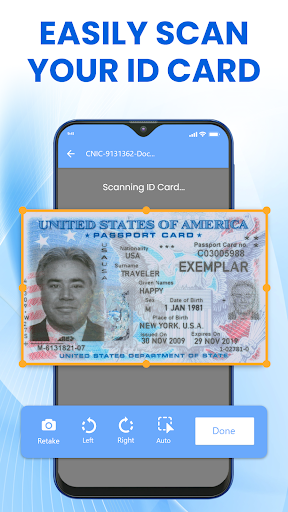
Camera Scanner - PDF document scanner app is a tool that helps you to scan documents anytime anywhere. Also, this DocScan is a smart scanner app that turns your phone camera into a PDF scanner or PDF maker. You can scan your photos and documents including ID card, reports, invoice, legal documents and can convert the scanned documents to pdf files.
Everything that you need you can …
Read the full description
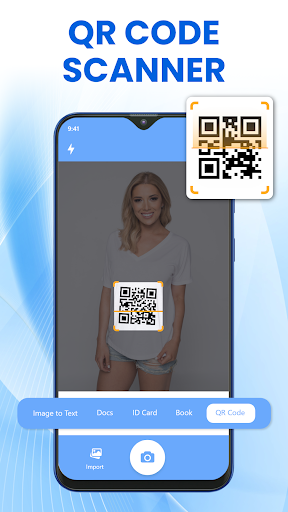
Are you looking for a camera scanner or scan to pdf converter? This camera scanner could be the choice to stop you from searching it furthermore! This Smart scanner pdf converter can meet all your needs and can help you extract PDF’s of scanned copies anytime anywhere. Hurry up to get this scanner app! Camera Scanner - PDF document scanner app is a tool that helps you to scan documents anytime anywhere. Also, this DocScan is a smart scanner app that turns your phone camera into a PDF scanner or PDF maker. You can scan your photos and documents including ID card, reports, invoice, legal documents and can convert the scanned documents to pdf files. Everything that you need you can scan to PDF, through this pdf scanner as this PDF camera scanner is useful for everyone around the world who has to deal with any type of physical or digital documents. Whether you are a businessman, student, employee, this all doc scanner application is must have for your phone. Moreover, this digital scanner makes your official work go smooth and clear. Now, you can save your time and money to be consumed using printing machines just download this doc scanner and compile your important documents by taping once. This all document scanner enables you to digitize any physical document by taking snapshots and converting to pdf. The flashlight feature helps you to scan documents in dim light by simply taking picture of them. Also, you can edit any scanned document, scanned Image or auto-crop image with smart cropping feature of convert to pdf tool. <b>Scan To PDF</b> Scan documents for free and convert to PDF with the comfort of your mobile phone. With camera scan, you can easily scan image to text, doc, Book, receipt QR code and CNIC to pdf. <b>Text Extract from images</b> Using this Image to text scanner, take a snapshot with the phone camera or select an image from the gallery and extract text from the image with (OCR). After the text extraction you can copy, share and save text file and can convert it into pdf. <b>Document Scanner – Document Viewer</b> In the doc scan module, take a photo from the camera, edit and enhance it adding watermark, digital signature then apply effects to the document and convert this scanned document into pdf file. Also, you can share this file online with anyone you want. <b>ID Card Scanner</b> Scan your ID cards, Passport, add watermark and signature on your CNIC and also convert to a pdf file. <b>QR code Scanner</b> The QR scanner is the most powerful tool in the camera scanner app that can scan barcodes & read QR codes easily. This QR code reader uses your phone camera to scan and recognize all types of codes.Also, it supports all types of QR code formats. <b>PDF Viewer</b> Pdf viewer and pdf scanner helps when you need to scan multiple documents, using your phone. Scan document with just one tap on a camera document scanner. This Pdf reader helps you read pdf files by zoom in /out function and you can also share pdf files with anyone. <b>PDF compressor</b> If you have less space in your phone minimize size of large pdf files with a pdf compressor in a single tap and free up space from your phone. <b>PDF Merger</b> Create and Merge different files in a single pdf file with just one tap. After merging, get the file saved in the saved files folder. You can merge five pdf files at a time. <b>Add Signature</b> Doc Scan tool allows you to add signature on pdf file by yourself or by importing signature from the gallery. Design a digital signature on various documents with your finger. <b>Key features of Camera scanner - Document Reader</b> • Quick and fast phone scanner • QR code scanner for all QR code formats • Merge, compress and add signature feature • Image text extractor • Unlimited Docx scans • Flash light feature to scan doc in low light • No internet Docx scanner • Scanned documents sharing option • Search document from recent files or all files folder
Installs since 29 Aug 2026 Measured
Exact Google Play install counts, collected daily
Ratings
343 ratings, 3 reviews
- 5 ★65%
- 4 ★25%
- 3 ★0.0%
- 2 ★5.0%
- 1 ★5.0%
Recent reviews
Latest public reviews from the store
No reviews in our sample for this app yet.
Top chart positions
Latest Google Play chart ranks by country, last 10 days
Not in any tracked top chart in the last 10 days.
Document Scanner & PDF Scanner history
Release, install milestones, listing and store changes
- Reached 100,000+ installs 25 Jul 2023
- Reached 50,000+ installs 6 Aug 2022
- Reached 10,000+ installs 2 Apr 2022
- Reached 1,000+ installs 8 Mar 2022
- Reached 500+ installs 3 Mar 2022
- First released on the store 27 Feb 2022
Update frequency
How often Document Scanner & PDF Scanner ships a new version, month by month
1 updates in the last 12 months. More often than most similar apps: they shipped a median of 0 updates in the same year.
Recent versions
Current version Varies with device
- Version 1.20.22 Feb 2026
- Version 1.20.116 Sep 2025
- Version 1.20.020 Jun 2025
- Version 1.19.94 Jun 2025
Listing keywords
Words and phrases Document Scanner & PDF Scanner repeats most in its store listing
Top phrases: camera scanner (7), qr code (7), document scanner (5), pdf files (5), convert to pdf (4).
Highlighted words also appear in the title. Counts cover the title, short description and description.
Business model and tech
From the store listing, the SDKs in the app package and its declared permissions
- Business model
- Free to downloadIn-app purchasesShows ads
- Built with
- No cross-platform framework or game engine detected
- Ad networks (1)
- AdMob
- Subscriptions and payments
- Google Play billing
- Analytics and crash reports
- Firebase
- Sensitive access
- CameraPhotos, videos and filesDraws over other appsAdvertising ID
2 ad, attribution and analytics SDKs detected. SDKs are read from the app package and permissions from the store listing, so code that loads later is not seen.
Technology
37 SDKs found in the app package
Ad networks
Advertising and install-attribution SDKs found in the app package
- AdMob
21 permissions
2 special access, 7 sensitive, 12 standard
- Draw over other appsSpecial access
- Manage all filesMANAGE_EXTERNAL_STORAGESpecial access
- Take photos and videosSensitive
- Change or delete shared storageSensitive
- Read photosREAD_MEDIA_IMAGESSensitive
- Read shared storageSensitive
- Read videosREAD_MEDIA_VIDEOSensitive
- Show notificationsPOST_NOTIFICATIONSSensitive
- Access USB storage filesystemSensitive
- Ad attribution (Privacy Sandbox)ACCESS_ADSERVICES_ATTRIBUTIONStandard
- Ad topics (Privacy Sandbox)ACCESS_ADSERVICES_TOPICSStandard
- Read how it was installed (install referrer)BIND_GET_INSTALL_REFERRER_SERVICEStandard
Compliance
What the listing and the app package show
- Store status
- Live
- Upkeep
- Updated 2 Feb 2026
- Registered in
- United States
- Privacy policy
- Linked on the listing
- Advertising
- Shows ads
- In-app purchases
- Offered
- Age rating
- Everyone
- Sensitive permissions
- 7 sensitive, 2 special access of 21
- Location access
- No
- Camera and microphone
- Camera
Apps like Document Scanner & PDF Scanner
Simple Progress TrackerQookie Games44.8K installs★ 3.68
VIP NotesOgroman3K installs★ 4.43
DevDuo IDE: AI Code EditorDevDuo Apps11K installs★ 4.21
iPro Habit Tracker - ProIntelliPro5.1K installs★ 4.0
Cash Calculator -Money CounterBibhu Man Rajbhandari123K installs★ 3.92
TimestripeTimestripe51.3K installs★ 3.44
AI Translator: Camera & VoiceIsaaclight AI88.5K installs★ 4.5
comlogMike Beyer11.8K installs★ 4.94
AutoApp For Pebblejoaomgcd32.5K installs★ 3.93
Document Scanner & PDF Scanner: questions and answers
How many downloads does Document Scanner & PDF Scanner have?
Document Scanner & PDF Scanner has 108,132 installs on Google Play, measured from the store's own count on 14 Nov 2026.
Who makes Document Scanner & PDF Scanner?
Document Scanner & PDF Scanner is published by Ninelogix Studio, a developer based in US.
When was Document Scanner & PDF Scanner last updated?
The latest version (Varies with device) was released on 2 Feb 2026.
Is Document Scanner & PDF Scanner free?
Yes. Document Scanner & PDF Scanner is free to download and offers in-app purchases, and it shows ads.
Is Document Scanner & PDF Scanner still available?
Yes. Document Scanner & PDF Scanner is live on Google Play as of 14 Nov 2026.
Track Document Scanner & PDF Scanner and its competitors
Watch any app for new versions, rating drops, chart moves and removals. Free plan, no card.