
EasyJoin: SMS from PC & Sync
SMS from computer, share files & sync clipboard. For Android, PC, Mac & iPhone.
- Installs
- 14.97K
- Measured
- Rating
- 4.36
- Ratings
- 325
- 35 reviews
- Version
- EasyJoin Pro 4.5.1
- Updated 7 Aug 2026
- Released
- 26 Feb 2018
- Tracked since 13 May 2026
- Size
- 5 MB
- Needs 4.0
Screenshots



About EasyJoin: SMS from PC & Sync
The description on the store listing
The ultimate private alternative for a seamless cross-platform experience that doesn't require a monthly subscription.
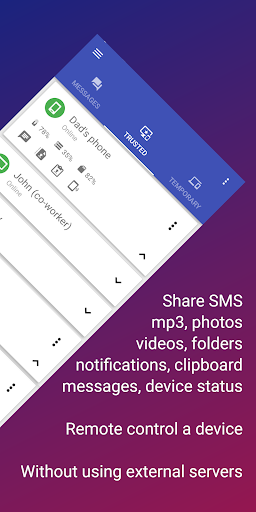
EasyJoin is a powerful WiFi file transfer and remote control app that connects all your devices—Android, Windows, Linux, Mac, and iOS. Unlike other tools, it creates a direct connection between your devices with no cloud, no tracking, and no monthly fees.
Manage your communication across all your desktop environments.
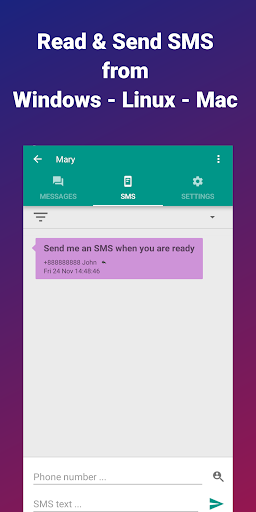
EasyJoin is the top-rated way to send SMS from computer:
• SMS from PC: Read and reply to text messages on your laptop.
• MMS Support: Send group texts from your desktop.
• Sync Notifications: View phone alerts on Windows, Linux, and macOS.
True …
Read the full description
The ultimate private alternative for a seamless cross-platform experience that doesn't require a monthly subscription. EasyJoin is a powerful WiFi file transfer and remote control app that connects all your devices—Android, Windows, Linux, Mac, and iOS. Unlike other tools, it creates a direct connection between your devices with no cloud, no tracking, and no monthly fees. Manage your communication across all your desktop environments. EasyJoin is the top-rated way to send SMS from computer: • SMS from PC: Read and reply to text messages on your laptop. • MMS Support: Send group texts from your desktop. • Sync Notifications: View phone alerts on Windows, Linux, and macOS. True Cross-Platform File Sharing Move data at the speed of your local network—no internet required. We offer dedicated apps for a total link to PC experience: • Multi-OS Support: Native apps for Windows, macOS, and Linux. • iPhone & iPad Support: Use our iOS apps to send and receive files between your Android and Apple devices. • Shared Clipboard: Copy text on your Android phone and paste it instantly on your Mac, PC, or iPhone. Privacy-First Why trust your private data to a cloud server? Unlike other popular synchronization tools, EasyJoin is built on a "Local-First" architecture. • No Cloud, No Risk: Most sync apps upload your SMS history and files to their servers. EasyJoin keeps everything on your local network. If it's not on an external server, it can't be leaked. • Zero-Knowledge Architecture: No accounts, no email sign-ups, and no logins. We don't track your usage because we don't even know who you are. • End-to-End Encryption: Every WiFi file transfer is secured. Advanced Remote Control & Automation More than just a file sharing app, EasyJoin gives you total control: • Remote Media: Control PC volume from your phone. • Remote Power: Shut down your PC remotely. Whether you need a private file transfer tool for your iPhone, an SMS from computer app for Windows or Mac, or a way to sync clipboard data on Linux, EasyJoin is the best-performing solution. Better than the "Big" Apps: • Optimized for Battery Life: No Ads, No Drain. Most "free" apps aren't actually free—they pay for themselves by draining your battery. Advertising modules can consume up to 75% of an app's total energy usage by constantly pinging GPS for location and using data to fetch banners. • One-Time Payment: Stop the "subscription fatigue." Own your software. • No Accounts: No sign-up required. Just connect and go. Connecting your ecosystem is simple and requires no accounts or cloud configuration. Step 1: Install & Connect • Install EasyJoin on your Android, Windows, macOS, or Linux device. • Download the iPhone or iPad app from the App Store to include your Apple devices. • Ensure all devices are on the same WiFi, Ethernet, or Hotspot network. Step 2: Pair & Trust • Open the app on both devices. They will automatically discover each other in the "Temporary" list. • Select your device and click the "Star" (Trust) icon. • That’s it! You can now send files, sync clipboards, and manage SMS from your PC. Pro-Tips for Power Users: • No WiFi? No Problem: Use your phone’s Portable Hotspot to create a private network. EasyJoin will work perfectly for offline file transfers. • Linux Users: EasyJoin supports major distributions. Follow the simple script on our website for a seamless Linux to Android link. • Firewall Setup: If devices don't see each other, ensure your Windows/Linux firewall isn't blocking local traffic. EasyJoin uses a direct P2P connection for maximum privacy. • VPN Note: If using a VPN, ensure "Local Network Discovery" is enabled in your VPN settings to allow the devices to communicate. Support & Feedback We’re here to help! If you have questions, suggestions, or feedback, contact us anytime: [email protected] Discover EasyJoin at https://easyjoin.net. This application uses Accessibility services to copy/paste text to editable text fields from private clipboard.
Installs since 28 Aug 2026 Measured
Exact Google Play install counts, collected daily
Ratings
325 ratings, 35 reviews
- 5 ★75%
- 4 ★11%
- 3 ★1.3%
- 2 ★4.4%
- 1 ★9.1%
Recent reviews
Latest public reviews from the store
- 15 May 2026
it needs optimization no reason to be that slow to connect to the bike it takes more then a minute I have places to be
- 17 Mar 2026
still need to work on some kinks. like the one issue I have when driving with the app is. when u deviate from the route it doesn't automatically update where u are. u have to go in the app again then it updates which cause me to stop while on a trip just so I can see where I need to go .
- 16 May 2023
Recently the app, already allow to connect in screen mirror my android smartphone, but this connection, only is stablished during 5 minutes and the is disconnect. Plase, verify this incident ASAP. Because is impossible use your application of this way. I Already fixed hte configuration app and now works correctly.!!!!!!
What reviewers bring up
Topics mentioned in the latest 10 reviews, by how many reviews mention them
Liked in good reviews (1 reviews)
No topic comes up twice.
Raised in bad reviews (7 reviews)
- bike 5
- navigation 4
- connection 3
- mirroring 3
- subscription 2
- friendly 2
- purchase 2
- display 2
Top chart positions
Latest Google Play chart ranks by country, last 10 days
Not in any tracked top chart in the last 10 days.
EasyJoin: SMS from PC & Sync history
Release, install milestones, listing and store changes
- Moved from Communication to Productivity 25 Jan 2022
- First released on the store 26 Feb 2018
Update frequency
How often EasyJoin: SMS from PC & Sync ships a new version, month by month
3 updates in the last 12 months. More often than most similar apps: they shipped a median of 2 updates in the same year.
Recent versions
Current version EasyJoin Pro 4.5.1
- Version EasyJoin Pro 4.5.17 Aug 2026
Improvements to private clipboard functionality: - You can move the popup by tapping the title (EJClip) and dragging the window. - The popup now triggers more reliably when you type in or long-click an edit text field. - Long-click a text clip in the popup to copy it to the system clipboard. - Bug fixes and minor improvements. If you need help with the app contact me at [email protected].
- Version EasyJoin Pro 4.4.710 Jun 2026
- Fixed an issue that could prevent file sharing from a third-party app. - Bug fixes and minor improvements. If you need help with the app contact me at [email protected].
- Version EasyJoin Pro 4.4.66 Jan 2026
- Fixed an issue affecting the display of the text edit field when the virtual keyboard is displayed. - Bug fixes and minor improvements. If you need help with the app contact me at [email protected].
- Version EasyJoin21 Apr 2021
Listing keywords
Words and phrases EasyJoin: SMS from PC & Sync repeats most in its store listing
Top phrases: sms from computer (3), file transfer (3), local network (3), windows linux (3), sms from pc (2).
Highlighted words also appear in the title. Counts cover the title, short description and description.
Business model and tech
From the store listing, the SDKs in the app package and its declared permissions
- Business model
- Paid, $18.99
- Built with
- No cross-platform framework or game engine detected
- Ad networks (0)
- None detected
- Sensitive access
- LocationMicrophoneContactsPhone and callsText messagesPhotos, videos and filesNearby devicesDraws over other apps
0 ad, attribution and analytics SDKs detected. SDKs are read from the app package and permissions from the store listing, so code that loads later is not seen.
Technology
23 SDKs found in the app package
30 permissions
4 special access, 12 sensitive, 14 standard
- Change Do Not DisturbACCESS_NOTIFICATION_POLICYSpecial access
- Draw over other appsSpecial access
- Install other appsREQUEST_INSTALL_PACKAGESSpecial access
- Manage all filesMANAGE_EXTERNAL_STORAGESpecial access
- Record audioSensitive
- Read contactsSensitive
- Change or delete shared storageSensitive
- Read shared storageSensitive
- Approximate locationSensitive
- Show notificationsPOST_NOTIFICATIONSSensitive
- Answer phone callsANSWER_PHONE_CALLSSensitive
- Call phone numbersSensitive
Compliance
What the listing and the app package show
- Store status
- Live
- Upkeep
- Updated 7 Aug 2026
- Privacy policy
- Linked on the listing
- Advertising
- No ads declared
- In-app purchases
- None declared
- Age rating
- Everyone
- Sensitive permissions
- 12 sensitive, 4 special access of 30
- Location access
- Yes, while in use
- Camera and microphone
- Microphone
Apps like EasyJoin: SMS from PC & Sync
Grackle AI: Now with Gen 4 xAINightly Nexus120K installs★ 2.24
RikkaHubREOVO39.4K installs★ 4.71
PanoptoPanopto243K installs★ 2.02
iPro Habit Tracker - ProIntelliPro5.1K installs★ 4.0
VIP NotesOgroman3.1K installs★ 4.43
AI Translator: Camera & VoiceIsaaclight AI88.8K installs★ 4.5
AutoApp For Pebblejoaomgcd32.5K installs★ 4.15
DAILY STAMP - My own routineyjteam33.3K installs★ 4.65
Linas MatkasseCheffelo75.2K installs★ 1.7
EasyJoin: SMS from PC & Sync: questions and answers
How many downloads does EasyJoin: SMS from PC & Sync have?
EasyJoin: SMS from PC & Sync has 14,969 installs on Google Play, measured from the store's own count on 21 Nov 2026.
Who makes EasyJoin: SMS from PC & Sync?
EasyJoin: SMS from PC & Sync is published by EasyJoin.
When was EasyJoin: SMS from PC & Sync last updated?
The latest version (EasyJoin Pro 4.5.1) was released on 7 Aug 2026.
Is EasyJoin: SMS from PC & Sync free?
No. EasyJoin: SMS from PC & Sync is a paid app priced at $18.99.
Is EasyJoin: SMS from PC & Sync still available?
Yes. EasyJoin: SMS from PC & Sync is live on Google Play as of 21 Nov 2026.
Track EasyJoin: SMS from PC & Sync and its competitors
Watch any app for new versions, rating drops, chart moves and removals. Free plan, no card.