
Ebook Converter
Convert your file (EPUB, FB2, MOBI, PDF, DOC and other) to EPUB, PDF, MOBI...
- Installs
- 1.57M
- Measured
- Rating
- 2.82
- Ratings
- 13.7K
- 569 reviews
- Version
- Varies with device
- Updated 27 Sep 2024
- Released
- 21 Jan 2015
- Tracked since 11 May 2026
- Size
- 5 MB
- Needs 4.0.3
Also on App Store: Ebook Converter (136 ratings), Ebook Converter (346 ratings)
Screenshots

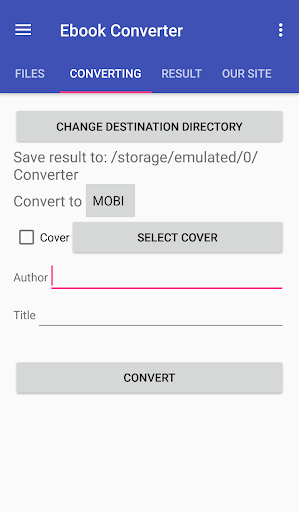


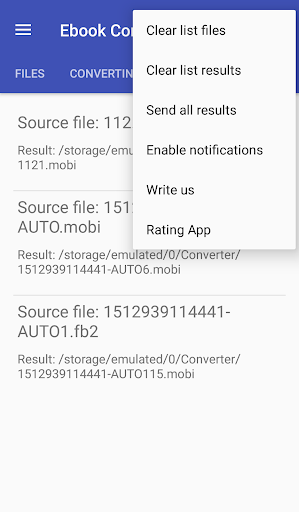


About Ebook Converter
The description on the store listing
Convert documents to eBook format (FB2, AZW3, LRF, TCR, SNB, RB, PML, PDB, OEB, MOBI, LIT, EPUB).
Simply select the files which you want to convert and click “Convert”.
After conversion, you can use eBook on your device or share it, for instance, send MOBI to Kindle by email.
We are constantly developing our app and pay attention to your wishes. Therefore, if you have any comments or suggestions — write to us, we will try to implement them (if possible).
For instance, we implemented such functions as:
1. Change the book author and title.
2. Change cover.
3. Send results at once.
4. SD card support.
In the free version, we have limited the number of files that can be used …
Read the full description
Convert documents to eBook format (FB2, AZW3, LRF, TCR, SNB, RB, PML, PDB, OEB, MOBI, LIT, EPUB). Simply select the files which you want to convert and click “Convert”. After conversion, you can use eBook on your device or share it, for instance, send MOBI to Kindle by email. We are constantly developing our app and pay attention to your wishes. Therefore, if you have any comments or suggestions — write to us, we will try to implement them (if possible). For instance, we implemented such functions as: 1. Change the book author and title. 2. Change cover. 3. Send results at once. 4. SD card support. In the free version, we have limited the number of files that can be used at once and the size of each file. We hope that you will appreciate our work and will be able to support us if you need our application. You can use our eBook converter for such tasks: * DOC to FB2 converter * EPUB to MOBI converter * EPUB to PDF converter * MOBI to EPUB converter * and more. Or convert from one format to another: * convert PDF to EPUB * convert PDF to MOBI * convert EPUB to MOBI * convert TXT to EPUB * convert CBR to PDF, CBZ to PDF * and more. Briefly about conversion: *. Our server is where the conversion takes place. Therefore, your files will be downloaded to the server via the Internet. Accordingly, the application will not work if there is no internet. *. The server will perform the conversion using Calibre. *. The result will be downloaded automatically to your device in the specified folder. *. The original file will be deleted at the end of the conversion, the result will be deleted after 1 hour. We do not use your files in any way. The Electronic Book Converter will help you to convert your (DOC, DOCX, PDF) documents or (FB2, EPUB, LIT, etc.) ebooks to formats supported by Kindle (TXT, PDF, AZW, MOBI): EPUB to MOBI, EPUB to PDF, PDF to MOBI, DOC to MOBI, EPUB to AZW. You can convert almost any book format into one of the most common EPUB (Electronic PUBlishing) formats. We support conversions such as: PDF to EPUB, MOBI to EPUB, FB2 to EPUB, AZW3 to EPUB, DOC to EPUB, lit to EPUB, TXT to EPUB. You can also convert your documents to FB2 format, for example: PDF to FB2, DOCX to FB2, DOC to FB2. The resulting ebook's file can be larger than the original file, as well as not meet your expectations. If you are not happy with the conversion result, please contact us. We will try to communicate your feedback to the Calibre developers. If you have a PDF consisting of images — then both us and Calibre developers do not recommend converting it to any ebook format. Small FAQ: I can't convert images, I keep getting an error, what should I do? Write to us, we will try to sort out this situation. How many files can I convert at the same time? In the free version, you can convert 5 files at a time. By paying a subscription - you can convert an unlimited number of files at a time. What is the maximum size of a converted file? The free version has a maximum file size of 20 MB. By paying a subscription - the maximum file size is 1 GB.
Installs, last 30 days Measured
Exact Google Play install counts, collected daily
Ratings
13,743 ratings, 569 reviews
- 5 ★37%
- 4 ★10.0%
- 3 ★0.9%
- 2 ★2.9%
- 1 ★49%
Recent reviews
Latest public reviews from the store
- 20 Apr 2026
Did exactly what it said it would.
- 19 Apr 2026
very good app
- 17 Apr 2026
an essential app for anyone.
- 7 Apr 2026
amezing app
What reviewers bring up
Topics mentioned in the latest 50 reviews, by how many reviews mention them
Liked in good reviews (17 reviews)
- ebook converter 2
- exactly 2
Raised in bad reviews (31 reviews)
- ads 8
- convert 6
- file 6
- server 4
- broken 4
- connection 3
- error 3
- description 2
Top chart positions
Latest Google Play chart ranks by country, last 10 days
Not in any tracked top chart in the last 10 days.
Ebook Converter history
Release, install milestones, listing and store changes
- Reached 1,000,000+ installs 17 Oct 2021
- Reached 500,000+ installs 8 Nov 2019
- Reached 100,000+ installs 29 Oct 2017
- Reached 50,000+ installs 24 Apr 2017
- Moved from Books & Reference to Tools 3 Jun 2016
- Reached 10,000+ installs 10 Jan 2016
- Reached 5,000+ installs 7 Aug 2015
- Reached 1,000+ installs 8 Mar 2015
Recent versions
Current version Varies with device
- Version 1.16.427 Sep 2024
- Version 1.15.91 Jul 2023
- Version 1.13.115 May 2019
- Version 1.1328 Apr 2019
Listing keywords
Words and phrases Ebook Converter repeats most in its store listing
Top phrases: epub to mobi (3), mobi epub (3), doc to fb2 (2), epub to pdf (2), maximum file size (2).
Highlighted words also appear in the title. Counts cover the title, short description and description.
Business model and tech
From the store listing and declared permissions
- Business model
- Free to downloadIn-app purchasesShows ads
- Sensitive access
- No sensitive permission declared
Compliance
What the listing and the app package show
- Store status
- Live
- Upkeep
- No update since 27 Sep 2024
- Registered in
- Poland
- Privacy policy
- Linked on the listing
- Advertising
- Shows ads
- In-app purchases
- Offered
- Age rating
- Everyone
Apps like Ebook Converter
Light Flow Pro - LED Controlandrewpmoore341K installs★ 3.11
Vault, App Lock: Security PlusKewlApps3M installs★ 4.39
One Hand Operation +Samsung Electronics Co., Ltd.4M installs★ 4.26
- Access Dots - Android 12/iOS 14 privacy indicatorsIJP2.7M installs★ 4.05
- Tweet2gifNaevtamarkus904K installs★ 2.73
Micro Qibla (old)muscat.dev1.7M installs★ 4.65
Manic Emulator - GBA RetroCoolDev Co Ltd1.3M installs★ 4.23
Smart FlashlightSmart Tools co.1.6M installs★ 4.49
QR Scanner2kit consulting504K installs★ 4.36
Ebook Converter: questions and answers
How many downloads does Ebook Converter have?
Ebook Converter has 1,568,974 installs on Google Play, measured from the store's own count on 21 Nov 2026.
Who makes Ebook Converter?
Ebook Converter is published by fCoder Solutions, a developer based in PL.
When was Ebook Converter last updated?
The latest version (Varies with device) was released on 27 Sep 2024.
Is Ebook Converter free?
Yes. Ebook Converter is free to download and offers in-app purchases, and it shows ads.
Is Ebook Converter still available?
Yes. Ebook Converter is live on Google Play as of 21 Nov 2026.
Track Ebook Converter and its competitors
Watch any app for new versions, rating drops, chart moves and removals. Free plan, no card.