
PrintVisor: Remote Print
Print your PDF files to any printer, from anywhere.
- Installs
- 647
- Measured
- Rating
- —
- Ratings
- —
- Version
- Varies with device
- Released
- 21 Feb 2024
- Tracked since 12 May 2026
- Size
- —
Screenshots


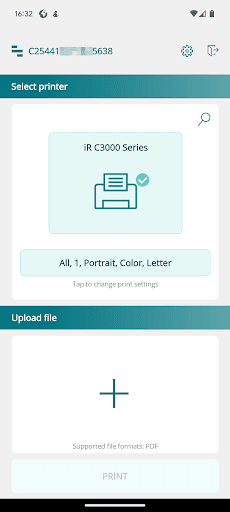


About PrintVisor: Remote Print
The description on the store listing
Print your PDF files to any printer, from anywhere.
PrintVisor: Remote Print is a free companion app that enables you to print PDF documents directly to any selected printer. You can easily print your PDFs from your smartphone or tablet, even if you are far away from the printer.
Note: This is the PrintVisor companion app. To log in and use it, you must have PrintVisor installed.
What makes this app different from other mobile printing apps? It allows you to print to older and simpler printer models that only have a wired local connection (USB, DOT4), without the support for a network connection.
[ Main Features ]
• Main feature: Print PDF documents remotely from any Android™ …
Read the full description
Print your PDF files to any printer, from anywhere. PrintVisor: Remote Print is a free companion app that enables you to print PDF documents directly to any selected printer. You can easily print your PDFs from your smartphone or tablet, even if you are far away from the printer. Note: This is the PrintVisor companion app. To log in and use it, you must have PrintVisor installed. What makes this app different from other mobile printing apps? It allows you to print to older and simpler printer models that only have a wired local connection (USB, DOT4), without the support for a network connection. [ Main Features ] • Main feature: Print PDF documents remotely from any Android™ device. • Print from anywhere in the world: Whether your printer is right next to you or in another country. • Easy-to-use and intuitive interface: Mobile printing made simple. • Supported file format: PDF. We plan to add more file formats in the future. • Dark & light theme: Customize the app's appearance to your preference. • Print settings: Select page range, number of copies, page orientation, paper size, and color mode. [ How it Works ] The application is straightforward and simple. Follow these steps: 1. Select a printer. 2. Upload a file. 3. Check the print settings. 4. Press Print. After clicking the Print button, the file will be sent to the server and then to the computer that is connected to the selected printer. The computer that has access to the printer must be turned on and connected to the PrintVisor Company Profile. You can find instructions on how to link your PC to the Company Profile on the PrintVisor website: https://www.printvisor.com/help-center/quick-start-guide#step-3. [ Requirements ] For the Remote Print app to work, the mobile device must have an Internet connection and the computer with PrintVisor installed must be turned on. However, the printer does not require a network connection, and your smartphone does not need to be on the same network as the printer or the computer. [ Additional Information ] • Our mobile printing app is compliant with GDPR regulations. We do not collect any personal data and we are dedicated to protecting our users' information. • If you encounter any issues, please contact us by sending a message to https://www.printvisor.com/contact. [ About PrintVisor ] PrintVisor is a Windows application that monitors printer statuses, tracks printer usage by employees, and provides print-related statistics. It offers a simple solution for real-time monitoring of ink/toner levels and logging recent print jobs throughout the entire organization. The program displays the statuses of all printing devices, including local and network printers that can be located anywhere. Monitoring can be done through the desktop app and/or a web dashboard. With PrintVisor, you'll always know when ink or toner is running low. Would you like to set up centralized monitoring of all printers in your company or organization? We encourage you to try the trial version of PrintVisor. If you have any questions or inquiries, you are welcome to reach us at https://www.printvisor.com/contact. Learn more: https://www.printvisor.com
Installs since 26 Aug 2026 Measured
Exact Google Play install counts, collected daily
Ratings
- 5 ★0.0%
- 4 ★0.0%
- 3 ★0.0%
- 2 ★0.0%
- 1 ★0.0%
Recent reviews
Latest public reviews from the store
- 16 Oct 2022
Good
- 20 Jan 2022
The best app ever
- 27 Jun 2021
Thanks heaps for all the hard work on this app and facilitating access to these dhamma content. I found the "Sadaham roo" section especially helpful. May the merit of this good dead be with you and may all your good wishes be fruitful. Theruwan saranai.
- 27 Jun 2021
Very useful app
What reviewers bring up
Topics mentioned in the latest 18 reviews, by how many reviews mention them
Liked in good reviews (18 reviews)
- theruwan saranai 3
- user friendly 2
- meditation 2
- bringing 2
- helpful 2
- useful 2
- සරණය 2
Raised in bad reviews (0 reviews)
No topic comes up twice.
Top chart positions
Latest Google Play chart ranks by country, last 10 days
Not in any tracked top chart in the last 10 days.
PrintVisor: Remote Print history
Release, install milestones, listing and store changes
- First released on the store 21 Feb 2024
Listing keywords
Words and phrases PrintVisor: Remote Print repeats most in its store listing
Top phrases: mobile printing (3), remote print (3), must be turned (2), print pdf documents (2), print your pdf (2).
Highlighted words also appear in the title. Counts cover the title, short description and description.
Business model and tech
From the store listing and declared permissions
- Business model
- Free to download
- Sensitive access
- No sensitive permission declared
Compliance
What the listing and the app package show
- Store status
- Live
- Registered in
- Poland
- Privacy policy
- Linked on the listing
- Advertising
- No ads declared
- In-app purchases
- None declared
- Age rating
- Everyone
Apps like PrintVisor: Remote Print
들어서 화면켜기Won3.5K installs★ 4.0
Height PredictionEcliptic App Ventures45.9K installs★ 2.4
Speicers`Pro VPNEldiablolucifer202021.2K installs★ 4.14
Lightning Tracker with AlertsYaksh Software4.3K installs★ 3.0
Mana Pathi (Unit Converter)Shirish Koirala2.2K installs★ 4.6
Multi-tab Calc - A simple app.Naoyuki Rikiji1.3K installs★ 5.0
Just Silence. Scheduled.Akid Soft1.6K installs★ 5.0
- WoWp AssistantВиталий Робиновский2K installs★ 4.2
LINKa: напишиLINKa7.9K installs★ 4.4
PrintVisor: Remote Print: questions and answers
How many downloads does PrintVisor: Remote Print have?
PrintVisor: Remote Print has 647 installs on Google Play, measured from the store's own count on 18 Nov 2026.
Who makes PrintVisor: Remote Print?
PrintVisor: Remote Print is published by fCoder Solutions, a developer based in PL.
Is PrintVisor: Remote Print free?
Yes. PrintVisor: Remote Print is free to download.
Is PrintVisor: Remote Print still available?
Yes. PrintVisor: Remote Print is live on Google Play as of 18 Nov 2026.
Track PrintVisor: Remote Print and its competitors
Watch any app for new versions, rating drops, chart moves and removals. Free plan, no card.