Epson iProjection
Epson iProjection is a wireless projection app for Android devices & Chromebooks
- Installs
- 6.72M
- Measured
- Rating
- 4.21
- Ratings
- 18.5K
- 271 reviews
- Version
- 4.2.0
- Updated 21 Oct 2025
- Released
- 11 Jul 2012
- Tracked since 12 May 2026
- Size
- —
Also on App Store: Epson iProjection (3.2K ratings)
Screenshots



About Epson iProjection
The description on the store listing
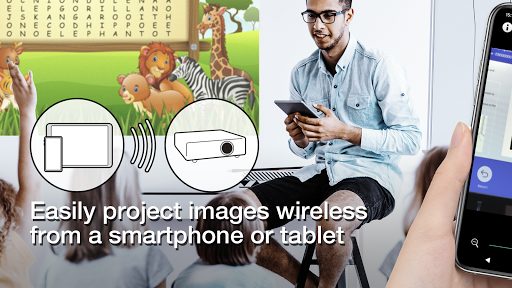
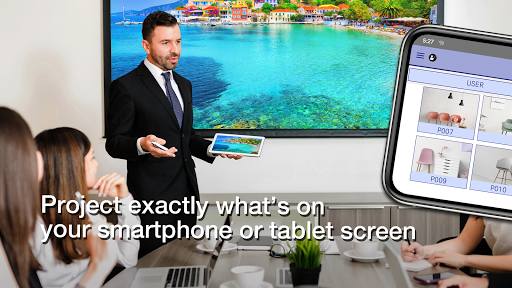
Epson iProjection is a wireless projection app for Android devices & Chromebooks. This app makes it easy to mirror your device's screen and project PDF files and photos wirelessly to a supported Epson projector.
[Key Features]
1. Mirror your device’s screen and output your device’s audio from the projector.
2. Project photos and PDF files from your device, as well as real-time video from your device's camera.
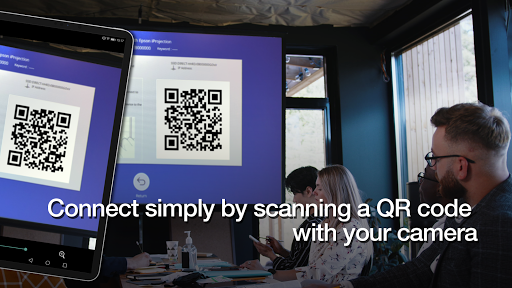
3. Easily connect your device by scanning a projected QR code.
4. Connect up to 50 devices to the projector, display up to four screens simultaneously, and share your projected image with the other connected devices.
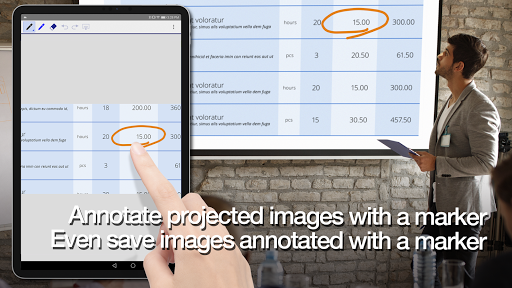
5. Annotate projected images with a pen tool and save the …
Read the full description
Epson iProjection is a wireless projection app for Android devices & Chromebooks. This app makes it easy to mirror your device's screen and project PDF files and photos wirelessly to a supported Epson projector. [Key Features] 1. Mirror your device’s screen and output your device’s audio from the projector. 2. Project photos and PDF files from your device, as well as real-time video from your device's camera. 3. Easily connect your device by scanning a projected QR code. 4. Connect up to 50 devices to the projector, display up to four screens simultaneously, and share your projected image with the other connected devices. 5. Annotate projected images with a pen tool and save the edited images on your device. 6. Control the projector like a remote control. [Notes] • For supported projectors, visit https://support.epson.net/projector_appinfo/iprojection/en/ . You can also check "Supported Projectors" in the app's support menu. • The JPG/JPEG/PNG/PDF file types are supported when projecting using "Photos" and "PDF". • Connecting using a QR code is not supported for Chromebooks. [About the Mirroring Feature] • The Chrome extension “Epson iProjection Extension” is required to mirror your device screen on Chromebook. Install it from the Chrome Web Store. https://chromewebstore.google.com/detail/epson-iprojection-extensi/odgomjlphohbhdniakcbaapgacpadaao • While mirroring your device’s screen, video and audio may be delayed depending on the device and network specifications. Only unprotected content can be projected. [Using the App] Make sure that the network settings for the projector have been completed. 1. Switch the input source on the projector to "LAN". Network information is displayed. 2. Connect to the same network as the projector from "Settings" > "Wi-Fi" on your Android device or Chromebook*1. 3. Start Epson iProjection and connect to the projector*2. 4. Select and project from "Mirror device screen", "Photos", "PDF", "Web Page", or "Camera". *1 For Chromebooks, connect the projector using the infrastructure mode (Simple AP is turned off or Advanced connection mode). Also, if a DHCP server is being used on the network and the Chromebook's IP address is set to manual, the projector cannot be searched for automatically. Set the Chromebook's IP address to automatic. *2 If you cannot find the projector you want to connect to using automatic search, select IP Address to specify the IP address. [App permissions] The app requires the following permissions for specific features. 【Optional】 Camera - Scan a connection QR code or project the camera image to the projector. 【Optional】 Recording - Transfer device audio to the projector during mirroring 【Optional】 Display over other apps - Display this app's screen in the foreground on the device during mirroring. 【Optional】 Notifications (Android 13 or later only) - Display notifications indicating that a connection or mirroring is in progress. * You can use the app without granting the optional permissions, but some features may not work. We welcome any feedback you have that could help us to improve this app. You can contact us through "Developer contact". Please note that we cannot reply to individual inquiries. For inquiries regarding personal information, please contact your regional branch described in the Privacy Statement. All images are examples and may differ from the actual screens. Android and Chromebook are trademarks of Google LLC. QR Code is a registered trademark of DENSO WAVE INCORPORATED in Japan and other countries.
Installs, last 30 days Measured
Exact Google Play install counts, collected daily
Ratings
18,478 ratings, 271 reviews
- 5 ★67%
- 4 ★9.0%
- 3 ★5.0%
- 2 ★2.9%
- 1 ★16%
Recent reviews
Latest public reviews from the store
- 12 Oct 2025
Good
Top chart positions
Latest Google Play chart ranks by country, last 10 days
Not in any tracked top chart in the last 10 days.
Epson iProjection history
Release, install milestones, listing and store changes
- Reached 5,000,000+ installs 11 Jul 2024
- Reached 1,000,000+ installs 22 Sep 2017
- Reached 100,000+ installs 15 Apr 2014
- Reached 50,000+ installs 16 Sep 2013
- Reached 10,000+ installs 25 Oct 2012
- Reached 5,000+ installs 12 Sep 2012
- Reached 1,000+ installs 23 Jul 2012
- Reached 500+ installs 18 Jul 2012
Update frequency
How often Epson iProjection ships a new version, month by month
0 updates in the last 12 months. Less often than most similar apps: they shipped a median of 4 updates in the same year.
Recent versions
Current version 4.2.0
- Version 4.2.021 Oct 2025
- Added support for French, German, Traditional Chinese, and Arabic. - Improved mirroring performance on Chromebook.
- Version 4.0.531 May 2024
- Version 4.0.327 Feb 2024
- Version 4.0.215 Nov 2023
Listing keywords
Words and phrases Epson iProjection repeats most in its store listing
Top phrases: epson iprojection (5), ip address (4), qr code (4), android devices chromebooks (2), chromebook's ip address (2).
Highlighted words also appear in the title. Counts cover the title, short description and description.
Business model and tech
From the store listing, the SDKs in the app package and its declared permissions
- Business model
- Free to download
- Built with
- No cross-platform framework or game engine detected
- Ad networks (0)
- None detected
- Analytics and crash reports
- Firebase
- Sensitive access
- No sensitive permission declared
1 ad, attribution and analytics SDKs detected. SDKs are read from the app package and permissions from the store listing, so code that loads later is not seen.
Technology
30 SDKs found in the app package
Compliance
What the listing and the app package show
- Store status
- Live
- Upkeep
- Updated 21 Oct 2025
- Privacy policy
- Linked on the listing
- Advertising
- No ads declared
- In-app purchases
- None declared
- Age rating
- Everyone
Apps like Epson iProjection
SimplenoteAutomattic, Inc1.9M installs★ 3.64
Thakur Prasad Calendar 2026Inditech bird2.1M installs★ 4.43
SGWorkPassMinistry of Manpower3.7M installs★ 3.93
BlockerHero - Porn BlockerTechsolvex1.6M installs★ 3.67
instdownfawazapp4.1M installs★ 4.3
NW PublisherNew World Publisher2.1M installs★ 4.74
CV & Resume CreatorDesygner Pty Ltd1.7M installs★ 4.65
identity onlineIDnow GmbH (iTM)1.4M installs★ 3.89
Collabora OfficeCollabora Productivity Limited1.6M installs★ 3.62
Epson iProjection: questions and answers
How many downloads does Epson iProjection have?
Epson iProjection has 6,724,329 installs on Google Play, measured from the store's own count on 19 Nov 2026.
Who makes Epson iProjection?
Epson iProjection is published by Seiko Epson Corporation.
When was Epson iProjection last updated?
The latest version (4.2.0) was released on 21 Oct 2025.
Is Epson iProjection free?
Yes. Epson iProjection is free to download.
Is Epson iProjection still available?
Yes. Epson iProjection is live on Google Play as of 19 Nov 2026.
Track Epson iProjection and its competitors
Watch any app for new versions, rating drops, chart moves and removals. Free plan, no card.