
eZy Edit: Batch Photo Editor
Edit multiple images at once & create templates only once to use at any time.
- Installs
- 1.43K
- Measured
- Rating
- 3.33
- Ratings
- 15
- 3 reviews
- Version
- Varies with device
- Updated 4 Apr 2026
- Released
- 12 Jun 2024
- Tracked since 13 May 2026
- Size
- —
Also on App Store: eZy Edit: Batch Photo Editor (2 ratings)
Screenshots




About eZy Edit: Batch Photo Editor
The description on the store listing
eZy Edit provides a great way to edit single and multiple images in one go! All you have to do is select photos from your gallery and start editing them right away.
Here are some of the most prominent features of our app:
- Image Editing Options:
With eZy Edit, you can efficiently edit multiple images at once. The app offers a variety of tools and functions, including:
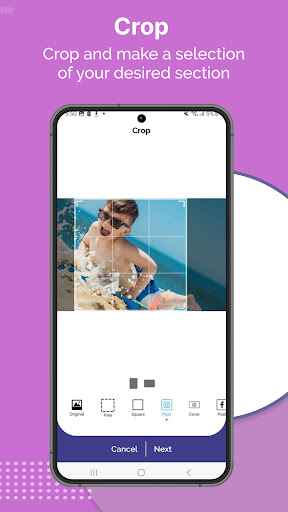
Crop: Trim your photos to remove unwanted edges or focus on specific areas.
Rotate: Adjust the orientation of your images with ease.
Flip: Mirror your photos horizontally or vertically.
Apply Effects: Enhance your images with various effects to improve their appearance or achieve a specific look.
Compress: Reduce …
Read the full description
eZy Edit provides a great way to edit single and multiple images in one go! All you have to do is select photos from your gallery and start editing them right away. Here are some of the most prominent features of our app: - Image Editing Options: With eZy Edit, you can efficiently edit multiple images at once. The app offers a variety of tools and functions, including: Crop: Trim your photos to remove unwanted edges or focus on specific areas. Rotate: Adjust the orientation of your images with ease. Flip: Mirror your photos horizontally or vertically. Apply Effects: Enhance your images with various effects to improve their appearance or achieve a specific look. Compress: Reduce the file size of your images without compromising quality, making them easier to share or store. Convert: Change the format of your images between popular file types like JPG and PNG. Resize: Adjust the dimensions of multiple images simultaneously with just one click, ensuring they fit your desired specifications. - Create Template: eZy Edit allows you to simplify your editing process by creating and saving templates. These templates can include any combination of edits you frequently use, such as cropping dimensions, rotation angles, and specific effects. Once saved, you can apply these templates to multiple images with a single click, ensuring consistent results across your entire photo collection. This feature not only saves time but also ensures that all your photos adhere to the same editing standards, making it ideal for professional photographers and social media enthusiasts alike. - Image Conversion: eZy Edit simplifies the process of converting images between different formats. With support for popular formats like PNG and JPG, the app allows you to convert multiple images in one go. This is particularly useful for standardizing your photo library or preparing images for specific uses, such as web uploads or printing. - Exif Metadata: Exif metadata contains important information about your images, such as the camera settings, date and time, and GPS location. With eZy Edit, you have the option to either preserve or remove this metadata during the editing process. Preserving metadata can be useful for maintaining the history and authenticity of your photos while removing it can help protect your privacy, especially when sharing images online. - Photo Effects: Enhance your images with a variety of photo effects available in eZy Edit. From subtle adjustments to dramatic transformations, the app offers a range of effects to suit any style or preference. You can apply filters, adjust brightness and contrast, add vignette effects, and more. These effects can be applied to single images or in batches, allowing you to achieve a uniform look across multiple photos. - Resize: Resizing images has never been easier with eZy Edit's batch resize feature. You can select multiple photos and specify the desired dimensions, whether you need to reduce the size for faster web uploads or enlarge them for printing purposes. The app offers various resizing options, including maintaining the original aspect ratio or custom dimensions. - Rotate Photos: Rotating photos in eZy Edit is both simple and efficient. Whether you need to adjust the orientation of a single image or a batch of photos, the app provides an easy-to-use interface for rotating images clockwise or counterclockwise. With the batch rotate feature, you can select multiple images and apply the same rotation to all of them at once, making the process quick and hassle-free. Any suggestions for the next version of eZy Edit? Have any problems using eZy Edit: Batch Photo Editor? Feel free to write to us at: [email protected]
Installs since 8 Nov 2026 Measured
Exact Google Play install counts, collected daily
Daily history starts once this app is in our daily install sample.
Ratings
15 ratings, 3 reviews
- 5 ★50%
- 4 ★0.0%
- 3 ★17%
- 2 ★0.0%
- 1 ★33%
Recent reviews
Latest public reviews from the store
- 11 May 2026
The best signing app for me. Easy to open, sign and edit pdf files. The only downfall is that the save options are limited.
- 10 Nov 2025
The app has completely simplify the way I work with PDFs. I can fill forms, add text, edit data. It is perfect for signing agreements, validating contracts easily. It allow me to track documents, manage files remotely. it supports both digital and electronic signatures, giving full control to the signer and verifier. Everything from creating signatures to writing on pages feels smooth and reliable.
- 10 Nov 2025
The app is a complete tool for managing PDFs and digital documents. I can track my agreements, and handle data remotely with full control. It makes it so easy to fill, edit, sign, and send files right from my device. The user interface is simple, and it saves me so much time when handling electronic documents. definitely one of the best apps!
- 10 Sep 2025
The app makes working with PDF files easy. I can fill data, and sign agreements all in one place. It feels like having a full document manager. I use it to track agreements, send docs remotely. A must have esign and document handler for professionals. For anyone looking for a complete digital contract and form solution, this is one of the best apps available.
What reviewers bring up
Topics mentioned in the latest 30 reviews, by how many reviews mention them
Liked in good reviews (27 reviews)
- signing 11
- documents 10
- fill 7
- files 6
- agreements 5
- remotely 5
- track 5
- digital 4
Raised in bad reviews (2 reviews)
- open 2
Top chart positions
Latest Google Play chart ranks by country, last 10 days
Not in any tracked top chart in the last 10 days.
eZy Edit: Batch Photo Editor history
Release, install milestones, listing and store changes
- Reached 1,000+ installs 4 Apr 2026
- Reached 500+ installs 6 Sep 2025
- Reached 100+ installs 13 Jul 2024
- First released on the store 12 Jun 2024
Recent versions
Current version Varies with device
- Version 1.3310 Sep 2025
Listing keywords
Words and phrases eZy Edit: Batch Photo Editor repeats most in its store listing
Top phrases: ezy edit (10), multiple images (7), adjust the orientation (2), batch photo editor (2), edit batch photo (2).
Highlighted words also appear in the title. Counts cover the title, short description and description.
Business model and tech
From the store listing and declared permissions
- Business model
- Free to downloadIn-app purchasesShows ads
- Subscriptions and payments
- Google Play billing
- Sensitive access
- Photos, videos and filesAdvertising ID
17 permissions
0 special access, 4 sensitive, 13 standard
- Change or delete shared storageSensitive
- Read photosREAD_MEDIA_IMAGESSensitive
- Read shared storageSensitive
- Show notificationsPOST_NOTIFICATIONSSensitive
- Ad attribution (Privacy Sandbox)ACCESS_ADSERVICES_ATTRIBUTIONStandard
- Ad topics (Privacy Sandbox)ACCESS_ADSERVICES_TOPICSStandard
- Read how it was installed (install referrer)BIND_GET_INSTALL_REFERRER_SERVICEStandard
- Read the advertising IDAD_IDStandard
- Read the advertising ID (Privacy Sandbox)ACCESS_ADSERVICES_AD_IDStandard
- Keep the phone awakeStandard
- Run a foreground serviceFOREGROUND_SERVICEStandard
- Full internet accessStandard
Compliance
What the listing and the app package show
- Store status
- Live
- Upkeep
- Updated 4 Apr 2026
- Registered in
- Pakistan
- Privacy policy
- Linked on the listing
- Advertising
- Shows ads
- In-app purchases
- Offered
- Age rating
- Everyone
- Sensitive permissions
- 4 sensitive of 17
- Location access
- No
- Camera and microphone
- Neither
Apps like eZy Edit: Batch Photo Editor
GB CamOscar R.C.7K installs★ 3.42
Stop Motion: Dreamlapse CameraShush Creative28.8K installs★ 3.0
RGM ThermalCAM 1-external camRGM Vision10.1K installs★ 3.36
Kuvat.fi uploaderMediadrive Ltd3.1K installs★ 2.7
Beautiful Rose Flower FramesMy Photo Apps15.2K installs★ 2.5
Vintage Retro Camera - Retro FArt Photo Studio21K installs★ 3.67
Red Eye Corrector: RedFixerpaciosdev apps7.8K installs★ 1.67
Night Dual Photo FramesWallpaper Collection14.1K installs★ 4.0
DOF Calculatorio:io21K installs★ 3.67
eZy Edit: Batch Photo Editor: questions and answers
How many downloads does eZy Edit: Batch Photo Editor have?
eZy Edit: Batch Photo Editor has 1,434 installs on Google Play, measured from the store's own count on 8 Nov 2026.
Who makes eZy Edit: Batch Photo Editor?
eZy Edit: Batch Photo Editor is published by Whizpool, a developer based in PK.
When was eZy Edit: Batch Photo Editor last updated?
The latest version (Varies with device) was released on 4 Apr 2026.
Is eZy Edit: Batch Photo Editor free?
Yes. eZy Edit: Batch Photo Editor is free to download and offers in-app purchases, and it shows ads.
Is eZy Edit: Batch Photo Editor still available?
Yes. eZy Edit: Batch Photo Editor is live on Google Play as of 8 Nov 2026.
Track eZy Edit: Batch Photo Editor and its competitors
Watch any app for new versions, rating drops, chart moves and removals. Free plan, no card.