
Foxit PDF Editor
An easy-to-use PDF editor that allows you to view, annotate, and protect PDFs.
- Installs
- 13.68M
- Measured
- Rating
- 3.9
- Ratings
- 212K
- 5.2K reviews
- Version
- 2026.6.0.1026.0325
- Updated 26 Oct 2026
- Released
- 17 Jan 2013
- Tracked since 12 May 2026
- Size
- 73 MB
- Needs 4.1
Also on App Store: Foxit PDF Editor (4.8K ratings), Foxit PDF Editor日本語版 (306 ratings)
Screenshots



About Foxit PDF Editor
The description on the store listing
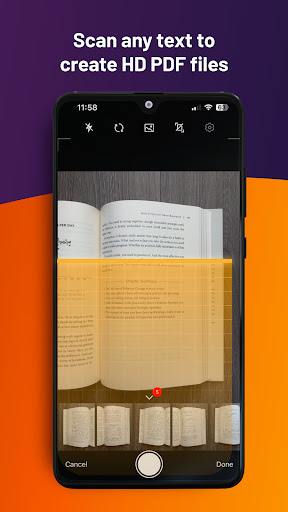
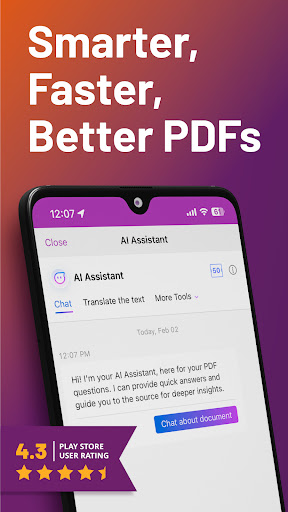
Looking for a versatile PDF editor that you can use anytime, anywhere? Look no further than Foxit PDF Editor mobile app. This easy-to-use PDF editor – trusted by hundreds of millions – allows you to view, edit, and annotate PDF files on Android devices while on the go. The app also offers advanced subscription-based features, including our AI Assistant, optical character recognition (OCR), handwritten notes conversion, and more.
Discover the capabilities of Foxit PDF Editor:
• Reliable: 100% compliant with your current PDF ecosystem.
• Efficient: Let our AI Assistant do the work for you.
• Lightweight: Doesn’t exhaust your device resources.
• Fast: Instant access to PDFs with no …
Read the full description
Looking for a versatile PDF editor that you can use anytime, anywhere? Look no further than Foxit PDF Editor mobile app. This easy-to-use PDF editor – trusted by hundreds of millions – allows you to view, edit, and annotate PDF files on Android devices while on the go. The app also offers advanced subscription-based features, including our AI Assistant, optical character recognition (OCR), handwritten notes conversion, and more. Discover the capabilities of Foxit PDF Editor: • Reliable: 100% compliant with your current PDF ecosystem. • Efficient: Let our AI Assistant do the work for you. • Lightweight: Doesn’t exhaust your device resources. • Fast: Instant access to PDFs with no delays. • Secure: Robust file protection features to safeguard sensitive information. • Collaborative: Maintain full control of your content while working with others.. • Supportive: Access 24/7 customer service via support chat. • Multi-Language: Support for 12 languages for global usability. What Foxit PDF Editor can offer to you: Utilize AI on PDF files • Summarize the document • Summarize the text • Translate the text • Enhance the writing of the text • Define and clarify the text • Fix spelling and grammar of the text • Chat about the document • Smart PDF editor commands View and manage PDF files • Reflow PDF files for easy viewing • Convert scanned text and handwritten notes into digital text* • Easy document navigation with bookmark management features • Search for text within your PDF document • Supports tabbed document interface (for tablet only) • Supports to read the PDF out loud • Rename, move, copy, or delete PDF file(s) Collaborate and share PDF files • Add annotations and stamps to PDF files • Share PDF files and screenshots from within the application • Share multiple files across your desktop and Android device via Wi-Fi • Save, synchronize, and access PDF files in popular cloud services (Google Drive, OneDrive, etc.) Create and convert PDFs • Create blank PDFs from scratch* • Create PDFs from Microsoft Office, image, text, and HTML files* • Scan and convert paper documents to PDFs • Convert PDFs to Microsoft Office, image, text, or HTML files* • Combine PDFs to create a new PDF* Edit PDF files • Insert audios, videos, or hyperlinks to PDFs* • Add/edit text and image objects in PDFs* • Edit document properties* • Optimize PDF documents* • Reorganize PDF pages (Add*, delete, rotate, or extract* pages) Work on PDF forms • Fill out and save PDF forms • Import and export form data • Submit PDF forms via HTTP, FTP, or Email • Work on XFA forms* Sign and protect PDFs • Add handwritten signatures to PDFs • Sign PDF documents with an existing digital certificate* • Protect PDF files with password and Microsoft Information Protection* • Protect PDF information with redaction* The features marked with the asterisk (*) are advanced features based on subscription through in-app purchase. To activate the advanced features, you should create a Foxit account and subscribe to Foxit PDF Editor. After subscription, just sign in with your Foxit account and the advanced features will be available. Terms and Conditions: You must comply with the Foxit-Terms of Use and Privacy Policy (https://appstore.foxitsoftware.com/appstore/license) when using this app. Have feedback? You can contact us at the following address: https://www.foxit.com/support/ticket.html Follow Foxit on Facebook and Twitter! https://www.facebook.com/foxitsoftware https://twitter.com/foxitsoftware
Installs, last 30 days Measured
Exact Google Play install counts, collected daily
Ratings
211,800 ratings, 5,193 reviews
- 5 ★71%
- 4 ★5.6%
- 3 ★1.9%
- 2 ★2.7%
- 1 ★19%
Recent reviews
Latest public reviews from the store
- 5 May 2026
I am using for 4 years best of all.
- 3 Nov 2025
✅️
- 13 Aug 2025
good for use with a stylus pen. has palm rejection.
- 29 Jul 2025
very nice usable app and collect content or coordinate
What reviewers bring up
Topics mentioned in the latest 33 reviews, by how many reviews mention them
Liked in good reviews (29 reviews)
- reader 2
- foxit 2
- ads 2
Raised in bad reviews (4 reviews)
No topic comes up twice.
Top chart positions
Latest Google Play chart ranks by country, last 10 days
Not in any tracked top chart in the last 10 days.
Foxit PDF Editor history
Release, install milestones, listing and store changes
- Reached 10,000,000+ installs 21 Dec 2023
- First released on the store 17 Jan 2013
Update frequency
How often Foxit PDF Editor ships a new version, month by month
13 updates in the last 12 months. More often than most similar apps: they shipped a median of 6 updates in the same year.
Recent versions
Current version 2026.6.0.1026.0325
- Version 2026.6.0.1026.032526 Oct 2026
• Enhanced AI Bookmarks • Enhanced Smart Podcast and Read Aloud • AI Chat History • Improved Sticky Note Comments: Keep PDF content visible while creating, editing, or replying to sticky note comments. • Enhanced Page Extraction: Extract selected pages into a new PDF, with the option to flatten annotations and automatically open the new file. • Enhanced Enterprise Cloud Storage Controls: Use Microsoft Intune to disable unapproved cloud integrations.
- Version 2026.4.3.0527.081027 May 2026
• DMS Integration - Foxit Cloud Documents has been upgraded to Foxit DMS in applicable regions, expanding the experience beyond cloud file storage to a broader document management system across Foxit products. o Access your files from My Files and Shared Files. o Checked-out File Handling - If a file is checked out in Foxit DMS, other users can open it in Editor but cannot edit it. o PDF Collaboration Update - Files shared for collaboration are now accessed from PDF Collaboration.
- Version 2026.4.2.0509.04428 May 2026
• DMS Integration - Foxit Cloud Documents has been upgraded to Foxit DMS in applicable regions, expanding the experience beyond cloud file storage to a broader document management system across Foxit products. o Access your files from My Files and Shared Files. o Checked-out File Handling - If a file is checked out in Foxit DMS, other users can open it in Editor but cannot edit it. o PDF Collaboration Update - Files shared for collaboration are now accessed from PDF Collaboration.
- Version 2026.4.1.0428.080328 Apr 2026
Listing keywords
Words and phrases Foxit PDF Editor repeats most in its store listing
Top phrases: pdf files (10), pdf editor (9), foxit pdf editor (5), foxit pdf (5), advanced features (3).
Highlighted words also appear in the title. Counts cover the title, short description and description.
Business model and tech
From the store listing and declared permissions
- Business model
- Free to downloadIn-app purchases
- Sensitive access
- No sensitive permission declared
Compliance
What the listing and the app package show
- Store status
- Live
- Upkeep
- Updated 26 Oct 2026
- Registered in
- United States
- Privacy policy
- Linked on the listing
- Advertising
- No ads declared
- In-app purchases
- Offered
- Age rating
- Everyone
Apps like Foxit PDF Editor
Work Shift CalendarLRHSoft13.6M installs★ 4.67
Pushbullet: SMS on PC and morePushbullet6.3M installs★ 4.24
IFTTT - Automate work and homeIFTTT, Inc10.3M installs★ 3.17
Text Scanner [OCR]Peace11.2M installs★ 4.2
AOL: Email News WeatherAOL Media LLC15.2M installs★ 4.07
Simple CalendarSimple Mobile Tool21.7M installs★ 4.44
My VodafoneVodafone Limited15.2M installs★ 3.47
RealCalc Scientific CalculatorQuartic Software28.5M installs★ 4.57
Mobi PDF・Editor・Scanner・ReaderMobiSystems21.7M installs★ 4.47
Foxit PDF Editor: questions and answers
How many downloads does Foxit PDF Editor have?
Foxit PDF Editor has 13,680,276 installs on Google Play, measured from the store's own count on 19 Nov 2026.
Who makes Foxit PDF Editor?
Foxit PDF Editor is published by Foxit Software Inc., a developer based in US.
When was Foxit PDF Editor last updated?
The latest version (2026.6.0.1026.0325) was released on 26 Oct 2026.
Is Foxit PDF Editor free?
Yes. Foxit PDF Editor is free to download and offers in-app purchases.
Is Foxit PDF Editor still available?
Yes. Foxit PDF Editor is live on Google Play as of 19 Nov 2026.
Track Foxit PDF Editor and its competitors
Watch any app for new versions, rating drops, chart moves and removals. Free plan, no card.