Mobi PDF・Editor・Scanner・Reader
Read, scan, edit & sign PDFs, OCR, convert PDF to Word, annotate & merge PDFs
- Installs
- 21.66M
- Measured
- Rating
- 4.47
- Ratings
- 182K
- 4.1K reviews
- Version
- 11.18.270981
- Updated 19 Oct 2026
- Released
- 16 Aug 2013
- Tracked since 13 May 2026
- Size
- 57 MB
- Needs 6.0
Screenshots


About Mobi PDF・Editor・Scanner・Reader
The description on the store listing
MobiPDF Editor and Scanner gives you a powerful collection of expert tools to quickly and easily view, review, edit, create, and secure PDFs on your phone, wherever you are.
MobiPDF is a proud member of the PDF Association.
<b>📃 AI-Powered Scan to PDF</b>
Experience AI-powered scanning with enhanced edge detection and capture clear scans of your paper documents to convert them into editable PDF files. From receipts and contracts to invoices, notes, certificates, reports, IDs, and passports, MobiPDF delivers fast and reliable scanning.
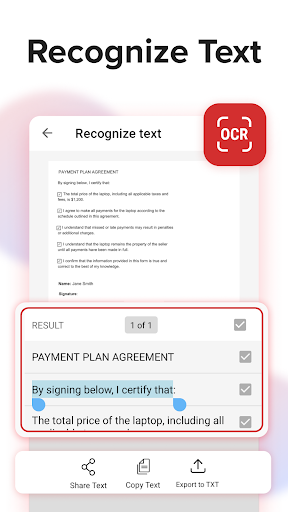
<b>👁️ Recognize text (OCR)</b>
Utilize OCR technology to recognize text from scans and images and easily share the recognized text by email, …
Read the full description
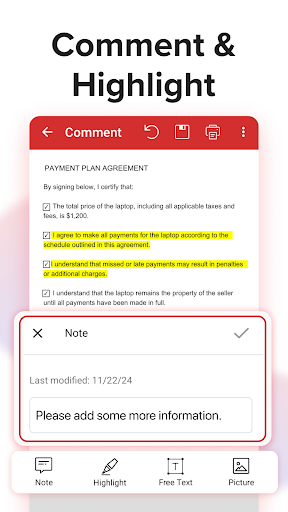
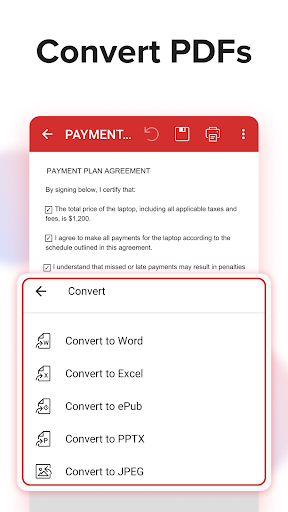
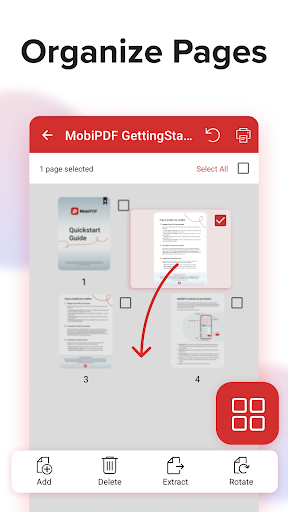
MobiPDF Editor and Scanner gives you a powerful collection of expert tools to quickly and easily view, review, edit, create, and secure PDFs on your phone, wherever you are. MobiPDF is a proud member of the PDF Association. <b>📃 AI-Powered Scan to PDF</b> Experience AI-powered scanning with enhanced edge detection and capture clear scans of your paper documents to convert them into editable PDF files. From receipts and contracts to invoices, notes, certificates, reports, IDs, and passports, MobiPDF delivers fast and reliable scanning. <b>👁️ Recognize text (OCR)</b> Utilize OCR technology to recognize text from scans and images and easily share the recognized text by email, messaging apps, or upload it to the cloud. <b>✏️ Edit PDF files</b> Access one of the most advanced mobile PDF editors on the market and edit PDFs, create blank PDFs, and insert, remove, or modify various document aspects including text, pictures, signatures, comments, drawings, certificates, and more. <b>✒️ Fill and Sign</b> Fill out and share forms and sign documents on the go with advanced support for fillable PDFs, enabling you to draw your signature directly on documents or reuse saved electronic signatures while making all the changes you need. <b>🖨️ Print PDFs</b> Print PDF documents wirelessly straight from your phone. <b>➕ Convert PDFs</b> Convert PDFs to Word, Excel, PowerPoint, or ePub formats while preserving the original layout and formatting, and save Word, Excel, PowerPoint, and ePub files as PDFs for easy sharing. Enjoy reliable conversion of PNG and JPEG images into editable PDF files or use the free PNG and JPEG converter within MobiPDF to easily turn PDF documents into images. <b>🔐 Protect PDFs</b> Protect your sensitive documents with passwords to lock, encrypt, and restrict user access and utilize digital certificates for authenticity validation. <b>☁️ Back-up your scans and PDFs</b> Log into your account to access 5GB of free cloud storage on MobiDrive. Upgrade to MobiPDF Premium for an additional 50GB of storage. <b>🗨️ View and Comment</b> Enhance your reading experience with MobiPDF's advanced PDF viewer and easily switch different page modes or enable Read More for distraction-free reading. Easily add comments, use drawing tools, highlight and markup text, insert stamps, or attach files to your PDF. <b>📚 Organize pages in PDFs</b> Enjoy full control over your PDF documents: view, rearrange, insert, delete, extract, duplicate, and rotate pages or merge PDFs into one to create your perfectly organized PDF layout. <i>Use In-App Purchases to unlock the best mobile scanner and editor experience. Please note: </i> • All payments are charged by Google Play Store after you confirm the purchase. • Unless you cancel at least 24 hours before the end of the current period, your account will be automatically charged for renewal. • You can manage your subscriptions by going to your Google Play Account Settings. Need more? Check out our free MobiPDF version for Windows desktop - https://mobisystems.com/en-us/mobipdf Help Center: https://support.mobisystems.com/hc/en-us/sections/20794400214045-Android Privacy Policy: https://mobisystems.com/en-us/privacy-policy Terms of Use: https://mobisystems.com/en-us/terms-of-use
Installs, last 30 days Measured
Exact Google Play install counts, collected daily
Ratings
182,373 ratings, 4,086 reviews
- 5 ★76%
- 4 ★9.5%
- 3 ★4.1%
- 2 ★1.4%
- 1 ★9.2%
Recent reviews
Latest public reviews from the store
- 18 May 2026
yes my place were i build my CV and everything
- 18 May 2026
your PowerPoint is trash
- 14 May 2026
VOILLA!
- 11 May 2026
awesome this app
What reviewers bring up
Topics mentioned in the latest 50 reviews, by how many reviews mention them
Liked in good reviews (39 reviews)
- features 3
- user friendly 2
- officesuite 2
- useful 2
- helps 2
- excel 2
Raised in bad reviews (7 reviews)
No topic comes up twice.
Top chart positions
Latest Google Play chart ranks by country, last 10 days
- Countries ranked
- 8
- Best rank
- #47
- Top 10 placements
- 0
- of 11 chart placements
- Average rank
- #100.5
Best countries on Google Play
- 🇩🇪 Germany · Top grossing, Productivity#47
- 🇫🇷 France · Top grossing, Productivity#54
- 🇲🇽 Mexico · Top grossing, Productivity#55
- 🇯🇵 Japan · Top grossing, Productivity#68
- 🇦🇺 Australia · Top grossing, Productivity#72
- 🇬🇧 United Kingdom · Top grossing, Productivity#79
| Country | Chart | Category | Rank | Best (10 days) | Date |
|---|---|---|---|---|---|
| 🇩🇪 Germany | Top grossing | Productivity | #47 | #43 | 19 Nov 2026 |
| 🇫🇷 France | Top grossing | Productivity | #54 | #53 | 19 Nov 2026 |
| 🇲🇽 Mexico | Top grossing | Productivity | #55 | #54 | 19 Nov 2026 |
| 🇯🇵 Japan | Top grossing | Productivity | #68 | #64 | 19 Nov 2026 |
| 🇦🇺 Australia | Top grossing | Productivity | #72 | #68 | 19 Nov 2026 |
| 🇬🇧 United Kingdom | Top grossing | Productivity | #79 | #76 | 19 Nov 2026 |
| 🇺🇸 United States | Top grossing | Productivity | #87 | #84 | 19 Nov 2026 |
| 🇧🇷 Brazil | Top grossing | Productivity | #124 | #122 | 19 Nov 2026 |
| 🇩🇪 Germany | Top free | Productivity | #145 | #101 | 19 Nov 2026 |
| 🇬🇧 United Kingdom | Top free | Productivity | #184 | #161 | 14 Nov 2026 |
Mobi PDF・Editor・Scanner・Reader history
Release, install milestones, listing and store changes
- Moved from Business to Productivity 17 Apr 2026
- First released on the store 16 Aug 2013
Update frequency
How often Mobi PDF・Editor・Scanner・Reader ships a new version, month by month
9 updates in the last 12 months. More often than most similar apps: they shipped a median of 1 updates in the same year.
Recent versions
Current version 11.18.270981
- Version 11.18.27093919 Oct 2026
Give your eyes a break and listen to your PDFs. Catch up on documents while you’re on the go or getting things done.
- Version 11.16.27080910 Aug 2026
Thank you for using MobiPDF! • Тhis month's focus was on bug fixing and making MobiPDF more polished and easy to use. Enjoying MobiPDF? Remember to leave us a review.
- Version 11.16.27062730 Jul 2026
Thank you for using MobiPDF! • Тhis month's focus was on bug fixing and making MobiPDF more polished and easy to use. Enjoying MobiPDF? Remember to leave us a review.
- Version 11.15.27054424 Jun 2026
More ways to open your files Access Word, Excel, PowerPoint, EPUB, and image files directly from File Browser.
Listing keywords
Words and phrases Mobi PDF・Editor・Scanner・Reader repeats most in its store listing
Top phrases: pdf documents (3), pdf files (3), editable pdf files (2), png and jpeg (2), word excel powerpoint (2).
Highlighted words also appear in the title. Counts cover the title, short description and description.
Business model and tech
From the store listing, the SDKs in the app package and its declared permissions
- Business model
- Free to downloadIn-app purchasesShows ads
- Built with
- No cross-platform framework or game engine detected
- Ad networks (3)
- AdMobAppLovinFacebook Audience Network
- Subscriptions and payments
- Google Play billing
- Attribution and measurement
- AppsFlyerOpen Measurement
- Analytics and crash reports
- CleverTapFirebase
- Sign-in and social
- Sensitive access
- CameraPhotos, videos and filesAccounts on the deviceAdvertising ID
6 ad, attribution and analytics SDKs detected. SDKs are read from the app package and permissions from the store listing, so code that loads later is not seen.
Technology
47 SDKs found in the app package
Ad networks
Advertising and install-attribution SDKs found in the app package
- AdMob
- AppLovin
- AppsFlyer
- Facebook Audience Network
- Open Measurement
43 permissions
2 special access, 5 sensitive, 36 standard
- Change system settingsWRITE_SETTINGSSpecial access
- Manage all filesMANAGE_EXTERNAL_STORAGESpecial access
- Take photos and videosSensitive
- See accounts on the deviceSensitive
- Change or delete shared storageSensitive
- Read shared storageSensitive
- Show notificationsPOST_NOTIFICATIONSSensitive
- Ad attribution (Privacy Sandbox)ACCESS_ADSERVICES_ATTRIBUTIONStandard
- Ad topics (Privacy Sandbox)ACCESS_ADSERVICES_TOPICSStandard
- Privacy Sandbox ads (custom audience)ACCESS_ADSERVICES_CUSTOM_AUDIENCEStandard
- Read how it was installed (install referrer)BIND_GET_INSTALL_REFERRER_SERVICEStandard
- Read the advertising IDAD_IDStandard
Compliance
What the listing and the app package show
- Store status
- Live
- Upkeep
- Updated 19 Oct 2026
- Registered in
- United States
- Privacy policy
- Linked on the listing
- Advertising
- Shows ads
- In-app purchases
- Offered
- Age rating
- Everyone
- Sensitive permissions
- 5 sensitive, 2 special access of 43
- Location access
- No
- Camera and microphone
- Camera
Apps like Mobi PDF・Editor・Scanner・Reader
Ginger Keyboard - Emoji, GIFsGingerSoftware Inc.10.5M installs★ 3.85
Alice AIDirect Cursus Computer Systems Trading LLC22.6M installs★ 4.36
RealCalc Scientific CalculatorQuartic Software28.5M installs★ 4.57
Easy Uninstaller App UninstallINFOLIFE LLC18.6M installs★ 4.51
DigiCal Calendar AgendaDigibites11M installs★ 4.47
My VodafoneVodafone Limited15.2M installs★ 3.47
Free VPN by Free VPN .org™Free VPN LLC11.1M installs★ 4.58
Simple CalendarSimple Mobile Tool21.7M installs★ 4.44
Docusign - Upload & Sign DocsDocusign23.6M installs★ 4.76
Mobi PDF・Editor・Scanner・Reader: questions and answers
How many downloads does Mobi PDF・Editor・Scanner・Reader have?
Mobi PDF・Editor・Scanner・Reader has 21,655,282 installs on Google Play, measured from the store's own count on 19 Nov 2026.
Who makes Mobi PDF・Editor・Scanner・Reader?
Mobi PDF・Editor・Scanner・Reader is published by MobiSystems, a developer based in US.
When was Mobi PDF・Editor・Scanner・Reader last updated?
The latest version (11.18.270981) was released on 19 Oct 2026.
Is Mobi PDF・Editor・Scanner・Reader free?
Yes. Mobi PDF・Editor・Scanner・Reader is free to download and offers in-app purchases, and it shows ads.
Is Mobi PDF・Editor・Scanner・Reader still available?
Yes. Mobi PDF・Editor・Scanner・Reader is live on Google Play as of 19 Nov 2026.
Track Mobi PDF・Editor・Scanner・Reader and its competitors
Watch any app for new versions, rating drops, chart moves and removals. Free plan, no card.