
Image Converter Studio
Handy yet powerful tool to open, convert and edit a wide range of image formats
- Installs
- 1.45K
- Measured
- Rating
- —
- Ratings
- —
- Version
- Varies with device
- Updated 30 Mar 2026
- Released
- 23 Jul 2021
- Tracked since 13 May 2026
- Size
- —
Screenshots
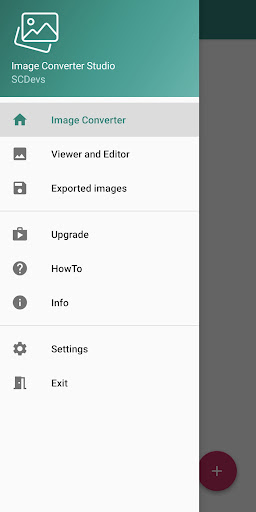
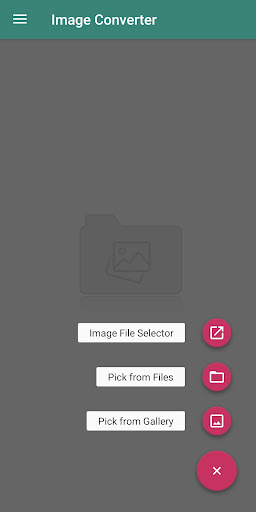


About Image Converter Studio
The description on the store listing
Image Converter Studio (ICS) is a handy yet powerful tool capable of converting, viewing and editing a wide range of image formats, including:
JPG, PNG, GIF, TIFF, WEBP, PDF, PSD, BMP, WBMP, TGA, HDR, PICON, PICT, PSB, SGI, RAS, PAM, PBM, PFM, PGM, PNM, PPM, XPM, DCX, PCX, AI, EPS, PS, PS2, PS3.
ICS supports batch operations and multi-frame image files. It also comes with a built-in Image Viewer making it useful for users to browse exported images and opening, even from other apps, image formats not supported by the system gallery.
App Features & Capabilities:
- conversion between a wide range of different formats
- NO online conversion, images are processed locally on your …
Read the full description
Image Converter Studio (ICS) is a handy yet powerful tool capable of converting, viewing and editing a wide range of image formats, including: JPG, PNG, GIF, TIFF, WEBP, PDF, PSD, BMP, WBMP, TGA, HDR, PICON, PICT, PSB, SGI, RAS, PAM, PBM, PFM, PGM, PNM, PPM, XPM, DCX, PCX, AI, EPS, PS, PS2, PS3. ICS supports batch operations and multi-frame image files. It also comes with a built-in Image Viewer making it useful for users to browse exported images and opening, even from other apps, image formats not supported by the system gallery. App Features & Capabilities: - conversion between a wide range of different formats - NO online conversion, images are processed locally on your device - support for bulk operations, even in case of different source formats - output settings, set scale and quality of the destination file(s) - support for multi-page/multi-frame files (TIFF, PDF, GIF) - convert two or more images into a single output file (TIFF, PDF, GIF) - automatically extract images from multi-page/multi-frame files - easy browsing of the exported images - built-in galley which extends the number of the openable image formats - HowTo and Info sections with useful hints - clean and simple user interface Image Editor is an additional tool available as In-App Purchase, can edit images and save them in their original format, all the image formats listed in the app are supported. Features: - Crop, crop oval, crop circular, rotate, flip horizontally, flip vertically - Resize image, change resolution - Read and/or remove Exif data - Apply filters: greyscale, sepia, cartoon, sketch, invert, emboss, blur - Adjust brightness, contrast, exposure, saturation, white balance, sharpness
Installs since 16 Nov 2026 Measured
Exact Google Play install counts, collected daily
Daily history starts once this app is in our daily install sample.
Ratings
- 5 ★0.0%
- 4 ★0.0%
- 3 ★0.0%
- 2 ★0.0%
- 1 ★0.0%
Recent reviews
Latest public reviews from the store
- 18 May 2026
The SCCU app is awesome! I love the many many features it has like Zelle, transfers and the ability to see upcoming transactions. I love that it gives you important alerts when necessary. The app is oh so easy to navigate and easy to login to! Thank you SCCU for this app and the Watchdog!
- 14 May 2026
Space coast has the absolute best customer service in the banking industry. the online banking app is very good also
- 14 May 2026
The app has made my financial life easier. Space Coast Credit Union has allowed me to have a bank account without those pesky fees that for profit financial institutions have. Being a proud member of the credit union I highly recommend the app and their accounts. There is no monthly service fee and you only need to open it with $25 and that is it. The only thing you have to worry is being inactive for 2 years or you'll be charged $5 a month. Other than that it is been a great credit union.
- 13 May 2026
Simple and easy to use. Very effective.
What reviewers bring up
Topics mentioned in the latest 50 reviews, by how many reviews mention them
Liked in good reviews (45 reviews)
- sccu 6
- bank 6
- service 4
- space coast 3
- application 3
- convenient 3
- navigate 3
- customer 3
Raised in bad reviews (5 reviews)
No topic comes up twice.
Top chart positions
Latest Google Play chart ranks by country, last 10 days
Not in any tracked top chart in the last 10 days.
Image Converter Studio history
Release, install milestones, listing and store changes
- Reached 1,000+ installs 27 Nov 2025
- Reached 500+ installs 27 May 2022
- Reached 100+ installs 29 Oct 2021
- Reached 50+ installs 29 Sep 2021
- Reached 10+ installs 3 Aug 2021
- Reached 5+ installs 1 Aug 2021
- First released on the store 23 Jul 2021
Update frequency
How often Image Converter Studio ships a new version, month by month
2 updates in the last 12 months. More often than most similar apps: they shipped a median of 0 updates in the same year.
Recent versions
Current version Varies with device
- Version 1.1130 Mar 2026
- Version 1.1010 Jan 2026
- Version 1.0920 Jun 2025
- Version 1.0831 Jan 2025
Listing keywords
Words and phrases Image Converter Studio repeats most in its store listing
Top phrases: image formats (5), multi frame (3), wide range (3), handy yet powerful (2), image converter studio (2).
Highlighted words also appear in the title. Counts cover the title, short description and description.
Business model and tech
From the store listing and declared permissions
- Business model
- Free to downloadIn-app purchasesShows ads
- Sensitive access
- No sensitive permission declared
Compliance
What the listing and the app package show
- Store status
- Live
- Upkeep
- Updated 30 Mar 2026
- Registered in
- Italy
- Privacy policy
- Linked on the listing
- Advertising
- Shows ads
- In-app purchases
- Offered
- Age rating
- Everyone
Apps like Image Converter Studio
GB CamOscar R.C.7K installs★ 3.42
Stop Motion: Dreamlapse CameraShush Creative28.8K installs★ 3.0
RGM ThermalCAM 1-external camRGM Vision10.1K installs★ 3.36
Kuvat.fi uploaderMediadrive Ltd3.1K installs★ 2.7
Beautiful Rose Flower FramesMy Photo Apps15.2K installs★ 2.5
Vintage Retro Camera - Retro FArt Photo Studio21K installs★ 3.67
Red Eye Corrector: RedFixerpaciosdev apps7.8K installs★ 1.67
Night Dual Photo FramesWallpaper Collection14.1K installs★ 4.0
DOF Calculatorio:io21K installs★ 3.67
Image Converter Studio: questions and answers
How many downloads does Image Converter Studio have?
Image Converter Studio has 1,447 installs on Google Play, measured from the store's own count on 16 Nov 2026.
Who makes Image Converter Studio?
Image Converter Studio is published by SCDevs, a developer based in IT.
When was Image Converter Studio last updated?
The latest version (Varies with device) was released on 30 Mar 2026.
Is Image Converter Studio free?
Yes. Image Converter Studio is free to download and offers in-app purchases, and it shows ads.
Is Image Converter Studio still available?
Yes. Image Converter Studio is live on Google Play as of 16 Nov 2026.
Track Image Converter Studio and its competitors
Watch any app for new versions, rating drops, chart moves and removals. Free plan, no card.