JSON Formatter
Simple tool to format (beautify) (make human readable) JSON, out of compact one.
- Installs
- 18.66K
- Measured
- Rating
- 4.25
- Ratings
- 56
- 6 reviews
- Version
- Varies with device
- Updated 8 Sep 2023
- Released
- 7 Nov 2017
- Tracked since 12 May 2026
- Size
- 2 MB
- Needs 4.0
Screenshots


About JSON Formatter
The description on the store listing
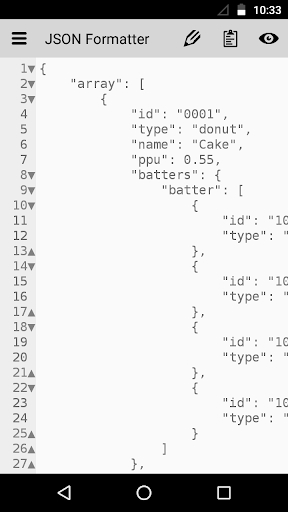
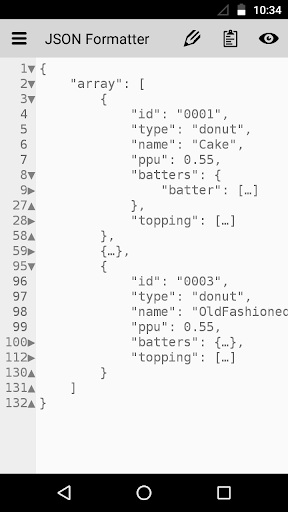
1 click of the button "Format" will beautify any JSON you have entered.
Even if the text is not complete,
even if the text is not a valid JSON,
the app will format it as far as it can, and make it easy to read.
Import JSON as a *.json file or as a *.txt text, or just paste it from your clipboard.
Export the result as a simple text file, or just copy it to your clipboard.
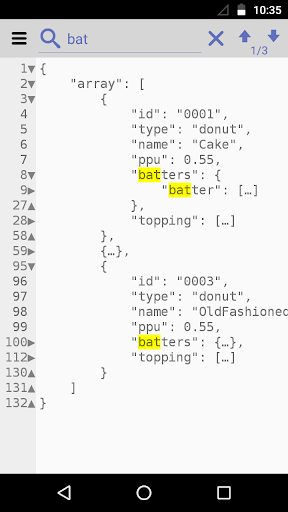
Enjoy the search option to quickly find, what you are looking for.
You have a easy "paste" button in the app, to quickly paste the text you have copied.
You also have "copy" button in the menu, to quickly copy the entire text to your clipboard.
"Delete" button in the side menu will clear the content.
A backup …
Read the full description
1 click of the button "Format" will beautify any JSON you have entered. Even if the text is not complete, even if the text is not a valid JSON, the app will format it as far as it can, and make it easy to read. Import JSON as a *.json file or as a *.txt text, or just paste it from your clipboard. Export the result as a simple text file, or just copy it to your clipboard. Enjoy the search option to quickly find, what you are looking for. You have a easy "paste" button in the app, to quickly paste the text you have copied. You also have "copy" button in the menu, to quickly copy the entire text to your clipboard. "Delete" button in the side menu will clear the content. A backup will be created automatically on every paste, so you do not loose you progress. You can create, delete, rename, restore backups by yourself in the Backups section. You have a Read only mode by default, so you do not change the text by accident with the constantly showing keyboard. Easy to switch between Read only mode and Edit mode is located in the top bar. Arrows to move the pointer to any part of the text will be shown in Edit mode. You can switch them off in Settings. Other preferences in Settings will allow you to make the app you own, and feel like home when using it. Enjoy fast way to make any JSON human readable. A small, hidden, unintrusive ad is at the top side menu, so it will be very hard to click by accident. This will allow you to easy switch between 2 (or more) JSONs.
Installs since 29 Aug 2026 Measured
Exact Google Play install counts, collected daily
Ratings
56 ratings, 6 reviews
- 5 ★75%
- 4 ★7.5%
- 3 ★0.0%
- 2 ★0.0%
- 1 ★17%
Recent reviews
Latest public reviews from the store
- 29 Aug 2024
Много благодаря! Има нужда от подобни apps за деца. Възможно ли е да се направи да се завърта екрана и да се трие буква с backspace за удобство на детето?
- 16 Dec 2023
Много интересни и инувативни кръстословици за деца. С картинки, перфектни са за да предизвикат интересът на детето.
Top chart positions
Latest Google Play chart ranks by country, last 10 days
Not in any tracked top chart in the last 10 days.
JSON Formatter history
Release, install milestones, listing and store changes
- Reached 10,000+ installs 12 Jul 2022
- Reached 5,000+ installs 20 Jul 2019
- Reached 1,000+ installs 20 Mar 2018
- Reached 500+ installs 5 Feb 2018
- Reached 100+ installs 21 Jan 2018
- Reached 50+ installs 22 Dec 2017
- Reached 10+ installs 24 Nov 2017
- First released on the store 7 Nov 2017
Update frequency
How often JSON Formatter ships a new version, month by month
0 updates in the last 12 months. Less often than most similar apps: they shipped a median of 1 updates in the same year.
Recent versions
Current version Varies with device
- Version 2.77 Sep 2023
Edit bug fix.
- Version 2.61 Sep 2023
- Version 2.426 May 2023
- Version 2.015 Feb 2018
Listing keywords
Words and phrases JSON Formatter repeats most in its store listing
Top phrases: read only mode (2), edit mode (2), human readable (2), side menu (2), switch between (2).
Highlighted words also appear in the title. Counts cover the title, short description and description.
Business model and tech
From the store listing, the SDKs in the app package and its declared permissions
- Business model
- Free to downloadShows ads
- Built with
- No cross-platform framework or game engine detected
- Ad networks (1)
- AdMob
- Analytics and crash reports
- Firebase
- Sensitive access
- Advertising ID
2 ad, attribution and analytics SDKs detected. SDKs are read from the app package and permissions from the store listing, so code that loads later is not seen.
Technology
28 SDKs found in the app package
Ad networks
Advertising and install-attribution SDKs found in the app package
- AdMob
7 permissions
0 special access, 0 sensitive, 7 standard
- Read the advertising IDAD_IDStandard
- Keep the phone awakeStandard
- Run a foreground serviceFOREGROUND_SERVICEStandard
- Start when the phone turns onStandard
- Full internet accessStandard
- See network connectionsStandard
- Internal app permissionDYNAMIC_RECEIVER_NOT_EXPORTED_PERMISSIONStandard
Compliance
What the listing and the app package show
- Store status
- Live
- Upkeep
- No update since 8 Sep 2023
- Privacy policy
- Linked on the listing
- Advertising
- Shows ads
- In-app purchases
- None declared
- Age rating
- Everyone
- Sensitive permissions
- 0 sensitive of 7
- Location access
- No
- Camera and microphone
- Neither
Apps like JSON Formatter
Solidifi Notary NetworkSolidifi U.S. Inc.6.6K installs★ 4.1
FaB CounterStefanKarlsson10.7K installs★ 4.67
My Christmas BuddyMyBuzz Technologies Ltd13.5K installs★ 3.92
Control Dash: Watch faceamoledwatchfaces™5.5K installs★ 5.0
Aria AI – Private Offline AIAlphaY15.6K installs★ 2.29
عميل خط الناقلsaad.dawood9012.8K installs★ 3.75
AES Encryption (256-Bit)Coding Fries8.3K installs★ 3.33
TypeDroid Pro with KeyboardShantanu Deshmukh2.4K installs★ 4.5
CargaYaEquipo Cargaya21.9K installs★ 4.1
JSON Formatter: questions and answers
How many downloads does JSON Formatter have?
JSON Formatter has 18,665 installs on Google Play, measured from the store's own count on 21 Nov 2026.
Who makes JSON Formatter?
JSON Formatter is published by Mincho Kolev.
When was JSON Formatter last updated?
The latest version (Varies with device) was released on 8 Sep 2023.
Is JSON Formatter free?
Yes. JSON Formatter is free to download, and it shows ads.
Is JSON Formatter still available?
Yes. JSON Formatter is live on Google Play as of 21 Nov 2026.
Track JSON Formatter and its competitors
Watch any app for new versions, rating drops, chart moves and removals. Free plan, no card.