
Markers
Simple, pressure-sensitive drawing on your phone or tablet.
- Installs
- 1.61M
- Measured
- Rating
- 4.06
- Ratings
- 10.1K
- 508 reviews
- Version
- Varies with device
- Updated 17 Aug 2025
- Released
- 23 Jun 2012
- Tracked since 14 May 2026
- Size
- 0 MB
- Needs 2.0
Screenshots
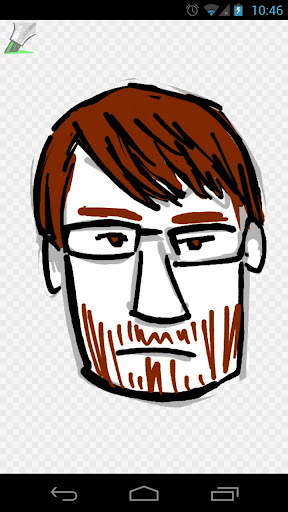


About Markers
The description on the store listing
<b>Markers</b> is a simple, multitouch, pressure-sensitive drawing app. Some of its features include:
<ul><li><b>Pressure sensitivity that works with most Android devices:</b> As more of your finger or capacitive stylus touches the glass, Markers will draw a thicker line. NOTE: It may take a minute or two of continuous drawing for Markers to adjust to your device’s touch panel, so be patient! (If your device has an active stylus, like the Galaxy Note or HTC Flyer, the true stylus pressure will be used instead.)</li>
<li><b>Multitouch painting:</b> Two fingers make two lines, three make three, and so on, up to the limits of your device (typically 5 simultaneous touches for phones and 10 …
Read the full description
<b>Markers</b> is a simple, multitouch, pressure-sensitive drawing app. Some of its features include: <ul><li><b>Pressure sensitivity that works with most Android devices:</b> As more of your finger or capacitive stylus touches the glass, Markers will draw a thicker line. NOTE: It may take a minute or two of continuous drawing for Markers to adjust to your device’s touch panel, so be patient! (If your device has an active stylus, like the Galaxy Note or HTC Flyer, the true stylus pressure will be used instead.)</li> <li><b>Multitouch painting:</b> Two fingers make two lines, three make three, and so on, up to the limits of your device (typically 5 simultaneous touches for phones and 10 for tablets).</li> <li><b>Kid-friendly interface:</b> Every pen size and color is on-screen; multitouch drawing means accidental touches (such as kid hands on the edges of the display) won't prevent any little fingers from painting.</li> <li><b>Plays well with others:</b> Share your drawings to other apps, and share images into Markers to draw on top of them.</li> <li><b>[New in 1.2] Pan and zoom:</b> By far the #1 most requested Markers feature! Tap the hand tool to switch into zoom mode; use one finger to scroll and two to zoom.</li> <li><b>[New in 1.2] Adjustable brushes:</b> Longpress a brush and drag to adjust the minimum and maximum widths.</li> <li><b>[New in 1.2] Android 4.4 (KitKat) immersive mode:</b> When you tap the Markers icon to hide the palettes, the status and navigation bars hide too; you can use the entire screen to draw. Tap the icon to show everything again.</li></ul> Questions? Bugs? Ideas? Click “Email Developer” below. Got a great drawing to share with the world? Share it with +Markers on Google+: http://dsandler.org/markers/+ Markers is open source software; the code is available here: http://dsandler.org/markers Thanks for all your kind words and support! ♥ <b>FAQ</b> <ul><li><i>Why is my drawing all black when I save it to Gallery?</i> — The drawing is actually on a transparent background, so you're seeing Gallery's black background through it. When you load it back into Markers or send it to another app, you'll see that the drawing is intact. If you'd prefer an opaque background, <b>longpress on a color swatch</b> in the palette to set the paper color.</li> <li><i>What's up with the pressure sensitivity on my device?</i> — See http://code.google.com/p/markers-for-android/wiki/DeviceSupport for known issues about individual devices.</li> </ul>
Installs, last 30 days Measured
Exact Google Play install counts, collected daily
Ratings
10,061 ratings, 508 reviews
- 5 ★62%
- 4 ★11%
- 3 ★10%
- 2 ★6.9%
- 1 ★10%
Recent reviews
Latest public reviews from the store
No reviews in our sample for this app yet.
Top chart positions
Latest Google Play chart ranks by country, last 10 days
Not in any tracked top chart in the last 10 days.
Markers history
Release, install milestones, listing and store changes
- Moved from Video Players & Editors to Art & Design 23 Aug 2024
- Reached 1,000,000+ installs 13 Nov 2016
- Reached 500,000+ installs 1 Aug 2015
- Reached 100,000+ installs 22 Nov 2012
- Reached 50,000+ installs 13 Jul 2012
- Reached 10,000+ installs 30 Jun 2012
- Reached 500+ installs 25 Jun 2012
- First released on the store 23 Jun 2012
Update frequency
How often Markers ships a new version, month by month
0 updates in the last 12 months. Less often than most similar apps: they shipped a median of 4 updates in the same year.
Recent versions
Current version Varies with device
- Version 1.5.017 Aug 2025
- Version 1.2.323 Feb 2014
- Version 1.2.24 Jan 2014
- Version 1.2.124 Nov 2013
Listing keywords
Words and phrases Markers repeats most in its store listing
Top phrases: li li (7), pressure sensitive drawing (2), li ul (2), pressure sensitive (2), pressure sensitivity (2).
Highlighted words also appear in the title. Counts cover the title, short description and description.
Business model and tech
From the store listing and declared permissions
- Business model
- Free to download
- Sensitive access
- No sensitive permission declared
Compliance
What the listing and the app package show
- Store status
- Live
- Upkeep
- Updated 17 Aug 2025
- Registered in
- United States
- Privacy policy
- Linked on the listing
- Advertising
- No ads declared
- In-app purchases
- None declared
- Age rating
- Everyone
Apps like Markers
Flyer Maker & Poster MakerCards1.7M installs★ 4.51
Logo Maker - Logo CreatorDevabits Inc2.6M installs★ 4.01
AI Drawing : Trace & SketchThe App Company INC9.1M installs★ 4.15
Animated Text Creator - Text AOQ4Dev2.1M installs★ 3.83
Animation Draw: Flip MakerFusion Flow Tech981K installs★ 4.52
Nexus - AI Video GeneratorDQL TechLab12.9M installs★ 3.39
Label Maker: Design & PrintCore Elgo913K installs★ 4.33
AI Photo - Image GeneratorMLC Development4.5M installs★ 4.19
Logo Maker and Logo CreatorOne Music Player2.1M installs★ 4.36
Markers: questions and answers
How many downloads does Markers have?
Markers has 1,606,536 installs on Google Play, measured from the store's own count on 20 Nov 2026.
Who makes Markers?
Markers is published by Daniel Sandler, a developer based in US.
When was Markers last updated?
The latest version (Varies with device) was released on 17 Aug 2025.
Is Markers free?
Yes. Markers is free to download.
Is Markers still available?
Yes. Markers is live on Google Play as of 20 Nov 2026.
Track Markers and its competitors
Watch any app for new versions, rating drops, chart moves and removals. Free plan, no card.