
Microsoft Designer
Create images and edit photos in seconds with AI
- Installs
- 5.79M
- Measured
- Rating
- 3.95
- Ratings
- 9K
- 420 reviews
- Version
- 1.2604204.7002
- Updated 29 Oct 2026
- Released
- 18 Jun 2024
- Tracked since 10 May 2026
- Size
- —
Also on App Store: Microsoft Designer (558 ratings)
Screenshots


About Microsoft Designer
The description on the store listing
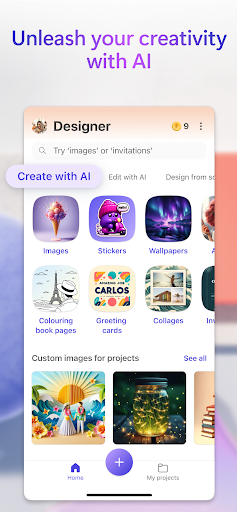
Microsoft Designer is an AI-powered design tool that helps you create designs and edit photos in seconds.
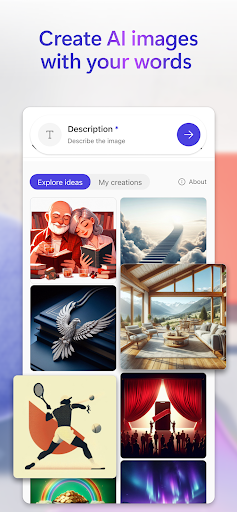
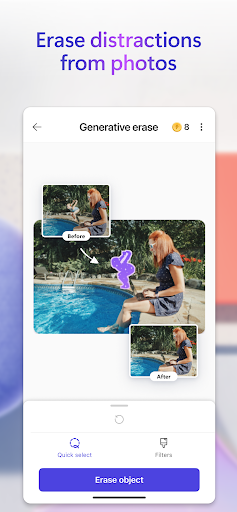
Unleash your creativity—visually create, design, and edit just about anything you can imagine with AI. Use the power of generative AI to create eye-catching images with your words, craft next-level designs that pop like personalized birthday cards, holiday cards, and wallpapers for your phone, and even use AI to edit photos like an expert - erasing unwanted objects from photos. Create what you want, when and where you need it.
Key capabilities:
Images: Create any image you can imagine. Sci-fi art, surreal scenes, funny images? Dream it, describe it, and create it with AI. …
Read the full description
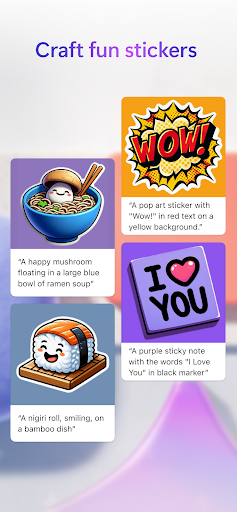
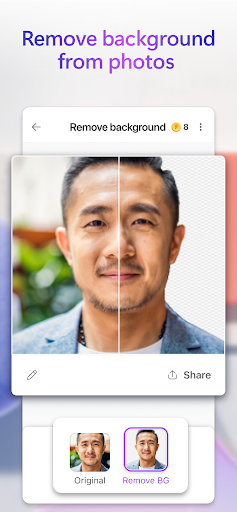
Microsoft Designer is an AI-powered design tool that helps you create designs and edit photos in seconds. Unleash your creativity—visually create, design, and edit just about anything you can imagine with AI. Use the power of generative AI to create eye-catching images with your words, craft next-level designs that pop like personalized birthday cards, holiday cards, and wallpapers for your phone, and even use AI to edit photos like an expert - erasing unwanted objects from photos. Create what you want, when and where you need it. Key capabilities: Images: Create any image you can imagine. Sci-fi art, surreal scenes, funny images? Dream it, describe it, and create it with AI. Your imagination is limitless! Stickers: Create something that sticks. Make custom stickers that help you stick out on messaging apps, social, and more. Edit with AI: make your photos and images picture perfect with AI. Generative erase: Erase unwanted distractions to make objects you don’t want in your image disappear. Remove background: Say bye-bye to bad backgrounds. Easily remove unwanted image backgrounds in one step. Blur background: Bring what’s most important into focus. Blur the background of any image to make your subject pop. Add filters, adjust brightness, resize: Customize to fit your creative vision, including resizing to turn your creations into a square or custom size that fits just right. Wallpapers/Backgrounds: Put it all on display. Create custom wallpaper or background to fit your current mood, make a statement, or to keep a special occasion front and center on your phone screen. Greeting cards: Craft the perfect greeting for any occasion. From birthday cards to holiday cards and beyond, create a thoughtful greeting card with personalized messages and images even if you’re at a loss for words. Monograms: Make your mark. Add some personal pop to your everyday life or for a special occasion like a wedding with custom crafted monograms that use letters and more to define your mark. Invitations: Create invitations that wow. Customize your invitations for every occasion and any event like birthdays, weddings, and anything else big or small. Social posts: Stand out online. Elevate and craft your next social post with Designer to create the perfect image and text to share online. Icons: Express yourself visually. Create icons to easily communicate your vision and decorate your designs. Emojis: Express yourself! Have the perfect reaction on hand with custom crafted emojis to fit any mood. Coloring book pages: Color it in and get in your flow. Create custom coloring book pages to make coloring more exciting. Great for all ages. Frame image: Turn your photos into a customized framed memory that you can share everywhere. Collages: Bring your favorite photos, styles, and descriptions together create a custom collage from your favorite memories. Banners: Create banners for newsletter headers, social profiles, and more to grab attention and stand out. Microsoft Designer is available for free with a Microsoft account. Your Microsoft account provides 5 GB of free cloud storage that you can use to save your designs, files, and photos across your devices. Additional information about terms of use can be found here: https://designer.microsoft.com/consumerTermsOfUse/en-US/consumerTermsOfUse.pdf Download Designer and create something new today!
Installs, last 30 days Measured
Exact Google Play install counts, collected daily
Ratings
8,963 ratings, 420 reviews
- 5 ★60%
- 4 ★8.9%
- 3 ★4.9%
- 2 ★8.9%
- 1 ★18%
Recent reviews
Latest public reviews from the store
- 28 Jan 2026
handy for checking stuff quickly and some light work when on mobile
- 15 Dec 2025
Easy to understand
- 12 Aug 2025
good
- 2 Jul 2025
wow this is real and imagine you also go a heads
What reviewers bring up
Topics mentioned in the latest 50 reviews, by how many reviews mention them
Liked in good reviews (30 reviews)
No topic comes up twice.
Raised in bad reviews (20 reviews)
- properly 5
- slow 2
Top chart positions
Latest Google Play chart ranks by country, last 10 days
- Countries ranked
- 9
- Best rank
- #102
- Top 10 placements
- 0
- of 10 chart placements
- Average rank
- #141.5
Best countries on Google Play
- 🇩🇪 Germany · Top free, Art & Design#102
- 🇨🇦 Canada · Top free, Art & Design#114
- 🇯🇵 Japan · Top free, Art & Design#116
- 🇰🇷 South Korea · Top free, Art & Design#119
- 🇬🇧 United Kingdom · Top free, Art & Design#121
- 🇫🇷 France · Top free, Art & Design#124
| Country | Chart | Category | Rank | Best (10 days) | Date |
|---|---|---|---|---|---|
| 🇩🇪 Germany | Top free | Art & Design | #102 | #75 | 19 Nov 2026 |
| 🇨🇦 Canada | Top free | Art & Design | #114 | #112 | 19 Nov 2026 |
| 🇯🇵 Japan | Top free | Art & Design | #116 | #116 | 19 Nov 2026 |
| 🇰🇷 South Korea | Top free | Art & Design | #119 | #119 | 19 Nov 2026 |
| 🇬🇧 United Kingdom | Top free | Art & Design | #121 | #114 | 19 Nov 2026 |
| 🇫🇷 France | Top free | Art & Design | #124 | #108 | 19 Nov 2026 |
| 🇺🇸 United States | Top free | Art & Design | #151 | #140 | 19 Nov 2026 |
| 🇮🇳 India | Top free | Art & Design | #174 | #169 | 19 Nov 2026 |
| 🇧🇷 Brazil | Top free | Art & Design | #197 | #197 | 13 Nov 2026 |
| 🇮🇳 India | Top grossing | Art & Design | #197 | #197 | 19 Nov 2026 |
Microsoft Designer history
Release, install milestones, listing and store changes
- Reached 5,000,000+ installs 27 Mar 2026
- Reached 1,000,000+ installs 23 Jul 2024
- First released on the store 18 Jun 2024
- Reached 500,000+ installs 9 Mar 2024
Update frequency
How often Microsoft Designer ships a new version, month by month
2 updates in the last 12 months. Less often than most similar apps: they shipped a median of 5 updates in the same year.
Recent versions
Current version 1.2604204.7002
- Version 1.2604204.700210 Feb 2026
- Version 1.2601604.700116 Jan 2026
- Version 1.2528804.700116 Oct 2025
- Version 1.2524204.700229 Aug 2025
Listing keywords
Words and phrases Microsoft Designer repeats most in its store listing
Top phrases: create custom (3), edit photos (3), microsoft designer (3), coloring book pages (2), photos in seconds (2).
Highlighted words also appear in the title. Counts cover the title, short description and description.
Business model and tech
From the store listing and declared permissions
- Business model
- Free to downloadIn-app purchases
- Subscriptions and payments
- Google Play billing
- Sensitive access
- CameraMicrophonePhone and callsPhotos, videos and files
24 permissions
1 special access, 9 sensitive, 14 standard
- Show full-screen alertsUSE_FULL_SCREEN_INTENTSpecial access
- Record audioSensitive
- Take photos and videosSensitive
- Change or delete shared storageSensitive
- Read photosREAD_MEDIA_IMAGESSensitive
- Read photos and videos the user picksREAD_MEDIA_VISUAL_USER_SELECTEDSensitive
- Read shared storageSensitive
- Read videosREAD_MEDIA_VIDEOSensitive
- Show notificationsPOST_NOTIFICATIONSSensitive
- Read phone status and identitySensitive
- Read how it was installed (install referrer)BIND_GET_INSTALL_REFERRER_SERVICEStandard
- Change audio settingsStandard
Compliance
What the listing and the app package show
- Store status
- Live
- Upkeep
- Updated 29 Oct 2026
- Registered in
- United States
- Privacy policy
- Linked on the listing
- Advertising
- No ads declared
- In-app purchases
- Offered
- Age rating
- Everyone
- Sensitive permissions
- 9 sensitive, 1 special access of 24
- Location access
- No
- Camera and microphone
- Both
Apps like Microsoft Designer
Logo Maker - Logo DesignerMicrobots587K installs★ 4.63
AR Tattoo: Fantasy & FunFocus apps6.5M installs★ 4.2
250 Complete Dress PatternFOREFO517K installs★ 3.93
MapChartwhidev2.2M installs★ 4.22
Truck Bussid DownloadPansbrothr Studio1.2M installs★ 4.78
Handwritten Fonts for StoriesInkverse625K installs★ 4.49
Pixel Dye: Color by numberOleMilk Games632K installs★ 4.61
AR Art Drawing: Sketch & PaintTrusted by Thousands4.5M installs★ 3.9
Beauty Camera - Selfie CameraTerri Tovar3.9M installs★ 4.24
Microsoft Designer: questions and answers
How many downloads does Microsoft Designer have?
Microsoft Designer has 5,785,274 installs on Google Play, measured from the store's own count on 19 Nov 2026.
Who makes Microsoft Designer?
Microsoft Designer is published by Microsoft Corporation, a developer based in US.
When was Microsoft Designer last updated?
The latest version (1.2604204.7002) was released on 29 Oct 2026.
Is Microsoft Designer free?
Yes. Microsoft Designer is free to download and offers in-app purchases.
Is Microsoft Designer still available?
Yes. Microsoft Designer is live on Google Play as of 19 Nov 2026.
Track Microsoft Designer and its competitors
Watch any app for new versions, rating drops, chart moves and removals. Free plan, no card.