Morse Code Engineer
Morse code audio/light decoder, transmitter and morse code <-> text translator
- Installs
- 51.11K
- Measured
- Rating
- 4.4
- Ratings
- 181
- 8 reviews
- Version
- 7.9
- Updated 26 Sep 2026
- Released
- 19 Aug 2022
- Tracked since 12 May 2026
- Size
- —
Screenshots


About Morse Code Engineer
The description on the store listing
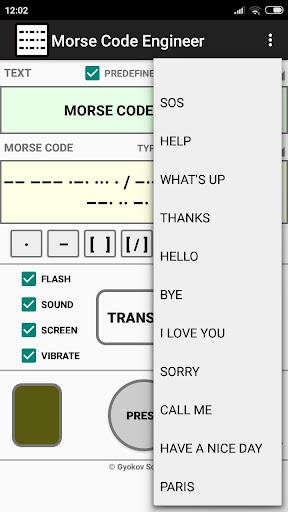
Morse code audio and light decoder, transmitter and morse code <-> text translator. Decode morse code transmission audio or light. Transmit using sound, flash, screen and vibration
App features:
- morse code audio/light detection using microphone and camera
- morse code transmission using flash, sound, screen and vibration
- morse code to text automatic translation
- text to morse code automatic translation
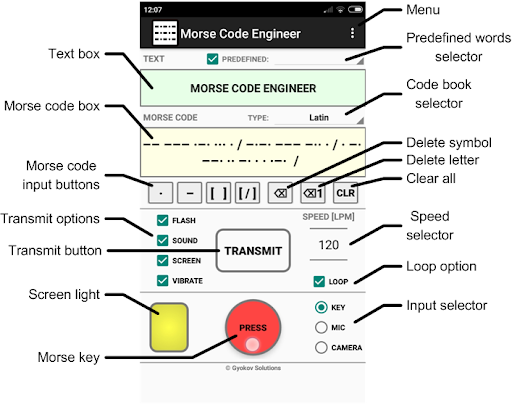
- input morse code using button or using buttons for dot, dash and space
- input predefined words
- add your own predefined words
- calibration for correct speed of the transmission
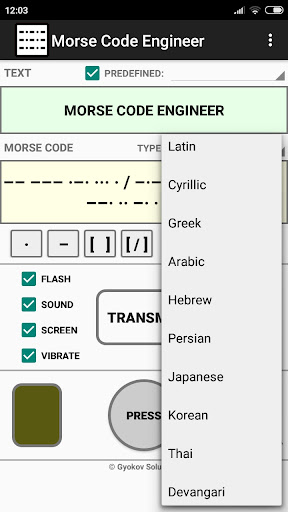
- different code books - Latin (ITU), Cyrillic, Greek, Arabic, Hebrew, Persian, Japanese, …
Read the full description
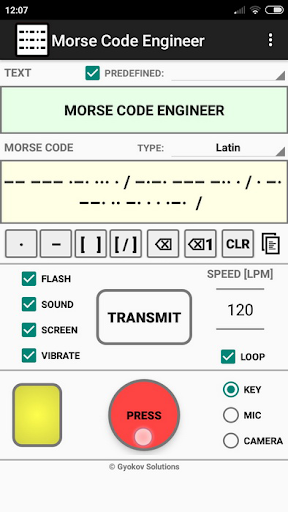
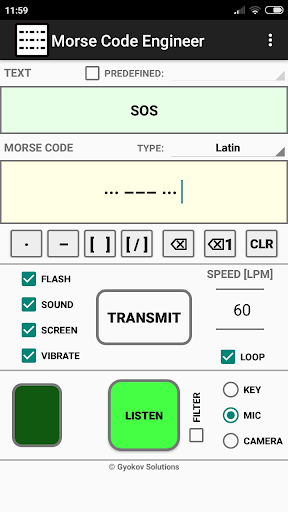
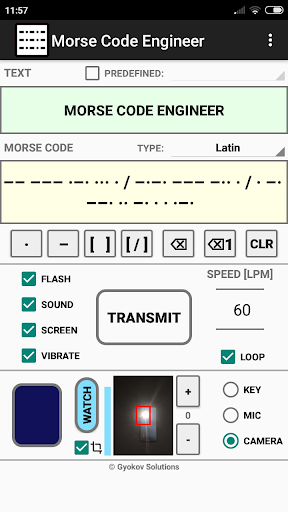
Morse code audio and light decoder, transmitter and morse code <-> text translator. Decode morse code transmission audio or light. Transmit using sound, flash, screen and vibration App features: - morse code audio/light detection using microphone and camera - morse code transmission using flash, sound, screen and vibration - morse code to text automatic translation - text to morse code automatic translation - input morse code using button or using buttons for dot, dash and space - input predefined words - add your own predefined words - calibration for correct speed of the transmission - different code books - Latin (ITU), Cyrillic, Greek, Arabic, Hebrew, Persian, Japanese, Korean, Thai, Devangari There are free app Morse Code Engineer and paid app Morse Code Engineer Pro. Pro version has no ads and features: - export of morse code to audio file and animated gif image - encrypt/decrypt messages with customized encryption book - adjust gap between characters and words - customize morse code transmission sound How to use: TEXT -> MORSE CODE Input text in text box. In morse code box the text will be automatically translated to morse code. You can change code book from drop down menu. MORSE CODE ->TEXT Input morse code in morse code box using: - button key [PRESS] - by doing short and long inputs. By default the input speed is auto detected and [SPEED] spinner (letters per minute) is updated. You can turn on/off speed autodetection in [SETTINGS - Auto detect speed]. If it is turned off you can use the [SPEED] spinner to adjust the speed of your input for better symbol recognition. - buttons below morse code box - [ . ] for dot and [ - ] for dash. Use [ ] button to input space between letters. Use [ / ] for spaces between words. You can clear symbols using backspace button or clear whole letter using backspace button for letters. Using [CLR] button you can clear bot text and morse code boxes. The morse code will be automatically translated to text and filled in text box. You can change code book from drop down menu. MORSE CODE TRANSMISSION Transmission is started with [START] button and is using: - flash - sound - screen - vibration You can control different options using corresponding check boxes. When screen option is used then double click on small screen while transmission is running will turn full screen transmission. Double click will return to app screen. You can change speed of transmission using speed spinner (letters per minute). You can loop the transmission by selectiong [LOOP] checkbox. MORSE CODE AUDIO DETECTION The app can listen and decode morse code transmission. To turn listening on select [MIC] on input panel and press [LISTEN] button. The app listens and detects morse code transmission and writes morse code in morse code box and translated text in text box. MORSE CODE LIGHT DETECTION The app can watch and decode morse code transmission using light. To turn listening on select [CAMERA] on input panel and press [WATCH] button. The app watches and detects morse code light transmission and writes morse code in morse code box and translated text in text box. By default the input speed is auto detected and [SPEED] spinner (letters per minute) is updated. You can turn on/off speed autodetection in [SETTINGS - Auto detect speed]. If it is turned off you can use the [SPEED] spinner to adjust the speed of morse code transmission for better symbol recognition. MENU OPTIONS: - Settings - open app settings - Code Book - shows selected codebook with letters and their morse code - REMOVE ADS - you can remove ads for current app session (until app is closed) by watching an add - Calibrate - runs calibration and sets correction time in order to adjust correct speed - Gyokov Solutions - opens developer's web page - Exit - exits app - Version - shows app version App privacy policy - https://sites.google.com/view/gyokovsolutions/morse-code-engineer-privacy-policy
Installs since 29 Aug 2026 Measured
Exact Google Play install counts, collected daily
Ratings
181 ratings, 8 reviews
- 5 ★78%
- 4 ★11%
- 3 ★0.0%
- 2 ★5.4%
- 1 ★5.4%
Recent reviews
Latest public reviews from the store
- 14 Feb 2024
Generate random tracks for a song (including drums), export midi, import in DAW and start creating the next hit song 🎹😁
- 27 Aug 2023
👍
- 15 Aug 2021
Yuh
- 28 Aug 2020
Good app
Top chart positions
Latest Google Play chart ranks by country, last 10 days
Not in any tracked top chart in the last 10 days.
Morse Code Engineer history
Release, install milestones, listing and store changes
- Reached 10,000+ installs 12 Jun 2023
- Reached 5,000+ installs 23 Dec 2022
- Reached 1,000+ installs 3 Sep 2022
- First released on the store 19 Aug 2022
Update frequency
How often Morse Code Engineer ships a new version, month by month
4 updates in the last 12 months. More often than most similar apps: they shipped a median of 0 updates in the same year.
Recent versions
Current version 7.9
- Version 7.926 Sep 2026
Morse Code Engineer is an app for morse code transmission, sound and light morse code detection using microphone and camera and morse code <-> text translation. v7.9 - Android 16 ready - Menu - Backup and restore settings v7.8 Settings - Accessibility v6.1 - Settings - Camera threshold v6.0 - Settings - Confirm clearing text - Android 15 ready v5.5 - option for wifi connection v5.3 - option for bluettoth connection. Activate it in Settings - Bluetooth connection.
- Version 7.816 Dec 2025
Morse Code Engineer is an app for morse code transmission, sound and light morse code detection using microphone and camera and morse code <-> text translation. v7.8 Settings - Accessibility v6.1 - Settings - Camera threshold v6.0 - Settings - Confirm clearing text - Android 15 ready v5.5 - option for wifi connection v5.3 - option for bluettoth connection. Activate it in Settings - Bluetooth connection.
- Version 7.410 Dec 2025
- Version 6.126 Nov 2025
Listing keywords
Words and phrases Morse Code Engineer repeats most in its store listing
Top phrases: morse code (37), morse code transmission (8), code transmission (8), morse code box (5), code box (5).
Highlighted words also appear in the title. Counts cover the title, short description and description.
Business model and tech
From the store listing, the SDKs in the app package and its declared permissions
- Business model
- Free to downloadShows ads
- Built with
- No cross-platform framework or game engine detected
- Ad networks (1)
- AdMob
- Sensitive access
- CameraMicrophoneNearby devicesAdvertising ID
1 ad, attribution and analytics SDKs detected. SDKs are read from the app package and permissions from the store listing, so code that loads later is not seen.
Technology
12 SDKs found in the app package
Ad networks
Advertising and install-attribution SDKs found in the app package
- AdMob
17 permissions
0 special access, 4 sensitive, 13 standard
- Record audioSensitive
- Take photos and videosSensitive
- Connect to paired Bluetooth devicesBLUETOOTH_CONNECTSensitive
- Show notificationsPOST_NOTIFICATIONSSensitive
- Ad attribution (Privacy Sandbox)ACCESS_ADSERVICES_ATTRIBUTIONStandard
- Ad topics (Privacy Sandbox)ACCESS_ADSERVICES_TOPICSStandard
- Read the advertising IDAD_IDStandard
- Read the advertising ID (Privacy Sandbox)ACCESS_ADSERVICES_AD_IDStandard
- Control the flashlightStandard
- Control vibrationStandard
- Keep the phone awakeStandard
- Run a foreground serviceFOREGROUND_SERVICEStandard
Compliance
What the listing and the app package show
- Store status
- Live
- Upkeep
- Updated 26 Sep 2026
- Registered in
- Bulgaria
- Privacy policy
- Linked on the listing
- Advertising
- Shows ads
- In-app purchases
- None declared
- Age rating
- Everyone
- Sensitive permissions
- 4 sensitive of 17
- Location access
- No
- Camera and microphone
- Both
Apps like Morse Code Engineer
Battery LevelCraddy Software30.5K installs★ 3.33
CrashformAssuralia172K installs★ 2.8
GproAlign Development Team11.5K installs★ 3.0
Long Screenshot - Scroll ScreeCreative Photo Lab33K installs★ 1.0
AMS NotifierDeLaval International AB45.5K installs★ 1.67
Apk Extractor - App Backupflinkapps10.3K installs★ 3.33
風水算命-羅盤指南針 辦公室家居風水 招財旺桃花靈機妙算命理館49.3K installs★ 3.9
E.ON Home – Solar, EV & MoreE.ON Digital Technology GmbH178K installs★ 2.8
Floating Clock StopWatch TimerFB Developers85K installs★ 2.89
Morse Code Engineer: questions and answers
How many downloads does Morse Code Engineer have?
Morse Code Engineer has 51,110 installs on Google Play, measured from the store's own count on 14 Nov 2026.
Who makes Morse Code Engineer?
Morse Code Engineer is published by GyokovSolutions, a developer based in BG.
When was Morse Code Engineer last updated?
The latest version (7.9) was released on 26 Sep 2026.
Is Morse Code Engineer free?
Yes. Morse Code Engineer is free to download, and it shows ads.
Is Morse Code Engineer still available?
Yes. Morse Code Engineer is live on Google Play as of 14 Nov 2026.
Track Morse Code Engineer and its competitors
Watch any app for new versions, rating drops, chart moves and removals. Free plan, no card.