
Multi Day Planner
Manage daily events and health conditions !
- Installs
- 24.22K
- Measured
- Rating
- 5.0
- Ratings
- 88
- 7 reviews
- Version
- Varies with device
- Updated 21 Dec 2019
- Released
- 16 Oct 2012
- Tracked since 13 May 2026
- Size
- 10 MB
- Needs 4.2
Screenshots




About Multi Day Planner
The description on the store listing
Save and manage daily events and health conditions just by tapping a pensil (Event) button on the calendar!
A Timetable function for students but can be used in a different way as well!
Save notes with tag names and sort them to folders! Use it as to-do list!
Handwriting Memo for a quick memo or to share photos with a memo with your family and friends!
Manage also daily and repeated plans so you can use as an organizer!
This is a multifunction app but very simple to use!
*Multi-Day Planner does not sync with Google Calendar. When the mobile is manner mode, the alarm may not work properly by the model.
Multi-Day Planner Manual
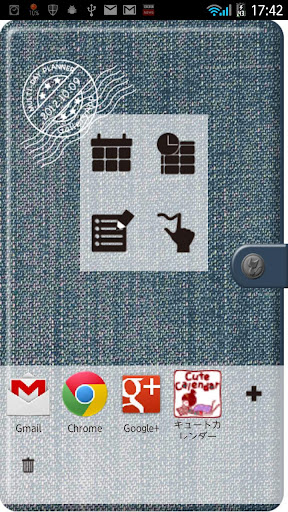
The initial window is a cover of the organizer. …
Read the full description
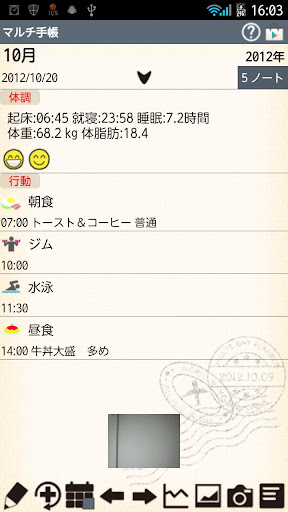
Save and manage daily events and health conditions just by tapping a pensil (Event) button on the calendar! A Timetable function for students but can be used in a different way as well! Save notes with tag names and sort them to folders! Use it as to-do list! Handwriting Memo for a quick memo or to share photos with a memo with your family and friends! Manage also daily and repeated plans so you can use as an organizer! This is a multifunction app but very simple to use! *Multi-Day Planner does not sync with Google Calendar. When the mobile is manner mode, the alarm may not work properly by the model. Multi-Day Planner Manual The initial window is a cover of the organizer. 1. Tap the gray button with a cat to set a password. 2. Tap + button to add another apps to use them while using Multi-Day Planner. This is very convenient function! You don't need to close Multi-Day Planner to use another apps! *How to do it* 1. Tap a black + button on the white belt. You can see the list of apps that have installed on your mobile. Select apps. 2. Drag the app to delete. *Buttons of the cover* 1. Calendar:Move to a calendar. Manage daily and repeated plans. 2. Timetable: Move to a timetable. It is for students but it can be used in different ways. Use it as you like. 3. Note: Save notes with tag names. Manage them with tag holders! Use as to-do list! 4. Handwriting memo: Make a quick memo or share photos with memo with your family and friends! *Calendar* Tap "Calendar" button on the cover. 1. Select a day then tap Pensil button (Event button) or "Tap here to create Event lists." on the calendar. Move to "Daily To-Do". 1. Tap "Action" tag of "Daily To-Do". 2. You can see the list of the default event icons. Let's tap "Medication" icon as a sample. 3. A pop-up "Medication" appears. the upper right button shows the time you tapped the icon. You can change the time for example, the time when you have to take the madication or the time you took the madication. X button is to clear the time when you don't need to save the time. You can save memo, set the alarm. Tap "Save" to finish and go back to the calendar. You can confirm saved events on the list of the calendar. You can save more events in the same way. 4. When you want to save an event that does not have on the list, but not want to register a new event icon on the list, tap "Add Event" icon (calendar & +). Enter the title name, change the time (if it is necessary), save memo, tap calendar & + to change the icon. Tap "Save" to finish. 5. When you want to add a new event icon on the list, Tap "Add" button (+). A pop-up appears. 1. Add:add a new event icon and save with this button. 2. Back:go back to Daily To-Do. 3. Tap (hand & +) to change the icon. 1. Event name. 2. Select the sort. If you save 999, the icon will be added at the end of the list. 3. SelectItem: You can create subcategories here. 4. Finish and save with Add button. Customize the event list as you like! *Condition Tag* Save records here just by tapping each buttons! It is very simple! You can save, Wake-up time/Bed time/Sleeping hours/Conditions(face icons)/Weight/Fat rate/Temperature/Blood pressure/Pulse and Memo. Each item can be displayed by a graph (Tap "Graph" button on the calendar.). *Buttons of the calendar/from the left* 1.Today : Go back today's date. 2&3. Left & Right button: Move the date right to left. 4. Graph button: You can see graphs of Daily To-Do. 5. Photo List button: Move to Photo window. 6. Camera button: Take photos or select photos from the gallery of the mobile. 7. Menu button: Move to another apps or another windows.
Installs since 29 Aug 2026 Measured
Exact Google Play install counts, collected daily
Ratings
88 ratings, 7 reviews
- 5 ★100%
- 4 ★0.0%
- 3 ★0.0%
- 2 ★0.0%
- 1 ★0.0%
Recent reviews
Latest public reviews from the store
- 30 Jul 2022
Very useful
- 13 Jul 2021
I like to have to put down my planner it is really awesome to keep up war daily journal and more things that you do in the day I like this app and I'm like to get this down on here every app I went on I'm figuring this out and if I could get everything done with this Play store
- 26 May 2019
so Cute Love It
- 3 Feb 2019
really cute but checking/uncheckin needs to be more clear. and how do you mark something as done for that day?
What reviewers bring up
Topics mentioned in the latest 49 reviews, by how many reviews mention them
Liked in good reviews (29 reviews)
- cute 9
- add 4
- planner 3
- organize 2
- useful 2
- little 2
- widget 2
- needed 2
Raised in bad reviews (15 reviews)
- confusing 2
- design 2
- part 2
Top chart positions
Latest Google Play chart ranks by country, last 10 days
Not in any tracked top chart in the last 10 days.
Multi Day Planner history
Release, install milestones, listing and store changes
- Reached 10,000+ installs 14 Nov 2013
- Reached 5,000+ installs 12 Jun 2013
- Reached 1,000+ installs 17 Dec 2012
- Reached 500+ installs 23 Nov 2012
- Reached 100+ installs 27 Oct 2012
- Reached 50+ installs 23 Oct 2012
- First released on the store 16 Oct 2012
Update frequency
How often Multi Day Planner ships a new version, month by month
0 updates in the last 12 months. Less often than most similar apps: they shipped a median of 1 updates in the same year.
Recent versions
Current version Varies with device
- Version 1.0.4020 Dec 2019
Support Android10
- Version 1.0.371 Oct 2019
- Version 1.0.3321 Feb 2019
- Version 1.0.282 Apr 2017
Listing keywords
Words and phrases Multi Day Planner repeats most in its store listing
Top phrases: multi day planner (5), event icon (4), button move (3), manage daily (3), add new event (2).
Highlighted words also appear in the title. Counts cover the title, short description and description.
Business model and tech
From the store listing, the SDKs in the app package and its declared permissions
- Business model
- Free to downloadShows ads
- Built with
- No cross-platform framework or game engine detected
- Ad networks (2)
- AdMobNend
- Analytics and crash reports
- Firebase
- Sensitive access
- Photos, videos and files
3 ad, attribution and analytics SDKs detected. SDKs are read from the app package and permissions from the store listing, so code that loads later is not seen.
Technology
24 SDKs found in the app package
Ad networks
Advertising and install-attribution SDKs found in the app package
- AdMob
- Nend
9 permissions
0 special access, 2 sensitive, 7 standard
- Change or delete shared storageSensitive
- Read shared storageSensitive
- Ask to skip battery optimisationREQUEST_IGNORE_BATTERY_OPTIMIZATIONSStandard
- Control vibrationStandard
- Keep the phone awakeStandard
- Start when the phone turns onStandard
- Full internet accessStandard
- See network connectionsStandard
- See Wi-Fi connectionsStandard
Compliance
What the listing and the app package show
- Store status
- Live
- Upkeep
- No update since 21 Dec 2019
- Registered in
- Japan
- Privacy policy
- Linked on the listing
- Advertising
- Shows ads
- In-app purchases
- None declared
- Age rating
- Everyone
- Sensitive permissions
- 2 sensitive of 9
- Location access
- No
- Camera and microphone
- Neither
Apps like Multi Day Planner
Kennies MarketiPro Systems4.8K installs★ 4.68
Family Fare PharmacySpartanNash12.8K installs★ 2.72
Lifestyle TV For Adult CouplesID5740.8K installs★ 1.92
Holy Bible (NIV) 1984RLPSoft27.1K installs★ 3.62
Horoscope Sagittarius 2026Molibe Apps - Photo Editing and Horoscope3.8K installs★ 4.68
Qarar964media109K installs★ 4.39
Jeevz - Personal DriverJeevz45.5K installs★ 4.1
TayoTayo.live104K installs★ 2.46
Hear ShareStarkey Hearing Technologies40.6K installs★ 2.57
Multi Day Planner: questions and answers
How many downloads does Multi Day Planner have?
Multi Day Planner has 24,219 installs on Google Play, measured from the store's own count on 15 Nov 2026.
Who makes Multi Day Planner?
Multi Day Planner is published by 株式会社GalleryApp, a developer based in JP.
When was Multi Day Planner last updated?
The latest version (Varies with device) was released on 21 Dec 2019.
Is Multi Day Planner free?
Yes. Multi Day Planner is free to download, and it shows ads.
Is Multi Day Planner still available?
Yes. Multi Day Planner is live on Google Play as of 15 Nov 2026.
Track Multi Day Planner and its competitors
Watch any app for new versions, rating drops, chart moves and removals. Free plan, no card.