
MusePad
Write your music ideas on the go with MusePad fast and easy editor.
- Installs
- 2.11K
- Measured
- Rating
- 4.8
- Ratings
- 72
- 14 reviews
- Version
- Varies with device
- Updated 13 Jul 2014
- Released
- 6 Mar 2012
- Tracked since 13 May 2026
- Size
- 1 MB
- Needs 2.3
Also on App Store: MusePad (1 ratings)
Screenshots




About MusePad
The description on the store listing
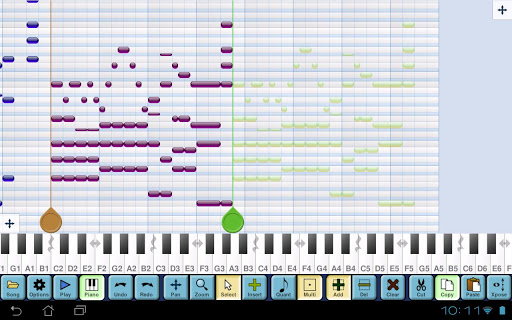
MusePad lets you record your musical ideas on the go, with your phone or tablet, enabling you to write simple melodies or complex chords / rhythm patterns. It's perfect for musicians, students and music enthusiasts who want to write their ideas quickly, analyze and communicate them effectively.
MusePad uses a piano roll style grid for displaying notes, and a piano keyboard for input. You enter the notes using the piano and they appear on the note grid. After that, you can delete notes directly on the grid, or add more notes tapping on the grid.
At any time, you can play your song from any starting position. When playing, current note(s) will be lit both on note grid and piano …
Read the full description
MusePad lets you record your musical ideas on the go, with your phone or tablet, enabling you to write simple melodies or complex chords / rhythm patterns. It's perfect for musicians, students and music enthusiasts who want to write their ideas quickly, analyze and communicate them effectively. MusePad uses a piano roll style grid for displaying notes, and a piano keyboard for input. You enter the notes using the piano and they appear on the note grid. After that, you can delete notes directly on the grid, or add more notes tapping on the grid. At any time, you can play your song from any starting position. When playing, current note(s) will be lit both on note grid and piano keyboard, following the notes with a smooth scroll movement. You will love to watch the music play! Features: - Note grid with diatonic / chromatic modes and key signature - Input notes with the piano keyboard, or placing them directly on the grid - Polyphonic piano input (in multitouch devices) with 8 octaves, scrollable in small devices - Unlimited undo / redo for correcting mistakes - Playback with highlighting of notes in grid and piano - Full navigation on the note grid, with pan & zoom - Save and load songs, or export them as MIDI - Cut / Copy / Paste / Transpose Multiple screen size configurations are available. Screen size is set initially to match your device's size, but you may use the big screen setting on a small device (using a pointer to help you press the tiny buttons) or the small screen setting on a big device. Try before you buy! You can download the Lite version of MusePad, which has all the features of MusePad (except load, save and export). More features will be added in the future. Stay tuned and enjoy MusePad!
Installs since 28 Aug 2026 Measured
Exact Google Play install counts, collected daily
Ratings
72 ratings, 14 reviews
- 5 ★82%
- 4 ★18%
- 3 ★0.0%
- 2 ★0.0%
- 1 ★0.0%
Recent reviews
Latest public reviews from the store
- 29 Dec 2019
Please let me turn off the sound: (
- 11 Aug 2017
I really enjoy the game. It's simple and a great concept. My only complaint is that there doesn't seem to be a way to mute or disable the in-game sounds. This is especially frustrating if I'm playing while also listening to a book.
Top chart positions
Latest Google Play chart ranks by country, last 10 days
Not in any tracked top chart in the last 10 days.
MusePad history
Release, install milestones, listing and store changes
- Reached 1,000+ installs 18 Jan 2014
- Reached 500+ installs 22 Apr 2013
- Reached 100+ installs 14 Jun 2012
- Reached 50+ installs 15 Apr 2012
- First released on the store 6 Mar 2012
Recent versions
Current version Varies with device
- Version 2.0213 Jul 2014
- Version 2.0120 May 2013
- Version 2.09 Feb 2013
- Version 1.0215 May 2012
Listing keywords
Words and phrases MusePad repeats most in its store listing
Top phrases: note grid (4), piano keyboard (3), grid and piano (2), screen setting (2), screen size (2).
Highlighted words also appear in the title. Counts cover the title, short description and description.
Business model and tech
From the store listing and declared permissions
- Business model
- Paid, $2.49
- Sensitive access
- Photos, videos and files
2 permissions
0 special access, 2 sensitive, 0 standard
- Change or delete shared storageSensitive
- Read shared storageSensitive
Compliance
What the listing and the app package show
- Store status
- Live
- Upkeep
- No update since 13 Jul 2014
- Registered in
- Spain
- Privacy policy
- Linked on the listing
- Advertising
- No ads declared
- In-app purchases
- None declared
- Age rating
- Everyone
- Sensitive permissions
- 2 sensitive of 2
- Location access
- No
- Camera and microphone
- Neither
Apps like MusePad
Podcast+Limoo17.4K installs★ 3.93
Subway Train SoundsInfinite_Apps27.7K installs★ 3.94
Lider FM 98,3Cadena Sistemas12.6K installs★ 4.6
Portal GazetaMobRadio9.1K installs★ 4.4
DefectedDefected Records21.4K installs★ 3.6
Radio ZüriseeRadio Zürisee AG30.6K installs★ 4.2
القران الكريم الشيخ محمد رفعتFull Quran21.4K installs★ 4.4
آهنگ های ایرانی بدون اینترنتchahdev40.2K installs★ 4.56
Bluetooth Speaker Switch BasicMarksThinkTank30.9K installs★ 4.09
MusePad: questions and answers
How many downloads does MusePad have?
MusePad has 2,114 installs on Google Play, measured from the store's own count on 14 Nov 2026.
Who makes MusePad?
MusePad is published by VirtualCode.es, a developer based in ES.
When was MusePad last updated?
The latest version (Varies with device) was released on 13 Jul 2014.
Is MusePad free?
No. MusePad is a paid app priced at $2.49.
Is MusePad still available?
Yes. MusePad is live on Google Play as of 14 Nov 2026.
Track MusePad and its competitors
Watch any app for new versions, rating drops, chart moves and removals. Free plan, no card.