
My Backup Pro
The easiest backup for Android Supporting the most content and the most devices.
- Installs
- 583K
- Measured
- Rating
- 3.76
- Ratings
- 38.7K
- 13.1K reviews
- Version
- 4.9.1
- Updated 21 Oct 2026
- Released
- —
- Tracked since 13 May 2026
- Size
- 7 MB
- Needs 4.1
Screenshots
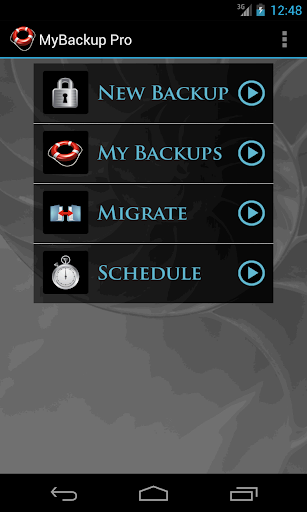

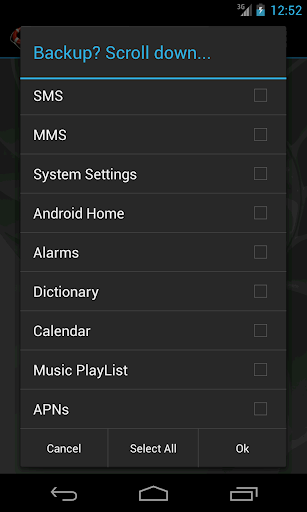


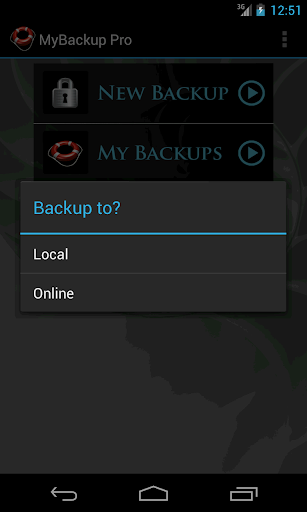


About My Backup Pro
The description on the store listing
MyBackup Pro is the easiest, most reliable, and feature packed Android backup solution available.
Supporting the most content, and the most Android devices.
Find out why over 5 million people have chosen MyBackup as their secure source for a Backup Solution.
FEATURES:
- Backup and Restore using your local device or SD card
* Backup and Restore using an On The Go (OTG) USB card
- Cloud backup to our online secure servers, or use your Dropbox account
- Cloud backup to your personal Google Drive Cloud account
- Migrate information directly between 2 devices
- Backup directly to your computer over the Internet!
- Schedule multiple different backups to multiple locations
- Restore …
Read the full description
MyBackup Pro is the easiest, most reliable, and feature packed Android backup solution available. Supporting the most content, and the most Android devices. Find out why over 5 million people have chosen MyBackup as their secure source for a Backup Solution. FEATURES: - Backup and Restore using your local device or SD card * Backup and Restore using an On The Go (OTG) USB card - Cloud backup to our online secure servers, or use your Dropbox account - Cloud backup to your personal Google Drive Cloud account - Migrate information directly between 2 devices - Backup directly to your computer over the Internet! - Schedule multiple different backups to multiple locations - Restore to an existing or new Android device - View the backup in detail without having to restore - All Android 1.6+ devices supported! - Available in 16 languages - Super easy backup with advanced features and settings - BETA: Trigger a backup to begin on your device remotely from our website SUPPORTED CONTENT: - Applications (Including Data if Rooted) - Photos - Music - Videos - Contacts - Call log - Text messages (SMS) - Message attachments (MMS) - Browser Bookmarks - Home Screen Shortcuts and Wallpaper (Pre Android 4.4 KitKat) - System Settings - Calendar events - Alarms - Dictionary - Music Playlists - APN settings - And much more... NEWS AND REVIEWS: CNET TV recommends Android users to use MyBackup Pro to backup their personal data. T-Mobile highlights MyBackup Pro in their quarterly magazine as "an application to have For the Security Minded." TechHive (PCWorld) gives MyBackup Pro 4.5 stars and recommends Android users to use MyBackup Pro to backup and secure their phones. HIGHLIGHTS: Cloud Backup (RerWare Cloud, Dropbox, Google Drive) or local backups to your device/SD card. Supporting the most content including your Applications, Photos, Music, Videos, Contacts, Call log, Browser Bookmarks, SMS (text messages), MMS (message attachments), Calendar, System Settings, Home Screens (including shortcut positions), Alarms, Dictionary, Music Playlists, APNs, and more... Restore your backup onto the same or new Android device. Migrate feature allows you to move any and all supported content directly from one Device to another over WiFi. View your Data, Apps and Media backups online by logging into the Web Viewer at the RerWare website. MyBackup Pro will work on all Android mobile devices, regardless if they have root access or not. Users who have a rooted phone can backup APK and the Data/Setting of all applications __ ROOT ONLY PHONE FEATURES BELOW __ MyBackup Pro now comes with all MyToolbox features for Free. This application will allow Root users to select multiple applications and perform the following functions with batch operations: - Freeze bloatware and system apps - Defrost frozen applications - Wipe Cache of applications - Wipe Data of applications - Uninstall applications - Break the Link to Apps - Link Apps - Force Close applications _______________________________ If you should have any questions or support needs, please do not hesitate to contact us using the support Email provided. We will get back to you as soon as we can. We appreciate your business.
Installs since 19 Jul 2026 Measured
Exact Google Play install counts, collected daily
Ratings
38,720 ratings, 13,104 reviews
- 5 ★63%
- 4 ★6.1%
- 3 ★2.8%
- 2 ★3.8%
- 1 ★24%
Recent reviews
Latest public reviews from the store
- 31 Jan 2023
This Application is really helpful as long as you know how to use the Directorialisation. And always make sure to write and Notepad your Account Information down, just in case there is a problem, then the support team can assist you with your Google Play Store and Account Purchase. Please nobody give bad reps to this Account because it is so cool, if you know how to use it. Cheers *****/*****
- 6 Jun 2021
This works really well as long as you have enough space on your internal memory to build the backup. No matter what your backup destination is, this app will use temp space on the main internal memory to built it, so if your phone is pretty full, with the stuff you want to backup, you cannot use it. Tried backing up my wife's old phone to move it to her new one, and there was just no way, even though we had ~100GB free on her (internal) SD card, which was designated as the backup destination. I've successfully used this app before on my own phones; fairly fast and so far very reliable. But the above scenario make it less useful. I ended up using a (paid for) solution on PC to transfer the info, and that worked fine.
What reviewers bring up
Topics mentioned in the latest 10 reviews, by how many reviews mention them
Liked in good reviews (1 reviews)
No topic comes up twice.
Raised in bad reviews (8 reviews)
- restore 5
- backup 4
- data 4
- pro 4
- another 3
- permissions 2
- restoring 2
- require 2
Top chart positions
Latest Google Play chart ranks by country, last 10 days
Not in any tracked top chart in the last 10 days.
My Backup Pro history
Release, install milestones, listing and store changes
Update frequency
How often My Backup Pro ships a new version, month by month
2 updates in the last 12 months. Less often than most similar apps: they shipped a median of 3 updates in the same year.
Recent versions
Current version 4.9.1
- Version 4.9.121 Oct 2026
v4.9.1 -New Android billing -Target SDK v4.8.8 - Fixed hidden backup button bug on some phones - Misc fixes v4.8.6 -Target SDK 35 - Misc fixes v4.8.4 - Fixed Android 12+ issues v4.8.0 - Fixed apps backup on Android 11+ v4.7.8 - Fixed Android 11+ issues v4.7.7 - Fixed Dropbox issue - Fixed Google Drive issue v4.7.6 - Fixed SMS/MMS restore on Android 10 v4.7.4 - Fixed intent redirection vulnerability v4.7.3 - Fixed Google Drive issues and Misc fixes.
- Version 4.8.89 Dec 2025
v4.8.8 - Fixed hidden backup button bug on some phones - Misc fixes v4.8.6 -Target SDK 35 - Misc fixes v4.8.4 - Fixed Android 12+ issues v4.8.0 - Fixed apps backup on Android 11+ v4.7.8 - Fixed Android 11+ issues v4.7.7 - Fixed Dropbox issue - Fixed Google Drive issue v4.7.6 - Fixed SMS/MMS restore on Android 10 v4.7.4 - Fixed intent redirection vulnerability v4.7.3 - Fixed Google Drive issues and Misc fixes. v4.7.1 - Fixed Google Drive and Dropbox. v4.7.0 - Misc fixes for Android 10.
- Version 4.8.629 Oct 2025
- Version 4.8.411 Sep 2023
Listing keywords
Words and phrases My Backup Pro repeats most in its store listing
Top phrases: mybackup pro (7), cloud backup (3), alarms dictionary music (2), backup and restore (2), contacts call log (2).
Highlighted words also appear in the title. Counts cover the title, short description and description.
Business model and tech
From the store listing, the SDKs in the app package and its declared permissions
- Business model
- Paid, $6.99In-app purchasesShows ads
- Built with
- No cross-platform framework or game engine detected
- Ad networks (1)
- AdMob
- Subscriptions and payments
- Google Play billing
- Analytics and crash reports
- Firebase
- Sensitive access
- ContactsPhone and callsText messagesCalendarPhotos, videos and filesAccounts on the deviceAdvertising ID
2 ad, attribution and analytics SDKs detected. SDKs are read from the app package and permissions from the store listing, so code that loads later is not seen.
Technology
36 SDKs found in the app package
Ad networks
Advertising and install-attribution SDKs found in the app package
- AdMob
52 permissions
6 special access, 11 sensitive, 35 standard
- Change system settingsWRITE_SETTINGSSpecial access
- Install other appsREQUEST_INSTALL_PACKAGESSpecial access
- Manage all filesMANAGE_EXTERNAL_STORAGESpecial access
- Read sensitive log dataSpecial access
- See every installed appQUERY_ALL_PACKAGESSpecial access
- Set exact alarmsSCHEDULE_EXACT_ALARMSpecial access
- Read calendar eventsSensitive
- Change contactsSensitive
- Read contactsSensitive
- See accounts on the deviceSensitive
- Change or delete shared storageSensitive
- Read shared storageSensitive
Compliance
What the listing and the app package show
- Store status
- Live
- Upkeep
- Updated 21 Oct 2026
- Registered in
- United States
- Privacy policy
- Linked on the listing
- Advertising
- No ads declared
- In-app purchases
- Offered
- Age rating
- Everyone
- Sensitive permissions
- 11 sensitive, 6 special access of 52
- Location access
- No
- Camera and microphone
- Neither
Apps like My Backup Pro
Simple NotesSmart Mobile Tools5.4M installs★ 4.52
AI VPN proxy serverCleaner + Antivirus + VPN company3.6M installs★ 4.04
Full Battery Charge AlarmSyrupy2.4M installs★ 4.7
Yandex Browser (alpha)Direct Cursus Computer Systems Trading LLC5.4M installs★ 4.35
Big Font - Big Text SizeEco Mobile Style5.1M installs★ 4.23
Tech CoachAsurion Mobile Applications, LLC.6M installs★ 3.99
CompassPixelProse SARL2.9M installs★ 4.55
Back Buttonogapps14.1M installs★ 4.09
Zipper - File ManagementPolarBear soft8.6M installs★ 4.21
My Backup Pro: questions and answers
How many downloads does My Backup Pro have?
My Backup Pro has 582,681 installs on Google Play, measured from the store's own count on 15 Nov 2026.
Who makes My Backup Pro?
My Backup Pro is published by Rerware, LLC, a developer based in US.
When was My Backup Pro last updated?
The latest version (4.9.1) was released on 21 Oct 2026.
Is My Backup Pro free?
No. My Backup Pro is a paid app priced at $6.99.
Is My Backup Pro still available?
Yes. My Backup Pro is live on Google Play as of 15 Nov 2026.
Track My Backup Pro and its competitors
Watch any app for new versions, rating drops, chart moves and removals. Free plan, no card.