
Network Analyzer
Wifi scanner, signal meter, ping, traceroute, whois, DNS query & other net tools
- Installs
- 5.91M
- Measured
- Rating
- 4.73
- Ratings
- 55.5K
- 4.2K reviews
- Version
- 5.1
- Updated 8 Aug 2026
- Released
- 5 Feb 2016
- Tracked since 13 May 2026
- Size
- 7 MB
- Needs 6.0
Screenshots


About Network Analyzer
The description on the store listing
Network Analyzer can help you diagnose various problems in your wifi network setup, Internet connectivity, and also detect various issues on remote servers thanks to the wide range of tools it provides.
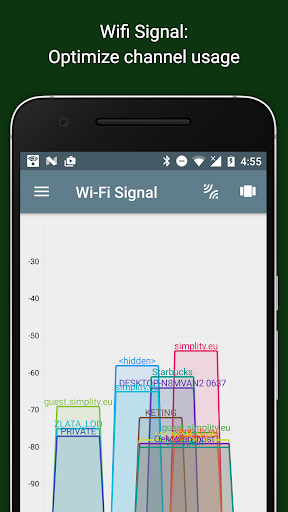
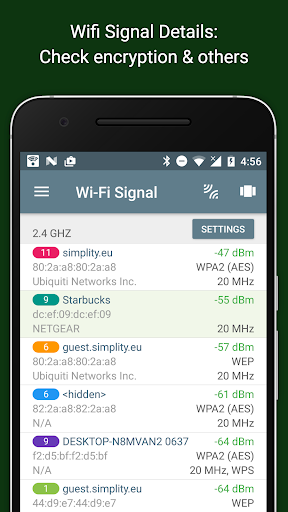
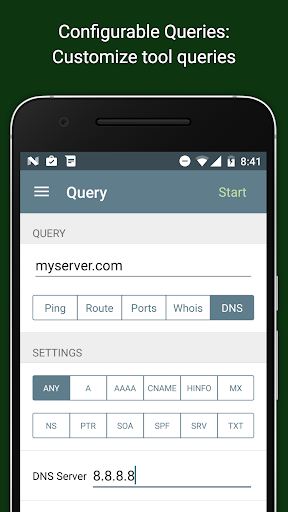
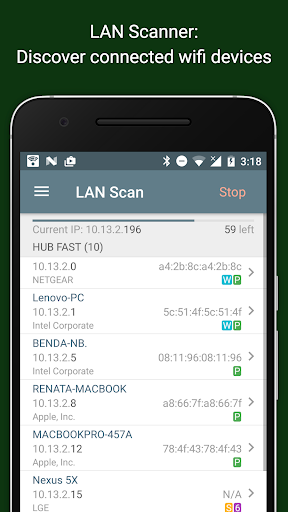
It is equipped with a fast wifi device discovery tool, including all the LAN device's addresses and names. Further, Network Analyzer contains standard net diagnostic tools such as ping, traceroute, port scanner, DNS lookup, and whois. Finally, it shows all neighbouring wi-fi networks together with additional details such as signal strength, encryption and router manufacturer to help discovering the best channel for a wireless router. Everything works with both IPv4 and IPv6.
Wifi …
Read the full description
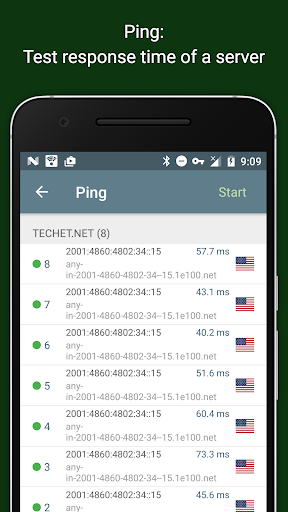
Network Analyzer can help you diagnose various problems in your wifi network setup, Internet connectivity, and also detect various issues on remote servers thanks to the wide range of tools it provides. It is equipped with a fast wifi device discovery tool, including all the LAN device's addresses and names. Further, Network Analyzer contains standard net diagnostic tools such as ping, traceroute, port scanner, DNS lookup, and whois. Finally, it shows all neighbouring wi-fi networks together with additional details such as signal strength, encryption and router manufacturer to help discovering the best channel for a wireless router. Everything works with both IPv4 and IPv6. Wifi signal meter: - Both graphical and textual representation showing network channels and signal strengths - Wifi network type (WEP, WPA, WPA2) - Wifi encryption (AES, TKIP) - BSSID (router MAC address), manufacturer, WPS support - Bandwidth (Android 6 and newer only) LAN scanner: - Fast and reliable detection of all network devices - IP addresses of all discovered devices - NetBIOS, mDNS (bonjour), LLMNR, and DNS name where available - Pingability test of discovered devices - Detection of IPv6 availability Ping & traceroute: - Round trip delay including IP address and hostname for every network node - Support of both for IPv4 and IPv6 Port scanner: - Fast, adaptive algorithm for scanning the most common ports or user specified port ranges - Detection of closed, firewalled, and open ports - Description of the known open port services Whois: - Whois of domains, IP addresses and AS numbers - Support of both for IPv4 and IPv6 DNS lookup: - Functionality similar to nslookup or dig - Support for A, AAAA, SOA, PTR, MX, CNAME, NS, TXT, SPF, SRV records - Support of both for IPv4 and IPv6 Network information: - Default gateway, external IP (v4 and v6), DNS server - Wifi network information such as SSID, BSSID, IP address, HTTP proxy, subnet mask , signal strength, etc. - Cell (3G, LTE) network information such as IP address, signal strength, network provider, MCC, MNC, etc. More - Full support of IPv6 - Detailed help - Regular updates, support page
Installs, last 30 days Measured
Exact Google Play install counts, collected daily
Ratings
55,515 ratings, 4,200 reviews
- 5 ★83%
- 4 ★12%
- 3 ★1.9%
- 2 ★0.6%
- 1 ★2.4%
Recent reviews
Latest public reviews from the store
- 19 May 2026
I appreciate that ads don't pop up every time you click on something it's a good tool to use. so 5 stars is a no brainer
- 18 May 2026
love this app. you can see what your external io address is and then check it
- 18 May 2026
extremely good troubleshooting IP printers availability on the network 8
- 17 May 2026
deep detail of the wifi
What reviewers bring up
Topics mentioned in the latest 50 reviews, by how many reviews mention them
Liked in good reviews (49 reviews)
- useful 6
- tool 6
- wifi 5
- ads 4
- troubleshooting 3
- understand 3
- especially 3
- network 3
Raised in bad reviews (0 reviews)
No topic comes up twice.
Top chart positions
Latest Google Play chart ranks by country, last 10 days
Not in any tracked top chart in the last 10 days.
Network Analyzer history
Release, install milestones, listing and store changes
- Reached 5,000,000+ installs 25 May 2025
- Reached 1,000,000+ installs 4 Oct 2018
- Reached 500,000+ installs 20 Jan 2018
- Reached 100,000+ installs 30 Oct 2016
- Reached 50,000+ installs 9 May 2016
- Reached 10,000+ installs 10 Mar 2016
- First released on the store 5 Feb 2016
Update frequency
How often Network Analyzer ships a new version, month by month
3 updates in the last 12 months. More often than most similar apps: they shipped a median of 2 updates in the same year.
Recent versions
Current version 5.1
- Version 5.18 Aug 2026
- improve NAT64 network support for external IP, ping and traceroute - add modern RDAP-based whois - add SNMP name resolution in LAN scanner - add support for SVCB/HTTPS DNS records - lots of bug fixes and minor improvements
- Version 5.05 Jul 2026
- rewrite the app in kotlin and jetpack compose using material 3 design - this is a significant rewrite of the app, please report any bugs you experience - use tab-based UI instead of the previous sidebar-based UI for better back gesture handling and easier navigation - support automatic light/dark theme switching based on system theme - lots of optimizations, bug fixes and minor improvements
- Version 5.0.15 Jul 2026
- fix crash when scanning networks with subnet mask 255.255.255.255 - make font size adjustable using system settings - optimize LAN scanner performance - minor fixes and improvements
- Version 4.218 Jul 2025
- add support for 6GHz Wi-Fi band (on compatible devices) - show more details about Wi-Fi 7 networks - add support for multiple SIMs (can be shown by using the "Show Multi-SIM Information" button at the bottom of the Information page, requires the READ_PHONE_STATE permission) - various stability fixes and UI improvements - if there are no problems with this release, the "103.12" release with these features will be made available on the FAQ page in a few weeks
Listing keywords
Words and phrases Network Analyzer repeats most in its store listing
Top phrases: ipv4 and ipv6 (4), ip address (3), network analyzer (3), network information (3), ping traceroute (3).
Highlighted words also appear in the title. Counts cover the title, short description and description.
Business model and tech
From the store listing and declared permissions
- Business model
- Free to downloadShows ads
- Sensitive access
- No sensitive permission declared
Compliance
What the listing and the app package show
- Store status
- Live
- Upkeep
- Updated 8 Aug 2026
- Privacy policy
- Linked on the listing
- Advertising
- Shows ads
- In-app purchases
- None declared
- Age rating
- Everyone
Apps like Network Analyzer
Home WiFi AlertDoubleDot Studios24.9M installs★ 4.16
English Spanish TranslatorNolreom Buremut6.3M installs★ 4.75
Game Booster Pro: Turbo ModeScoteam589K installs★ 4.48
Recover Deleted Photos - DSDetective Studio9.7M installs★ 3.68
PC RemoteMonect (Suzhou) Co., Ltd.12.3M installs★ 3.63
Android Device PolicyGoogle LLC503M installs★ 3.62
Video Downloader for Twitter XAculix Technologies LLP2.3M installs★ 4.62
Gallery Photo Lock, GalleryA+XiX Tech3.2M installs★ 4.78
WiFi Connection Managerroamingsoft11.3M installs★ 3.61
Network Analyzer: questions and answers
How many downloads does Network Analyzer have?
Network Analyzer has 5,905,506 installs on Google Play, measured from the store's own count on 19 Nov 2026.
Who makes Network Analyzer?
Network Analyzer is published by Jiri Techet.
When was Network Analyzer last updated?
The latest version (5.1) was released on 8 Aug 2026.
Is Network Analyzer free?
Yes. Network Analyzer is free to download, and it shows ads.
Is Network Analyzer still available?
Yes. Network Analyzer is live on Google Play as of 19 Nov 2026.
Track Network Analyzer and its competitors
Watch any app for new versions, rating drops, chart moves and removals. Free plan, no card.