OCR Instantly Pro
Snap a picture and instantly convert printed text to digital, editable text!
- Installs
- 6.72K
- Measured
- Rating
- 4.0
- Ratings
- 454
- 53 reviews
- Version
- Varies with device
- Updated 19 May 2026
- Released
- 21 Nov 2013
- Tracked since 13 May 2026
- Size
- —
Screenshots




About OCR Instantly Pro
The description on the store listing
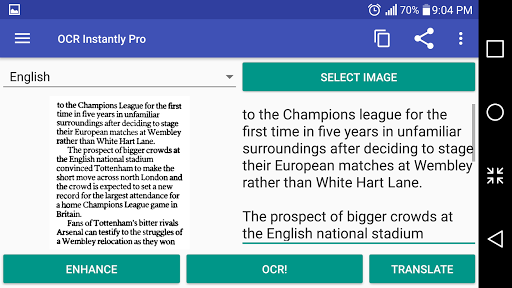
OCR stands for Optical Character Recognition which is a technology to convert image to text. This apps takes an image and converts it into digitized text which can then be shared to other applications such as Email and SMS, or simply copy paste the text to anywhere you like.
Full length review: http://www.youtube.com/watch?v=X5s948BJhRI
= Important Notes =
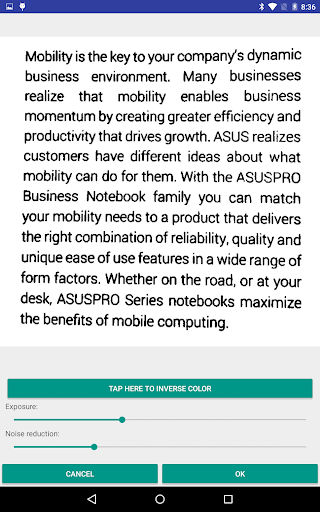
Garbage in, garbage out - make sure text is sharp and large enough for recognition.
**Make sure text is upright (horizontally aligned to the app)** Beware of camera rotation!
Handwritten text will not work.
Text on top of unclean background (images or borders/lines in excel sheet) will not work.
PDF source is not supported. …
Read the full description
OCR stands for Optical Character Recognition which is a technology to convert image to text. This apps takes an image and converts it into digitized text which can then be shared to other applications such as Email and SMS, or simply copy paste the text to anywhere you like. Full length review: http://www.youtube.com/watch?v=X5s948BJhRI = Important Notes = Garbage in, garbage out - make sure text is sharp and large enough for recognition. **Make sure text is upright (horizontally aligned to the app)** Beware of camera rotation! Handwritten text will not work. Text on top of unclean background (images or borders/lines in excel sheet) will not work. PDF source is not supported. OCR for Gujarati, Persian and Punjabi is experimental and the result is very bad. You have been warned. **Please read the in-app Help section for tips to improve OCR accuracy before leaving a bad review :) ** = Key Points = Offline OCR Built-in image enhancement tools Simple to use but feature rich Huge language support = Pro Features = Remove ads - Permanently removes all advertisements. Image dewarp - Fix text lines that are wavy/bent due to curved book pages. Save to sdcard & image share - Image/text can be saved to sdcard. Also allows sharing of enhanced image. OCR modes - Advance OCR modes, character white/blacklist, and disable dictionary. Paragraph scanning mode - Allows you to remove unwanted line breaks in paragraphs. Create PDF - Creates PDF files where text can be selected and copy paste. Text to speech - Text to speech language support. Also allows automatic text reading upon OCR. Multi-language OCR - Perform OCR with multiple languages. Full screen editing - Allows one to hide the image during text editing. = Supports more than 60 languages = Afrikaans, Albanian, Ancient Greek, Arabic, Azerbaijani, Bangla/Bengali, Basque, Belarusian, Bulgarian, Catalan, Cherokee, Chinese (Simplified), Chinese (Traditional), Croatian, Czech, Danish, Dutch, English, Esperanto, Estonian, Finnish, Frankish, French, Galician, German, Greek, Gujarati, Hebrew, Hindi, Hungarian, Icelandic, Indonesian, Italian (Old), Italian, Japanese, Kannada, Korean, Latvian, Lithuanian, Macedonian, Malay, Malayalam, Maltese, Middle English, Middle French, Norwegian, Oriya, Persian, Polish, Portuguese, Punjabi, Romanian, Russian, Serbian (Latin), Slovakian, Slovenian, Spanish (old), Spanish, Swahili, Swedish, Tagalog, Tamil, Telugu, Thai, Turkish, Ukrainian, Vietnamese
Installs since 29 Aug 2026 Measured
Exact Google Play install counts, collected daily
Ratings
454 ratings, 53 reviews
- 5 ★61%
- 4 ★15%
- 3 ★4.5%
- 2 ★10%
- 1 ★10%
Recent reviews
Latest public reviews from the store
- 5 Apr 2026
the app is good
- 21 Mar 2026
love this app the most exciting thing is that I can create my own family I started playing it now in a month I will update you at how it is
- 26 Dec 2025
helped me with my play through in my forever world and my other story's in my other saves it's one of the best apps for the Sims.
- 13 Nov 2025
very great app just poor instructions
What reviewers bring up
Topics mentioned in the latest 11 reviews, by how many reviews mention them
Liked in good reviews (6 reviews)
- family 3
- sims 3
- beta 2
- wish 2
Raised in bad reviews (2 reviews)
No topic comes up twice.
Top chart positions
Latest Google Play chart ranks by country, last 10 days
Not in any tracked top chart in the last 10 days.
OCR Instantly Pro history
Release, install milestones, listing and store changes
- Reached 5,000+ installs 5 Apr 2016
- Reached 1,000+ installs 12 Feb 2014
- First released on the store 21 Nov 2013
Update frequency
How often OCR Instantly Pro ships a new version, month by month
0 updates in the last 12 months. Less often than most similar apps: they shipped a median of 1 updates in the same year.
Recent versions
Current version Varies with device
- Version 3.1.110 Mar 2024
- Version 3.1.010 Dec 2022
- Version 3.0.917 Sep 2019
- Version 3.0.524 Mar 2017
Listing keywords
Words and phrases OCR Instantly Pro repeats most in its store listing
Top phrases: text to speech (2), copy paste (2), language support (2), ocr modes (2), sure text (2).
Highlighted words also appear in the title. Counts cover the title, short description and description.
Business model and tech
From the store listing, the SDKs in the app package and its declared permissions
- Business model
- Paid, $4.99
- Built with
- No cross-platform framework or game engine detected
- Ad networks (0)
- None detected
- Sensitive access
- Photos, videos and files
0 ad, attribution and analytics SDKs detected. SDKs are read from the app package and permissions from the store listing, so code that loads later is not seen.
Technology
4 SDKs found in the app package
4 permissions
0 special access, 2 sensitive, 2 standard
- Change or delete shared storageSensitive
- Read shared storageSensitive
- Full internet accessStandard
- See network connectionsStandard
Compliance
What the listing and the app package show
- Store status
- Live
- Upkeep
- Updated 19 May 2026
- Registered in
- Malaysia
- Privacy policy
- Linked on the listing
- Advertising
- No ads declared
- In-app purchases
- None declared
- Age rating
- Everyone
- Sensitive permissions
- 2 sensitive of 4
- Location access
- No
- Camera and microphone
- Neither
Apps like OCR Instantly Pro
Recovery: Photo, Video FilesEskimo Technologies Group330K installs★ 4.62
Photo Notes PlusLensoft119K installs★ 4.45
Secret Folder - Secure FolderOnvitro35.2K installs★ 4.25
Screen recordingColorOS99K installs★ 3.91
Spiral VPNDalcom Sangsa LLC109K installs★ 4.19
Rotation Small AppPranav Pandey26.3K installs★ 4.33
D-Link CCTVD-Link India Limited137K installs★ 3.32
Algebra Equation CalculatorEdugameapp225K installs★ 3.08
Hz Frequency Healing SoundsPrometheus Interactive LLC93.7K installs★ 4.37
OCR Instantly Pro: questions and answers
How many downloads does OCR Instantly Pro have?
OCR Instantly Pro has 6,724 installs on Google Play, measured from the store's own count on 14 Nov 2026.
Who makes OCR Instantly Pro?
OCR Instantly Pro is published by TheSimplest.Net, a developer based in MY.
When was OCR Instantly Pro last updated?
The latest version (Varies with device) was released on 19 May 2026.
Is OCR Instantly Pro free?
No. OCR Instantly Pro is a paid app priced at $4.99.
Is OCR Instantly Pro still available?
Yes. OCR Instantly Pro is live on Google Play as of 14 Nov 2026.
Track OCR Instantly Pro and its competitors
Watch any app for new versions, rating drops, chart moves and removals. Free plan, no card.