
PDF Editor - Edit & Sign Docs
Sign, edit, read, create, draw, protect and modify any PDF file
- Installs
- 3.86M
- Measured
- Rating
- 4.1
- Ratings
- 11.9K
- 233 reviews
- Version
- 92.0
- Updated 28 Aug 2026
- Released
- 1 Apr 2019
- Tracked since 13 May 2026
- Size
- 101 MB
- Needs 4.4
Screenshots


About PDF Editor - Edit & Sign Docs
The description on the store listing
PDF Editor - Sign PDF, Create PDF & Edit PDF
Sign, edit, read, create, draw, protect and modify any PDF file
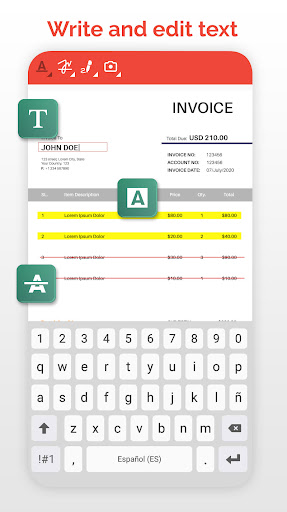
PDF Editor - Sign PDF, Create PDF & Edit PDF is a document editor that allows you to edit PDF. It is also a PDF Reader to read PDF. Choose the PDF to edit and modify your PDF in a thousand ways: draw, write on PDF, paint, password, PDF reader, bookmarks, notes, signatures and much more thanks to the best free PDF editor for smartphones.
PDF Editor - Sign PDF, Create PDF and Edit PDF has the following characteristics:
- Sign PDF:
You can add and save your signature to edit and sign your PDF. Leave your signature in your PDF writer. Write your signature and save it to be …
Read the full description
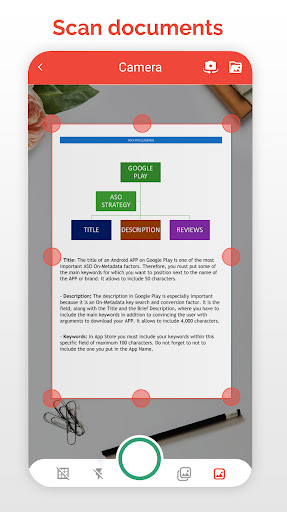
PDF Editor - Sign PDF, Create PDF & Edit PDF Sign, edit, read, create, draw, protect and modify any PDF file PDF Editor - Sign PDF, Create PDF & Edit PDF is a document editor that allows you to edit PDF. It is also a PDF Reader to read PDF. Choose the PDF to edit and modify your PDF in a thousand ways: draw, write on PDF, paint, password, PDF reader, bookmarks, notes, signatures and much more thanks to the best free PDF editor for smartphones. PDF Editor - Sign PDF, Create PDF and Edit PDF has the following characteristics: - Sign PDF: You can add and save your signature to edit and sign your PDF. Leave your signature in your PDF writer. Write your signature and save it to be able to sign future PDFs with a single click. - Notes: Add notes to your PDF files, PDF Editor has a document and note editor to annotate the most important parts of your edited PDF file. - Paint and draw lines and shapes: Use the pencil to draw lines in the PDF, select the color and edit the PDF drawing lines and shapes. Point out annotations, draw arrows, make squares, write on PDF as if it were a word file or an image. - Text editor: Built-in text editor to underline or cross out the text of your PDF. Edit PDF by writing text and then you can highlight, underline or cross out the words you want. - Stamps: New way of sign PDF with the most important messages. Edit PDF with a customizable stamp with the date and time. Perfect to review PDF. - Bookmark: You can put bookmark in your PDF documents to mark where you were reading your PDF or editing your PDF. Very useful to read PDF books. Easy and simple PDF reader. - Photos and images: Add photos and images to your PDF, you can choose the photo from the gallery or take pictures with the camera to add the image to the PDF with the size and shape you want. - Create PDF: Create your PDF document, choose paper size, folio color and if you have guide lines, you can generate PDF and edit PDF documents to your liking thanks to the powerful pdf writer. - Password: Protect PDF documents is easy and fast with this application because you can put a password to the documents to block PDF and that can only be unlocked with the password that you put. - Share your files with other tools and applications: Share the documents you have converted with any other messaging application, mail or social network. Complete your work with PDF Manager or PDF Converter and finish completing the application with the best tools. The best free PDF office tool to create PDF, edit PDF and modify PDF. endless editing possibilities. Edit PDF in many ways: use the pen to draw lines in the PDF, add text to the PDF, sign the PDF, underline text in PDF and more PDF editing options. Do you want to protect a PDF with a password? Add your signature to the PDF? Everything is possible with this free PDF Creator & Editor. Fill PDF forms without using a PC, a PDF reader with bookmarks to read books on your device.
Installs, last 30 days Measured
Exact Google Play install counts, collected daily
Ratings
11,879 ratings, 233 reviews
- 5 ★64%
- 4 ★15%
- 3 ★2.9%
- 2 ★2.9%
- 1 ★15%
Recent reviews
Latest public reviews from the store
- 25 Jan 2025
Good for open all types files
- 24 Oct 2024
Great 👍 thanks
- 15 Feb 2024
Perfect
- 1 Oct 2023
Nice one
What reviewers bring up
Topics mentioned in the latest 50 reviews, by how many reviews mention them
Liked in good reviews (18 reviews)
- files 2
Raised in bad reviews (31 reviews)
- waste 3
- conversion 2
- expensive 2
- subscribe 2
- convert 2
- error 2
- trial 2
- paid 2
Top chart positions
Latest Google Play chart ranks by country, last 10 days
Not in any tracked top chart in the last 10 days.
PDF Editor - Edit & Sign Docs history
Release, install milestones, listing and store changes
- Reached 1,000,000+ installs 30 Jul 2020
- First released on the store 1 Apr 2019
Update frequency
How often PDF Editor - Edit & Sign Docs ships a new version, month by month
4 updates in the last 12 months. More often than most similar apps: they shipped a median of 2 updates in the same year.
Recent versions
Current version 92.0
- Version 92.027 Mar 2026
🚀 Completely redesigned PDF editing engine ✏️ 11 annotation tools: pen, shapes, text, stamps, signature & more 🎨 Color and width picker for each tool 🗑️ New eraser tool 📄 Multi-document support with tabs 🔄 Page rotation 🖊️ Improved signatures with customizable colors 🎯 Redesigned interface, more professional and fluid ⚡ Better performance and stability
- Version 87.04 Feb 2026
- Version 86.017 Dec 2025
- Version 84.015 Dec 2025
Listing keywords
Words and phrases PDF Editor - Edit & Sign Docs repeats most in its store listing
Top phrases: edit pdf (9), pdf editor (6), create pdf (5), sign pdf (5), pdf edit pdf (4).
Highlighted words also appear in the title. Counts cover the title, short description and description.
Business model and tech
From the store listing, the SDKs in the app package and its declared permissions
- Business model
- Free to downloadIn-app purchasesShows ads
- Built with
- No cross-platform framework or game engine detected
- Ad networks (2)
- AdMobMoPub
- Subscriptions and payments
- Google Play billing
- Attribution and measurement
- Integral Ad Science
- Analytics and crash reports
- FirebaseGoogle Analytics
- Sensitive access
- LocationCameraPhotos, videos and filesAccounts on the deviceAdvertising ID
4 ad, attribution and analytics SDKs detected. SDKs are read from the app package and permissions from the store listing, so code that loads later is not seen.
Technology
59 SDKs found in the app package
Ad networks
Advertising and install-attribution SDKs found in the app package
- AdMob
- Integral Ad Science
- MoPub
20 permissions
2 special access, 6 sensitive, 12 standard
- Manage all filesMANAGE_EXTERNAL_STORAGESpecial access
- See which apps are usedPACKAGE_USAGE_STATSSpecial access
- Take photos and videosSensitive
- See accounts on the deviceSensitive
- Change or delete shared storageSensitive
- Read shared storageSensitive
- Approximate locationSensitive
- Show notificationsPOST_NOTIFICATIONSSensitive
- Ad attribution (Privacy Sandbox)ACCESS_ADSERVICES_ATTRIBUTIONStandard
- Ad topics (Privacy Sandbox)ACCESS_ADSERVICES_TOPICSStandard
- Read how it was installed (install referrer)BIND_GET_INSTALL_REFERRER_SERVICEStandard
- Read the advertising IDAD_IDStandard
Compliance
What the listing and the app package show
- Store status
- Live
- Upkeep
- Updated 28 Aug 2026
- Registered in
- Spain
- Privacy policy
- Linked on the listing
- Advertising
- Shows ads
- In-app purchases
- Offered
- Age rating
- Everyone
- Sensitive permissions
- 6 sensitive, 2 special access of 20
- Location access
- Yes, while in use
- Camera and microphone
- Camera
Apps like PDF Editor - Edit & Sign Docs
Calgary Garbage DayThe City of Calgary161K installs★ 4.77
AI Chat Assistant - Gain AIChat AI Labs795K installs★ 4.26
Block Notes — Minimal notepadBloco Studio1.5M installs★ 4.57
Consultar ProcessosAPP Consultar Processos1.4M installs★ 4.19
Calendar 2026Shree Radha Damodar2.3M installs★ 4.45
Net10 My AccountNeT10 Wireless1.1M installs★ 3.76
Tamil CalendarSmart Droidies741K installs★ 4.19
Digital Signature & Sign PDFsBE OKE Media169K installs★ 4.33
- AD Blocker Browser Block Web Content & Adguardjoettaraubapps1.4M installs★ 3.11
PDF Editor - Edit & Sign Docs: questions and answers
How many downloads does PDF Editor - Edit & Sign Docs have?
PDF Editor - Edit & Sign Docs has 3,857,359 installs on Google Play, measured from the store's own count on 19 Nov 2026.
Who makes PDF Editor - Edit & Sign Docs?
PDF Editor - Edit & Sign Docs is published by Offiwiz, a developer based in ES.
When was PDF Editor - Edit & Sign Docs last updated?
The latest version (92.0) was released on 28 Aug 2026.
Is PDF Editor - Edit & Sign Docs free?
Yes. PDF Editor - Edit & Sign Docs is free to download and offers in-app purchases, and it shows ads.
Is PDF Editor - Edit & Sign Docs still available?
Yes. PDF Editor - Edit & Sign Docs is live on Google Play as of 19 Nov 2026.
Track PDF Editor - Edit & Sign Docs and its competitors
Watch any app for new versions, rating drops, chart moves and removals. Free plan, no card.