
Petit Diary
Petit Diary is very simple & easy to use!
- Installs
- 32.82K
- Measured
- Rating
- 1.0
- Ratings
- 100
- 7 reviews
- Version
- Varies with device
- Updated 26 Dec 2019
- Released
- 6 Aug 2012
- Tracked since 13 May 2026
- Size
- 6 MB
- Needs 4.2
Screenshots


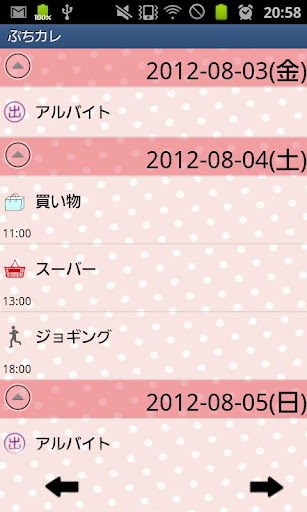

About Petit Diary
The description on the store listing
Petit Diary is very simple & easy to use!
Simple to manage your schedule and plans!
Just tapping a pensil (Event) button on the calendar to register a new event and a plan!
Select an event icon to save the event!
*Petit Diary does not sync with Google Calendar.
Petit Diary Manual
*Initial Window*
Initial Window is the calendar.
Let's save events on the calendar!
1. Tap "Tap here to create event lists." or Event button of the calendar.
2. Move to Daily To-Do.
*Daily To-Do1*
1. You can see the default event icons on the list. For example, tap "Medication" icon as a sample.
2. A pop-up "Medication" appears. top right button shows the time you tapped the icon. You can …
Read the full description
Petit Diary is very simple & easy to use! Simple to manage your schedule and plans! Just tapping a pensil (Event) button on the calendar to register a new event and a plan! Select an event icon to save the event! *Petit Diary does not sync with Google Calendar. Petit Diary Manual *Initial Window* Initial Window is the calendar. Let's save events on the calendar! 1. Tap "Tap here to create event lists." or Event button of the calendar. 2. Move to Daily To-Do. *Daily To-Do1* 1. You can see the default event icons on the list. For example, tap "Medication" icon as a sample. 2. A pop-up "Medication" appears. top right button shows the time you tapped the icon. You can change the time for example, the time when you have to take the madication or the time you took the madication. 3. You can save a memo and can set the alarm. 4. Tap "Save" to finish. *Daily To-Do2* You can edit the content of the default event icons by press and hold. 1. Select one icon that you want to edit and press and hold. 2. A pop-up appears. <Edit window's buttons/from left> a)Add:add a new event icon and save with this button. b)Back:go back to Daily To-Do. c)Delete:Delete the event icon. 3. Change name, sort and if you want to create subcategories, you can enter items SelectItem dialog box. *Daily To-Do3* When you want to save an event that does not have on the list, but not want to register a new event icon on the list, tap "Add Event" icon (green calendar & gray +)! 1. Enter the title name, change the time( if it is necessary), save memo. 2. Tap the icon (green calendar & gray +) to change the icon. 3. Tap "Save" to finish. 4. You can confirm saved events on the list of the calendar. *Daily To-Do4* When you want to add a new event icon on the list, 1. Tap "Add" button (gray + icon). <Add EventIcon window's buttons> a)Add:add a new event icon and save with this button. b)Back:go back to Daily To-Do. c)Delete:Delete the event icon. 2. Enter the name, change the sort (otherwise it will be added the last on the list). 3. Tap the icon (pink + & hand) to change the icon. 4. If you want to create subcategories, you can enter items SelectItem dialog box. 5. Tap "Back" button of the mobile to finish and save. 6. You can customize the event icon list in the same way. *Buttons of the calendar/from the left* 1. Event button: Save daily events and plans. 2. Repeat button: Create repeated plans. 3. Today butoon: Go back today's date. 4. Left & Right button: Move the date right to left. 5. Photo List button: Move to Photo window. 6. Camera button: Take photos or select photos from the gallery of the mobile. *How to edit saved events* 1. Open the calendar. After saving events, you can confirm the saved events on the list of the calendar. 2. Tap one of the events from the list of the calendar. 3. Move to "Daily Event". a.Move up:Move the event to the previous day or before. b.Put off:Move the event to the next day or later. c.Checkmark:Tick the checkmark here then a red checkmark appears on the event of the list on the calendar. You can understand the event has done at a glance. d.Delete:Delete the event. 4. Edit the data (Time, Title, Memo and icon) you need to change. 5. You can set the alarm. 6. Press "Back" button of the mobile to finish and save. *How to create repeated events* 1. Tap the second "Repeat" button on the calendar. 2. Tap "New". 3. Move to "Repeated Event". 4. Enter and select the data (Titile, Date, and Time). 5. Select one repeat interval from the list. a. Everyday: a plan repeats everyday. b. Repeat with a specific day: select the number of the days to create the repeated plans. c. Repeat with a specific week: select the number of the weeks to create the repeated plans. 6. Tap "Next" each page to go ahead. 7. Tap "Save" to finish.
Installs since 26 Aug 2026 Measured
Exact Google Play install counts, collected daily
Ratings
100 ratings, 7 reviews
- 5 ★68%
- 4 ★0.0%
- 3 ★0.0%
- 2 ★0.0%
- 1 ★32%
Recent reviews
Latest public reviews from the store
- 5 Mar 2026
Good
- 19 Feb 2026
আপনার ছাত্র সংখ্যা নিয়ে যে কোনো ধরনের কাজ, সকলের সঠিক Information আপনার হাতেই থাকবে।
- 19 Feb 2026
এটা খুবই ভালো একটা App আপনি আপনার প্রতিস্ঠানের সকল রেকর্ড খুব সহজেই হিসের করতে পারবেন। এবং কি কি করতে চান তা এখানে post করে সকলকে জানাতে ও পারবেন।
Top chart positions
Latest Google Play chart ranks by country, last 10 days
Not in any tracked top chart in the last 10 days.
Petit Diary history
Release, install milestones, listing and store changes
- Reached 10,000+ installs 8 Mar 2013
- Reached 5,000+ installs 24 Jan 2013
- Reached 1,000+ installs 24 Sep 2012
- Reached 500+ installs 3 Sep 2012
- Reached 100+ installs 13 Aug 2012
- First released on the store 6 Aug 2012
Recent versions
Current version Varies with device
- Version 1.0.2126 Dec 2019
Support Android10
- Version 1.0.2019 Oct 2018
- Version 1.0.1820 Feb 2017
- Version 1.0.1724 Oct 2015
Listing keywords
Words and phrases Petit Diary repeats most in its store listing
Top phrases: event icon (9), petit diary (5), add new event (3), delete the event (3), save to finish (3).
Highlighted words also appear in the title. Counts cover the title, short description and description.
Business model and tech
From the store listing, the SDKs in the app package and its declared permissions
- Business model
- Free to downloadShows ads
- Built with
- No cross-platform framework or game engine detected
- Ad networks (7)
- AdMobAdlantisAdstirInMobiMediba AdmakerNendmediba ad
- Sensitive access
- Photos, videos and files
7 ad, attribution and analytics SDKs detected. SDKs are read from the app package and permissions from the store listing, so code that loads later is not seen.
Technology
13 SDKs found in the app package
Development tools
Ad networks
Advertising and install-attribution SDKs found in the app package
- AdMob
- Adlantis
- Adstir
- InMobi
- Mediba Admaker
- Nend
- mediba ad
9 permissions
0 special access, 2 sensitive, 7 standard
- Change or delete shared storageSensitive
- Read shared storageSensitive
- Ask to skip battery optimisationREQUEST_IGNORE_BATTERY_OPTIMIZATIONSStandard
- Control vibrationStandard
- Keep the phone awakeStandard
- Start when the phone turns onStandard
- Full internet accessStandard
- See network connectionsStandard
- See Wi-Fi connectionsStandard
Compliance
What the listing and the app package show
- Store status
- Live
- Upkeep
- No update since 26 Dec 2019
- Registered in
- Japan
- Privacy policy
- Linked on the listing
- Advertising
- Shows ads
- In-app purchases
- None declared
- Age rating
- Everyone
- Sensitive permissions
- 2 sensitive of 9
- Location access
- No
- Camera and microphone
- Neither
Apps like Petit Diary
Pátio BatelMobits22.5K installs★ 3.5
Flame ConnectGlen Dimplex Mobile Apps28.3K installs★ 3.26
Devocional Boa SementeBoa Semente - DLC12.2K installs★ 4.1
SociabilitySociability Ventures Ltd13.8K installs★ 3.0
BarberTime: Citas y BarberíasBarberTime E.I.R.L868 installs★ 5.0
CP+ Spiritual FitnessConnection Pointe Christian Church1.6K installs★ 4.89
Mind Power : मन की शक्तिMahaDevi Technology66.6K installs★ 4.4
Fixo CargoBaroli Technologies37.1K installs★ 4.5
A Thu Thuathuthu122K installs★ 4.14
Petit Diary: questions and answers
How many downloads does Petit Diary have?
Petit Diary has 32,823 installs on Google Play, measured from the store's own count on 18 Nov 2026.
Who makes Petit Diary?
Petit Diary is published by 株式会社GalleryApp, a developer based in JP.
When was Petit Diary last updated?
The latest version (Varies with device) was released on 26 Dec 2019.
Is Petit Diary free?
Yes. Petit Diary is free to download, and it shows ads.
Is Petit Diary still available?
Yes. Petit Diary is live on Google Play as of 18 Nov 2026.
Track Petit Diary and its competitors
Watch any app for new versions, rating drops, chart moves and removals. Free plan, no card.