
Quick Buttons - Navigation bar
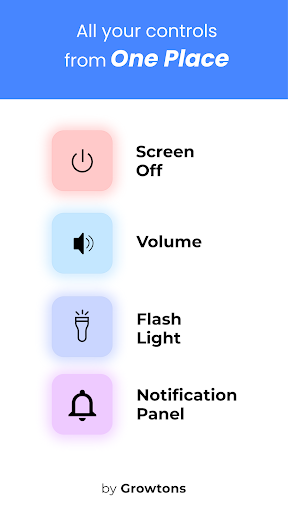
Enjoy Soft back button , home button , flash light , volume button ,power button
- Installs
- 1.10M
- Measured
- Rating
- 3.82
- Ratings
- 3.3K
- 76 reviews
- Version
- 4.0.1.0
- Updated 25 Mar 2026
- Released
- 29 Apr 2021
- Tracked since 12 May 2026
- Size
- 1 MB
- Needs 5.1
Screenshots



About Quick Buttons - Navigation bar
The description on the store listing
Convert all your hard buttons into soft buttons with this app! .😎
This app provides you with a colorful bottom navigation bar which has the back button , home button and recent apps button along with a set of feature buttons that includes power button , volume button , flash light.
Is your back button, home button or volume button stopped working or are they damaged? This app is for you 😃
Do you love to have a colorful navigation bar or prefer to use soft buttons for power button and volume button instead of your device’s hard buttons ? You are at the right place 😃
This app enables you to preserve and safeguard your power button and volume buttons by providing you the soft …
Read the full description
Convert all your hard buttons into soft buttons with this app! .😎 This app provides you with a colorful bottom navigation bar which has the back button , home button and recent apps button along with a set of feature buttons that includes power button , volume button , flash light. Is your back button, home button or volume button stopped working or are they damaged? This app is for you 😃 Do you love to have a colorful navigation bar or prefer to use soft buttons for power button and volume button instead of your device’s hard buttons ? You are at the right place 😃 This app enables you to preserve and safeguard your power button and volume buttons by providing you the soft power button and soft volume button and therefore reducing the need to use your device’s volume button to increase/ decrease volume and power button to turn your screen off. <b>Working of this app:</b> 1) Install our quick buttons app and enable the accessibility service for this app. Steps to Enable Accessibility service: • Once installed, our app prompts you to enable accessibility service • Clicking on enable takes you to your device’s accessibility settings. • In this page, choose the Quick buttons App and enable accessibility service for the app. 2) Once accessibility service is Enabled, you will immediately see Navigation bar and feature bar being added to your screen. 3) Once you exit your settings page, you will be landed into the Quick Buttons App. 4) Here you can configure all the features and settings you prefer. Following are the features / settings you can configure: o You can configure want the back button at left or right o You can choose a color for your bottom navigation bar from a list of handpicked colors o You can choose a set of feature buttons which you want to enable/ disable. <b>Show or Hide Navigation Bar:</b> If you want to hide navigation bar , just click on the dock button (right most button) provided in the navigation bar. In order to get back your navigation bar, tap or swipe from the bottom and your navigation bar will re appear. <b> Dock / Undock Feature Bar: </b> Similarly you can dock the feature bar by clicking the dock button (bottom most button) in the feature bar. This will dock the feature bar and will occupy minimum space on the screen. Clicking on the docked bar would reopen the feature bar. With this app you are always free to choose which features you want. If you prefer to use only the navigation bar ( back button , home button , recents button ), you can just disable the feature buttons from the Quick Button App’s settings. Similarly, if you wish to use only the feature buttons (power button , volume button and flash light ), you can disable the navigation bar feature from the Quick Buttons App’s settings NOTE: This app uses accessibility service for the sole purpose of providing navigation bar, power button ,volume button and flash light features. NOTE: For devices running in Android versions Oreo or below, an additional Device Admin permission may be required for the power button feature. However this permission is not mandatory if you do not wish to use the power button feature. 🏆<b>Key features of this app</b>🏆 1) Two in one feature: Provides a navigation bar ( back button , home button , recents button ) as well as the feature buttons ( power button , volume button and flash light ). 2) Easy way to show / hide Navigation bar 3) New Themes and Icons to personalize your navigation bar. 4) Vibrate option on navigation button click Enjoy the app and do rate us if you liked the app 😎
Installs, last 30 days Measured
Exact Google Play install counts, collected daily
Ratings
3,315 ratings, 76 reviews
- 5 ★58%
- 4 ★12%
- 3 ★8.1%
- 2 ★4.5%
- 1 ★18%
Recent reviews
Latest public reviews from the store
No reviews in our sample for this app yet.
Top chart positions
Latest Google Play chart ranks by country, last 10 days
Not in any tracked top chart in the last 10 days.
Quick Buttons - Navigation bar history
Release, install milestones, listing and store changes
- Reached 1,000,000+ installs 25 Mar 2026
- Reached 500,000+ installs 14 May 2024
- Reached 100,000+ installs 3 May 2022
- Reached 50,000+ installs 2 Nov 2021
- Reached 10,000+ installs 12 Jul 2021
- Reached 5,000+ installs 14 Jun 2021
- First released on the store 29 Apr 2021
Recent versions
Current version 4.0.1.0
- Version 4.0.1.029 Oct 2025
New NavBar Designs Everyday! Background Images for Nav Bar Icon Customizations added Color Effects Introduced Soft buttons for volume button, power button , flash light and notifications
- Version 3.5.61 Oct 2024
- Version 3.4.8.810 Aug 2024
- Version 3.4.7.219 May 2024
Listing keywords
Words and phrases Quick Buttons - Navigation bar repeats most in its store listing
Top phrases: navigation bar (16), power button (11), volume button (9), accessibility service (6), feature bar (6).
Highlighted words also appear in the title. Counts cover the title, short description and description.
Business model and tech
From the store listing, the SDKs in the app package and its declared permissions
- Business model
- Free to downloadIn-app purchasesShows ads
- Built with
- No cross-platform framework or game engine detected
- Ad networks (1)
- AdMob
- Subscriptions and payments
- Google Play billing
- Sensitive access
- Draws over other appsAdvertising ID
1 ad, attribution and analytics SDKs detected. SDKs are read from the app package and permissions from the store listing, so code that loads later is not seen.
Technology
12 SDKs found in the app package
Ad networks
Advertising and install-attribution SDKs found in the app package
- AdMob
16 permissions
2 special access, 1 sensitive, 13 standard
- Ask to uninstall appsREQUEST_DELETE_PACKAGESSpecial access
- Draw over other appsSpecial access
- Show notificationsPOST_NOTIFICATIONSSensitive
- Ad attribution (Privacy Sandbox)ACCESS_ADSERVICES_ATTRIBUTIONStandard
- Ad topics (Privacy Sandbox)ACCESS_ADSERVICES_TOPICSStandard
- Read the advertising IDAD_IDStandard
- Read the advertising ID (Privacy Sandbox)ACCESS_ADSERVICES_AD_IDStandard
- Control the flashlightStandard
- Control vibrationStandard
- Foreground service (data sync)FOREGROUND_SERVICE_DATA_SYNCStandard
- Keep the phone awakeStandard
- Run a foreground serviceFOREGROUND_SERVICEStandard
Compliance
What the listing and the app package show
- Store status
- Live
- Upkeep
- Updated 25 Mar 2026
- Registered in
- India
- Privacy policy
- Linked on the listing
- Advertising
- Shows ads
- In-app purchases
- Offered
- Age rating
- Everyone
- Sensitive permissions
- 1 sensitive, 2 special access of 16
- Location access
- No
- Camera and microphone
- Neither
Apps like Quick Buttons - Navigation bar
Show Dislike (Return YT Count)Mannar Mannan148K installs★ 4.35
Speaker Cleaner - Remove WaterEasy AppStudio330K installs★ 4.54
Easy Fire ToolsGerrit Nowaczyk1.6M installs★ 3.61
AI Song Lyrics GeneratorCoder Gautam YT254K installs★ 4.7
XnBrowse:proxy, Unblock sitesNankobhano appsna1.1M installs★ 4.21
Network/WIFI Info & Sim QueryDilip Master Apps548K installs★ 4.18
My HKTHong Kong Telecommunications (HKT) Ltd891K installs★ 1.71
Zawgyi Unicode ConverterDagonMetric440K installs★ 4.52
HIDVCAMhopeway1.2M installs★ 2.81
Quick Buttons - Navigation bar: questions and answers
How many downloads does Quick Buttons - Navigation bar have?
Quick Buttons - Navigation bar has 1,102,812 installs on Google Play, measured from the store's own count on 19 Nov 2026.
Who makes Quick Buttons - Navigation bar?
Quick Buttons - Navigation bar is published by Growtons Tech, a developer based in IN.
When was Quick Buttons - Navigation bar last updated?
The latest version (4.0.1.0) was released on 25 Mar 2026.
Is Quick Buttons - Navigation bar free?
Yes. Quick Buttons - Navigation bar is free to download and offers in-app purchases, and it shows ads.
Is Quick Buttons - Navigation bar still available?
Yes. Quick Buttons - Navigation bar is live on Google Play as of 19 Nov 2026.
Track Quick Buttons - Navigation bar and its competitors
Watch any app for new versions, rating drops, chart moves and removals. Free plan, no card.