QuickButtonsPro Navigation Bar
Colorful Navigation Bar and Soft keys for Volume Button, Power Button & Torch
- Installs
- 6.52K
- Measured
- Rating
- 3.7
- Ratings
- 204
- 15 reviews
- Version
- 3.0.9
- Updated 27 Sep 2026
- Released
- 25 Dec 2022
- Tracked since 12 May 2026
- Size
- —
Screenshots


About QuickButtonsPro Navigation Bar
The description on the store listing
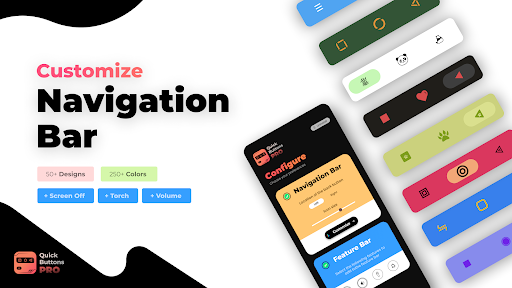
Customize your Navigation Bar with a wide range of 250+ colors and 50+ icon designs for Back Button , Home Button and Recents Button. Also enjoy using Soft Keys for Power Button, Volume Button and flashlight button !
This app lets you define color for your Navigation Bar’s Background and its icons.
Also we have a wide collection of designs for the Navigation Bar icons. Try them all and choose the one which fits you the Best!
This app provides you with soft power button and soft volume button which preserves your device’s volume and power button. 😃
<b>Working of this app:</b>
1) Install our Quick Buttons Pro app and enable the accessibility service for this app.
Steps to Enable …
Read the full description
Customize your Navigation Bar with a wide range of 250+ colors and 50+ icon designs for Back Button , Home Button and Recents Button. Also enjoy using Soft Keys for Power Button, Volume Button and flashlight button ! This app lets you define color for your Navigation Bar’s Background and its icons. Also we have a wide collection of designs for the Navigation Bar icons. Try them all and choose the one which fits you the Best! This app provides you with soft power button and soft volume button which preserves your device’s volume and power button. 😃 <b>Working of this app:</b> 1) Install our Quick Buttons Pro app and enable the accessibility service for this app. Steps to Enable Accessibility service: • Once installed, our app prompts you to enable accessibility service • Clicking on enable takes you to your device’s accessibility settings. • In this page, choose the Quick buttons App and enable accessibility service for the app. 2) Once accessibility service is Enabled, you will immediately see Navigation bar and feature bar being added to your screen. 3) Once you exit your accessibility settings page, you will be landed into the Quick Buttons Pro App where you can start configuring. <b>Customize your Navigation Bar:</b> 1) In the <b>Quick Buttons Pro</b> Configure page, you can find an option to specify whether you want the Back Button on the left or right. Selecting an option brings the Back Button & Home Button to the desired positions. 2) To start customizing your Navigation Bar, click on the Customize Button. 3) You will be redirected to Customization Page, where you can make the following customizations: 🏆 <b>Customizing Colors:</b>🏆 • To customize colors, just click on the Colors option and you will be redirected to a page where you can customize colors. To update color for the Navigation Bar Background, just select the Background option from the Bottom Menu, and click on a color that you want to apply for the background. And that’s it, you will see the background color is applied to your Navigation Bar. • Similarly to update the color of the Navigation Bar Icons and ripple, select the corresponding option from the bottom menu and click on the desired color. 🏆 <b>Styling Navigation Bar Icons:</b>🏆 • To change NavBar designs, just click on Icons option and you will be redirected to a page where you can choose the icons that you would love for your Navigation Bar. • To select a particular icon design for your Navigation Bar, just click on the desired icon and the changes will apply instantly! 🏆 <b>Advanced Settings</b>🏆 By clicking on the advanced settings page, you may enable / disable the vibration effect for the NavBar icons and here you can also configure whether you want to hide/show the dock button <b>Customizing the Feature Bar:</b> In the Quick Buttons Pro configure page, within the feature bar section, you can select/unselect feature buttons that you would like to have on the feature Bar. <b>Show or Hide Navigation Bar:</b> If you want to hide navigation bar , just click on the dock button (right most button) provided in the navigation bar. In order to get back your navigation bar, tap or swipe from the bottom and your navigation bar will re appear. <b> Dock / Undock Feature Bar: </b> Similarly you can dock the feature bar by clicking the dock button (bottom most button) in the feature bar. This will dock the feature bar and will occupy minimum space on the screen. Clicking on the docked bar would reopen the feature bar. Enjoy the app and do rate us if you liked the app 😎 NOTE: This app uses accessibility service for the sole purpose of providing navigation bar, power button, volume button and flash light features. NOTE: For devices running in Android versions Oreo or below, an additional Device Admin permission may be required for the power button feature. However this permission is not mandatory if you do not wish to use the power button feature.
Installs since 29 Aug 2026 Measured
Exact Google Play install counts, collected daily
Ratings
204 ratings, 15 reviews
- 5 ★51%
- 4 ★6.7%
- 3 ★14%
- 2 ★6.7%
- 1 ★21%
Recent reviews
Latest public reviews from the store
- 16 May 2026
this s the best help for my broken phone 😂👌💥💖
- 7 May 2026
This is good working app. TQ 😘
- 28 Apr 2026
excellent
- 28 Mar 2026
excellent works
What reviewers bring up
Topics mentioned in the latest 50 reviews, by how many reviews mention them
Liked in good reviews (28 reviews)
- screen 4
- button 3
- power 3
- hope 3
- perfectly 2
- disabled 2
- problem 2
- broken 2
Raised in bad reviews (19 reviews)
- ads 5
- notification 2
- recommend 2
- battery 2
- watch 2
- short 2
- start 2
- show 2
Top chart positions
Latest Google Play chart ranks by country, last 10 days
Not in any tracked top chart in the last 10 days.
QuickButtonsPro Navigation Bar history
Release, install milestones, listing and store changes
- Reached 5,000+ installs 6 Apr 2026
- Reached 1,000+ installs 19 Feb 2023
- Reached 500+ installs 12 Jan 2023
- First released on the store 25 Dec 2022
Update frequency
How often QuickButtonsPro Navigation Bar ships a new version, month by month
2 updates in the last 12 months. More often than most similar apps: they shipped a median of 0 updates in the same year.
Recent versions
Current version 3.0.9
- Version 3.0.927 Sep 2026
- New feature bar icons - Hide navigation bar on lock screen - Adjustable vibration levels - Auto-hide timer for the navigation bar - Navbar background transparency - Improved tablet support
- Version 3.0.210 Jul 2026
- New feature bar icons - Hide navigation bar on lock screen - Adjustable vibration levels - Auto-hide timer for the navigation bar - Navbar background transparency - Improved tablet support
- Version 2.523 Oct 2025
Floating Feature bar New features like Screenshot, Power Settings, etc. added Minor UI updates
- Version 2.330 Dec 2024
Listing keywords
Words and phrases QuickButtonsPro Navigation Bar repeats most in its store listing
Top phrases: navigation bar (19), feature bar (9), power button (7), accessibility service (6), quick buttons (5).
Highlighted words also appear in the title. Counts cover the title, short description and description.
Business model and tech
From the store listing, the SDKs in the app package and its declared permissions
- Business model
- Paid, $0.99
- Built with
- No cross-platform framework or game engine detected
- Ad networks (0)
- None detected
- Sensitive access
- Draws over other apps
0 ad, attribution and analytics SDKs detected. SDKs are read from the app package and permissions from the store listing, so code that loads later is not seen.
Technology
9 SDKs found in the app package
4 permissions
2 special access, 0 sensitive, 2 standard
- Ask to uninstall appsREQUEST_DELETE_PACKAGESSpecial access
- Draw over other appsSpecial access
- Control the flashlightStandard
- Control vibrationStandard
Compliance
What the listing and the app package show
- Store status
- Live
- Upkeep
- Updated 27 Sep 2026
- Registered in
- India
- Privacy policy
- Linked on the listing
- Advertising
- No ads declared
- In-app purchases
- None declared
- Age rating
- Everyone
- Sensitive permissions
- 0 sensitive, 2 special access of 4
- Location access
- No
- Camera and microphone
- Neither
Apps like QuickButtonsPro Navigation Bar
Easy Schedule Notebookoxdb.net51.5K installs★ 5.0
Land Parcels Areas CalculatorGeoZidan46K installs★ 1.73
Gallery Vault - Hide PhotoMerryblue51K installs★ 4.2
Heat Index Calculator - How toVnMobileSolutions Inc.3.7K installs★ 4.24
2D OwnerTechnologyGateway46K installs★ 4.8
3D Print Cost CalculatorReme Le Hane38.5K installs★ 3.95
Bluetooth ScannerThe Tree Team51.3K installs★ 3.87
HD wifi EndoskopCEI Conrad Electronic International (HK) Limited117K installs★ 2.41
WGS84 ConverterPilaBlu - Apps111K installs★ 4.29
QuickButtonsPro Navigation Bar: questions and answers
How many downloads does QuickButtonsPro Navigation Bar have?
QuickButtonsPro Navigation Bar has 6,520 installs on Google Play, measured from the store's own count on 17 Nov 2026.
Who makes QuickButtonsPro Navigation Bar?
QuickButtonsPro Navigation Bar is published by Growtons Tech, a developer based in IN.
When was QuickButtonsPro Navigation Bar last updated?
The latest version (3.0.9) was released on 27 Sep 2026.
Is QuickButtonsPro Navigation Bar free?
No. QuickButtonsPro Navigation Bar is a paid app priced at $0.99.
Is QuickButtonsPro Navigation Bar still available?
Yes. QuickButtonsPro Navigation Bar is live on Google Play as of 17 Nov 2026.
Track QuickButtonsPro Navigation Bar and its competitors
Watch any app for new versions, rating drops, chart moves and removals. Free plan, no card.