
Remote ADB Shell
Connect to ADB running on another Android device over the network
- Installs
- 746K
- Measured
- Rating
- 3.89
- Ratings
- 1K
- 55 reviews
- Version
- 1.7.2
- Updated 15 Sep 2023
- Released
- 13 Jul 2013
- Tracked since 12 May 2026
- Size
- 1 MB
- Needs 4.0
Screenshots




About Remote ADB Shell
The description on the store listing
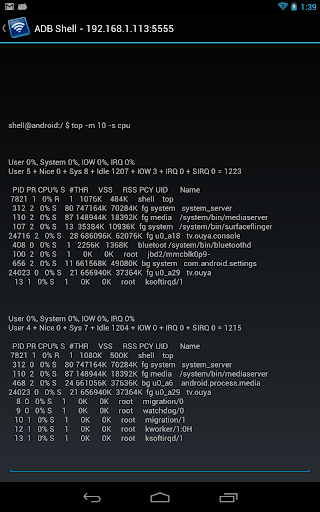
Remote ADB Shell is a terminal app that allows you to connect to the ADB shell service of other Android devices over the network and execute terminal commands. This can be useful for remotely debugging Android devices (running tools like top, logcat, or dumpsys). It supports multiple simultaneous connections to different devices and keeps these connections alive even when the app is in the background. This app does not require root on either device, but root may be helpful to configure the target devices. If the target devices are not rooted, you must use a computer with the Android SDK and Google USB drivers to configure the them (detailed below).
This app is a wrapper around the shell …
Read the full description
Remote ADB Shell is a terminal app that allows you to connect to the ADB shell service of other Android devices over the network and execute terminal commands. This can be useful for remotely debugging Android devices (running tools like top, logcat, or dumpsys). It supports multiple simultaneous connections to different devices and keeps these connections alive even when the app is in the background. This app does not require root on either device, but root may be helpful to configure the target devices. If the target devices are not rooted, you must use a computer with the Android SDK and Google USB drivers to configure the them (detailed below). This app is a wrapper around the shell that is exposed over ADB. It maintains a 15 command history which is accessible by long pressing the command box. Long pressing the terminal display itself will give the option to send a Ctrl+C, toggle auto-scrolling, or exit the terminal session. This works in the exact same way that the "adb shell" command works on a computer. Because this app uses a native implementation of the ADB protocol in Java, it does not require root on either device or any 3rd party apps on the target device. The devices simply speak the same protocol to each other that they would to a computer running the ADB client from the Android SDK. IMPORTANT: Devices running Android 4.2.2 and later use RSA keys to authenticate the ADB connection. In my testing, devices running 4.2.2 will need to be plugged in to a computer the first time you connect to them (from each device with this app installed). This allows them to display the public key acceptance dialog, which you must accept (and check "Always allow from this computer"). Devices running Android 4.3 and 4.4 seem to have no problem displaying the dialog without a connection to a computer, so it looks like this is a workaround specific to Android 4.2.2. To configure a stock un-rooted target, plug the target device into a computer that has the Android SDK installed and run "adb tcpip 5555" from the Android SDK's platform-tools folder. This will start ADB listening on port 5555 on the target device. The device can then be unplugged and will remain configured properly until reboot. For devices that are rooted (although it's not required), you can install one of the several "ADB WiFi" apps to enable the ADB server to listen over the network. Devices with a custom ROM may have an option to enable ADB over the network in the Developer Options pane of Settings. Using either of these methods will properly configure ADB for network access with this app. The extra step for 4.2.2 is still required for the initial connection. To connect to your remote Android device, type in the IP address of the device and the port number (5555 from the example above) in Remote ADB Shell. Tap Connect and it will attempt to connect to the device and start up the terminal. Developers: The custom Java ADB library I've written for this app is open-source under the BSD license at https://github.com/cgutman/AdbLib The source for this app is available under the Apache license: https://github.com/cgutman/RemoteAdbShell
Installs, last 30 days Measured
Exact Google Play install counts, collected daily
Ratings
1,049 ratings, 55 reviews
- 5 ★61%
- 4 ★7.0%
- 3 ★11%
- 2 ★1.9%
- 1 ★19%
Recent reviews
Latest public reviews from the store
- 21 Jun 2025
very good
Top chart positions
Latest Google Play chart ranks by country, last 10 days
Not in any tracked top chart in the last 10 days.
Remote ADB Shell history
Release, install milestones, listing and store changes
- Reached 500,000+ installs 15 Sep 2023
- Reached 100,000+ installs 16 Aug 2019
- Reached 50,000+ installs 9 Aug 2017
- Reached 10,000+ installs 18 Oct 2014
- Reached 5,000+ installs 13 Apr 2014
- Reached 1,000+ installs 30 Oct 2013
- Reached 500+ installs 29 Sep 2013
- Reached 100+ installs 4 Aug 2013
Recent versions
Current version 1.7.2
- Version 1.7.228 Jun 2022
v1.7.2 - Fixed several reported crashes
- Version 1.7.118 May 2022
- Version 1.6.522 Oct 2017
- Version 1.6.412 Jan 2016
Listing keywords
Words and phrases Remote ADB Shell repeats most in its store listing
Top phrases: adb shell (5), devices running (4), remote adb shell (3), android sdk (3), remote adb (3).
Highlighted words also appear in the title. Counts cover the title, short description and description.
Business model and tech
From the store listing and declared permissions
- Business model
- Free to download
- Sensitive access
- No sensitive permission declared
Compliance
What the listing and the app package show
- Store status
- Live
- Upkeep
- No update since 15 Sep 2023
- Privacy policy
- Linked on the listing
- Advertising
- No ads declared
- In-app purchases
- None declared
- Age rating
- Everyone
Apps like Remote ADB Shell
BatteryAlarmGoldLokik Soni58.2K installs★ 3.33
Photo Watch Face ProTiny Watch21.4K installs★ 4.42
GPS Location Sharing & LocatorNeo Utilities796K installs★ 4.2
Views Fans: CommunityaAa Designer36.5K installs★ 3.67
Space Clean ToolkitStarlume Tech597K installs★ 3.85
Calculator+ Photo&Video vaultGreen Water420K installs★ 4.37
Red Panic ButtonUltimate Communication Software LTD257K installs★ 3.31
Cutting Paper CalculatorTasikWeb.com84.5K installs★ 3.92
FORMSThe App Master848K installs★ 2.78
Remote ADB Shell: questions and answers
How many downloads does Remote ADB Shell have?
Remote ADB Shell has 745,877 installs on Google Play, measured from the store's own count on 19 Nov 2026.
Who makes Remote ADB Shell?
Remote ADB Shell is published by Cameron Gutman.
When was Remote ADB Shell last updated?
The latest version (1.7.2) was released on 15 Sep 2023.
Is Remote ADB Shell free?
Yes. Remote ADB Shell is free to download.
Is Remote ADB Shell still available?
Yes. Remote ADB Shell is live on Google Play as of 19 Nov 2026.
Track Remote ADB Shell and its competitors
Watch any app for new versions, rating drops, chart moves and removals. Free plan, no card.