
Screenshot
You can easily take screenshots in a variety of ways.
- Installs
- 60.54K
- Measured
- Rating
- 3.57
- Ratings
- 255
- 3 reviews
- Version
- 4.2
- Updated 29 Aug 2026
- Released
- 30 May 2022
- Tracked since 13 May 2026
- Size
- —
Screenshots

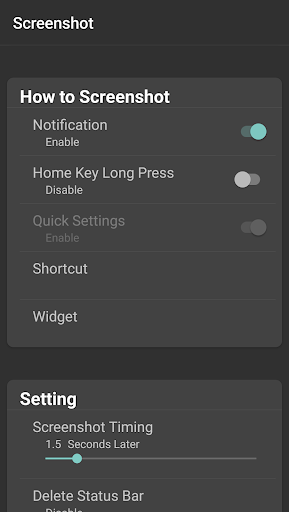


About Screenshot
The description on the store listing
You can easily take screenshots in a variety of ways.
You can also remove the status bar, navigation bar, and display cutout areas.
- App Functions
- You can take a screenshot.
You must enable the Media Projection (Start Recording or Casting) permission.
- You can remove the status bar, navigation bar, and display cutout areas.
- You can adjust the timing of screenshots.
- You can take screenshots in the following ways.
- Notification
- Home Key Long Press
- Quick Settings
- Shortcut / Widget
You can take a screenshot by displaying the screen you want to take a screenshot of after pressing the shortcut or widget from the home …
Read the full description
You can easily take screenshots in a variety of ways. You can also remove the status bar, navigation bar, and display cutout areas. - App Functions - You can take a screenshot. You must enable the Media Projection (Start Recording or Casting) permission. - You can remove the status bar, navigation bar, and display cutout areas. - You can adjust the timing of screenshots. - You can take screenshots in the following ways. - Notification - Home Key Long Press - Quick Settings - Shortcut / Widget You can take a screenshot by displaying the screen you want to take a screenshot of after pressing the shortcut or widget from the home screen. You can adjust the timing of the screenshot. - Notes - This application runs in the background. Therefore, using task killer apps, power saving apps, power saving apps, memory cleaner apps, or battery optimization may cause screenshots to stop functioning. If screenshots are stopped, screenshots will resume by launching this app. - About the use of Advertising ID Use the ad ID to display the ad. The privacy policy is from here. https://markn.cloudfree.jp/AndroidApp/privacy - About Permissions - Starts Automatically at Startup Used to automatically take a screenshot when the device is booted or rebooted. - Network communication Used for displaying advertisements. - Media projection (Start Recording or Casting) Used to take screenshots. - Review by Appliv https://app-liv.jp/5345230/
Installs since 29 Aug 2026 Measured
Exact Google Play install counts, collected daily
Ratings
255 ratings, 3 reviews
- 5 ★57%
- 4 ★0.0%
- 3 ★14%
- 2 ★0.0%
- 1 ★29%
Recent reviews
Latest public reviews from the store
- 31 Mar 2026
👍
- 22 Aug 2025
좋아요
- 7 Dec 2024
Very convenient and love it
- 8 Apr 2023
사용하기 편하고 좋은 프러젝트 펀딩할수있어서 재미있게 사용하고 있습니다.
What reviewers bring up
Topics mentioned in the latest 28 reviews, by how many reviews mention them
Liked in good reviews (15 reviews)
No topic comes up twice.
Raised in bad reviews (11 reviews)
- 와디즈 불매하자 2
- 들어가면 2
Top chart positions
Latest Google Play chart ranks by country, last 10 days
Not in any tracked top chart in the last 10 days.
Screenshot history
Release, install milestones, listing and store changes
- Reached 50,000+ installs 15 Nov 2025
- Reached 10,000+ installs 26 Dec 2022
- Reached 5,000+ installs 3 Oct 2022
- Reached 1,000+ installs 25 Jul 2022
- Reached 500+ installs 27 Jun 2022
- First released on the store 30 May 2022
Update frequency
How often Screenshot ships a new version, month by month
3 updates in the last 12 months. More often than most similar apps: they shipped a median of 2 updates in the same year.
Recent versions
Current version 4.2
- Version 4.029 Aug 2026
Ver.4.0 You can now set the language for each app from the Settings app. Ver.3.9 Support for Android17. Ver.3.7 Added support for monochrome app launcher icons. Ver.3.6 Library Updates. Ver.3.4 Support for Android16. We have released a new application. We hope you will give it a try. https://play.google.com/store/apps/details?id=com.markn.BlueLightFilter Ver.3.3 Library Updates. Ver.2.9 Support for Android15. Ver.2.8 Library Updates.
- Version 3.729 Dec 2025
Ver.3.7 Added support for monochrome app launcher icons. Ver.3.6 Library Updates. Ver.3.4 Support for Android16. We have released a new application. We hope you will give it a try. https://play.google.com/store/apps/details?id=com.markn.BlueLightFilter Ver.3.3 Library Updates. Ver.2.9 Support for Android15. Ver.2.8 Library Updates.
- Version 3.614 Dec 2025
- Version 3.510 Oct 2025
Listing keywords
Words and phrases Screenshot repeats most in its store listing
Top phrases: take screenshot (4), take screenshots (4), adjust the timing (2), bar and display (2), bar navigation bar (2).
Highlighted words also appear in the title. Counts cover the title, short description and description.
Business model and tech
From the store listing and declared permissions
- Business model
- Free to downloadShows ads
- Sensitive access
- Advertising ID
14 permissions
0 special access, 1 sensitive, 13 standard
- Show notificationsPOST_NOTIFICATIONSSensitive
- Ad attribution (Privacy Sandbox)ACCESS_ADSERVICES_ATTRIBUTIONStandard
- Ad topics (Privacy Sandbox)ACCESS_ADSERVICES_TOPICSStandard
- Read the advertising IDAD_IDStandard
- Control vibrationStandard
- Foreground service (media projection)FOREGROUND_SERVICE_MEDIA_PROJECTIONStandard
- Keep the phone awakeStandard
- Run a foreground serviceFOREGROUND_SERVICEStandard
- Start when the phone turns onStandard
- Full internet accessStandard
- See network connectionsStandard
- See Wi-Fi connectionsStandard
Compliance
What the listing and the app package show
- Store status
- Live
- Upkeep
- Updated 29 Aug 2026
- Privacy policy
- Linked on the listing
- Advertising
- Shows ads
- In-app purchases
- None declared
- Age rating
- Everyone
- Sensitive permissions
- 1 sensitive of 14
- Location access
- No
- Camera and microphone
- Neither
Apps like Screenshot
ADV ResidencialADV SEGURIDAD111K installs★ 3.63
Region 6 NS RecyclesRegion 6 Solid Waste Management6.7K installs★ 4.8
Kalendarz Polski ze ŚwiętamiAkstar Mobile70.2K installs★ 3.9
Ai AnalyzerJLP Creation Studio165K installs★ 4.0
Servientrega ColombiaServientrega S.A.144K installs★ 1.83
JigglyPaint: Draw/Shake/Share!KunLun.Co7.4K installs★ 4.06
Taxi CalculatorLeonardo Javier Russo65.1K installs★ 4.11
Supernotes – Notes & JournalSupernotes28.4K installs★ 4.19
FileCloudFileCloud76.5K installs★ 3.66
Screenshot: questions and answers
How many downloads does Screenshot have?
Screenshot has 60,543 installs on Google Play, measured from the store's own count on 15 Nov 2026.
Who makes Screenshot?
Screenshot is published by Markn Software.
When was Screenshot last updated?
The latest version (4.2) was released on 29 Aug 2026.
Is Screenshot free?
Yes. Screenshot is free to download, and it shows ads.
Is Screenshot still available?
Yes. Screenshot is live on Google Play as of 15 Nov 2026.
Track Screenshot and its competitors
Watch any app for new versions, rating drops, chart moves and removals. Free plan, no card.