
SecondScreen
Change your device's resolution & density when connected to an external display
- Installs
- 6.25M
- Measured
- Rating
- 4.18
- Ratings
- 17.3K
- 249 reviews
- Version
- 2.9.4
- Updated 25 Jun 2025
- Released
- 14 Jul 2014
- Tracked since 12 May 2026
- Size
- 2 MB
- Needs 4.2
Screenshots




About SecondScreen
The description on the store listing
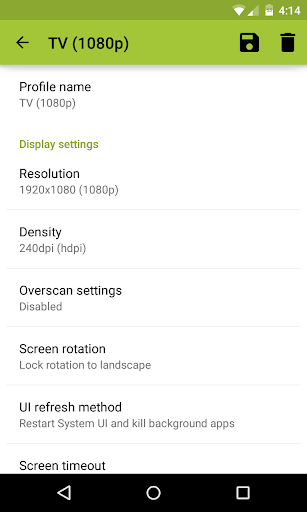
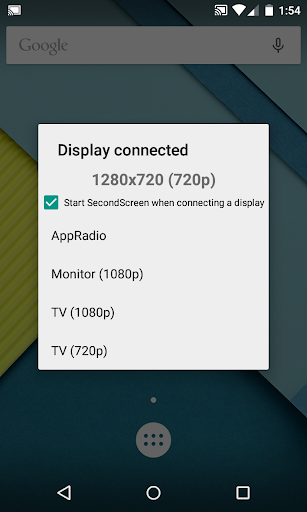
SecondScreen is an application designed for power users that frequently connect their Android devices to external displays. It works with your existing screen mirroring solution to give you the best experience possible. With SecondScreen, you can change your device's resolution and density to fit your TV or monitor, enable always-on desktop mode in Chrome, and even turn your device's backlight off, among several other features.
Featured on <a href="http://www.google.com/url?q=http%3A%2F%2Fwww.pocketables.com%2F2014%2F08%2Fsecondscreen-root-users-optimize-second-display.html&sa=D&sntz=1&usg=AOvVaw1rqrbA4kANzYQBRwfcqF2w">Pocketables</a>, <a …
Read the full description
SecondScreen is an application designed for power users that frequently connect their Android devices to external displays. It works with your existing screen mirroring solution to give you the best experience possible. With SecondScreen, you can change your device's resolution and density to fit your TV or monitor, enable always-on desktop mode in Chrome, and even turn your device's backlight off, among several other features. Featured on <a href="http://www.google.com/url?q=http%3A%2F%2Fwww.pocketables.com%2F2014%2F08%2Fsecondscreen-root-users-optimize-second-display.html&sa=D&sntz=1&usg=AOvVaw1rqrbA4kANzYQBRwfcqF2w">Pocketables</a>, <a href="http://www.google.com/url?q=http%3A%2F%2Fwww.xda-developers.com%2Fcast-device-second-screen%2F&sa=D&sntz=1&usg=AOvVaw3qlWsOaCu-O0DAgZTLZEod">XDA-Developers</a>, <a href="http://www.google.com/url?q=http%3A%2F%2Fwww.androidpolice.com%2F2014%2F07%2F23%2Fnew-app-secondscreen-lets-root-users-adjust-a-devices-resolution-for-better-chromecasting%2F&sa=D&sntz=1&usg=AOvVaw2M3Pjbxxg0g1D8CNTWPdj8">Android Police</a>, <a href="http://www.google.com/url?q=http%3A%2F%2Fwww.androidheadlines.com%2F2014%2F07%2Froot-required-second-screen-app-forces-resolution-density-correction-streaming.html&sa=D&sntz=1&usg=AOvVaw0qh5ahx2kbGsCs9Z1qapQA">AndroidHeadlines</a>, <a href="https://www.google.com/url?q=https%3A%2F%2Fandroidcommunity.com%2Fsecond-screen-app-allows-more-control-casting-your-devices-display-20140726%2F&sa=D&sntz=1&usg=AOvVaw2JjImAjjZQiLWRChl-h8FB">Android Community</a>, and <a href="http://www.google.com/url?q=http%3A%2F%2Fwww.androidbeat.com%2F2014%2F07%2Fsupercharge-mirroring-casting-tv-secondscreen%2F&sa=D&sntz=1&usg=AOvVaw0372QJ8ZnjINULpGY0iZGV">Android Beat</a>! <b>PLEASE READ BEFORE DOWNLOADING: • This app REQUIRES elevated permissions, granted via root access or adb shell commands. The app will do nothing if you do not have a rooted device or access to adb. • This app is ONLY for devices with AOSP / Google experience ROMs. It is not guaranteed to function properly on devices with manufacturer-skinned ROMs. • This app does not provide screen mirroring capabilities on its own. Screen mirroring may require either an MHL/SlimPort adapter or a wireless solution such as Miracast or Chromecast. • A Bluetooth keyboard and mouse is strongly recommended as the app can make UI elements smaller and harder to press on the device itself.</b> <b>Features:</b> • Easily change resolution and density (DPI) - take full advantage of the resolution of your external display, and show the Android tablet interface if you're using a phone • Simple profile-based interface - easy to enable/disable different profiles for different types of displays • Many configurable options, including: • Automatically enable Bluetooth and Wi-Fi - quickly connect a keyboard, mouse, and/or game controller • Automatically enable Daydreams • Show desktop sites in Chrome by default - browse the real Web, on your TV! • Lock screen orientation to landscape • Overscan support for older TVs (Android 4.3+) • System-wide immersive mode (Android 5.0+) • Disable device backlight and/or vibration - save battery while your device is connected <i>(not compatible with all devices)</i> • Full integration with Tasker • Load profiles automatically when a display is connected • Quick Actions - quickly and easily run SecondScreen features without creating or editing profiles • Homescreen shortcuts - launch a profile with one tap, without entering the app <b>Explanation of permissions:</b> • root access or adb shell commands required to change resolution/DPI, disable backlight/vibration, enable desktop-only mode in Chrome • "connect and disconnect from Wi-Fi", "view Wi-Fi connections" - required for profiles to enable Wi-Fi • "access Bluetooth settings", "pair with Bluetooth devices" - required for profiles to enable Bluetooth • "close other apps" - required to refresh the user interface after a resolution/DPI change. Ensure all data is saved before launching a profile. • "run at startup" - required to show SecondScreen profile notification after a (soft/hard) reboot • "modify system settings" - required for profiles to lock rotation and set brightness This app uses the Device Administrator permission.
Installs since 19 Jul 2026 Measured
Exact Google Play install counts, collected daily
Ratings
17,319 ratings, 249 reviews
- 5 ★70%
- 4 ★7.0%
- 3 ★3.9%
- 2 ★1.9%
- 1 ★17%
Recent reviews
Latest public reviews from the store
- 3 Apr 2026
Great notepad app. would be 5 star but i cannot find a feature to backup my notes to the cloud or anywhere. Could also use a place to hold deleted notes for, perhaps 30 days, before being deleted (or manually purged)
- 24 Mar 2026
ok
- 18 Mar 2026
I love it, only wish to allow export all notes at once to SD card note one by one, I have over 20 notes, export then to new phone not easy
- 17 Mar 2026
Indispensable! So useful and very well designed. A delight to use. Thanks for a functionally complete, ad-free app.
What reviewers bring up
Topics mentioned in the latest 50 reviews, by how many reviews mention them
Liked in good reviews (36 reviews)
- notes 11
- notepad 10
- ads 7
- export 4
- text 4
- better 3
- open 3
- txt 3
Raised in bad reviews (12 reviews)
- another 3
- files 3
- function 2
- line 2
Top chart positions
Latest Google Play chart ranks by country, last 10 days
Not in any tracked top chart in the last 10 days.
SecondScreen history
Release, install milestones, listing and store changes
- Reached 5,000,000+ installs 25 Jun 2025
- Reached 1,000,000+ installs 6 Mar 2021
- Reached 500,000+ installs 3 Nov 2016
- Reached 100,000+ installs 7 Feb 2015
- Reached 50,000+ installs 5 Dec 2014
- First released on the store 14 Jul 2014
Update frequency
How often SecondScreen ships a new version, month by month
0 updates in the last 12 months. Less often than most similar apps: they shipped a median of 4 updates in the same year.
Recent versions
Current version 2.9.4
- Version 2.9.413 Sep 2024
• Maintenance release targeting the latest versions of Android • Fix issue where orientation would stay locked after turning off profile
- Version 2.9.320 Jan 2023
- Version 2.9.211 Jan 2021
- Version 2.9.131 Oct 2019
Listing keywords
Words and phrases SecondScreen repeats most in its store listing
Top phrases: wi fi (4), required for profiles (3), href href (3), screen mirroring (3), access or adb (2).
Highlighted words also appear in the title. Counts cover the title, short description and description.
Business model and tech
From the store listing, the SDKs in the app package and its declared permissions
- Business model
- Free to download
- Built with
- No cross-platform framework or game engine detected
- Ad networks (0)
- None detected
- Sensitive access
- Nearby devicesDraws over other apps
0 ad, attribution and analytics SDKs detected. SDKs are read from the app package and permissions from the store listing, so code that loads later is not seen.
Technology
9 SDKs found in the app package
18 permissions
2 special access, 1 sensitive, 15 standard
- Change system settingsSpecial access
- Draw over other appsSpecial access
- Show notificationsPOST_NOTIFICATIONSSensitive
- Close other appsStandard
- Foreground service (special use)FOREGROUND_SERVICE_SPECIAL_USEStandard
- Run a foreground serviceFOREGROUND_SERVICEStandard
- Start when the phone turns onStandard
- Access Bluetooth settingsStandard
- Pair with Bluetooth devicesStandard
- Connect to and disconnect from Wi-FiStandard
- See Wi-Fi connectionsStandard
- Api v23API_V23Standard
Compliance
What the listing and the app package show
- Store status
- Live
- Upkeep
- Updated 25 Jun 2025
- Privacy policy
- Linked on the listing
- Advertising
- No ads declared
- In-app purchases
- None declared
- Age rating
- Everyone
- Sensitive permissions
- 1 sensitive, 2 special access of 18
- Location access
- No
- Camera and microphone
- Neither
Apps like SecondScreen
USA VPNFaster VPN Apps1.1M installs★ 4.26
MobEasy : App CreatorMobEasy2.3M installs★ 4.0
Nova Browser - Web & FastAdPulse INC1.4M installs★ 4.38
Deprem Bilgi SistemiSabah Mühendislik5.1M installs★ 4.33
EDF Dom & CorseGroupe EDF648K installs★ 4.3
My GPS Location: Realtime GPSdigrasoft UG (haftungsbeschränkt)3.5M installs★ 4.44
NFC Reader PlusDOSA Apps6.1M installs★ 4.14
Accurate BarometerAR Labs1.4M installs★ 4.39
Private ScreenshotsShamanLand3.3M installs★ 3.6
SecondScreen: questions and answers
How many downloads does SecondScreen have?
SecondScreen has 6,249,881 installs on Google Play, measured from the store's own count on 15 Nov 2026.
Who makes SecondScreen?
SecondScreen is published by Braden Farmer.
When was SecondScreen last updated?
The latest version (2.9.4) was released on 25 Jun 2025.
Is SecondScreen free?
Yes. SecondScreen is free to download.
Is SecondScreen still available?
Yes. SecondScreen is live on Google Play as of 15 Nov 2026.
Track SecondScreen and its competitors
Watch any app for new versions, rating drops, chart moves and removals. Free plan, no card.