Taskbar
PC-style start menu & recent app launcher, with Android 10 Desktop Mode support!
- Installs
- 7.31M
- Measured
- Rating
- 4.35
- Ratings
- 19.7K
- 546 reviews
- Version
- 6.2.2
- Updated 18 Jun 2025
- Released
- 19 Jul 2016
- Tracked since 12 May 2026
- Size
- 2 MB
- Needs 5.0
Screenshots
About Taskbar
The description on the store listing
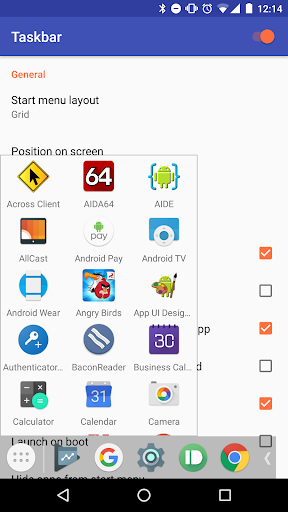
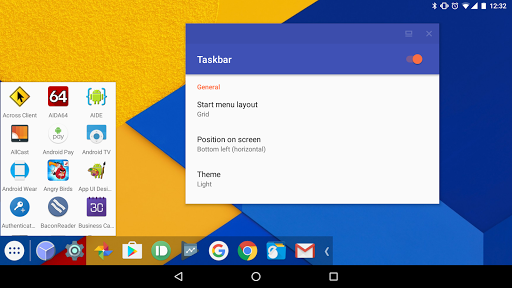
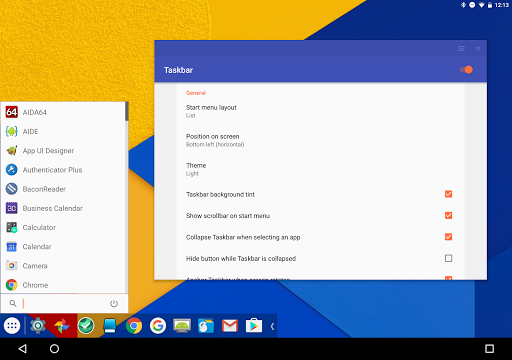
Taskbar puts a start menu and recent apps tray on top of your screen that's accessible at any time, increasing your productivity and turning your Android tablet (or phone) into a real multitasking machine!
Taskbar supports Android 10's Desktop Mode, allowing you to connect your compatible device to an external display and run apps in resizable windows, for a PC-like experience! On devices running Android 7.0+, Taskbar can also launch apps in freeform windows without an external display. No root required! (see below for instructions)
Taskbar is also supported on Android TV (sideloaded) and Chrome OS - use Taskbar as a secondary Android app launcher on your Chromebook, or turn your …
Read the full description
Taskbar puts a start menu and recent apps tray on top of your screen that's accessible at any time, increasing your productivity and turning your Android tablet (or phone) into a real multitasking machine! Taskbar supports Android 10's Desktop Mode, allowing you to connect your compatible device to an external display and run apps in resizable windows, for a PC-like experience! On devices running Android 7.0+, Taskbar can also launch apps in freeform windows without an external display. No root required! (see below for instructions) Taskbar is also supported on Android TV (sideloaded) and Chrome OS - use Taskbar as a secondary Android app launcher on your Chromebook, or turn your Nvidia Shield into an Android-powered PC! <i>If you find Taskbar useful, please consider upgrading to the Donate Version! Simply tap the "Donate" option at the bottom of the app (or, on the web, click <a href="https://play.google.com/store/apps/details?id=com.farmerbb.taskbar.paid">here</a>).</i> <b>Features:</b> • Start menu - shows you all applications installed on the device, configurable as a list or as a grid • Recent apps tray - shows your most recently used apps and lets you easily switch between them • Collapsible and hideable - show it when you need it, hide it when you don't • Many different configuration options - customize Taskbar however you want • Pin favorite apps or block the ones you don't want to see • Designed with keyboard and mouse in mind • 100% free, open source, and no ads <b>Desktop mode (Android 10+, requires external display)</b> Taskbar supports Android 10's built-in desktop mode functionality. You can connect your compatible Android 10+ device to an external display and run apps in resizable windows, with Taskbar's interface running on your external display and your existing launcher still running on your phone. Desktop mode requires a USB-to-HDMI adapter (or a lapdock), and a compatible device that supports video output. Additionally, certain settings require granting a special permission via adb. To get started, open up the Taskbar app and click "Desktop mode". Then, just tick the checkbox and the app will guide you through the setup process. For more information, click the (?) icon in the upper-right hand corner of the screen. <b>Freeform window mode (Android 7.0+, no external display required)</b> Taskbar lets you launch apps in freeform floating windows on Android 7.0+ devices. No root access is required, although Android 8.0, 8.1, and 9 devices require an adb shell command to be run during initial setup. Simply follow these steps to configure your device for launching apps in freeform mode: 1. Check the box for "Freeform window support" inside the Taskbar app 2. Follow the directions that appear in the pop-up to enable the proper settings on your device (one-time setup) 3. Go to your device's recent apps page and clear all recent apps 4. Start Taskbar, then select an app to launch it in a freeform window For more information and detailed instructions, click "Help & instructions for freeform mode" inside the Taskbar app. <b>Accessibility service disclosure</b> Taskbar includes an optional accessibility service, which can be enabled in order to perform system button press actions such as back, home, recents, and power, as well as displaying the notification tray. The accessibility service is used only to perform the above actions, and for no other purpose. Taskbar does not use accessibility services to perform any data collection whatsoever (in fact, Taskbar cannot access the Internet in any capacity as it does not declare the required Internet permission).
Installs since 19 Jul 2026 Measured
Exact Google Play install counts, collected daily
Ratings
19,723 ratings, 546 reviews
- 5 ★66%
- 4 ★15%
- 3 ★5.6%
- 2 ★1.9%
- 1 ★12%
Recent reviews
Latest public reviews from the store
- 2 Mar 2026
seriously serious apk hete
- 15 Feb 2026
Insanely good. Makes a PC out of a Tablet. Underrated gem this app.
- 8 Jan 2026
outstanding
- 22 Nov 2025
Wanted a better taskbar for my Z Fold.
What reviewers bring up
Topics mentioned in the latest 50 reviews, by how many reviews mention them
Liked in good reviews (43 reviews)
- android 10
- taskbar 7
- mode 7
- desktop 5
- tablet 4
- window 4
- donate 4
- screen 4
Raised in bad reviews (4 reviews)
No topic comes up twice.
Top chart positions
Latest Google Play chart ranks by country, last 10 days
Not in any tracked top chart in the last 10 days.
Taskbar history
Release, install milestones, listing and store changes
- Reached 5,000,000+ installs 18 Jun 2025
- Reached 1,000,000+ installs 12 Mar 2021
- Reached 500,000+ installs 11 Jul 2019
- Reached 100,000+ installs 14 Dec 2016
- First released on the store 19 Jul 2016
Update frequency
How often Taskbar ships a new version, month by month
0 updates in the last 12 months. Less often than most similar apps: they shipped a median of 3 updates in the same year.
Recent versions
Current version 6.2.2
- Version 6.2.21 Oct 2024
New in 6.2.2: • Fix crash occurring when favorite app tiles are selected New in 6.2.1: • Maintenance release targeting the latest versions of Android • Various bug fixes and crash fixes • Updated German translation
- Version 6.2.113 Sep 2024
- Version 6.215 Dec 2021
- Version 6.1.127 Nov 2020
Listing keywords
Words and phrases Taskbar repeats most in its store listing
Top phrases: desktop mode (6), external display (6), accessibility service (3), freeform window (3), start menu (3).
Highlighted words also appear in the title. Counts cover the title, short description and description.
Business model and tech
From the store listing, the SDKs in the app package and its declared permissions
- Business model
- Free to download
- Built with
- No cross-platform framework or game engine detected
- Ad networks (0)
- None detected
- Sensitive access
- Nearby devicesDraws over other apps
0 ad, attribution and analytics SDKs detected. SDKs are read from the app package and permissions from the store listing, so code that loads later is not seen.
Technology
12 SDKs found in the app package
21 permissions
5 special access, 1 sensitive, 15 standard
- Ask to uninstall appsREQUEST_DELETE_PACKAGESSpecial access
- Change system settingsSpecial access
- Draw over other appsSpecial access
- See every installed appQUERY_ALL_PACKAGESSpecial access
- See which apps are usedPACKAGE_USAGE_STATSSpecial access
- Show notificationsPOST_NOTIFICATIONSSensitive
- Add home screen shortcutsStandard
- Foreground service (special use)FOREGROUND_SERVICE_SPECIAL_USEStandard
- Run a foreground serviceFOREGROUND_SERVICEStandard
- See running appsStandard
- Start when the phone turns onStandard
- Pair with Bluetooth devicesStandard
Compliance
What the listing and the app package show
- Store status
- Live
- Upkeep
- Updated 18 Jun 2025
- Privacy policy
- Linked on the listing
- Advertising
- No ads declared
- In-app purchases
- None declared
- Age rating
- Everyone
- Sensitive permissions
- 1 sensitive, 5 special access of 21
- Location access
- No
- Camera and microphone
- Neither
Apps like Taskbar
FastDown: Offline Music & MP3Music Video Downloader, Player & Editor1.3M installs★ 3.97
Online tracker last seenFind My Family - GPS Location Tracker Technology258K installs★ 4.23
VPN Proxy AppVPNAI WELL GROUPS3.7M installs★ 4.35
Dice Roller - Random GeneratorTD CONSTRUCTION INVESTMENT AND TRADING SERVICES2.5M installs★ 3.9
ParkMan - The Parking AppParkMan Oy1.5M installs★ 4.03
The Rise of Herobrine: MCPESamueljh12.1M installs★ 3.97
Translate:Language TranslatorTranVision.AI606K installs★ 4.53
ACNH.Guide 2Gene Sy1.4M installs★ 4.45
Split Screen - Dual WindowGeniusTools Labs6.9M installs★ 4.14
Taskbar: questions and answers
How many downloads does Taskbar have?
Taskbar has 7,308,592 installs on Google Play, measured from the store's own count on 15 Nov 2026.
Who makes Taskbar?
Taskbar is published by Braden Farmer.
When was Taskbar last updated?
The latest version (6.2.2) was released on 18 Jun 2025.
Is Taskbar free?
Yes. Taskbar is free to download.
Is Taskbar still available?
Yes. Taskbar is live on Google Play as of 15 Nov 2026.
Track Taskbar and its competitors
Watch any app for new versions, rating drops, chart moves and removals. Free plan, no card.