
SpeedDo (Task,Progress)
It"s very simple and easy to use!
- Installs
- 1.32K
- Measured
- Rating
- 3.0
- Ratings
- 9
- Version
- Varies with device
- Updated 28 Dec 2019
- Released
- 17 Nov 2013
- Tracked since 13 May 2026
- Size
- 6 MB
- Needs 4.2
Screenshots


About SpeedDo (Task,Progress)
The description on the store listing
It"s very simple and easy to use!
You can easily add one task to another!
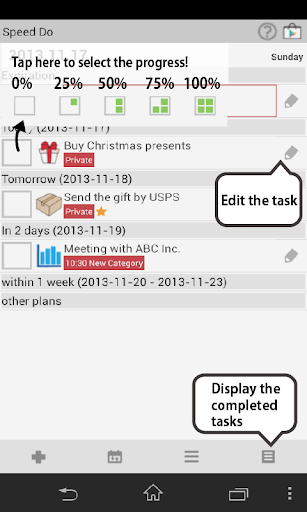
Displays the progress of the tasks!
You can add categorized icons in each task!
It crosses out the completed tasks so you'll know which
tasks are completed by a glance!
Assort tasks/Display by the category/mark for important tasks!
Select the color Green or Pink!
Functions
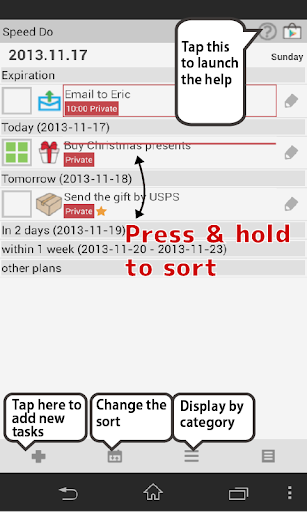
1 Add new tasks(memo/add icon/categorize/deadline/time/alarm).
2 Assort by date/by category/by alphabet.
3 Display by category.
4 Display all the completed tasks.
5 Edit tasks(mark for the important tasks/share/delete/copy).
6 Help (Move to Speed Do description page of our website).
7 Menu button (of your phone)
「Setting」: Display …
Read the full description
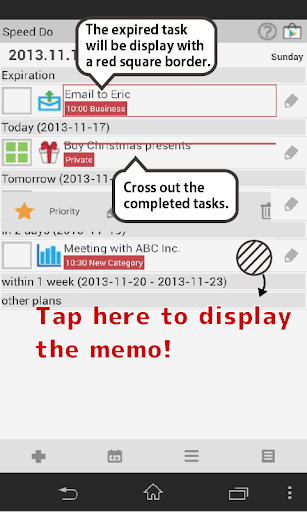
It"s very simple and easy to use! You can easily add one task to another! Displays the progress of the tasks! You can add categorized icons in each task! It crosses out the completed tasks so you'll know which tasks are completed by a glance! Assort tasks/Display by the category/mark for important tasks! Select the color Green or Pink! Functions 1 Add new tasks(memo/add icon/categorize/deadline/time/alarm). 2 Assort by date/by category/by alphabet. 3 Display by category. 4 Display all the completed tasks. 5 Edit tasks(mark for the important tasks/share/delete/copy). 6 Help (Move to Speed Do description page of our website). 7 Menu button (of your phone) 「Setting」: Display on the status bar (Launch Speed Do from the status bar.)/Select colors etc... 「Password」: Password setting. 「Backup」: Import SD card/Export SD card/Export Cloud( Back up the data to Gmail/Drive/Dropbox/Evernote) 「Recovery」: Recover to previous data etc... 「Exit」: Exit the app. 8 Expired tasks'll be displayed with a red square border. 9 Cross out the completed tasks.
Installs since 17 Nov 2026 Measured
Exact Google Play install counts, collected daily
Daily history starts once this app is in our daily install sample.
Ratings
9 ratings
- 5 ★0.0%
- 4 ★0.0%
- 3 ★0.0%
- 2 ★0.0%
- 1 ★0.0%
Recent reviews
Latest public reviews from the store
- 19 Jan 2014
Best
- 25 May 2011
Simple, light and useful! Great for color-blind people!
- 29 Mar 2011
This is a very well made app!
Top chart positions
Latest Google Play chart ranks by country, last 10 days
Not in any tracked top chart in the last 10 days.
SpeedDo (Task,Progress) history
Release, install milestones, listing and store changes
- Reached 1,000+ installs 28 Jul 2016
- Reached 500+ installs 26 Jun 2014
- First released on the store 17 Nov 2013
Update frequency
How often SpeedDo (Task,Progress) ships a new version, month by month
0 updates in the last 12 months. Less often than most similar apps: they shipped a median of 1 updates in the same year.
Recent versions
Current version Varies with device
- Version 1.0.727 Dec 2019
- Version 1.0.518 May 2015
- Version 1.0.44 May 2015
Listing keywords
Words and phrases SpeedDo (Task,Progress) repeats most in its store listing
Top phrases: completed tasks (3), sd card export (2), card export (2), important tasks (2), sd card (2).
Highlighted words also appear in the title. Counts cover the title, short description and description.
Business model and tech
From the store listing, the SDKs in the app package and its declared permissions
- Business model
- Free to downloadShows ads
- Built with
- No cross-platform framework or game engine detected
- Ad networks (7)
- AdMobAdlantisAdstirInMobiMediba AdmakerNendmediba ad
- Sensitive access
- Photos, videos and files
7 ad, attribution and analytics SDKs detected. SDKs are read from the app package and permissions from the store listing, so code that loads later is not seen.
Technology
14 SDKs found in the app package
Development tools
Ad networks
Advertising and install-attribution SDKs found in the app package
- AdMob
- Adlantis
- Adstir
- InMobi
- Mediba Admaker
- Nend
- mediba ad
7 permissions
0 special access, 2 sensitive, 5 standard
- Change or delete shared storageSensitive
- Read shared storageSensitive
- Ask to skip battery optimisationREQUEST_IGNORE_BATTERY_OPTIMIZATIONSStandard
- Control vibrationStandard
- Keep the phone awakeStandard
- Full internet accessStandard
- See network connectionsStandard
Compliance
What the listing and the app package show
- Store status
- Live
- Upkeep
- No update since 28 Dec 2019
- Registered in
- Japan
- Privacy policy
- Linked on the listing
- Advertising
- Shows ads
- In-app purchases
- None declared
- Age rating
- Everyone
- Sensitive permissions
- 2 sensitive of 7
- Location access
- No
- Camera and microphone
- Neither
Apps like SpeedDo (Task,Progress)
Great Clips ConnectGreat Clips19.3K installs★ 4.0
My NotebookArabic alphabet studio14.4K installs★ 5.0
DokandarDokandarltd8.2K installs★ 4.33
ELECTRICAL CONTRACTOR MagazineELECTRICAL CONTRACTOR Magazine17.2K installs★ 4.5
TicketManagerTicketManager12.2K installs★ 3.5
CrewConneXTA Connections15.1K installs★ 1.32
Flex Inventory ManagementUniGroup, Inc.5K installs★ 3.54
Unique Business WayPARAM COMPUTER3.3K installs★ 5.0
VeriTread CarrierVeriTread LLC12.5K installs★ 4.31
SpeedDo (Task,Progress): questions and answers
How many downloads does SpeedDo (Task,Progress) have?
SpeedDo (Task,Progress) has 1,324 installs on Google Play, measured from the store's own count on 17 Nov 2026.
Who makes SpeedDo (Task,Progress)?
SpeedDo (Task,Progress) is published by 株式会社GalleryApp, a developer based in JP.
When was SpeedDo (Task,Progress) last updated?
The latest version (Varies with device) was released on 28 Dec 2019.
Is SpeedDo (Task,Progress) free?
Yes. SpeedDo (Task,Progress) is free to download, and it shows ads.
Is SpeedDo (Task,Progress) still available?
Yes. SpeedDo (Task,Progress) is live on Google Play as of 17 Nov 2026.
Track SpeedDo (Task,Progress) and its competitors
Watch any app for new versions, rating drops, chart moves and removals. Free plan, no card.