SpeedView: Legacy Edition
Advanced speedometer application that offers lots of useful features.
- Installs
- 4.74M
- Measured
- Rating
- 2.71
- Ratings
- 27.3K
- 2.1K reviews
- Version
- 4.0.2
- Updated 21 Jun 2022
- Released
- 20 Mar 2010
- Tracked since 11 May 2026
- Size
- 5 MB
- Needs 4.4
Screenshots


About SpeedView: Legacy Edition
The description on the store listing
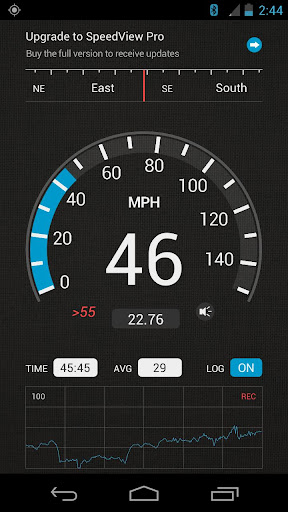
SpeedView is an advanced speedometer application that uses the phone's built-in GPS system to show your current, maximum and average speed, as well as the direction, total distance, and time traveled. Suitable for running, car driving, biking, or hiking.
• High accuracy
GPS-based speedometer that is more accurate than the one in your car.
• Linear compass
Shows your current direction of travel. A compass mode is also available.
• HUD mode
Mirrors the numbers so you can place your phone on your car's dashboard and see the speed reflected in the front glass. You can check out this video to see how it works: http://youtu.be/rzda7CQ-ZAU
• Speed graph
Displays a graph chart …
Read the full description
SpeedView is an advanced speedometer application that uses the phone's built-in GPS system to show your current, maximum and average speed, as well as the direction, total distance, and time traveled. Suitable for running, car driving, biking, or hiking. • High accuracy GPS-based speedometer that is more accurate than the one in your car. • Linear compass Shows your current direction of travel. A compass mode is also available. • HUD mode Mirrors the numbers so you can place your phone on your car's dashboard and see the speed reflected in the front glass. You can check out this video to see how it works: http://youtu.be/rzda7CQ-ZAU • Speed graph Displays a graph chart covering the last several minutes. • Speed warning You can set the speed limits for three different types of roads so that when you go too fast a visual alert or sound will notify you. • Display units Supports units such as miles, kilometers, and nautical miles. • GPX track export Enables you to save your current track to the SD card or email it to someone. The GPX format is supported by Google Earth and many other programs: http://www.topografix.com/gpx_resources.asp • Background mode You can minimize the program and keep it running in the background. It will work as usual and even notify you when you exceed the speed limit. Please note that the accuracy of GPS measurements is affected by a number of factors including atmospheric conditions, obstructions and the visibility of satellites. We use Sense360, a third party technology provider, to help us better understand how our users use SpeedView and their devices. SpeedView sends raw sensor data generated by your device to Sense360. This sensor data may include information from GPS receivers, accelerometers, gyroscopes, and other sensors, which may allow Sense360 to determine, for example, your device’s location, acceleration, and orientation. Sense360 may use this data to send us analytic reports regarding how our users are using SpeedView and their devices, or for marketing purposes. To learn more, please visit Sense360’s privacy policy, available at: http://sense360.com/privacy-policy.html. This version is ad-supported. A paid version without ads and more features is also available. If you have any questions or comments, feel free to post them on our blog: http://blog.codesector.com/
Installs, last 30 days Measured
Exact Google Play install counts, collected daily
Ratings
27,313 ratings, 2,082 reviews
- 5 ★31%
- 4 ★8.0%
- 3 ★5.0%
- 2 ★13%
- 1 ★43%
Recent reviews
Latest public reviews from the store
No reviews in our sample for this app yet.
Top chart positions
Latest Google Play chart ranks by country, last 10 days
Not in any tracked top chart in the last 10 days.
SpeedView: Legacy Edition history
Release, install milestones, listing and store changes
- First released on the store 20 Mar 2010
Update frequency
How often SpeedView: Legacy Edition ships a new version, month by month
0 updates in the last 12 months. Less often than most similar apps: they shipped a median of 4 updates in the same year.
Recent versions
Current version 4.0.2
- Version 4.0.221 Jun 2022
Updated app dependencies
- Version 3.9.925 Feb 2020
- Version 3.9.814 Feb 2020
- Version 3.9.622 Dec 2019
Listing keywords
Words and phrases SpeedView: Legacy Edition repeats most in its store listing
Top phrases: advanced speedometer application (2), advanced speedometer (2), sensor data (2), speedometer application (2).
Highlighted words also appear in the title. Counts cover the title, short description and description.
Business model and tech
From the store listing, the SDKs in the app package and its declared permissions
- Business model
- Free to downloadShows ads
- Built with
- No cross-platform framework or game engine detected
- Ad networks (0)
- None detected
- Analytics and crash reports
- Firebase
- Sensitive access
- LocationPhotos, videos and filesBody sensors and activity
1 ad, attribution and analytics SDKs detected. SDKs are read from the app package and permissions from the store listing, so code that loads later is not seen.
Technology
18 SDKs found in the app package
15 permissions
0 special access, 5 sensitive, 10 standard
- Change or delete shared storageSensitive
- Read shared storageSensitive
- Recognise physical activityACTIVITY_RECOGNITIONSensitive
- Location in the backgroundACCESS_BACKGROUND_LOCATIONSensitive
- Precise locationSensitive
- Read how it was installed (install referrer)BIND_GET_INSTALL_REFERRER_SERVICEStandard
- Control vibrationStandard
- Keep the phone awakeStandard
- Run a foreground serviceFOREGROUND_SERVICEStandard
- Start when the phone turns onStandard
- Connect to and disconnect from Wi-FiStandard
- Full internet accessStandard
Compliance
What the listing and the app package show
- Store status
- Live
- Upkeep
- No update since 21 Jun 2022
- Registered in
- Australia
- Privacy policy
- Linked on the listing
- Advertising
- Shows ads
- In-app purchases
- None declared
- Age rating
- Everyone
- Sensitive permissions
- 5 sensitive of 15
- Location access
- Yes, also in the background
- Camera and microphone
- Neither
Apps like SpeedView: Legacy Edition
Loggi para entregadorLoggi3.7M installs★ 3.18
menetrend.app - Public TransitAppCorner Kft.1.1M installs★ 4.16
Subway Korea(route navigation)(주)넵튠5.4M installs★ 4.31
カーナビ決定版!ドライブサポーター :渋滞・駐車・オービスNAVITIME JAPAN CO., LTD.5.7M installs★ 4.0
Qibla Direction Compass القبلةBEKART TECH BILISIM LTD STI3M installs★ 4.75
National RailNational Rail Enquiries6.8M installs★ 2.82
ВолгаAVTOPASS, OOO729K installs★ 4.24
EnBW mobility+: EV chargingEnBW AG2.6M installs★ 3.0
Marine Radar - Ship trackerHeadway Labs3.1M installs★ 4.45
SpeedView: Legacy Edition: questions and answers
How many downloads does SpeedView: Legacy Edition have?
SpeedView: Legacy Edition has 4,735,053 installs on Google Play, measured from the store's own count on 19 Nov 2026.
Who makes SpeedView: Legacy Edition?
SpeedView: Legacy Edition is published by Code Sector Australia, a developer based in AU.
When was SpeedView: Legacy Edition last updated?
The latest version (4.0.2) was released on 21 Jun 2022.
Is SpeedView: Legacy Edition free?
Yes. SpeedView: Legacy Edition is free to download, and it shows ads.
Is SpeedView: Legacy Edition still available?
Yes. SpeedView: Legacy Edition is live on Google Play as of 19 Nov 2026.
Track SpeedView: Legacy Edition and its competitors
Watch any app for new versions, rating drops, chart moves and removals. Free plan, no card.