SpeedView Pro
Advanced speedometer application that offers lots of useful features.
- Installs
- 46.63K
- Measured
- Rating
- 3.96
- Ratings
- 1.4K
- 238 reviews
- Version
- 3.3.2
- Updated 6 Sep 2016
- Released
- 24 Sep 2010
- Tracked since 12 May 2026
- Size
- 4 MB
- Needs 4.0.3
Screenshots



About SpeedView Pro
The description on the store listing
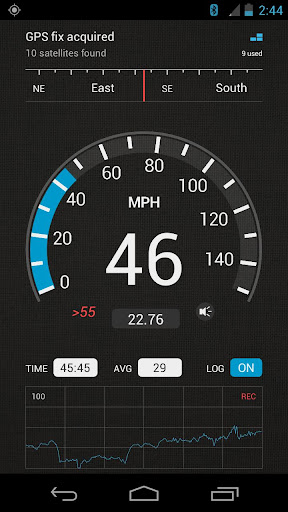
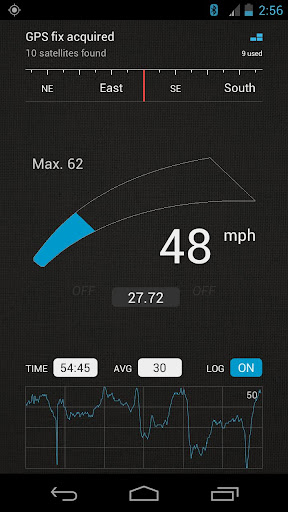
SpeedView is an advanced speedometer application that uses the phone's built-in GPS system to show your current, maximum and average speed, as well as the direction, total distance, and time traveled. Suitable for running, car driving, biking, or hiking.
• High accuracy
GPS-based speedometer that is more accurate than the one in your car.
• Linear compass
Shows your current direction of travel. A compass mode is also available.
• HUD mode
Mirrors the numbers so you can place your phone on your car's dashboard and see the speed reflected in the front glass. You can check out this video to see how it works: http://youtu.be/rzda7CQ-ZAU
• Speed graph
Displays a graph chart …
Read the full description
SpeedView is an advanced speedometer application that uses the phone's built-in GPS system to show your current, maximum and average speed, as well as the direction, total distance, and time traveled. Suitable for running, car driving, biking, or hiking. • High accuracy GPS-based speedometer that is more accurate than the one in your car. • Linear compass Shows your current direction of travel. A compass mode is also available. • HUD mode Mirrors the numbers so you can place your phone on your car's dashboard and see the speed reflected in the front glass. You can check out this video to see how it works: http://youtu.be/rzda7CQ-ZAU • Speed graph Displays a graph chart covering the last several minutes. • Speed warning You can set the speed limits for three different types of roads so that when you go too fast a visual alert or sound will notify you. • Display units Supports units such as miles, kilometers, and nautical miles. • GPX track export Enables you to save your current track to the SD card or email it to someone. The GPX format is supported by Google Earth and many other programs: http://www.topografix.com/gpx_resources.asp • Background mode You can minimize the program and keep it running in the background. It will work as usual and even notify you when you exceed the speed limit. Please note that the accuracy of GPS measurements is affected by a number of factors including atmospheric conditions, obstructions and the visibility of satellites. If you have any questions or comments, feel free to post them on our blog: http://blog.codesector.com/
Installs, last 30 days Measured
Exact Google Play install counts, collected daily
Ratings
1,434 ratings, 238 reviews
- 5 ★54%
- 4 ★21%
- 3 ★8.2%
- 2 ★4.0%
- 1 ★12%
Recent reviews
Latest public reviews from the store
No reviews in our sample for this app yet.
Top chart positions
Latest Google Play chart ranks by country, last 10 days
Not in any tracked top chart in the last 10 days.
SpeedView Pro history
Release, install milestones, listing and store changes
- Reached 10,000+ installs 14 Apr 2011
- Reached 5,000+ installs 9 Jan 2011
- First released on the store 24 Sep 2010
Update frequency
How often SpeedView Pro ships a new version, month by month
0 updates in the last 12 months. Less often than most similar apps: they shipped a median of 1 updates in the same year.
Recent versions
Current version 3.3.2
- Version 3.3.222 Oct 2015
- Final 3.x release • Optimized for Android 6.0 • Support for Nexus 5X
- Version 3.3.127 Mar 2015
- Version 3.3.023 Mar 2015
- Version 3.2.121 Mar 2015
Listing keywords
Words and phrases SpeedView Pro repeats most in its store listing
Top phrases: advanced speedometer application (2), advanced speedometer (2), speedometer application (2).
Highlighted words also appear in the title. Counts cover the title, short description and description.
Business model and tech
From the store listing, the SDKs in the app package and its declared permissions
- Business model
- Paid, $1.99Shows ads
- Built with
- No cross-platform framework or game engine detected
- Ad networks (1)
- AdMob
- Analytics and crash reports
- Google Analytics
- Sensitive access
- No sensitive permission declared
2 ad, attribution and analytics SDKs detected. SDKs are read from the app package and permissions from the store listing, so code that loads later is not seen.
Technology
7 SDKs found in the app package
Ad network libraries
Development tools
Ad networks
Advertising and install-attribution SDKs found in the app package
- AdMob
Compliance
What the listing and the app package show
- Store status
- Live
- Upkeep
- No update since 6 Sep 2016
- Registered in
- Australia
- Privacy policy
- Linked on the listing
- Advertising
- No ads declared
- In-app purchases
- None declared
- Age rating
- Everyone
Apps like SpeedView Pro
Моя ТройкаМосковский Метрополитен157K installs★ 1.47
Easy Flight Tracker & RadarRising TechLabs566K installs★ 3.95
Meškanie vlakujecim.sk76.1K installs★ 4.4
Amber ConnectAmber Connect Limited175K installs★ 4.25
Qibla Direction No InternetMohasalah680K installs★ 4.03
TwoNav 6: Routes and MapsTwoNav308K installs★ 3.0
Air Raid Alert Map of UkraineUkrzen Team711K installs★ 4.68
ドラぷら-ETC料金検索と渋滞予報士の渋滞予測!ZENRIN DataCom Co., Ltd.648K installs★ 3.1
Mobiliteit.luHACON598K installs★ 3.75
SpeedView Pro: questions and answers
How many downloads does SpeedView Pro have?
SpeedView Pro has 46,630 installs on Google Play, measured from the store's own count on 19 Nov 2026.
Who makes SpeedView Pro?
SpeedView Pro is published by Code Sector Australia, a developer based in AU.
When was SpeedView Pro last updated?
The latest version (3.3.2) was released on 6 Sep 2016.
Is SpeedView Pro free?
No. SpeedView Pro is a paid app priced at $1.99.
Is SpeedView Pro still available?
Yes. SpeedView Pro is live on Google Play as of 19 Nov 2026.
Track SpeedView Pro and its competitors
Watch any app for new versions, rating drops, chart moves and removals. Free plan, no card.